
Since Anaconda acquired Outerbounds, I’ve been working with customers on what’s now AI Orchestration in Anaconda Platform, which runs Python workflows and apps at scale in your own cloud, built on open-source Metaflow. In recent conversations, customers asked:
- Does fanning out to over 1,000 tasks work? If so, how, and is it a good idea?
- How do I retry failed tasks?
- Can we create node pools with multiple instance types, so there’s a better chance of getting spot instances?
To test my understanding, I took the following path:
- Part 1, getting it running: turning my old script into a flow, sending it to the cluster, the two walls I hit on the way (a 100-task cap and census.gov’s rate limit), and where retry and resume fit in.
- Part 2, making it fast: batching to lower overhead, keeping GBs out of memory, reading only what I needed, and sorting the Parquet so searches skip most of it.
- Part 3, the takeaways: short answers to those three questions (and a couple more), if you just want the TL;DR.
Part 1: Core platform usage
A foreach turns a loop over files into parallel tasks, one per file.

One of my old apps made a good test, since it processes thousands of URLs in an embarrassingly parallel way. In MapnStreets, you type a street name, say “Main St”, and it tells you how many road segments carry that name (95,173 for Main St, the most common of 2.3 million names), which states have the most of them (Massachusetts, then Pennsylvania and New York), and paints every one of them on a heat map of the country. Add a * to match a prefix, like Roosevelt*, and see Roosevelt St, Roosevelt Ave, etc. I originally built it in 2023 with Fugue and GeoPandas on Ray, so porting it would also show what the platform can offer.

The processing script consists of three stages, basically extract, transform, and load (ETL):
- List: scrape the Census Bureau’s listing page for the ~3,200
.ziplinks. - Download and process: for each link, download the zip and read the shapefile with GeoPandas.
- Combine: stack the results into one dataset the app can search.
The second stage is the one worth fanning out. Fanning out means running many copies of the same step in parallel, each on its own piece of the input, instead of looping over the input one item at a time. It works here because each file is independent: no download needs another one’s result. Metaflow calls this a foreach, and the step after it, join, is where the results come back together.
Each stage became a Metaflow step, plus the end step every flow needs. fetch_links and read_shapefile are the helpers for the first two stages:
class MapnStreetsFlow(FlowSpec):
    @step
    def start(self):
        self.urls = fetch_links(BASE_URL)
        self.next(self.download_and_process, foreach="urls")

    @step
    def download_and_process(self):
        self.gdf = read_shapefile(self.input)  # this task's URL
        self.next(self.join)

    @step
    def join(self, inputs):
        self.gdf = pd.concat([inp.gdf for inp in inputs])
        self.next(self.end)

    @step
    def end(self):
        pass
Instead of writing each result to disk, I assigned the GeoDataFrame to self.gdf. In Metaflow, the open-source framework underpinning the platform, anything you assign to self in a step becomes an artifact: it’s pickled, saved with the run (in S3 on the platform), and available to the next step as inp.gdf and after the run as run.data.gdf. That’s handy for smaller objects, but there are better ways for bigger objects. I tested it locally on a few URLs and it worked.
Picking where tasks run
Moving a step from laptop to cluster takes one decorator, @kubernetes, and that’s the main payoff: a step can run on a machine far bigger than a laptop. On the cluster the step can run in a container with fast-bakery rather than your local environment. Because each step is self-contained, you can wrap @pypi on each step with its unique Python version and packages.
Each step can also ask for its own resources. For example, the download tasks ask for two CPUs and 8 GB each, while the join, which sorts the whole dataset, gets more memory and 80 GB of scratch disk:
@kubernetes(cpu=2, memory=8000, disk=20000)
@pypi(python="3.11", packages={"geopandas": "1.1.3", "requests": "2.32.3"})
@step
def download_and_process(self):
    ...

@kubernetes(cpu=4, memory=12000, disk=80000)
@pypi(python="3.11", packages={"duckdb": "1.5.6", "pyarrow": "25.0.1"})
@step
def join(self, inputs):
    ...
Before the decorator, the code ran on my laptop against a few URLs. After it, the full run goes to the cluster, where a single machine can have 96 cores or more and many tasks can run at once. But this isn’t bulletproof: there are other variables, such as upstream rate limits.
The tasks run on a compute pool, which you set up once in the platform UI: choose “Metaflow Tasks” under Usage, pick an instance type, and set the minimum and maximum number of instances and the disk size. Checking “Use spot (interruptible) instances” puts the pool on spot capacity: spare cloud machines, sold at a steep discount, that the provider can reclaim at any time. A pool is either spot or on-demand, so if you want both, create two pools. Spot GPUs are often scarce, so GPU pools are usually better left on-demand.

Each pool takes a single instance type, so spreading across types means one pool per type: for example, c5.2xlarge and c6a.2xlarge, both 8 cores and 16 GiB, so a task fits on either. Leave compute_pool out of @kubernetes and tasks go to whichever pool has room, which schedules about the same as one pool with several instance types.

No Dockerfile or bucket
At this point the flow ran on the cluster, and I’d set up very little to get there. As a Python developer, I find infra setup particularly tedious (and dare I say, annoying?).
One thing I’ve always struggled with was Dockerfiles, and although LLMs can easily generate one now, the slow part is building the image, pushing it to a registry, keeping one image per set of dependencies, and rebuilding whenever a pin changes. The @pypi line alongside python flow.py --environment=fast-bakery run allows the platform to build and cache each step’s environments: the download step gets GeoPandas and the join step gets DuckDB.
There’s no bucket to set up either. Anything I assign to self is stored for me, and later, when I needed to write files myself, Metaflow’s S3 client was already configured with the location and credentials. I never created a bucket or copied a key.
Scaling up to all ~3,200 files is where the pitfalls show up (but can be easily addressed).
Pitfall #1: The 100-task limit
Fanning out past 100 tasks, like my 162 batches of 20 files (more on batching in Part 2), will result in this error message:
Foreach in step start yielded 162 child steps which is more than the current maximum of 100 children.This limit is intentional: it stops a foreach from spawning more than 100 tasks by accident. If this is what you desire, raise the cap with --max-num-splits, and use --max-workers (16 by default) to limit how many tasks run at once.
python flow.py --environment=fast-bakery run --max-num-splits 162Pitfall #2: Rate limits
Once a run fans out, the next thing that breaks might be from upstream. More parallelism doesn’t always pan out when the bottleneck is someone else’s server; in this case, census.gov started returning HTTP 429 (Too Many Requests) once lots of pods hit it at once. To recover from this, @retry can be added to the step, plus inline code that catches 429s specifically and waits for Retry-After:
for attempt in range(5):
    r = requests.get(url, timeout=60)
    if r.status_code == 429:
        time.sleep(int(r.headers.get("Retry-After", 5)))
        continue
    r.raise_for_status()
    break
The inline loop retries a single request, and @retry reruns the whole task if something else breaks. However, this is only part of the solution; we should be respectful of someone else’s server (and also not risk getting banned) so we should also add --max-workers to limit the number of tasks fetching from the server simultaneously. A random sleep inside each task can also help to prevent a retry storm.
Retry vs. resume
The second customer question has two answers, depending on when the failure happens.
@retry handles failures inside a run. If a task dies from something transient, like a network error or a spot instance getting reclaimed, Metaflow reruns just that task automatically, so you don’t have to watch the run and restart things by hand:
@retry(times=4, minutes_between_retries=1)
@kubernetes(cpu=2, memory=8000, disk=20000)
@step
def download_and_process(self):
    ...
A retry reruns the same code, though, so it can’t fix a bug. When a run fails for real, fix the code (or add the missing file) and resume it:
python flow.py --environment=pypi resume join --origin-run-id 25 --max-num-splits 165Resume reuses the steps that already succeeded in the original run (run 25 here) and reruns from the step you name, join in this case. If you don’t name a step, it picks up at the step that failed, and if a later step fails too, you can fix that and resume again. Without --origin-run-id, it resumes your latest run.
My original Fugue script handled this with .done marker files, so a rerun could skip downloads that had already finished:
# before (2023): skip any file that already has a .done marker
for link in df["link"]:
    parquet_path = DATA_DIR / Path(link).with_suffix(".parquet").name
    done_path = parquet_path.with_suffix(".done")
    if done_path.exists():
        continue
    ...  # download, convert, write parquet
    done_path.touch()
Resume automatically handles this: successful tasks are copied over from the original run, and only failed ones run again.
Part 2: Optimization
With the flow running end to end, the rest was making it fast and light: fewer pod startups, less memory, and smaller reads.
Make each task worth its startup time
While watching the runs, I noticed a one-URL task ran for only about 4 seconds, but in my configuration a pod took much longer than that to start. That’s normal for container platforms: every pod has to be scheduled and started before your code runs. With one URL per task, startup was taking most of the task’s runtime. That reminded me of the Dask chunk-size tradeoff: more chunks means more parallelism but also more overhead, and the job is finding the sweet spot.
So I went back to 100 URLs and compared 1 URL per task against 20. Batching is a list of lists, and making the chunk size a Parameter means it can change without touching the code:
class MapnStreetsFlow(FlowSpec):
    chunk_size = Parameter("chunk-size", default=20, type=int)

    @step
    def start(self):
        ...
        self.url_batches = [
            urls[i : i + self.chunk_size]
            for i in range(0, len(urls), self.chunk_size)
        ]
        self.next(self.download_and_process, foreach="url_batches")
The comparison was then two runs:
python flow.py --environment=pypi run --url-limit 100 --chunk-size 1
python flow.py --environment=pypi run --url-limit 100 --chunk-size 20
With 1 URL per task, the run took 6m 46s. The timeline shows why: 100 tasks of about 4 seconds each, spread across almost 5 minutes of the download step.

With 20 URLs per task, the same 100 URLs took 2m 32s. Each task ran for 10–16 seconds, and there were 20x fewer pods to start. The full run, all ~3,200 files in 162 batches of 20, took 19m 32s.
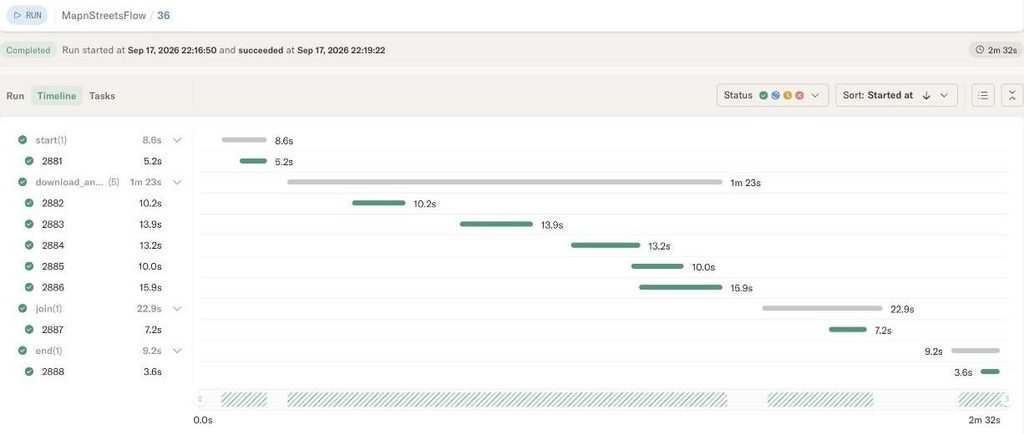
The rule of thumb: make each task’s work substantially longer than its startup time. Even at 20 URLs, a task’s work was probably still shorter than its pod startup, so there’s room to go bigger.
The cost is retry granularity: the unit of @retry and resume is now a batch, so if one URL fails for good, all 20 get re-downloaded. That’s fine as long as each batch is short.
Don’t hold everything in memory at once
With the downloads done, the join step combined everything into the final dataset. It took several minutes, but it finished. Everything was saved, so I pointed the MapnStreets app at the result… and the loading spinner kept spinning:
run = Flow("MapnStreetsFlow").latest_successful_run
gdf = run.data.gdf  # unpickles 5 GB into memory; app hangs
The slow join and the hanging app had the same cause. Each inp.gdf in the join downloads a pickled blob from S3, unpickles it, and keeps it in memory, and then pd.concat copies all of it again into one big DataFrame. The app had it worse: it had to load one 5 GB pickle before it could show anything. Holding all that in memory also means paying for far more RAM than the work needs.

The fix was to stop passing data through Metaflow artifacts. Each task writes its own Parquet part to S3 and passes along only its key, a short string that points at the file:
with S3(run=self) as s3:
    s3.put_files([(key, str(local))])
self.part_key = key  # just a string
self.next(self.join)
The join collects the keys, fetches the parts in parallel with s3.get_many, and hands them to DuckDB with a memory limit and a place to spill:
keys = [inp.part_key for inp in inputs if inp.part_key]
with S3(run=self) as s3:
    for obj in s3.get_many(keys):  # parallel downloads
        Path(obj.path).replace(parts / Path(obj.key).name)

con = duckdb.connect()
con.execute("SET memory_limit='8GB'")
con.execute(f"SET temp_directory='{work / 'spill'}'")  # spill to disk
DuckDB reads the parts from local disk and spills the sort to that temp directory once it passes the limit. The join needs disk space rather than RAM, and no single process ever holds the whole dataset, so it fits on a smaller, cheaper machine.
The app changed the same way. Instead of unpickling a DataFrame, it reads two strings off the latest successful run and queries the Parquet files directly:
run = Flow("MapnStreetsFlow").latest_successful_run
edges_url = run.data.edges_url    # s3://.../edges.parquet
counts_url = run.data.counts_url  # s3://.../name_counts.parquet
Because the app always reads latest_successful_run, every successful run updates the dashboard with no extra wiring.

Load only what you need
When the app first hung, my first suspect was all the columns I didn’t need. Topologically Integrated Geographic Encoding and Referencing (TIGER) edge files have about 30 columns, and the app uses three columns plus geometry. We can add it to the shapefile reader itself:
KEEP_COLUMNS = ["STATEFP", "COUNTYFP", "FULLNAME"]
gdf = gpd.read_file(f"zip://{local_zip}", columns=KEEP_COLUMNS)
geometry = shapely.to_wkb(gdf.geometry.to_numpy())
That pushes the selection into the reader, so the other columns are never parsed or carried anywhere. Storing geometry as well-known binary (WKB) instead of well-known text (WKT) makes the parts 2–3x smaller and skips a text parse on every row.
On the app side, because not everything in the app is a map, a separate, small counts table (name → count) can help answer record counts and rankings without touching geometry at all, making the results extra speedy.
total = con.execute(
    f"SELECT sum(n) FROM read_parquet('{counts_url}') WHERE FULLNAME = ?",
    [street],
).fetchone()[0]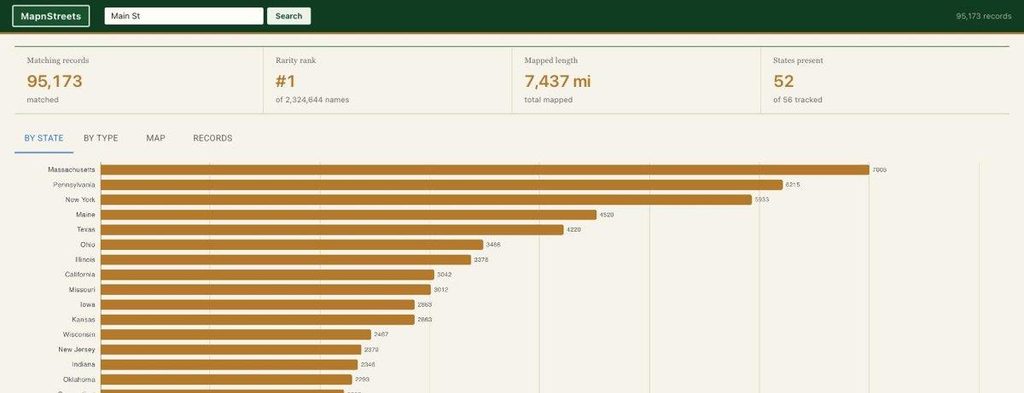
Sort for how you query
The last fix was the search itself. At first, every query scanned the full 4 GB Parquet file. The data was unsorted, so every row group held names from A to Z and nothing could be skipped. The 2023 version got around this by spreading each lookup across CPUs with Fugue. But we can do better: sorting on FULLNAME in the join fixes it, and the row group size is set in the same statement:
COPY (
    SELECT STATEFP, COUNTYFP, FULLNAME, geometry
    FROM read_parquet('parts/*.parquet')
    WHERE FULLNAME IS NOT NULL
    ORDER BY FULLNAME
) TO 'edges.parquet' (
    FORMAT parquet, COMPRESSION zstd, ROW_GROUP_SIZE 100000
)
With the file sorted, DuckDB can skip any row group whose min/max stats can’t contain the name being searched. Row group size matters too, because a row group’s column chunk is the smallest piece a reader can fetch. At 1 million rows per group, looking up “Main St” pulled ~110 MB of geometry to use ~6 MB of it; at 100,000 rows, that dropped to ~11 MB per group.

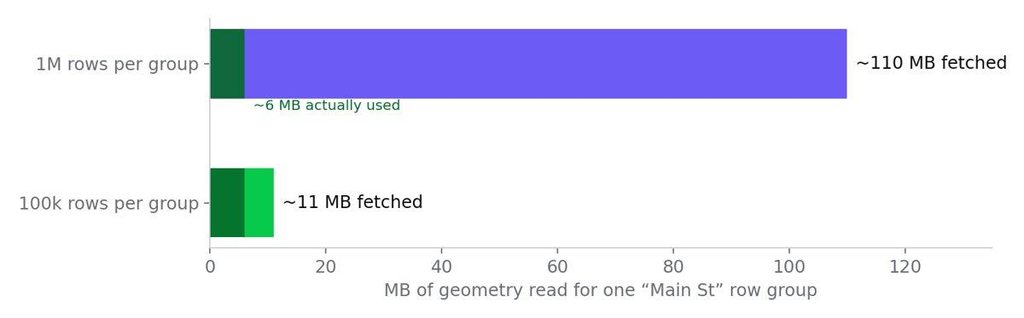
The big file only gets opened when the user asks to plot shapes on the map, and even then the app reads only the byte ranges it needs from S3.

Roosevelt* is one contiguous range: 12,569 segments across 152 names, mostly avenues.Part 3: What I’d tell customers now
Does fanning out to 1,000+ tasks work?
Yes. The 100-task cap is a guardrail: raise it with --max-num-splits and control concurrency with --max-workers. Whether it’s a good idea depends on how much work each task does. Pod startup isn’t free, and a task that does a few seconds of work is mostly overhead, so batch until each task’s work is substantially longer than its startup. On 100 URLs, batching 20 per task cut the run from 6m 46s to 2m 32s. And as concurrency goes up, watch for upstream rate limits.
How do I retry failed tasks?
Two ways. @retry reruns a failed task automatically inside the run, which covers transient problems like network errors or a reclaimed spot instance. resume is for after a run fails: fix the cause, resume with --origin-run-id, and it reuses whatever already succeeded. Resume can’t absorb every change to the graph (inserting a step inside a foreach didn’t work for me), so it’s worth getting the steps right up front.
Can node pools have multiple instance types?
Not within one pool: each pool takes one instance type. Create a spot pool per instance type instead and leave compute_pool out of @kubernetes. Tasks then go to whichever pool has room, which schedules about the same as one mixed pool.
How do I stay under an upstream rate limit?
Set --max-workers, because the number of tasks in flight is your real request rate. Then handle 429s inline by waiting for Retry-After, and add @retry as a backstop for anything else.
How should I pass large data between steps?
Through S3, not Metaflow artifacts. Write each task’s output to S3 with Metaflow’s S3 client and pass only the key. Metaflow artifacts are great for storing smaller objects, but unpickling gigabytes in a join or an app is slow and memory-hungry.
How do I make lookups on a big Parquet file fast?
Read only the columns you need, sort the file by the column you search on, and keep row groups small (100,000 rows worked well here). For counts and rankings, keep a small summary table so most queries never touch the big file.
Wrapping up
None of this is specific to street names. At its core it’s data wrangling and ETL, and the shape is reusable: list the inputs, fan out one task per batch, and combine the results through S3 keys instead of Metaflow artifacts. Swap fetch_links and read_shapefile for your own list and processing functions, and the rest of the flow (batching, retries, resume, the DuckDB join) carries over as is.
And through all of it, I never wrote a Dockerfile or created a bucket. The platform handled the setup I’d usually dread as a Python developer.
The code is on GitHub.
Learn more about AI Orchestration on Anaconda Platform.