
A flow that’s clean on your laptop can still stall before it reaches production, held up by a manual security review of every package and model it depends on, usually run after the code is already written. Starting today, that review happens automatically with the release of governed packages and models as part of AI Orchestration in Anaconda Platform. Add the Anaconda decorators to a flow, and every step runs using packages and models your organization has approved.
Once an AI project reaches production, it usually runs as a repeatable job. It pulls new data, trains or fine-tunes a model, runs your evaluations, and ships the model only if it meets the threshold you set. In Anaconda Platform you write that job as a flow: a Python class where each method is a step. The same code runs on your laptop, on cloud GPUs, or on a nightly schedule. Flows are built on Metaflow, the open-source framework that came to Anaconda with the Outerbounds acquisition in April 2026.
The team has long believed that the software of the coming decade will be built from three ingredients: code, data, and models. Metaflow grew out of that belief, with a simple wish at its center: Developers should be able to develop, scale, and deploy their work without wrestling CUDA drivers, conflicting library versions, or infrastructure boilerplate along the way. As models and data find their way into every system, though, the ugliest problems move to the supply chain:
- Which packages is this step actually running?
- Where did this model come from, and are we allowed to use it in production?
The models and frameworks will keep changing every few months, and that’s fine. Governance moves at a slower, steadier pace, and it should. What teams need is a foundation that lets the fast parts move fast while the slow parts keep everything safe.
This release brings that foundation into the flow itself. Every step now gets its packages and models from Anaconda’s governed sources. When you declare what a step needs, the platform builds its environment from the channels your team is allowed to use and pulls the model only if your model policy permits it. It also records both with the run, so any result can be traced back to what produced it. Your security team sets the rules once, and developers keep writing directed acyclic graphs (DAGs) the way they’re used to.
Anaconda’s package governance, now in your flows
To use Anaconda’s trusted packages in a flow, add the @anaconda_base decorator to your flow and list the Python version and packages it needs. The platform builds OCI-compatible images using packages from Anaconda’s governed channels, so there’s no environment to set up by hand. Here’s an example flow that depends on pytorch and pandas, saved as pytorch_flow.py:
# pytorch_flow.py
from metaflow import FlowSpec, step, anaconda_base

@anaconda_base(
    python="3.12",
    packages={"pytorch": "2.6.*", "pandas": "2.2.*"},
)
class PyTorchFlow(FlowSpec):

    @step
    def start(self):
        self.accuracy = train_and_evaluate()   # your training code
        self.next(self.end)

    @step
    def end(self):
        pass

if __name__ == "__main__":
    PyTorchFlow()
The @anaconda_base definition applies to every step in the flow, and everything below it is ordinary Python. Behind that one declaration, each step gets:
- Anaconda’s curated, security-reviewed channels as the package source
- Your organization’s package policies, such as a rule blocking known vulnerabilities, applied before anything installs
- Packages Anaconda builds and maintains, backed by security metadata and software bills of materials (SBOMs) that document their components, licenses, and provenance
These channels draw on Anaconda’s Trusted Distribution: 19,000+ vetted packages built, tested, and digitally signed by Anaconda engineers before a flow can use them.
Secure by default: Administrators set the policy, and every flow inherits it
The platform resolves dependencies against your perimeter‘s channels and bakes the result into a container image, so the same environment runs whether you test locally or promote to production.
# Run locally: builds the environment on your machine
python pytorch_flow.py --environment=anaconda run

# Run in the cloud: bakes an image and runs it on your cluster
python pytorch_flow.py --environment=fast-bakery run --with kubernetes
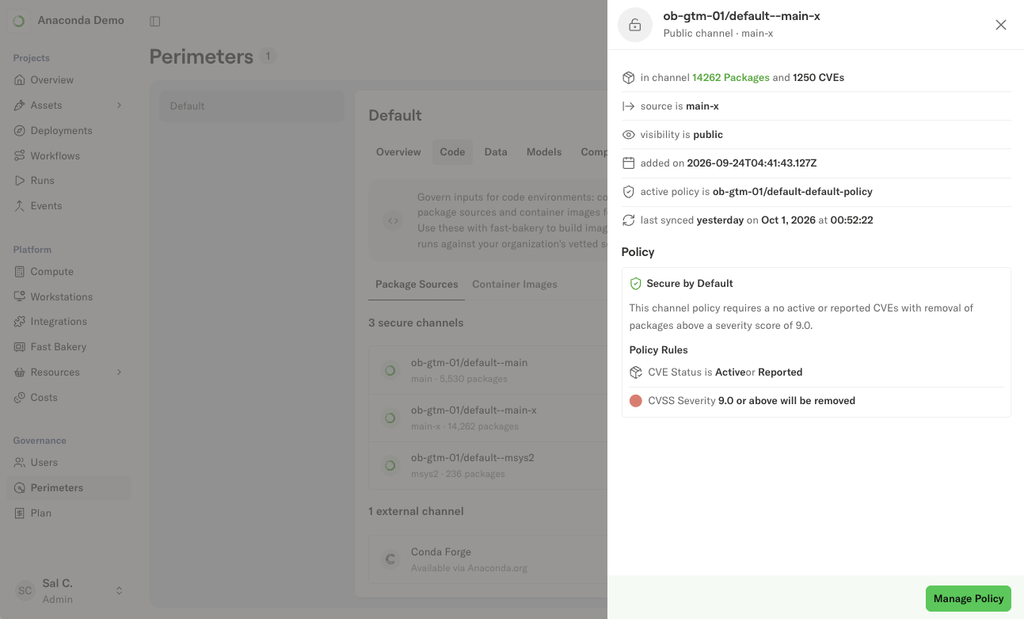
Administrators set package policies on each perimeter’s channels in the platform. A policy is a set of exclusion rules based on Anaconda’s package security metadata, such as common vulnerabilities and exposures (CVE) score, status, or license family, and each channel offers a recommended default policy that administrators can customize.
Searching a channel for PyTorch packages and their known CVEs.
Saving a policy rebuilds the channel’s package index without the excluded packages. When the platform resolves a flow’s environment, it draws from those filtered channels, so excluded packages aren’t available to any flow in the perimeter, and developers don’t change any code. Each perimeter has its own channels, so your production environment can run a stricter policy than your development environment without one affecting the other.
To move a flow from development to production, you promote it through your existing continuous integration and continuous delivery (CI/CD) pipeline, including any approval steps your team already uses, such as code review, test runs, or sign-offs. The code stays the same, and the production perimeter’s policies apply from that point on. For details, see our recent post on perimeters.
Models come from our catalog, filtered by policy
Steps that need a model pull it from Anaconda’s model catalog. Your team sees only the models its perimeter allows, and administrators write the rules using the model’s metadata: publisher, license, country of origin, model size, and expected memory requirements. A rule can be as plain as “production only uses models whose license allows commercial use.”
The catalog holds 77+ curated models. Each one is automatically sourced, quantized, and benchmarked, then validated by Anaconda’s team before it’s published. Models ship with their own AI Bill of Materials (AIBOM), license documentation, and benchmark results, so your team can check a model’s lineage and risk before anyone deploys it.
Once policies are set, your team can put its approved models to work in a few ways: inside a flow step with the @anaconda_models decorator, downloaded for local work, or as a dedicated inference deployment with its own API endpoint.
Our model inference is built for production workloads. Each model is available at more than one quantization level, so you can trade some precision for a smaller footprint and a faster response time when a step needs to run at volume. Deploy to a GPU-autoscaling endpoint in the cloud, or load the same model locally with Desktop. Both paths expose the same API, so the code that calls a model doesn’t change when you move from testing to production.
Some models also get a built-in chat interface for trying them out. Each model page includes ready-to-copy snippets for all three options (flow-step, local, and deployment), along with license and publisher details for anyone who needs to review them.

A channel policy excluding packages with critical, active CVEs.
Respond to a security advisory with a one-line change
Each perimeter’s channels show the packages they contain and the known CVEs for each one. Search a channel for a package to see its files and CVE count, and open the CVEs tab for details.

Each model page shows how to use the model in a flow, locally or as a deployment.
For example, CVE-2025-32434 affected how PyTorch loads model files in versions up to 2.5.1 and was fixed in 2.6.0. Because each flow declares its packages in code, finding the flows pinned to an affected version is a search of your repositories. Updating one is a one-line change to the pin, followed by a rerun. The platform keeps the artifacts from every run, so you can compare the new run directly with the previous one:
from metaflow import Run

# example run IDs: before and after the pin change
print(Run("PyTorchFlow/1841").data.accuracy)   # contains pytorch 2.5.1
print(Run("PyTorchFlow/1902").data.accuracy)   # contains pytorch 2.6.0
The channel shows you which packages carry known CVEs. The platform’s run history lets you act on that: rerun the same workload with one package changed and compare the results side by side.
Tying it all together
In Anaconda Platform, developers declare the packages and models a flow needs, administrators set the policies on each perimeter’s channels and model catalog, and the platform resolves every step against those rules. Existing flows keep working as they are. That lets teams build and run AI workflows in their environment on packages and models their security teams already trust.
Request a demo to see governed packages and models running in a flow in your own cloud account.
Read the docs to learn more.