
Skip to content
Anaconda Homepage
  • Products
        • ANACONDA PLATFORM

          • Platform OverviewEnterprise Python and AI
          • Anaconda CorePython package management
          • Anaconda AI CatalystAI development suite
          • Deployment OptionsCloud, self-hosted, and more
        • FOR DEVELOPERS

          • Anaconda Distribution
          • Navigator
          • Notebooks
          • Excel Toolbox
        • PLATFORM BENEFITS

          • Security & Governance
          • Trusted Distribution
          • Actionable Insights
        • PLATFORM & LICENSING

          • Pricing & Plans
          • Buy Starter Licenses
          • Buy Business Licenses
  • Solutions
        • CAPABILITIES

          • AI/ML Model Development
          • Team Collaboration
          • Code Assistance
          • View All Capabilities →
        • INDUSTRIES

          • Education
          • Financial Services
          • Healthcare
          • Manufacturing
          • Technology
        • SERVICES & SUPPORT

          • Professional Services
          • Support
  • Resources
        • FOR USERS

          • Community Forums
          • Documentation
          • Download Distribution
          • Getting Started Guide
          • Product Feedback
          • Tutorials & Learning
        • MEET US

          • Events
          • Podcast
          • Webinars
        • ARTICLES

          • Blog
          • Case Studies
          • Guides
          • Topics
          • Whitepapers
        • SUPPORT

          • Help Center
          • Professional Services
          • System Status
  • Company
        • ABOUT US

          • Our Story
          • Leadership Team
          • Partners
        • PRESS

          • Press Releases
          • In the News
        • CONTACT

          • Contact Us
          • Sales Inquiries
        • CAREERS

          • Join Our Team
  • Free Download
  • Sign In
  • Get Demo

Home Blog R Language Support Now in Anaconda Code for Excel

Product

R Language Support Now in Anaconda Code for Excel

By Owen Price
  • April 2, 2025

We’re thrilled to announce the latest addition to Anaconda Toolbox: R language support in Anaconda Code! With this beta release, you can now harness the statistical power and visualization capabilities of R directly within your Excel worksheets, giving you even more flexibility in your data analysis toolkit. Let’s explore a practical example that showcases how this integration can revolutionize your data workflows.

With this powerful addition, Anaconda Code users can now script in both Python and R in the same Excel workbook, combining the two biggest data science languages with the world’s most popular productivity tool.
Anaconda Code sidebar

Customizable Environment

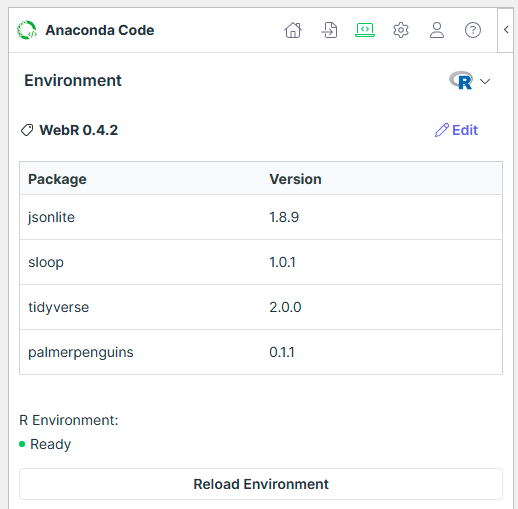
Anaconda Code means you can install R libraries directly into an R environment in your workbook, allowing you to choose from over 20k libraries to upgrade your statistical workflows. The environment is managed locally in the add-in, meaning your data stays in the workbook at all times. 
Anaconda Code environments

Statistical Analysis Made Simple with R in Excel

Consider a common challenge in data analysis: performing advanced statistical tests that go beyond Excel’s built-in functions. While Excel offers basic statistical tools, R is renowned for its comprehensive statistical capabilities. Now, you can access these powerful tools without leaving your Excel environment.

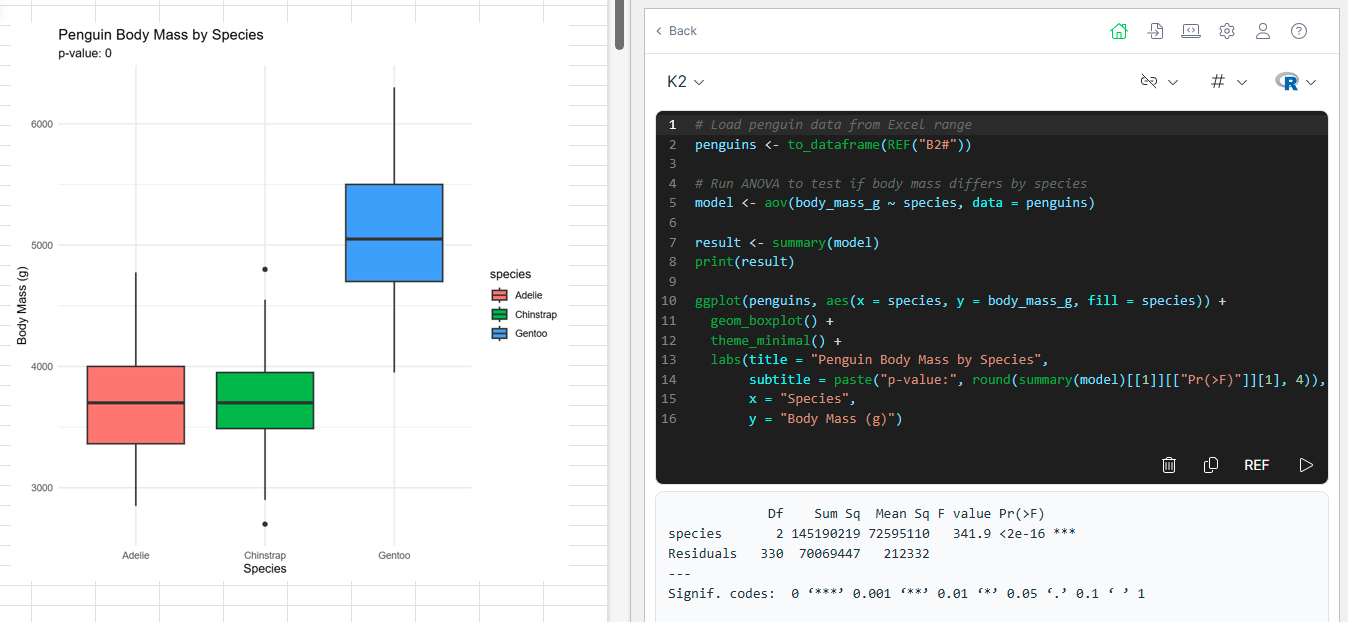
Anaconda Code’s REF function passes worksheet data directly into the R script where we can easily perform a one-way analysis of variance, printing the statistics to the cell’s log and returning a boxplot to the worksheet.
Statistical data screenshot

Why R in Anaconda Code Is a Game-Changer

Complementary Strengths: Combine R’s statistical prowess with Excel’s accessibility and familiar interface 

Seamless Data Flow: Work with Excel ranges directly in R without exporting or importing files 

Enhanced Visualizations: Create publication-quality graphics with ggplot2 and other R visualization packages 

Statistical Depth: Access R’s extensive ecosystem of statistical packages directly from your spreadsheet 

Local Execution: Scripts run locally in your secure Anaconda Code environment

Getting Started with R in Anaconda Code

Using R in Anaconda Code is straightforward:

  1. Install Anaconda Toolbox: If you haven’t already, install Anaconda Toolbox for Excel via the Add-Ins button on the Home tab of the Excel Ribbon. Just search for “Anaconda”
  2. Launch Anaconda Code: After the add-in is installed, you can launch Anaconda Code from the button on the Formulas tab of the ribbon
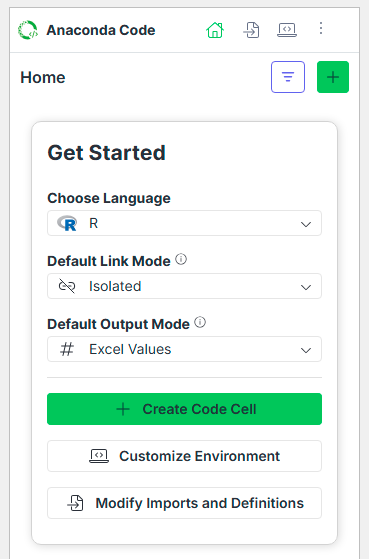
  3. Get Started: To help you get started, we’ve placed the important options front and center when you first open Anaconda Code, so you can get started quickly and with confidence
  4. Write Your R Script: Use familiar R syntax
  5. Run and Visualize: Execute your code and see results directly in Excel

Unlocking New Possibilities

The addition of R to Anaconda Code opens up exciting new possibilities for data professionals and analysts:

For Data Scientists: Continue using your preferred R packages and workflows while collaborating with colleagues who use Excel 

For Excel Power Users: Access advanced statistical techniques without leaving your spreadsheet 

For Data Analysts: Choose the right tool for each specific analysis—Python, R, or Excel—all in one environment 

For Researchers: Apply rigorous statistical methods to your data using R’s specialized packages

Cross-Language Integration

What makes this integration particularly powerful is the ability to use both Python and R in the same workbook. Different analyses might benefit from the strengths of each language—use Python’s machine learning capabilities alongside R’s statistical functions, all within your Excel workflow.

Start Leveraging R in Excel Today

Ready to elevate your Excel data analysis with the power of R? Install Anaconda Toolbox for Excel and begin exploring the possibilities of R integration today!

PrevPrevious ArticleAnaconda’s AI Assistant Comes to the Desktop
Next ArticleQuick Start Environments: Simplifying AI Development for PractitionersNext
You May Also Like

Anaconda Expands Platform Capabilities to Accelerate AI Development

Matt Madden

Anaconda AI Catalyst: Governing AI Lifecycles From NVIDIA DGX Spark to Nemotron

Seth Clark

Updated CPU Requirements for Linux and Recommendations for Windows

Tyler Ferguson

You May Also Like

Anaconda Expands Platform Capabilities to Accelerate AI Development

Matt Madden
Read More

Anaconda AI Catalyst: Governing AI Lifecycles From NVIDIA DGX Spark to Nemotron

Seth Clark
Read More

Updated CPU Requirements for Linux and Recommendations for Windows

Tyler Ferguson
Read More
Company
  • Press
  • Careers
  • Contact Us
  • Press
  • Careers
  • Contact Us
Products
  • Anaconda Platform
  • Capabilities
  • Professional Services
  • Pricing
  • Anaconda Platform
  • Capabilities
  • Professional Services
  • Pricing
Customers
  • Cloud Login
  • Support Center
  • Learning Catalog
  • Docs
  • Community
  • Product Feedback
  • Cloud Login
  • Support Center
  • Learning Catalog
  • Docs
  • Community
  • Product Feedback
Popular
  • AI Governance Guide
  • AI Platform Guide
  • Python Data Structures Guide
  • State of Data Science Report
  • AI Governance Guide
  • AI Platform Guide
  • Python Data Structures Guide
  • State of Data Science Report
Create Account
Contact Sales
Create Account
Contact Sales
Facebook X-twitter Linkedin Github Instagram Youtube

© 2026 Anaconda Inc. All rights reserved.

  • Legal
  • Accessibility
  • Privacy Policy
  • Terms of Use
  • Legal
  • Accessibility
  • Privacy Policy
  • Terms of Use