
Identifying the best tools to use for building and training artificial intelligence (AI) applications has become a challenge in 2026 because there have never been as many AI development tool options as there are today. The scope has shifted fundamentally: most AI application development now starts with a pre-trained model that you access via API or download from a hub. So fewer builders have to start from scratch.
AI development tooling has moved through three phases. Earlier tools were assistive, offering code completion and autocomplete suggestions inside a development environment. Augmentative tools followed, providing context-aware code generation and real-time debugging support that understood the full codebase. Today’s agentic AI tools can autonomously execute multi-step tasks and access applications across an entire workspace. This progression has expanded what “AI development tools” means and who they serve.
Who is building AI applications?
There are generally three audiences building production-grade AI applications:
- Developers using machine learning (ML) frameworks (e.g., PyTorch, TensorFlow, scikit-learn), model APIs (e.g., Google Gemini API, Hugging Face), large language model (LLM) development frameworks (e.g., LangChain, LlamaIndex), and deployment infrastructure (e.g., Docker, Kubernetes). This audience includes data scientists, ML engineers, AI engineers, data engineers, and AI research scientists.
- AI builders using AI coding assistants (e.g., GitHub Copilot, Jetbrains AI Assistant) and agentic coding tools (e.g., Cursor, Anthropic Claude Code) to write code faster across any software project. This audience includes software developers, full-stack engineers, and technical generalists.
- AI builders using prompt-to-app builders (e.g., Replit, Bolt.new, V0) that scaffold full-stack applications from natural language prompts. Non-engineers can use these tools to generate working apps from templates without writing code.
This guide primarily serves the first audience but we’ll also cover the second audience, because both of these audiences are building AI applications in 2026. If you see yourself in either of these categories, you’re in the right place. The third audience is outside this guide’s scope.
This guide covers six categories of AI development tools: ML frameworks and libraries, model hubs and API services, LLM application development frameworks, AI coding assistants, model deployment and serving, and AI environment and dependency management.
What are AI development tools and how do they fit together?
AI development tools are the frameworks, libraries, platforms, APIs, and assistants that teams use to build and deploy AI-powered applications. In 2026, this category spans everything from deep learning frameworks and large language models (LLMs) to APIs, AI coding assistants, and orchestration tools for agentic workflows.
To understand these tools, it helps to know the functional layer they occupy in a production AI application. Categories overlap, and many tools span multiple layers. A model trained in PyTorch may be containerized with Docker, orchestrated by Kubernetes, served through vLLM, and consumed by an application built on LangChain. The Python development environment supporting all of it is managed by a tool like Anaconda. Weaknesses at any layer compound as AI projects move from prototypes toward production.
ML Frameworks and Libraries
ML frameworks are where AI models are defined, trained, and evaluated using code. This category includes deep learning frameworks (e.g., PyTorch, TensorFlow), classical ML libraries (e.g., scikit-learn), and specialized libraries for NLP and computer vision.
Framework choice shapes the entire downstream workflow: deployment tooling, serving infrastructure, and optimization paths all depend on the framework used during training. This layer produces trained model artifacts, evaluation metrics, and reproducible experiment code. Teams that skip this layer might discover the cost at deployment, when environment mismatches cause models that passed all tests in development to fail in production.
Model Hubs and API Services
Model hubs and API services are where teams access pre-trained AI models, fine-tune them for specific tasks, or consume generative AI capabilities through APIs without training from scratch. This category includes model repositories (e.g., Hugging Face), cloud AI APIs (e.g., OpenAI, Google Gemini, Anthropic), and managed model services (e.g., Amazon Bedrock, Azure OpenAI Service).
Most AI application development starts at this layer, which produces API integrations, fine-tuned model variants, and application logic that wraps model capabilities. Teams that bypass this layer and attempt to train foundation models from scratch spend months on work that pre-trained models eliminate.
LLM Application Development Frameworks
Large language model (LLM) application development frameworks are where teams build applications that orchestrate LLM calls, manage context, chain reasoning steps, and integrate external tools into structured workflows.
The functions within this category are distinct but frequently used together in the same application. Orchestration frameworks (e.g., LangChain, LangGraph) chain LLM calls and manage stateful, multi-step workflows. RAG and data frameworks (e.g., LlamaIndex, Haystack) connect LLMs to external data for retrieval-augmented generation. Agent frameworks (e.g., Pydantic AI) coordinate autonomous, tool-using agents. Model routing tools (e.g., OpenRouter) direct LLM calls to the most appropriate model based on cost, latency, or capability. Guardrail tools (e.g., LlamaGuard) enforce safety and content policies on model inputs and outputs, which is especially important for agentic systems that act with minimal human oversight. Prompt optimization tooling (e.g., DSPy) shifts prompt design from hand-crafted strings toward systematic, measurable optimization.
Evaluation is an adjacent concern that is increasingly treated as a first-class part of the LLM development workflow. Frameworks like MLflow, DeepEval, and PromptFoo measure output quality, latency, and regression across prompt changes, giving teams a way to know whether their LLM application is improving over time.
This layer produces agentic AI applications, retrieval-augmented generation (RAG) systems, multi-step reasoning pipelines, and tool-using AI agents. Without this layer, teams write ad hoc LLM integration code that is difficult to test, debug, or maintain; agentic workflows lack structure or guardrails; and there is no systematic way to measure whether model outputs are improving or regressing over time.
AI Coding Assistants
AI coding assistants help developers write, review, refactor, and debug code across all software projects. This category includes IDE-integrated assistants (e.g., GitHub Copilot, JetBrains AI, Tabnine), AI-native IDEs (e.g., Cursor, Windsurf), agentic coding tools (e.g., Claude Code, Codex, Cline, aider), and code review platforms (e.g., Qodo).
This category of tools is adjacent to, but distinct from, the others in this guide: AI coding assistants help developers build any software, including AI applications, while the other categories are specifically about building AI-powered systems. In practice, this layer produces faster development velocity, automated test generation, and AI-assisted code review.
Model Deployment and Serving
Model deployment and serving is where trained AI models or LLM-based applications are packaged and served to end users or downstream systems. In 2026, deployment spans batch and real-time inference, LLM serving (i.e., managing GPU resources, token throughput, and cost), and containerized AI application deployment.
This layer produces inference endpoints, batch scoring pipelines, containerized applications, and scaling infrastructure. The gap between prototype and production persists precisely at this layer when it is underfunded or underspecified. Remote deployment is a two-layer stack: containerization (e.g., Docker, Kubernetes) provides the infrastructure, while an inference engine (e.g., llama.cpp, vLLM, MLX) handles performance optimization.
Python: AI Environment and Dependency Management
AI environment and dependency management ensures that Python environments, packages, and dependencies are consistent, secure, and reproducible across every stage of the AI development lifecycle. Every other category in this guide depends on this layer. When environments diverge across a developer’s laptop, a training cluster, and production systems, AI applications fail in subtle, hard-to-debug ways that do not show up until after deployment.
“When environments diverge across a developer’s laptop, a training cluster, and production systems, AI applications fail in subtle, hard-to-debug ways that do not show up until after deployment.”
This category addresses problems that no individual AI development tool solves on its own: binary dependency conflicts that cause packages to behave differently across operating systems and architectures; open-source supply chain risk, including unvetted packages, known common vulnerabilities and exposures (CVEs), and unclear licensing; hardware visibility; and environment drift across team members, projects, and deployment targets. Without it, models that pass all tests in development fail silently in production, and enterprises have no visibility into the open-source components running in their AI systems.
None of these layers is sufficient on its own. Weaknesses at any layer compound as AI projects move from experimentation toward production.
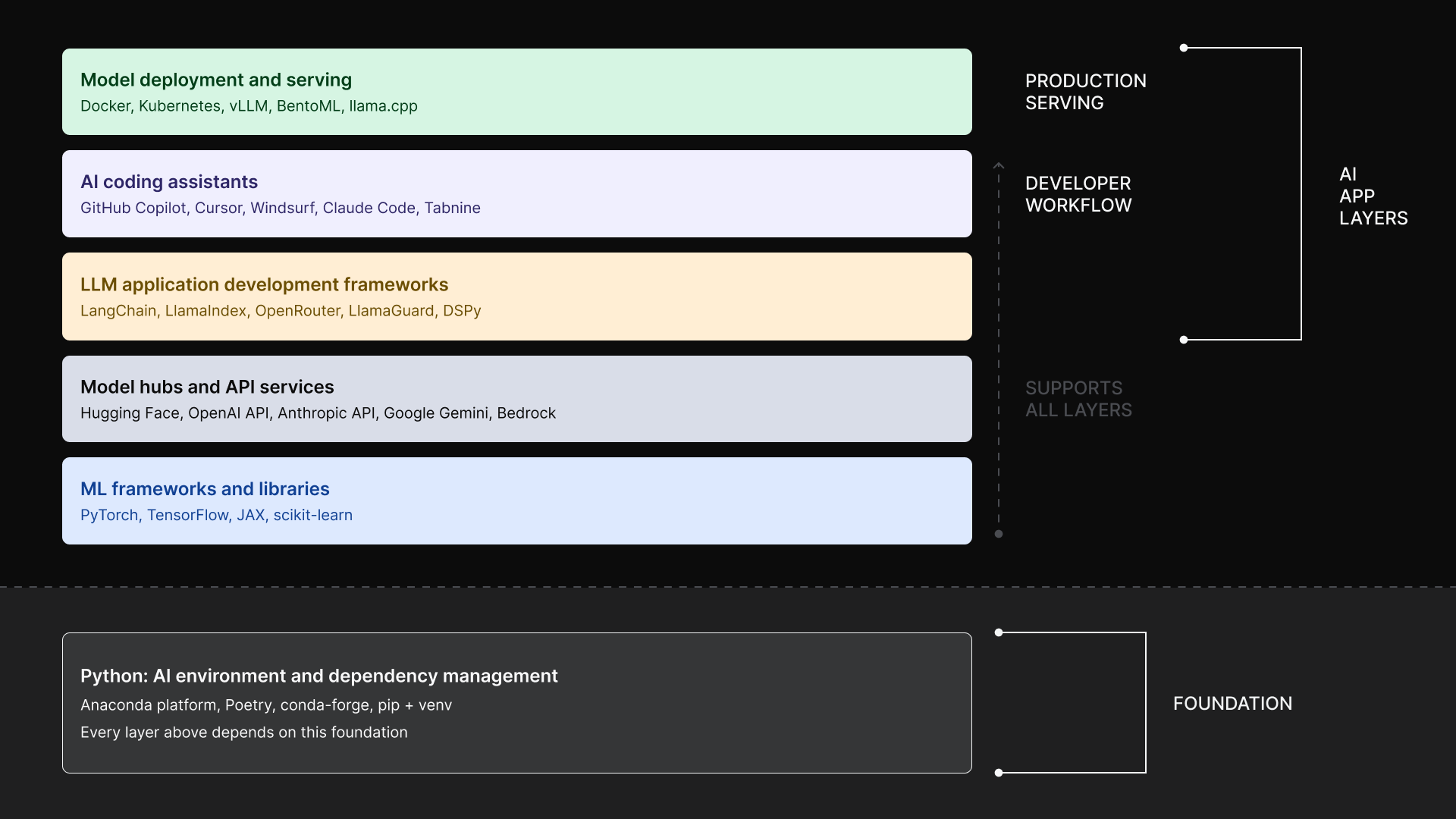
Best AI Development Tools by Function
Each section below identifies the most commonly adopted tool for a given function, explains why it is considered best in practice, and names representative alternatives. Tool choice is situational. You’ll need to adjust your choices based on workload type, team expertise, cloud provider, and governance requirements to determine the right fit.
ML Framework: PyTorch
PyTorch is a dominant framework for research and production ML. PyTorch downloads via Anaconda grew 24% year-over-year, from 1.1 million downloads in May 2025 to 1.3 million downloads in May 2026. Its dynamic computational graphs enable intuitive debugging and experimentation, making it the framework of choice for teams that need to iterate quickly on model architecture. The broader ecosystem covers training through serving: PyTorch Lightning for structured training loops, Torchvision and TorchAudio for specialized tasks, and TorchServe for production inference. PyTorch is the framework behind most foundation model and LLM training, and models trained in it integrate directly with serving via ONNX export, TorchServe, or cloud platform integrations on AWS, Google Cloud, and Azure.
PyTorch handles model definition, training, and evaluation. It does not handle data preparation, orchestration, or monitoring. Production deployment requires additional tooling for serving, scaling, and governance.
Representative alternatives: TensorFlow (production-oriented, strong deployment ecosystem, Keras integration), JAX (high-performance numerical computing, favored by Google research teams), scikit-learn (classical ML: preprocessing, classification, regression, and clustering for non-deep-learning workloads)
Model Hub and API Service: Hugging Face
Hugging Face is the central hub for the open-source AI ecosystem and often the default starting point for teams building AI applications on top of pre-trained language models, vision models, and multimodal models. Hugging Face Transformers has surpassed TensorFlow on Anaconda. By May 2026, Transformers has grown to 356K monthly downloads while TensorFlow downloads have decreased to 208K monthly downloads. The Transformers library provides a unified API for loading, fine-tuning, and deploying models across NLP, computer vision, audio, and multimodal tasks. The Datasets library standardizes access to training and evaluation data. Hugging Face Inference Endpoints let teams deploy models without managing infrastructure, reducing time from model selection to a production-ready API endpoint. Hugging Face also offers serverless inference via the Inference API (no infrastructure management, pay-per-request). Teams often start with the free-tier Inference API before needing Endpoints.
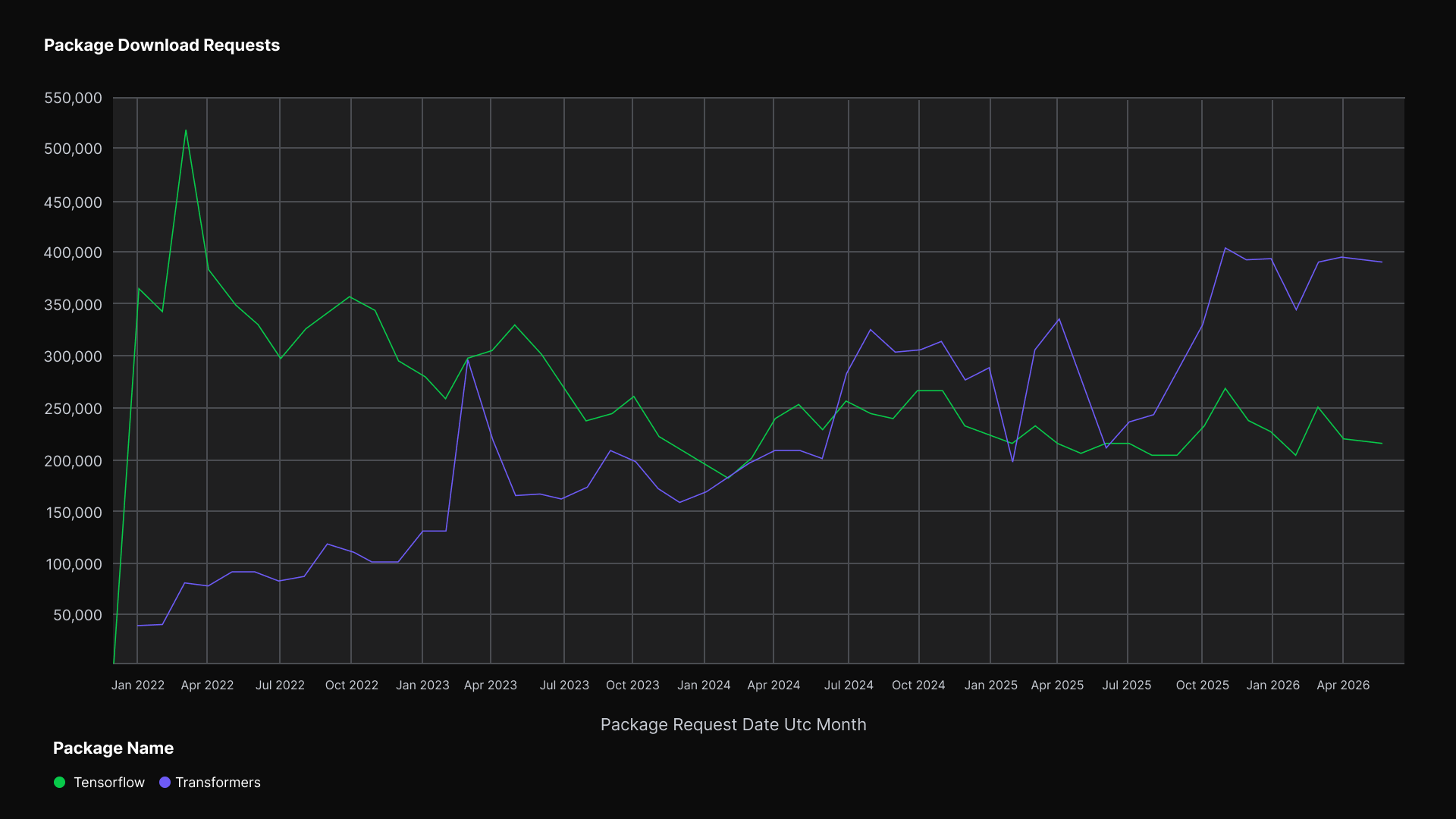
Hugging Face is a model hub and tooling ecosystem, not a full ML platform. It does not provide experiment tracking, pipeline orchestration, or enterprise governance. Hosted inference involves cost and latency tradeoffs compared to self-hosted deployment, particularly for high-throughput workloads.
Representative alternatives: OpenAI API (proprietary access to GPT-4o and ChatGPT-compatible endpoints; strong general-task performance with managed infrastructure), Google Gemini API (multimodal model access via Google AI Studio and Vertex AI), Anthropic API (Claude model family for text, code, and analysis), Amazon Bedrock (managed access to multiple foundation models on AWS)
LLM Application Development Framework: LangChain
LangChain is a framework for building LLM-powered applications. Its modular architecture chains LLM calls with retrieval, tool use, and reasoning steps. LangGraph extends LangChain for stateful, multi-agent workflows where AI agents must coordinate across tasks. LangSmith handles tracing, evaluation, and monitoring of LLM applications in production. A large integration ecosystem covers vector stores, document loaders, model providers from OpenAI to Anthropic, and external tools across common use cases.
LangChain is the default framework for building RAG systems, chatbots, AI agents, and tool-using AI applications. It adds abstraction overhead: for a single API call, using the model provider’s SDK directly is more efficient. Rapid version changes can introduce breaking changes, so dependency management across a LangChain-based codebase requires active attention.
Representative alternatives: LlamaIndex (specialized for RAG and data-connected LLM applications), LangGraph (LangChain extension for graph-based, stateful multi-agent workflows), Semantic Kernel (Microsoft’s SDK for AI application development, strong in .NET and enterprise environments), Haystack (open-source framework for NLP and LLM pipelines)
AI Coding Assistant: GitHub Copilot
GitHub Copilot is an AI coding assistant that is integrated across VS Code, JetBrains IDEs, Neovim, and Visual Studio. It provides real-time code completion, autocomplete for common patterns, chat-based assistance, and pull request summaries. Enterprise AI features include content exclusion policies, IP indemnity, and organization-wide usage analytics. Copilot supports multiple underlying language models, including GPT-4o, Claude from Anthropic, and Gemini from Google, giving teams flexibility in model selection. It is expanding into agentic capabilities through a coding agent that can execute multi-file changes autonomously from a single prompt.
AI coding assistants accelerate all software development, including building AI applications. Developers working in PyTorch, LangChain, or with Hugging Face models benefit from context-aware code generation that understands framework-specific syntax and API usage. AI-generated code requires human review. Enterprise adoption requires governance policies around code provenance, security review, and acceptable use across the codebase.
Representative alternatives: Cursor (AI-native VS Code fork with deep repository context and multi-file agent mode; preferred by developers who want an AI-first editor), Windsurf (AI-native standalone IDE with Cascade AI assistant; a leading alternative for full-stack development), Claude Code (Anthropic’s agentic coding tool for terminal-based development via CLI), JetBrains AI Assistant (native integration into IntelliJ, PyCharm, and other JetBrains IDEs), Amazon Q Developer (AI coding assistant with deep AWS integration), Tabnine (privacy-focused, can run locally on-premises)
Model Deployment and Serving: vLLM + Docker/Kubernetes
Modern AI deployment is a two-layer stack. Docker ensures environment consistency from development to production, which is critical for AI applications with complex dependency graphs. Kubernetes provides orchestration, GPU scheduling, and resource management for AI workloads and supports any serving framework, model format, or cloud provider. vLLM provides the inference engine inside the container, using PagedAttention and continuous batching to maximize token throughput and minimize memory fragmentation for LLM serving.
Docker and Kubernetes are infrastructure tools, not AI-specific serving solutions; teams still need a serving framework on top of them. Kubernetes GPU scheduling is an enterprise-grade commitment. Managed services on AWS (EKS), Google Cloud (GKE), and Azure (AKS) reduce this burden for teams without dedicated platform engineering.
Representative alternatives: BentoML (Python-native model serving with built-in containerization), Ollama (local model serving for development and testing), TensorFlow Serving (optimized for TensorFlow models), cloud-managed endpoints (SageMaker on AWS, Vertex AI on Google Cloud, Azure ML)
AI Environment and Dependency Management: Anaconda
The Anaconda Platform provides the secure Python and AI foundation that teams use to standardize environments, manage dependencies, and govern open-source usage across the full AI development lifecycle. Trusted by more than 50 million users and embedded across 95% of the Fortune 500, it addresses problems that no individual AI development tool solves on its own.
The platform provides curated, expert-built packages with automated vulnerability scanning, binary dependency resolution, and environment management that keeps development, training, and production consistent across laptop, cloud, and self-hosted infrastructure. Every package is built, tested, and signed by Anaconda engineers, eliminating the binary dependency conflicts that cause silent failures in AI applications.
The Anaconda MCP server makes AI coding tools like Claude Code and Cursor conda-aware: they can see installed packages, create environments, and reason about dependencies within the active workspace. Centralized visibility into open-source usage, licensing, and CVE exposure gives enterprises the audit capability required in regulated industries.
Anaconda integrates with the AI tools covered throughout this guide. PyTorch, Hugging Face, LangChain, GitHub Copilot, and vLLM all run on Python. Anaconda ensures those development tools work reliably, securely, and consistently from development through production.
Anaconda scales across team maturity. Individual developers use it to create reproducible environments for AI experimentation. Teams use it to standardize development environments and share artifacts across projects. Enterprises use it to govern packages and models with centralized visibility, security controls, and full auditability.
Representative alternatives: Poetry (Python dependency management with lockfiles, but no CVE scanning or enterprise governance), conda-forge (community-maintained package channel, but without commercial SLAs or security vetting), Docker (OS-level isolation; complementary to Anaconda, which handles language-level dependency resolution), pip + venv (lightweight Python packaging for simple projects, but no binary dependency management, CVE scanning, or enterprise controls).
Anaconda and Snowflake demonstrate how to handle security vulnerabilities, dependency conflicts, and compliance risks at scale.
AI Development Tools vs. Platforms
Most teams do not choose between tools and a platform at the outset. The decision emerges as AI work matures and the costs of fragmented tooling become visible. Individual AI tools are well-suited for early-stage experimentation, prototypes, highly specialized tasks, and rapid iteration by small teams.
Friction accumulates as AI development scales. Environments drift across team members and deployment targets. Model assets, experiment metadata, and deployment configurations live in separate systems with no unified view. Open-source dependencies introduce unmanaged security and licensing risk. Integration between tools requires custom glue code that becomes technical debt. Shadow AI, where teams use AI to access unapproved AI tools (including models) outside governance structures, creates compliance exposure that organizations often discover only after an incident.
AI platforms emerge in response to these constraints. They standardize environments without eliminating flexibility, provide shared foundations for packages, model access, and governance, and introduce the visibility required for team and enterprise AI workflows. Anaconda’s position is specific: it is the Python and AI foundation layer that platforms and tools alike depend on. PyTorch, LangChain, GitHub Copilot, and vLLM all run on Python. Anaconda ensures those tools work reliably, securely, and consistently regardless of which platform sits above them.
Anaconda is not a choice between tools and a platform; it’s the foundation both depend on, from the first experiment through enterprise deployment.
How to Choose the Right AI Development Tool
Project Requirements and AI Workload Type
Start tool selection with the type of AI work being done. The tooling requirements for a team building a RAG chatbot differ substantially from those of a team training a custom computer vision model, which differ from a team building agentic automation workflows.
Relevant distinctions include training custom AI models from scratch versus fine-tuning pre-trained models versus building on top of model APIs; traditional ML workloads versus LLM application development versus agentic AI systems; and batch inference versus real-time inference versus interactive AI applications. The category of workload determines which tool categories are relevant before any feature comparison begins.
Technical Expertise and Team Structure
Tool choice reflects who will build AI applications, who will maintain them, and who is accountable when failures occur. Flexible, code-first tools (e.g., PyTorch, LangChain, Docker) favor experienced AI/ML engineering teams. Managed platforms and APIs on AWS, Google Cloud, and Azure reduce operational burden for teams without deep infrastructure expertise.
Low-code and no-code tools serve domain experts who need AI features without engineering depth. AI coding assistants accelerate development at all skill levels but do not replace the need for AI/ML fundamentals or sound software engineering judgment. Once AI work moves beyond a single data scientist, shared development environments and consistent conventions are essential.
Integration and Workflow Fit
Integration is the primary hidden cost of AI tool choice. The relevant questions are: How do AI models move from training to deployment? How are LLM calls orchestrated with retrieval and tool use? How does monitoring feed back into iteration? How does all of this connect to existing infrastructure and version control via git?
Common integration failures include models that train in one environment but fail in another due to dependency mismatches; LLM applications that behave differently in production due to prompt or context drift; and AI-generated code that introduces dependencies conflicting with the existing development environment or uses outdated patterns without explicit prompting. Selecting AI tools that fit into a coherent development workflow, not isolated steps, is the most effective preventive measure.
Security, Governance, and Compliance
Governance deserves dedicated attention in the 2026 AI development landscape. Three dimensions are important:
- Open-source supply chain security: AI applications depend on hundreds of Python packages, any of which can introduce CVEs or licensing violations.
- Model governance: teams need to track which model version is in production, what data it was trained on, and whether it meets compliance requirements.
- AI coding assistant governance: enterprise teams need policies around AI-generated code provenance, security review, and acceptable use across the codebase.
Cost and Scalability
Evaluate cost beyond licensing. Total cost of ownership includes compute, API usage, infrastructure, support, and the hidden cost of debugging environment issues and unreproducible results. API-based generative AI services from OpenAI, Anthropic, and Google introduce variable costs that can escalate rapidly with usage.
AI coding assistants use several pricing models: flat-rate subscriptions, credit-based systems, bring-your-own-key configurations, and local LLM options that trade API costs for infrastructure overhead. Evaluate tools based on total cost of ownership across data volume, team size, and workflow complexity, not sticker price.
Open-Source vs. Proprietary Tradeoffs
Open-source and proprietary AI tools represent a spectrum, not a binary choice. Open-source tools provide transparency, flexibility, community-driven innovation, and freedom from vendor lock-in. Teams in regulated industries often prefer open-source AI models because they can inspect training data and model weights and maintain a complete audit trail.
At scale, open-source tooling introduces risks: fragmented usage, unmanaged dependencies, security exposure, licensing ambiguity, and shadow AI. Enterprise platforms like Anaconda standardize and govern open-source usage without replacing open-source innovation.
Anaconda Is the World’s Most Trusted AI Platform
Every tool in this guide runs on Python. When those environments diverge across a developer’s laptop, a training cluster, and production systems, AI applications fail in ways that don’t show up until after deployment. Anaconda is the layer that prevents that.
Anaconda provides the platform built for this foundational layer, and earlier this year, Anaconda acquired Outerbounds, the company behind Metaflow, an open-source AI/ML orchestration framework, to create a unified platform spanning the entire AI-native development software lifecycle. Anaconda’s platform provides:
- Thousands of curated, scanned Python packages that eliminate dependency conflicts
- Reproducible environments that ensure what works in experimentation works in production
- Centralized governance over open-source usage, licensing, and CVE exposure
- A curated model catalog with responsible AI scoring, quantized models, and inference services using the Anaconda platform
PyTorch, Hugging Face, LangChain, GitHub Copilot, and vLLM all run on Python. Anaconda is the trusted foundation that ensures those AI tools are secure and reliable.
Learn more about the Anaconda platform.
FAQs
What is the difference between AI development tools and AI development platforms?
AI development tools address specific layers of the development workflow: PyTorch for model training, LangChain for LLM orchestration, GitHub Copilot for code assistance inside VS Code or JetBrains IDEs. AI development platforms integrate multiple capabilities under shared infrastructure, covering data pipelines, model training, deployment, monitoring, and governance.
AI platforms reduce integration overhead but trade some flexibility for convenience. Most teams start with individual tools and adopt a platform as integration costs grow and governance requirements increase. Examples of platforms include Anaconda, Databricks, SageMaker, and Vertex AI; examples of individual tools include PyTorch, LangChain, and Hugging Face.
How can teams ensure reproducibility across AI development environments?
Reproducibility in AI development requires consistency at three layers: code (version control with git), data (versioning tools such as DVC to lock training datasets), and environment (locked Python environments ensuring identical package versions across development, training, and production). The third layer is the most commonly neglected. Environment drift between a data scientist’s laptop, a training cluster, and production infrastructure causes AI models that pass all tests in development to fail silently in production. Anaconda Core addresses this with curated, locked package channels that eliminate binary dependency conflicts across operating systems and architectures, with environment configurations exportable and reproducible across any infrastructure. To learn more about reproducibility, check out 8 Levels of Reproducibility: Future-Proofing Your Python Projects.
How are AI coding assistants changing the way teams build AI applications?
AI coding assistants have moved from assistive to augmentative to agentic. Tools like GitHub Copilot and Tabnine began by offering inline code completion and code suggestions. Current tools such as Cursor and Windsurf provide deep codebase context and multi-file editing within a full IDE workspace. Agentic tools like Claude Code and the Copilot coding agent can now execute entire development tasks from a CLI with minimal human input, using natural language prompts to initiate and guide the work.
AI-generated code requires human review and can introduce maintenance challenges including inconsistent naming conventions and integration issues with existing codebases. AI coding assistants accelerate software engineering; they do not replace it.
What should teams consider when choosing between open-source and proprietary AI models?
Open-source AI models via Hugging Face offer transparency, customizability, and the ability to inspect weights and training data. They can run locally, keeping sensitive data within the organizational perimeter. Proprietary models from OpenAI (including ChatGPT-compatible APIs), Anthropic, and Google typically offer stronger out-of-the-box performance on general tasks, managed infrastructure, and SLAs. Key considerations include data privacy, customization needs, cost predictability (proprietary APIs introduce variable costs that scale with usage), and compliance requirements for regulated industries. Anaconda’s platform provides governance and responsible AI scoring across both open-source and proprietary models in enterprise deployments.
How do organizations manage security risks from open-source AI dependencies?
AI applications depend on hundreds of Python packages, any of which can introduce CVEs, licensing violations, or supply chain attacks. Effective mitigation requires curated package repositories with automated CVE scanning rather than installing directly from PyPI; SBOM generation to maintain a full inventory of open-source components; license compliance auditing for packages with GPL or AGPL licenses; and policy enforcement preventing the installation of unvetted packages in production development environments. Anaconda Core addresses all four requirements, providing scanned package channels, CVE alerts, auto-blocking of compromised packages, and centralized governance across teams.
What role do AI agents play in modern AI development workflows?
AI agents are AI systems that take multi-step actions autonomously using tools, reasoning through decisions, and executing tasks without a human prompt for every step. In AI development, agents appear in two contexts: AI coding agents (Claude Code, Cursor’s agent mode, Cline, aider) that autonomously write, refactor, and debug code; and application-layer agents (built with LangGraph, CrewAI, AutoGen) that orchestrate LLM calls and external tools in production applications. According to McKinsey’s Technology Trends Outlook 2025, agentic AI is one of the fastest-growing enterprise technology trends this year. The frontier is agentic coding tools that can manage entire development tasks across multiple files and repositories with minimal human input.