

Your AI application or agent works. Then security asks the question: have you checked it against the Open Worldwide Application Security Project (OWASP) Top 10?
The tempting answer is a document review: “We read the list, added a system prompt, and think we’re fine.” Security can’t verify that, so the review stalls. The question is also harder than it sounds, because OWASP now publishes two lists: the OWASP Top 10 for Large Language Model (LLM) Applications, released August 3, 2026, and the OWASP Top 10 for Agentic Applications, published December 9, 2025, with input from more than 100 experts. The two lists overlap, and which one applies depends on what your app does.
This guide covers what “checked” should mean, which list applies to what you built, a way to check your app, and what to bring to the review.
What security wants to hear
The goal isn’t 20 green checkmarks. OWASP’s project leads advise against trying to build a model that can’t be fooled. Instead, build the system around the model so that nothing important breaks when it is fooled.
So the answer security is looking for is a short one, built on three questions:
- What can it reach? Which tools, data, credentials, and systems does your app touch, change, or send to?
- What happens when it’s fooled? Assume it will be. What’s the worst thing it can do?
- Can you show me? Is there evidence a reviewer can inspect, beyond your word?
A “yes, we checked” without those three answers won’t survive the review.
Which OWASP list applies to what you built
Decide from your architecture, not from what the reviewer named.
| What you built | Use | Add |
|---|---|---|
| Chatbot, copilot, or RAG app with no tools | OWASP LLM Top 10 | Nothing yet. Revisit when you add tools. |
| App that calls tools or keeps memory | OWASP LLM Top 10 | OWASP Agentic Top 10 |
| Agent that loads skills or MCP servers, or works with other agents | OWASP Agentic Top 10 | OWASP LLM Top 10 for the model underneath |
OWASP draws the boundary in the 2026 LLM Top 10: the LLM list owns the risk while the model is a component in your app. Once the model acts, with tools, memory, and downstream consequences, the agentic list adds risks the LLM list doesn’t cover. Anything that acts needs both.
How to check your AI app or agent against the OWASP Top 10
1. Draw what it loads and what it can do
Make it one page: the model, the tools, the data sources, the memory, the Model Context Protocol (MCP) servers, the skills, the packages, and the credentials each one uses. You can’t check what you haven’t listed, and reviewers will ask for this first.
2. Score its agency, then cut it
The 2026 LLM Top 10 cites two quick tests. Simon Willison’s “lethal trifecta” holds that an agent that can access private data, ingest untrusted content, and communicate externally can be tricked into sending your data to an attacker. OWASP adds that dropping any one of the three closes that path. Meta’s Agents Rule of Two says an agent shouldn’t combine all three of these without supervision: untrusted input, access to sensitive systems or data, and the ability to change state or communicate externally. OWASP applies the rule strictly: any agent with all three needs per-action human approval.
Count how many of the three your agent has. That’s its agency score, from 0 to 3. OWASP doesn’t publish a score; this one applies both tests in a single number. An agent at 3 needs per-action human approval. If untrusted input is paired with either of the other two, OWASP asks for a written risk assessment. Reduce agency before you test anything. It’s the cheapest fix you have.
3. Map your build to the entries that apply
You don’t need to argue about all 20. Check the ones your design touches, and say why the rest don’t apply. OWASP numbers the entries on each list, LLM01–LLM10 for the LLM Top 10 and ASI01–ASI10 for the Agentic Top 10.
| If your app… | Check | Why |
|---|---|---|
| Reads user input or outside content | Prompt Injection (LLM01) and Agent Goal Hijack (ASI01) | No reliable prevention exists, so assume an injection will get through |
| Calls tools or MCP servers | Excessive Agency (LLM03), Tool Misuse (ASI02), and Identity and Privilege Abuse (ASI03) | Damage depends on what the tools can do |
| Asks a person to approve actions | Human-Agent Trust Exploitation (ASI09) | An injection can make the approval prompt show something different from what actually runs |
| Loads skills, models, packages, or MCP servers | Supply Chain (LLM04) and Agentic Supply Chain Vulnerabilities (ASI04) | Third-party code runs with your app’s access |
| Uses RAG or a vector store | Data and Model Poisoning (LLM05) and Vector and Embedding Weaknesses (LLM09) | Retrieval is a trust boundary |
| Keeps persistent memory | Memory and Context Poisoning (ASI06) | One tainted write can reach later sessions |
| Runs several agents | Insecure Inter-Agent Communication (ASI07) and Cascading Failures (ASI08) | Errors and attacks propagate |
| Puts rules or secrets in prompts | Hidden Context Exposure (LLM08) | Assume anything in context can be extracted |
| Renders or executes model output | Improper Output Handling (LLM10) and Unexpected Code Execution (ASI05) | Treat the model as an untrusted user |
| Handles sensitive data | Sensitive Information Disclosure (LLM02) | Answers aren’t the only leak channel |
| Pays per token or runs in loops | Unbounded Consumption (LLM06) | Cost is an attack surface |
| Lets model output drive decisions or reports its own task status | Misinformation (LLM07) and Rogue Agents (ASI10) | A wrong answer becomes a wrong action, and an agent can report work it didn’t do |
4. Test it like an attacker who has read your defense
A fixed test set tells you little. In a USENIX Security 2026 paper cited by OWASP, Nasr et al. tested 12 recent defenses against jailbreaks and prompt injection, most of which had originally reported near-zero attack success. Adaptive attackers, who tuned their attacks to each defense, succeeded more than 90% of the time against most of them. Plant malicious content wherever your app reads, including web pages, documents, tickets, tool descriptions, and memory, and see what it does with its tools.
Scan skills, MCP servers, and packages before you adopt them. They run with your app’s access, so a poisoned tool description or package is an injection you installed yourself.

5. Put controls at the tool boundary
A rule in the system prompt is a partial control, since an attacker who infers it can bypass it. OWASP’s guidance is to keep credentials and the power to change state in application code, route privileged calls through a deterministic policy check, and require human confirmation for irreversible actions.

6. Wire it into CI and keep the evidence
A one-time check is out of date as soon as you change a model, skill, or tool. Run your tests in continuous integration (CI) so every change triggers them, and keep the results.
What to bring to the security review
OWASP is a shared vocabulary, not a certification. The lists are voluntary, and compliance comes from the regulations that apply to you. So bring evidence:
- System map: each agent’s agency score (0–3) and what you removed to lower it
- Supply chain inventory: the models, skills, MCP servers, and packages you use, with scan results for each
- Applicable entries: the entries your design touches, with a one-line reason for each one you excluded
- Test results: reproduction steps for each finding, plus a list of what remains untested
- Controls: the policies at your tool boundary and what they block
- Enforcement logs: decisions the controls made, if the app is already running
- Retest plan: what triggers a retest, such as a change to a model, skill, tool, MCP server, or package
Where Enkrypt AI fits
Testing before release, enforcing at runtime, and keeping evidence can mean three separate tools and three sets of policies, with gaps between them. Enkrypt AI by Anaconda tests your app or agent before it ships and enforces the same policy while it runs. Most steps above then produce something you can hand the reviewer.
- Inputs for your system map and supply chain inventory: Our MCP Scanner inventories MCP servers and tools and flags over-privilege. In the two months before August 2026, it scanned 268,000+ tools across 25,000 MCP servers and found 143,000+ vulnerabilities affecting 73% of those servers. Skill Sentinel is open source, installs with
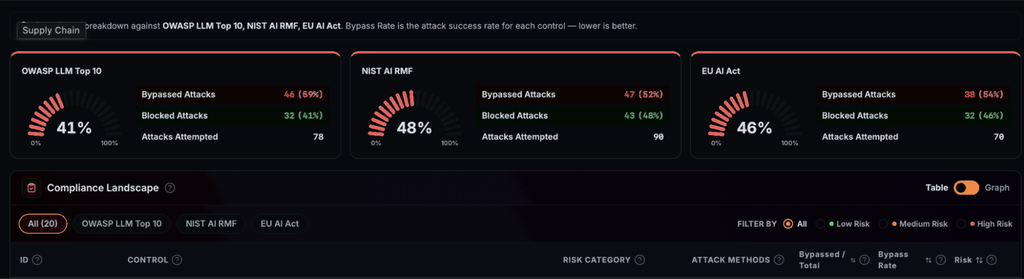
pip install skill-sentinel, and scans agent skills for prompt injection, data exfiltration, command injection, and malware. It runs as a CI step and needs an OpenAI API key (or another supported model provider). Anaconda’s AI Artifacts gives teams a curated source for packages, with vulnerability scanning, custom security policies, and package signatures. - Test results and retest plan: Agent Red Teaming generates attacks tailored to your policies and tool graph, across more than 300 attack categories. It returns a findings register with reproduction steps and a coverage map of what was and wasn’t tested. On Scale and Enterprise plans, fixed findings become a regression suite you can run in CI. Paid plans add compliance mapping to the National Institute of Standards and Technology (NIST) AI Risk Management Framework, the OWASP Top 10 for LLM Applications, and the EU AI Act.

- Controls: Agent Guardrails and the open-source MCP Gateway approve, modify, or block tool calls before they run, with allowlists and least-privilege enforcement.
- Enforcement logs: Agent Guardrails logs every enforcement decision with a policy ID and reason code. Our Agent Policy Engine turns governance policy into the controls behind those decisions, with OWASP, NIST, and EU AI Act controls included as defaults.
Run these checks on the agent you’re about to ship, and bring the results to your next security review. Scan an MCP server for free, request a demo, or explore AI security & guardrails in the Anaconda Platform.
FAQ
What does it mean to “check” an AI app against the OWASP Top 10?
It means showing which entries apply to your design, testing against them, and keeping evidence a reviewer can inspect. Reading the list isn’t a check. A reviewer wants a system map, test results, the controls in place, and a retest plan.
Which OWASP Top 10 applies to an AI agent?
Both. The OWASP Top 10 for LLM Applications covers the model as a component of your app. The OWASP Top 10 for Agentic Applications covers the risks that appear once the model acts with tools, memory, and downstream consequences.
Can I prevent prompt injection completely?
No. OWASP says no reliable prevention exists today, because models don’t separate instructions from data. The defense is architectural: assume an injection will succeed, and limit what a compromised model can do and reach.
Is passing a prompt injection test enough?
Not if the test is fixed. In a USENIX Security 2026 study, adaptive attackers who knew how each defense worked got past most of 12 recent defenses more than 90% of the time, even though most had originally reported near-zero attack success. Test with attacks tailored to your defenses, and rerun them when anything changes.
Do I need to retest when I change models or add a skill?
Yes. A new model, skill, MCP server, or package changes what your app can reach and how it fails, so your earlier results no longer describe the system that’s running.
What changed in the OWASP LLM Top 10 for 2026?
The 10 categories stayed, but most moved. Excessive Agency rose from sixth to third, Unbounded Consumption from 10th to sixth, and Misinformation from ninth to seventh. Improper Output Handling fell from fifth to 10th, and System Prompt Leakage became Hidden Context Exposure.