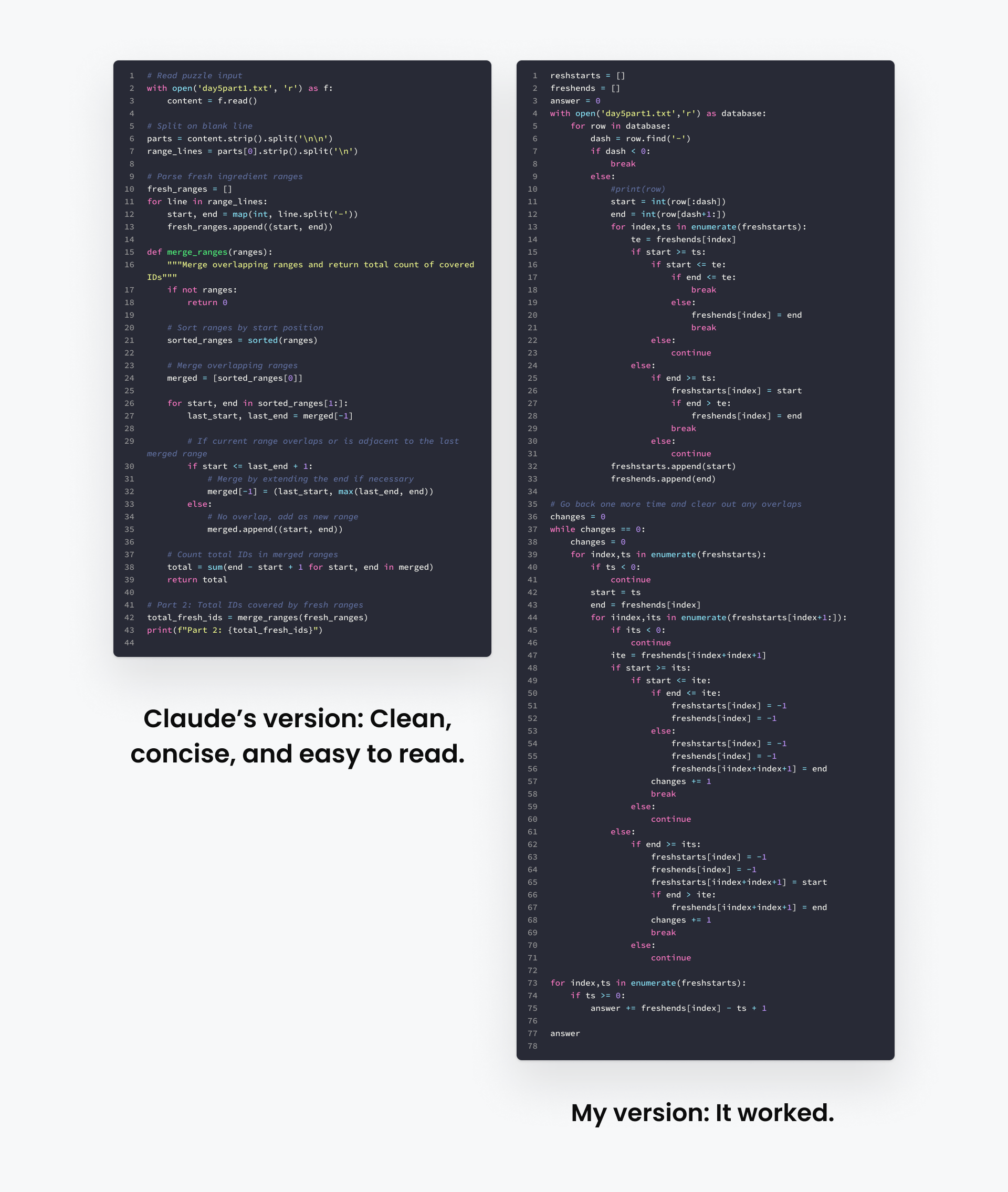
What This Tells Us About LLM Coding Strengths
What worked:
- Recognizing patterns: “I’ve seen problems like this before”
- Avoiding common pitfalls: Writing generally bug-free code
- Achieving perfect syntax: Avoiding typos, forgotten semicolons, and API misremembering
- Generating boilerplate: Creating standard structures without the tedium
The takeaway: For well-defined problems with clear requirements, AI is probably faster and possibly better than you. Stop typing out boilerplate, and stop debugging silly syntax errors. Let the AI handle that.
AI Can Teach You Things You Don’t Know to Ask About
Claude’s feedback to me from the first six days was, “The main area for improvement is keeping things simple” and then hit me with “Premature optimization is the root of all evil” (Donald Knuth)
On Day 8, I solved Part 2 of the puzzle with a “brute force” approach that worked fine for the problem size. Claude gave me feedback:
“You’re using brute-force approaches where elegant algorithms exist.”
Wait. Days ago, Claude told me to stop overthinking. Now it wants more optimization?
So I pushed back: “Help me understand when to dig deeper and when I should just use a solution that works.”
Claude’s response surprised me:
“You’re solving one-off puzzles, not production code. Your ‘does it get me an answer in reasonable time?’ approach is sensible. But here’s what you’re missing…”
Then it taught me about Union-Find algorithms for connectivity problems, efficient graph traversal techniques, and computational geometry approaches I was not familiar with (or had forgotten).
This is the “unknown unknowns” problem: I didn’t know these algorithms existed, so I couldn’t look them up. I couldn’t even Google the right terms.
How to Extract Real Learning From AI
What worked:
- Challenge the AI’s advice: When Claude contradicted itself, I asked why. That sparked the best conversation and insight.
- Ask “what don’t I know?” Explicitly: “Are there standard algorithms for this type of problem?”
- Request feedback: Have AI review your code and ask for alternative implementations.
- Verify everything: Hallucinations do exist, even for code, so verify.
What didn’t work:
- Just accepting Claude’s solution without understanding it
- Assuming Claude knows your context (experience level, constraints, goals)
- Trusting optimization advice without understanding the tradeoffs
The practical takeaway: AI can be an incredible teacher for filling knowledge gaps, but only if you actively interrogate it. Don’t just take code and YOLO it. Ask it to explain patterns, suggest alternatives, and reveal what you don’t know. But verify claims against documentation before trusting them.
Where AI Still Fails (And What That Means For You)
Day 9 was a geometric problem requiring you to find shapes contained within other shapes across billions of tiles. Claude tried:
- Brute force approaches (too slow)
- Clever optimizations (still too slow)
- Multiple data structure reorganizations (nope)
Then it quit. Apologized. Asked what approach I took and whether it should keep going.
Though there was no genius in my approach (I solved it using the Shapely geometry library), the thing that Claude missed is that there are domain-specific tools specific for this type of case. The student had become the master.
The Pattern of AI Failure
Though this wasn’t a huge failure, reviewing Claude’s struggles across all 10 days, here’s where it hit walls:
AI struggles with:
- Unclear requirements and language Imprecise language can result in the wrong answer
- Creative reframing that requires seeing problems from new angles
- Knowing when to abandon an approach humans give up faster (for better and sometimes worse)
- Selecting domain-specific tools outside its common patterns
- Problems requiring real-world context it doesn’t have
- Being confidently wrong. AI can appear really confident, even when it’s wrong
Despite those downsides, my victory was short-lived. The AI continued to beat me handily from day 10 onward.
The practical takeaway: This is not an infallible technology. You are still an important part of the process. Use AI as a tool, as a collaborator, and as a source of concepts, but not as an unquestioned expert. Trust but verify!
The Hidden Cost Nobody Talks About
Here’s what surprised me most: Rather than eroding my skills, my performance was on par with last year and in some cases better.
After a year of heavy AI usage, I performed roughly the same as in previous years’ Advent of Code challenges. Same number of puzzles solved (on a % basis). Same types of problems that stumped me. However, I was a lot more effective at starting and making progress.
Rather than making me worse, AI may be making me better because I’m coding MORE this year. The hurdle to start a new project is so much lower now, which means I’m able to start more things. Rather than wasting time debugging syntax or API issues, I’m able to resolve them more quickly.
So if AI isn’t making developers worse, what’s the problem?
The problem is who else I worked with: No one. I asked fewer questions to others and used the Reddit discussions less. You could see this clearly in our internal #advent-of-code Slack channel as well.
In previous years, our company’s Advent of Code channel was a lot more active each day:
- Sharing approaches
- “That’s clever!” reactions to creative solutions
- Links to Reddit threads analyzing different strategies
- People getting unstuck through community discussion
This year? Quiet. Participation could have just been down year over year. Maybe people were just busy. From my perspective though, I was personally less social this year.
What We Lose When AI Replaces Community
When I got stuck, Claude analyzed my code. When I wanted to see different approaches, Claude showed me. When I needed feedback, Claude provided detailed analysis. It was just so easy, and it was bespoke feedback on my code.
This was incredibly valuable—a smart tutor with unlimited time, perfectly tailored to my needs.
But I lost something essential: Exposure to how different people think.
Human Learning is Comparative
- You see someone’s wildly different approach and realize your assumptions were arbitrary
- You explain your solution and realize mid-explanation that it’s flawed
- You argue about tradeoffs and learn to articulate your reasoning
- You’re exposed to algorithms and techniques you weren’t familiar with (those unknown unknowns I mentioned earlier)
Claude gave me one perspective: Claude’s. An impressive perspective trained on millions of examples. But still just one.
And there’s a network effect: Every person talking to AI instead of people makes the community quieter, which makes it less appealing, which makes more people turn to AI…
It’s About More Than Just Connectedness
Yes, these connections we form when we work with others are valuable, but also this connection usually forces us to document things and communicate them. When we lose that, we lose the history. We lose the lessons learned. We start storing all of our knowledge in AI, which can be as problematic as you can imagine.
There’s a common phrase that “the internet never forgets.” This is usually in reference to some mistake someone made in the past, but in this case, it’s a good thing. We (and the internet) need to not forget.
The practical takeaway: Use AI for your work, but contribute back to the community. When AI teaches you something interesting, share it with humans. Write about it. Discuss it. The community that helped AI learn and our communal context needs feeding back.
The Framework: When to Use AI, When to Go Solo
Based on 10 days of direct comparison, here’s the decision framework I’ve developed:
When to Use AI
✅ You know what you want but not how to implement it
- You can articulate requirements clearly
- The problem is well-defined
- You need boilerplate/scaffolding
✅ You’re working with unfamiliar syntax/APIs
- You know the concept but forgot the exact methods
- You’re using a library for the first time
- You need examples quickly
✅ You’re doing routine, tedious work
- Writing tests for existing code
- Creating documentation
- Refactoring for style consistency
- Converting between formats
✅ You need to surface unknown unknowns
- Ask: “What standard algorithms exist for this?”
- Request alternative approaches
- Challenge AI’s assumptions
When to Go Solo (or Collaborate With Others)
❌ You’re learning something new intentionally
- The struggle IS the point
- You need the concept to stick
- You’re building foundational skills
❌ The problem space is novel or creative
- No clear parallel in training data
- Requires lateral thinking
- Needs domain expertise AI doesn’t have
❌ You need strategic thinking
- “What problem am I really solving?”
- “Is this the right approach?”
- “What are the tradeoffs?”
❌ You want diverse perspectives
- Learning how others think
- Discovering approaches you wouldn’t consider
- Building community connections
❌ Context and judgment matter
- Company-specific considerations
- User needs and constraints
- Long-term maintenance implications
The Hybrid Approach (Often Best)
For most projects: Use both, but deliberately.
- Start with AI for scaffolding and boilerplate
- Review and understand everything it generates
- Implement the complex logic yourself to stay sharp
- Use AI for tedious parts (tests, docs, refactoring)
- Discuss results with humans to get diverse perspectives
The Bottom Line
AI coding tools are genuinely impressive. Claude solved puzzles in 90 seconds that took me an hour. It taught me algorithms I didn’t know existed. It made programming fun again by removing the boring parts.
But AI can’t replace three things:
- The struggle that makes learning stick
- The diverse perspectives that come from human collaboration
- The community connections that make us better
So, use AI. Absolutely. It’s a powerful tool, and ignoring it is foolish.
But use it deliberately.
- Let it handle the tedious, not the interesting
- Push it to reveal your unknown unknowns
- Verify its suggestions against documentation
- Share what you learn with other humans
- Occasionally fly solo to stay sharp
The goal isn’t to code without AI. The goal is to be a better developer because of AI, not despite it.
And sometimes, that means turning it off. For next year, I absolutely will be challenging myself with the Advent of Code, but I’ll be giving Claude a vacation.
My challenge to you: Pick one project this month, and do it completely AI-free. See what you learn. See what you miss. See what you don’t.
Then, tell me about it. I’m curious how your experience compares to mine.
Find me on LinkedIn to continue the conversation.