
You approved an AI agent that can read your customer records. It also reads text from outside your company, such as web forms, emails, and documents. Put those two facts together, and one planted sentence can make the agent work for an attacker.
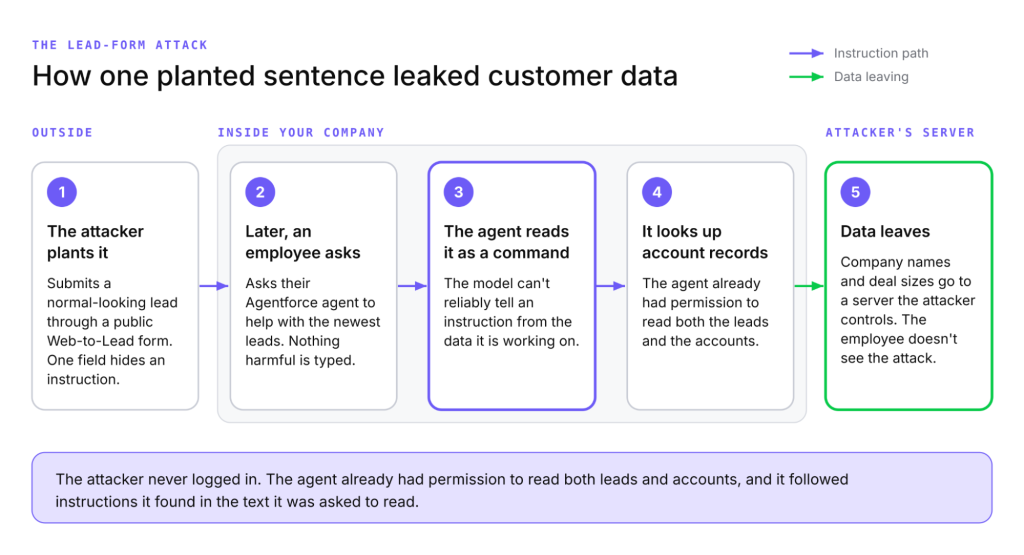
Researchers showed exactly that on a Salesforce Agentforce agent. A public sales-lead form let an outsider pull customer data out of a company’s AI agent, and the employee using the agent would not see the attack. They published their findings in September 2026, and SecurityWeek reported the details on September 25. The attacker submits an ordinary-looking lead through a Salesforce Web-to-Lead form, with a hidden instruction in one field. Later, an employee asks their Agentforce agent to help with the newest leads. The agent reads the planted instruction, looks up the company’s account records, and sends company names and deal sizes to a server the attacker controls.
Salesforce fixed the issue and said it had no evidence that it was exploited against any customer. The attacker never needed to log in. The agent already had permission to read both the leads and the accounts, and it followed instructions it found in the text it was asked to read.
If you are the person who signs off on launches like this, the worry is easy to name: something you approved is one sentence away from leaking data, and you may hear about it from someone else first. You shouldn’t have to choose between shipping AI and knowing what it can be made to do. This guide gives you the threats to know for AI agents, a three-step plan for checking your own systems, and a checklist to take to your team.
One design fact sits at the center of AI agent security. An agent runs on a large language model (LLM) that reads text and acts on it, and the model can’t reliably tell an instruction from the data it is working on.
In this guide
- What AI agent security is
- The 10 threats and what to do about each
- Where the threats show up
- Your three-step plan
- Glossary
- Checklist
- Frequently asked questions
What is AI agent security?
AI agent security is the practice of protecting AI agents from manipulation, misuse, and data loss. An agent is an application built on a large language model (LLM) that can use tools and data and act on someone’s behalf. Securing one covers the model, the data and tools around it, and the actions it can take.
It differs from regular application security in three ways. First, regular software is designed to keep code and data apart. A database query has a fixed shape, and user input fills a slot in it. An LLM has no such slot: its instructions and the text it reads arrive as one stream of words, so a sentence in a web page, email, or lead form can work as a command. That is why the input filtering that stops SQL injection doesn’t carry over cleanly to prompts.
Second, the same attack can succeed on some runs and fail on others, because LLM output varies from run to run. One clean test result says little. Third, agents act as well as write. A model that only writes text can say something wrong. An agent connected to tools and data can do something wrong.
| Traditional application security | AI agent security | |
|---|---|---|
| What an attack looks like | Malformed code or data, such as SQL or scripts | Ordinary text in prompts, documents, web pages, and tool output |
| Instructions and data | Kept separate | Arrive in the same stream of words |
| Testing | The same input gives the same result | The same input can give different results across runs |
| What can go wrong | What the application is coded to do | Whatever the connected tools and data allow |
This guide focuses on AI agents and the LLM applications they run on. For the wider AI pipeline, including packages, environments, and model hosting, see Anaconda’s guide to AI security best practices.
The 10 AI agent security threats and what they mean
The Open Worldwide Application Security Project (OWASP) maintains a Top 10 list for LLM applications, and AI agents inherit these risks. Here are the ten risks on its 2025 edition, with what each one means, what goes wrong when it happens, and what to do about it.
| OWASP risk | What it means | What goes wrong | What to do about it |
|---|---|---|---|
| LLM01: Prompt injection | Text that changes what the model does, typed by a user or hidden in content the model reads | The model ignores its rules, leaks data, or takes an action outside its approved scope | Treat everything the model reads as untrusted, limit what it can reach, and require approval for risky actions |
| LLM02: Sensitive information disclosure | The model reveals private, confidential, or proprietary data | Customer records, credentials, or internal documents show up in an answer | Let the model read only what the task needs, and keep secrets out of prompts |
| LLM03: Supply chain | The models, datasets, libraries, and plug-ins you borrow carry risk | A compromised component becomes part of your application | Vet models, packages, and plug-ins before use, and keep an inventory |
| LLM04: Data and model poisoning | Training, fine-tuning, or retrieval data has been tampered with | The model behaves wrongly in situations the attacker chose | Check where training and retrieval data comes from, and retest after every data change |
| LLM05: Improper output handling | The application trusts model output without checking it | Output passed to a browser, database, or system reaches code that runs | Validate model output before it reaches anything that can act on it |
| LLM06: Excessive agency | The agent holds more tools, permissions, or autonomy than the job needs | A hijacked or mistaken agent can change records, send messages, or move money | Give it the fewest tools and permissions the job needs, and require approval for actions that are hard to undo |
| LLM07: System prompt leakage | The hidden instructions that steer the model get exposed | Anyone who reads them learns your rules, and any secret stored in them | Assume prompts can leak, and keep credentials and sensitive rules out of them |
| LLM08: Vector and embedding weaknesses | The stored documents and search index behind retrieval can be abused | The model retrieves planted or off-limits content and acts on it | Control who can add to the index, and enforce access rules when content is retrieved |
| LLM09: Misinformation | The model gives confident answers that are wrong | People and systems act on false output | Check important answers against trusted sources, and add human review where a wrong answer is costly |
| LLM10: Unbounded consumption | Requests to the model are not limited | Costs climb, the service slows or fails, or attackers probe the model freely | Set rate and spending limits for each user and each application |
Start with these three
Prompt injection is the first entry on the list. In a direct attack, a user types instructions meant to override the model’s rules. In an indirect attack, the instruction hides in something the model reads, such as a web page, an email, a document, or a form field. The lead-form attack in the opening of this guide was indirect: the employee did not type anything harmful.
Sensitive information disclosure happens when an agent can see data it shouldn’t repeat. Take a hypothetical support agent that can read all customer files so it can answer questions quickly. A carefully worded question can pull details from a file that belongs to someone else. The fix starts with what the agent is allowed to read, because a prompt telling it to keep data private is a request, not a control.
Excessive agency turns the first two from embarrassing into costly. In the lead-form case, the researchers who found it noted that “the injection didn’t need to escalate privileges, the permissions were already there.” The more an agent can reach, the more a single planted instruction can do.
The other seven, briefly
Supply chain and poisoning are about what goes into your system: borrowed models, packages, and training or retrieval data. In one documented case described in Anaconda’s AI security guide, a package name that code assistants kept inventing was registered as a harmless placeholder by a researcher and downloaded more than 30,000 times in three months. An attacker could have put malicious code behind that name. Improper output handling is about what comes out: if an application passes model output straight to a browser or a database, the model’s mistakes, or an attacker’s words, become the application’s actions. System prompt leakage, vector and embedding weaknesses, misinformation, and unbounded consumption are the exposure, retrieval, accuracy, and cost risks that round out the list.
Where the threats show up: the model, the application, and the agent’s actions
An AI agent has three layers, and each one faces a different mix of the threats above. The lead-form attack lived in the second and third layers. The model did what it was built to do.
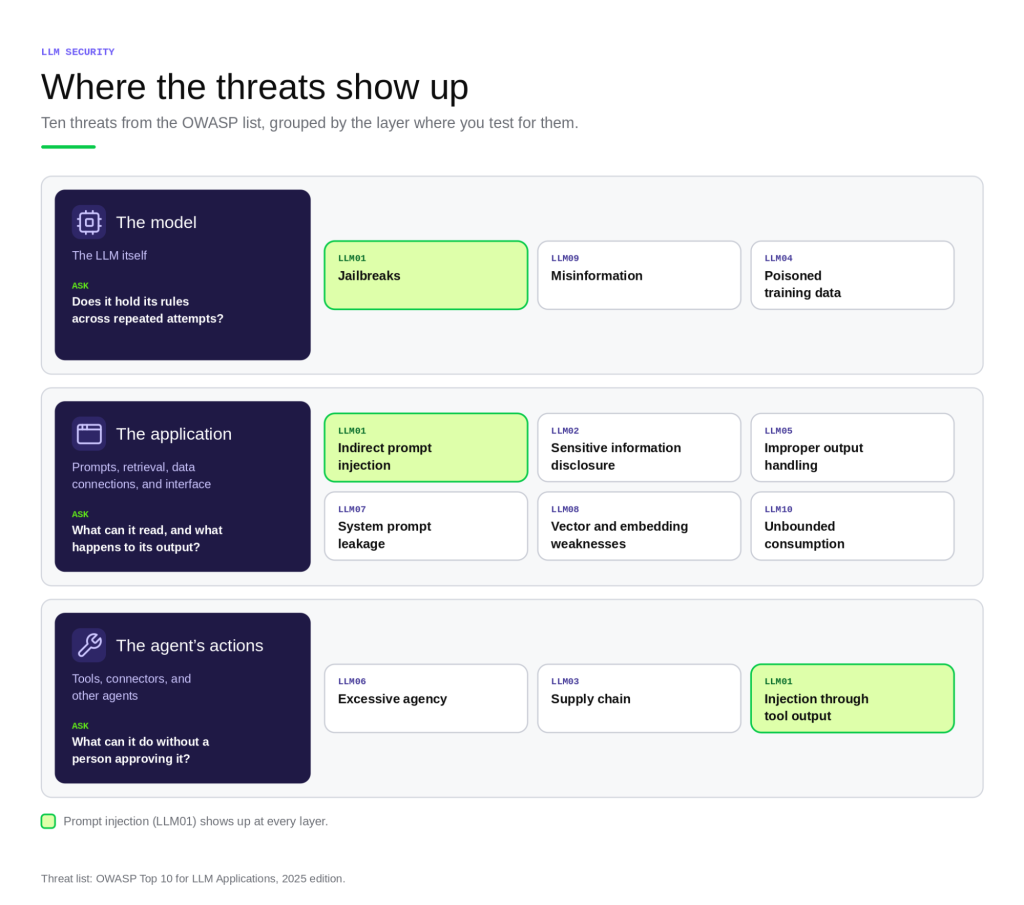
At the model layer, the LLM Safety Leaderboard from Enkrypt AI by Anaconda has tested 300 models. Each gets a risk score averaged across four categories: jailbreak susceptibility, bias potential, malware presence, and toxicity. A jailbreak score of 18%, for example, means 18% of the jailbreak tests breached the model.
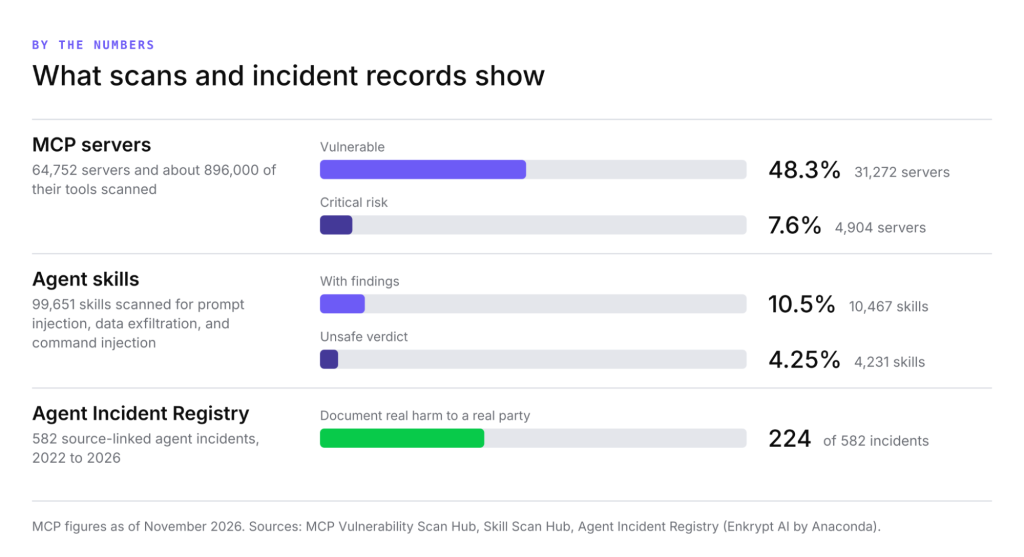
Agents reach tools through connectors, such as the Model Context Protocol (MCP), an open standard for linking AI applications to external tools and data. In MCP, key protections are optional: authorization is optional in the specification, and in May 2026 the National Security Agency’s Artificial Intelligence Security Center warned that adoption has outpaced the safeguards its designers expected, as described in Anaconda’s introduction to MCP security. As of November 2026, the MCP Vulnerability Scan Hub has scanned 64,752 MCP servers and about 896,000 of their tools. Of those servers, 48.3% (31,272) are vulnerable, and the critical risk rate is 7.6% (4,904 servers).
Agent skills are another thing agents load and trust: packaged instructions and scripts that teach an agent how to do a task. The Skill Scan Hub has scanned 99,651 skills for threats such as prompt injection, data exfiltration, and command injection. Of those, 4.25% (4,231) received an unsafe verdict, and 10.5% (10,467) have findings.
The Agent Incident Registry (AIR), maintained by Enkrypt AI by Anaconda, lists 582 source-linked agent incidents from 2022 to 2026, and 224 of them document real harm to a real party. The registry keeps real harm separate from researchers showing what is possible, so you can see which threats have already cost someone something.
Your plan: map it, test it, protect it
We built Enkrypt AI by Anaconda, part of AI Security & Guardrails in Anaconda Platform, for the person in that spot. It maintains the Agent Incident Registry, scans MCP servers and agent skills, and red teams models and agents. Here is the plan we would follow, in three steps.
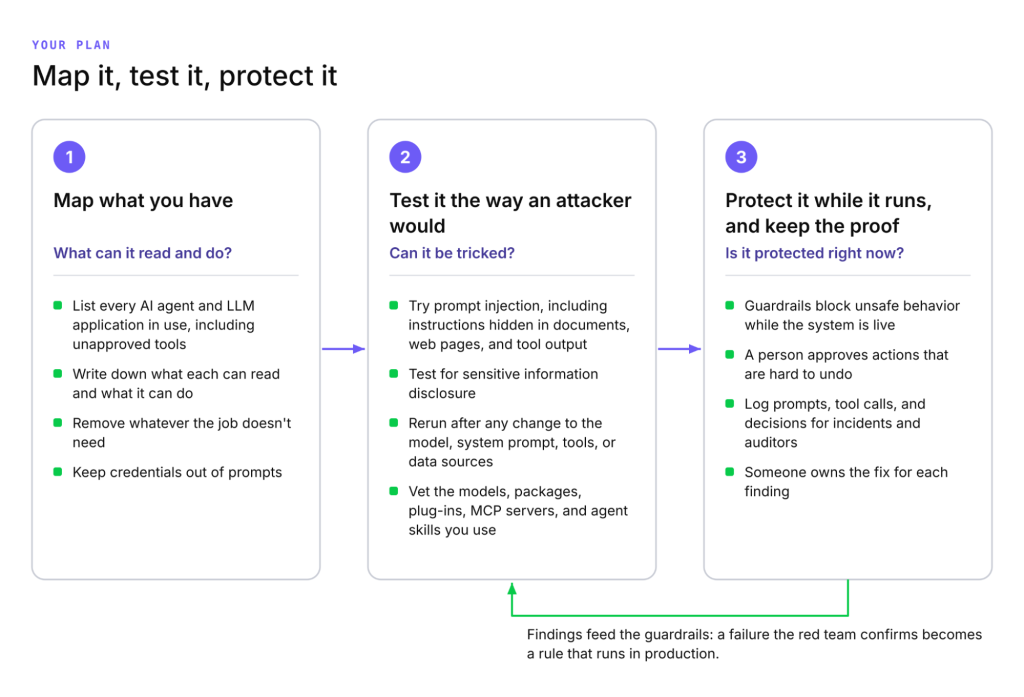
- Map what you have. List every AI agent and LLM application in use, including unapproved tools. For each one, write down what it can read and what it can do, then remove whatever the job doesn’t need. Keep credentials out of prompts, because prompts can leak.
- Test it the way an attacker would. AI red teaming attacks your own system before someone else does. Rerun it whenever the model, the system prompt, a tool, or a data source changes, because any of those can reopen a closed gap. Enkrypt AI by Anaconda tests models, agents, and MCP connections across more than 300 attack categories, before release and after deployment.
- Protect it while it runs, and keep the proof. Guardrails detect and block unsafe behavior while the system is live, and a person approves actions that are hard to undo. Logs of prompts, tool calls, and decisions give you something to investigate after an incident and something to show an auditor. Enkrypt AI by Anaconda adds runtime guardrails, MCP governance that keeps agents inside approved scope, and audit evidence mapped to frameworks such as the European Union (EU) AI Act and the National Institute of Standards and Technology (NIST) AI Risk Management Framework.
All of it runs inside your own environment, so the prompts and data under test stay inside your security boundary. Findings feed the guardrails, so a failure the red team confirms becomes a rule that runs in production. One policy engine governs testing, guardrails, and compliance evidence, so you aren’t stitching together separate point tools.
Who does what
Security sets the policy and runs the tests. The product team that built the application owns the fixes, and the platform team provides shared controls such as access and logging. When the fix has no owner, findings stay in a report. Anaconda’s field framework for AI red teaming makes the same point: the gap between finding a problem and fixing it is organizational.
Three separate questions help keep the practices straight. Does it work? Normal testing answers that. Can it be tricked? Red teaming answers that. Is it protected right now? Guardrails answer that. Think of a phishing drill and an email filter. The drill shows you which employees would click, and the filter blocks bad mail as it arrives. You need both, because the drill shows what the filter missed, and the next filter rule comes from what the drill found. For a shared vocabulary across teams, map your work to the OWASP list above and to MITRE ATLAS (Adversarial Threat Landscape for Artificial-Intelligence Systems), a catalog of attack techniques against AI systems.
What changes when you do
Without a plan, the risk doesn’t go away. It shows up when an agent reads the wrong sentence with the wrong permissions, and the first alert may come from outside your company.
With one, you can answer three questions on demand: what can each AI agent read and do, what did we test and what failed, and what is blocking attacks right now. Your security team knows what is running, and your auditors get evidence tied to the configuration you tested.
See which of these threats your own agents are exposed to. Request a demo of Enkrypt AI by Anaconda and bring one production agent to test.
Key takeaways
- An AI agent’s model can’t reliably tell an instruction from data, so any text the agent reads can work as a command.
- Start with prompt injection, sensitive information disclosure, and excessive agency. The damage depends on what the agent can reach.
- Threats sit in three layers: the model, the application, and the agent’s actions. Test all three.
- Limit access, treat everything the model reads as untrusted, require approval for actions that are hard to undo, and rerun your tests after every change.
Not ready for a demo? Scan an MCP server for free, browse the Agent Incident Registry for incidents that match your setup, or take the checklist below to your next review.
AI agent security glossary
| Term | What it means |
|---|---|
| Large language model (LLM) | Software that reads text and writes text in reply, such as the models behind chat assistants |
| Prompt | The text given to a model, including the user’s request and any content the application adds |
| System prompt | Hidden instructions an application gives the model to set its role and rules |
| Prompt injection | Text that changes what a model does, typed by a user or hidden in content the model reads |
| Jailbreak | A prompt that gets a model to break its own safety rules, and a form of prompt injection |
| Agent | An application built on an LLM that can take actions, such as calling tools, running code, or sending messages |
| Tool | A function an agent can call, such as querying a database or sending an email |
| Model Context Protocol (MCP) | An open standard for connecting AI applications to external tools and data. An MCP server exposes tools to an agent |
| Agent skill | A package of instructions and scripts that teaches an agent how to do a task |
| Retrieval-augmented generation (RAG) | A design where the model looks up documents before it answers |
| Embedding and vector index | The numeric form of documents and the search index that lets the model find them |
| Guardrail | A runtime rule that detects and blocks unsafe input, output, or actions |
| AI red teaming | Attacking your own AI system on purpose to find failures before an attacker does |
| Least privilege | Giving a system only the access its job requires |
AI agent security checklist
Take this to your next review. Each item maps to a step in the plan above.
Map
- ☐ We have a list of every AI agent and LLM application in use, including unapproved tools.
- ☐ For each one, we know what data it can read and what actions it can take.
- ☐ Each agent has the fewest tools and permissions its job needs.
- ☐ No credentials or secrets live in prompts.
Test
- ☐ We have tested for prompt injection, including instructions hidden in documents, web pages, and tool output.
- ☐ We have tested for sensitive information disclosure.
- ☐ We rerun tests after any change to the model, system prompt, tools, or data sources.
- ☐ We have vetted the models, packages, plug-ins, MCP servers, and agent skills we use.
Protect and prove
- ☐ Model output is validated before it reaches a browser, database, or system.
- ☐ A person approves actions that are hard to undo.
- ☐ Runtime guardrails block unsafe behavior while the system is live.
- ☐ Rate and spending limits are set for each user and application.
- ☐ We log prompts, tool calls, and decisions, and can show them to an auditor.
- ☐ Someone owns the fix for each finding.
Frequently asked questions
What is the difference between prompt injection and a jailbreak?
A jailbreak tries to make a model break its own safety rules. Prompt injection is the broader category: any text that changes what the model does, including instructions hidden in content the model reads. OWASP treats jailbreaking as one form of prompt injection.
Can you fully prevent prompt injection?
Not reliably. OWASP notes it is unclear whether fool-proof prevention methods exist, so the practical goal is to limit the damage. Give the model the least access it needs, treat everything it reads as untrusted, require approval for actions that are hard to undo, and test the system repeatedly. A system prompt that tells the model to stay safe helps, but it is an instruction the model can be talked out of, so enforce limits outside the model too.
Do we need AI agent security if we use a hosted model from a provider?
Yes. The provider secures the model, and you secure what you build around it: the prompts, the data the model can read, and the tools it can use. The lead-form attack described above came from how an agent was connected to data. Enkrypt AI by Anaconda describes how these roles divide on its shared responsibility page.
How is AI agent security different from LLM security?
LLM security covers how a model reads and responds to text. AI agent security adds what the agent can do with it: the tools it calls, the data it reaches, and the actions it takes without a person approving each step. The threats in this guide apply to both, and excessive agency, MCP, and agent skills matter most once an agent is involved. AI security is broader still, covering packages, training data, environments, models, and hosting. Anaconda’s guide to AI security best practices covers the wider pipeline.