
AI Catalyst is Anaconda’s enterprise AI development suite that gives you access to pre-validated, quantized open source models with built-in governance.
Think of it as the enterprise-ready version of downloading open-source models from Hugging Face, but with all the security, compliance, and optimization work already done for you. Since data remains on your company’s infrastructure, you significantly reduce data leakage risks and can get started in production quickly.
In this blog post, we’ll explore four potential use cases for AI Catalyst:
- Rephrase (rewrite email messages)
- Summarize (tldr of internal docs)
- Escalate (when customer requires human intervention)
- Extract (auto-formatting messy leads data)
Getting Started: Your First API Call
First, you’ll need access to an AI Catalyst dashboard.
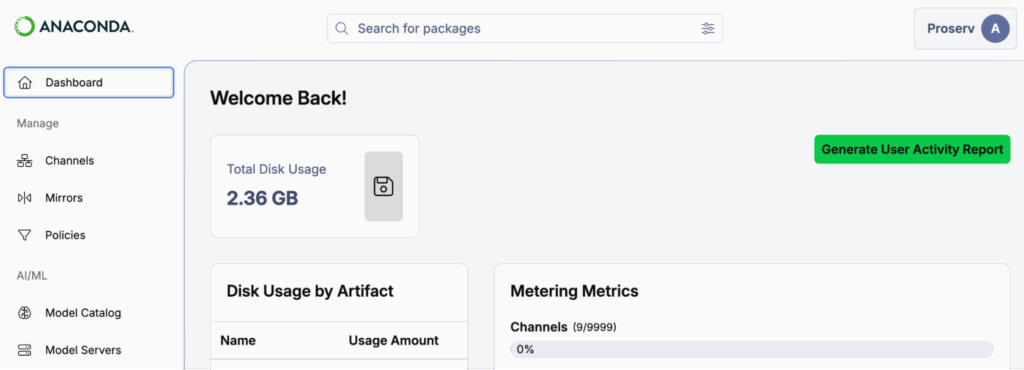
Then, select “Model Servers” from the sidebar and launch a server. For this example, we’ll use Qwen3-8B, a popular 8-billion parameter open-source model from Alibaba Cloud that offers a strong balance of capability and efficiency for structured tasks.

Click on the row and export your AI Catalyst “Server Address” to your environment. You’ll be making API calls to an address like this:
export AI_CATALYST_BASE_URL="https://<YOUR_COMPANY>.anacondaconnect.com/api/..."Pro tip: For long-term use, store the exports in your .bash_profile, .zshrc, or equivalent.
Next, generate and export your AI Catalyst API key by clicking your profile icon > API Keys > + Create API Key.
export AI_CATALYST_API_KEY="..."Now let’s verify everything works with a simple test:
import os
import openai

raw_client = openai.Client(
    base_url=os.getenv("AI_CATALYST_BASE_URL"), api_key=os.getenv("AI_CATALYST_API_KEY")
)
response = raw_client.chat.completions.create(
    messages=[{"role": "user", "content": "Hello World!"}],
    model="ai_catalyst"  # required arg, but can be anything
)
print(response.choices[0].message.content)
It should respond with something like:
“Hello! 😊 How can I assist you today? If you have any questions or need help with something, feel free to ask!”
Let’s review what just happened. You’re using a quantized version of Qwen3 that Anaconda has already:
- Pre-validated for security vulnerabilities
- Compressed for more efficient inference on smaller servers
- Made available through your organization’s approved model catalog
With AI Catalyst you get raw access to models as well as enterprise-ready infrastructure. Now let’s explore what you can actually do with this.
The Journey: From Simple to Sophisticated
Use Case: Rephrase
This basic example can already be adapted for practical use cases, such as rephrasing emails or summarizing internal documents. Since AI Catalyst runs on your company’s infrastructure, your data remains secure within your environment.
Let’s add a system prompt and paste in an example email:
import os
import openai

SYSTEM_PROMPT = "Make the email sound more business casual; do not comment, just return the revised email text." # 1
EMAIL_CONTENT = """
hey sarah can u help me figure out what's going on with the deployment pipeline? keeps failing and idk why
Thx,
Andrew
"""  # 2

raw_client = openai.Client(
    base_url=os.getenv("AI_CATALYST_BASE_URL"),
    api_key=os.getenv("AI_CATALYST_API_KEY")
)
response = raw_client.chat.completions.create(
    messages=[
        {"role": "system", "content": SYSTEM_PROMPT},  # 3
        {"role": "user", "content": EMAIL_CONTENT},
    ],
    model="ai_catalyst",
)
print(response.choices[0].message.content)
This should return something like:
“””
Hi Sarah,
Could you help me troubleshoot the deployment pipeline? It keeps failing, and I’m not sure why.
Thanks,
Andrew
“””
Use Case: Summarize
Now, as a developer, you may find this useful but wonder how users would actually interact with this. Let me introduce Panel-Material-UI (the Material themed version of Panel), a Python framework for building user interfaces.
Here, we will use the ChatInterface component so users can paste documents and retrieve a summary from the AI Catalyst model:
import os
import openai
import panel_material_ui as pmui

SYSTEM_PROMPT = "Share a TLDR of the following docs."

raw_client = openai.Client(
    base_url=os.getenv("AI_CATALYST_BASE_URL"),
    api_key=os.getenv("AI_CATALYST_API_KEY")
)

def chat_callback(message):  # 1
    response = raw_client.chat.completions.create(
        messages=[
            {"role": "system", "content": SYSTEM_PROMPT},
            {"role": "user", "content": message},  # 2
        ],
        model="ai_catalyst",
    )
    return response.choices[0].message.content

chat = pmui.ChatInterface(callback=chat_callback, sizing_mode="stretch_both")  # 3
chat.show()
File uploads are also supported, but you need to handle it in the callback. Visit the Panel ChatFeed and ChatInterface documentation to learn more. Deploying this interface is straightforward: see the deployment docs for details.
Use Case: Escalate
In the previous examples, the focus was on free-form text. However, free-form output is difficult for downstream code to consume reliably, even with regular expressions (regex). For instance, LLMs can add additional comments or format the output differently than expected.
To address this, I’d like to introduce two libraries, instructor and pydantic, to transform LLM outputs into well-defined, structured models that can be used safely and consistently downstream.
import os
import openai
import instructor
from pydantic import BaseModel, Field

SYSTEM_PROMPT = """
Determine if the user message requires escalation.
For example, users that need to change profile information can be handled by redirecting to self-service options,
but users that want to report an issue or cancel their subscription should be escalated to a human agent.
"""  # 1
USER_CONTENT = "I think my subscription cost is too high, can you help me with that?"  # 2

class EscalationResponse(BaseModel):  # 3
    escalate: bool = Field(
        description="Indicates whether the message requires escalation to a human agent."
    )
    reason: str = Field(
        description="A brief explanation of why the message does or does not require escalation."
    )

raw_client = openai.Client(
    base_url=os.getenv("AI_CATALYST_BASE_URL"), api_key=os.getenv("AI_CATALYST_API_KEY")
)
client = instructor.from_openai(raw_client, mode=instructor.Mode.JSON)
response = client.chat.completions.create(
    messages=[
        {"role": "system", "content": SYSTEM_PROMPT},
        {"role": "user", "content": USER_CONTENT},  # 4
    ],
    model="ai_catalyst",
    response_model=EscalationResponse,  # 5
)

if response.escalate:  # 6
    print(f"User needs human agent. {response.reason!r}")
else:
    print(f"User does not need human agent. {response.reason!r}")
Here, we use print statements as placeholders. In production scenarios, you would redirect the user to a self-service page or trigger an alert for human intervention.
With this approach, you can easily adapt this pattern for other use cases like triaging or sentiment analysis.
Use Case: Extract
Structured outputs are also powerful for data extraction tasks. Imagine your sales team returned from a conference with lead information scattered across notes, napkins, and business cards, names, emails, phone numbers, and companies all jumbled together in an inconsistent format.
While you could upload photos of these materials directly, for this example we’ll use text content to demonstrate the extraction.
import os
import openai
import instructor
import pandas as pd
from pydantic import BaseModel, Field

SYSTEM_PROMPT = """
Extract contact information from sales lead notes.
Parse out names, emails, company names, and phone numbers even if the format is inconsistent.
"""

# Pretend user content (could also be extracted from photos of business cards/notes)
USER_CONTENT = """
john smith - Acme Corp [email protected] 111-1234
[email protected], TechStart Industries Phone: (222) 987-6543
[email protected] Mike Brown - 333.222.3333 Innovations LLC
Jane Doe | Global Solutions | [email protected] | tel: 4448881234
[email protected] Robert Wilson Enterprise Systems (555)-777-9999
"""

class Person(BaseModel):
    email: str = Field(description="Email address of the contact")
    name: str = Field(description="First and last name of the contact in title case")
    company: str = Field(description="Company or organization name")
    phone: str = Field(description="Phone number in (XXX) XXX-XXXX format")

class People(BaseModel):
    contacts: list[Person] = Field(description="List of extracted contacts")

raw_client = openai.Client(
    base_url=os.getenv("AI_CATALYST_BASE_URL"),
    api_key=os.getenv("AI_CATALYST_API_KEY")
)
client = instructor.from_openai(raw_client, mode=instructor.Mode.JSON)

response = client.chat.completions.create(
    messages=[
        {"role": "system", "content": SYSTEM_PROMPT},
        {"role": "user", "content": USER_CONTENT},
    ],
    model="ai_catalyst",
    response_model=People,
)

# Convert to pandas DataFrame.
df = pd.DataFrame([contact.model_dump() for contact in response.contacts])

# Save to CSV.
df.to_csv("conference_leads.csv", index=False)
df
The result is a cleanly formatted DataFrame that you can write to CSV and upload to your CRM or sales system.
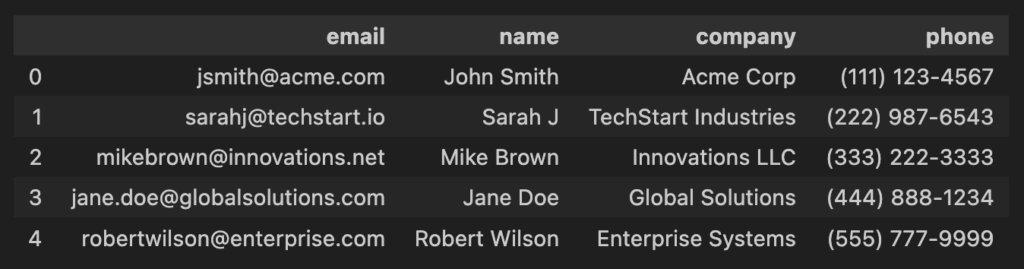
The possibilities extend far beyond data extraction. You could use structured outputs to automatically redact sensitive information (PII), implement safety guardrails for larger language models by classifying user intent and filtering harmful requests, route customer inquiries to appropriate departments, or validate data quality in real time.
These compact, quantized models may be small in size, but they unlock enormous potential for building robust, production-ready AI workflows.
The AI Catalyst Advantage: What Makes This Different
“Cool examples, but I could do this with any LLM API, right?”
To some extent, but AI Catalyst brings:
1. Pre-validated, Quantized Models
- Security scanned (with AI Bill of Materials–which is like a recipe for the components of an AI model)
- Compressed (up to 5x smaller for certain models, improved inference speed)
- Benchmarked (you know exactly what you’re getting)
- License-checked (no unexpected legal issues)
2. Local Development to Cloud Production, Same API
- Prototype locally on your laptop (no GPU needed for quantized models)
- Test with the exact same API interface
- Deploy to your private cloud when ready
- Enable GPU autoscaling for production traffic
3. Governance That Doesn’t Block Teams
- Audit trails of every model call
- Policy enforcement (which models are approved for which use cases)
- Complete data privacy (models run in your private cloud, not a third party)
- RBAC and SSO integration
Wrapping Up: The Small Model Revolution
My take: The future of enterprise AI is small and structured, not large and generative.
For the vast majority of enterprise use cases—extraction, routing, detection—you don’t need the latest GPT version. You need fast, reliable, governed models that do one thing really well. AI Catalyst makes this possible without the usual months of infrastructure work.
Keep these principles in mind as you build: Start simple, structure your outputs, use quantization to your advantage, and let AI Catalyst handle the governance headaches.
Get started with AI Catalyst.