
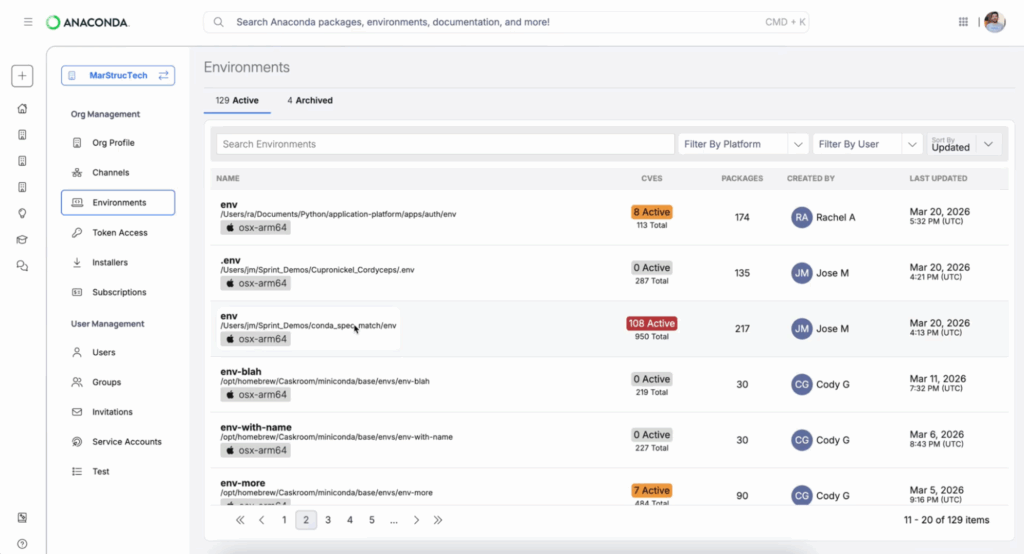
The Environments service is now generally available for Anaconda Business tier customers. It captures conda environment state automatically as practitioners work, giving admins a centralized, continuously updated inventory of every environment across the organization. The inventory is searchable by CVE identifier, package, Python version, or owner.
Alongside it, Environment Search is now live as part of Unified Search on Anaconda Cloud. Admins and practitioners can find any environment in their organization from the same interface they already use to search packages, models, and collections.
Together, they address two longstanding problems: admins who can’t see what environments exist, and practitioners who shouldn’t have to track their own work for the security team.
What the Environment Services Manager Does
When a practitioner runs anaconda login, a plugin installs automatically and begins registering their conda environments with the organization as they create or use them. There’s nothing for practitioners to learn or maintain. The service requires no new CLI workflow, no manual registration step, and no separate tool to install.
For admins, this means a centralized, continuously updated inventory of environments across the organization. The service provides:
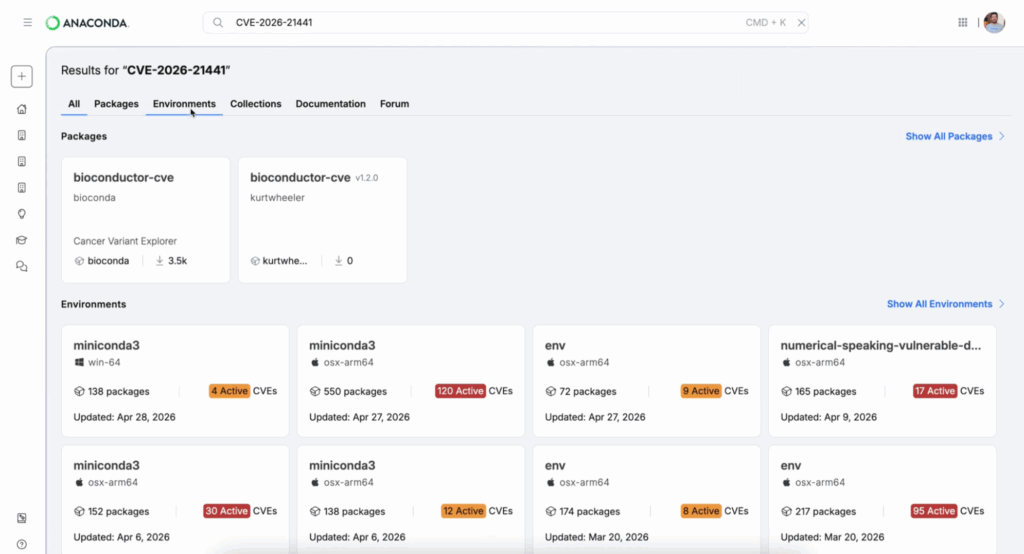
- CVE-based search across all registered environments. When a vulnerability is disclosed, admins can query by CVE identifier and identify affected environments in seconds rather than days. The results include environment owners, package versions, and environment metadata, enabling targeted remediation instead of broadcast communications.
- Organization-level control. Admins enable the service through their organization settings. For customers not already using the Environments beta, it ships disabled by default. Admins choose when to turn it on, and can toggle it off if needed.
Find Any Environment in Your Organization With One Search
Environment Search makes every environment in the org discoverable from a single interface. Searches can be filtered by name, Python version, owner, or package.
Access is enforced by role-based access control and scoped to organizational boundaries, so practitioners see only the environments they’re authorized to view. For admins, the full org-scoped inventory is searchable.
The practical workflow change is straightforward: a data scientist looking for a shared finance team environment, a platform engineer auditing Python 3.11 environments across teams, a machine learning engineer identifying environments containing a specific package version. All of these previously required navigating multiple tools or relying on tribal knowledge. They’re now a search query.
Environment Search is built on the same Unified Search infrastructure that already indexes packages, documentation, and community forums on Anaconda Cloud. The environments tab joins an experience that your team is already using.
Why This Matters Now
Environment sprawl doesn’t announce itself. It accumulates quietly as practitioners create environments across laptops, servers, and notebooks, none of it captured in any admin-accessible inventory. By the time a CVE drops or an audit lands, the gap between what’s running and what’s documented is already months wide.
The Environments service closes that gap automatically. Admins get the inventory they need for incident response, audit compliance, and policy decisions without asking practitioners to change how they work. Practitioners get discoverability without overhead: find what your organization is already running, reuse it, and continue working.
The Roadmap From Here
What ships now establishes the foundation: a reliable environment inventory that enables fast, targeted CVE response and makes your organization’s runtime state searchable for the first time.
For practitioners, the immediate experience is invisible—automatic logging happens in the background. The direct benefits come in the next phase with environment templates, reusable configurations, and pre-approved setups that cut onboarding time.
Our roadmap includes policy automation that can execute rules like “block critical CVEs in production” without manual review, pre-approved environment templates that reduce setup time, lockfile-based deployments that guarantee identical environments from dev to production, and automated patching that can remediate environments when a CVE drops. Those capabilities depend directly on the inventory reliability we’re establishing now.
For organizations where environment sprawl has been a source of churn, compliance gaps, or recurring incident response overhead, the value starts the moment logging coverage improves and CVE search is available.
Availability
The Environments service and Environment Search are available now for Anaconda Business tier customers on Anaconda Cloud.
To get started:
- Log into your Anaconda Cloud account (anaconda.com/app) and enable the service on your organization settings (see documentation). The service ships disabled by default.
- Have practitioners log in from the command line using
anaconda login. This is the preferred path—the plugin installs automatically and begins registering environments from that point forward. Alternatively, practitioners can install and register theconda-env-logpackage manually. - Navigate to the Environments section of your admin dashboard to see your organization’s inventory as coverage builds.
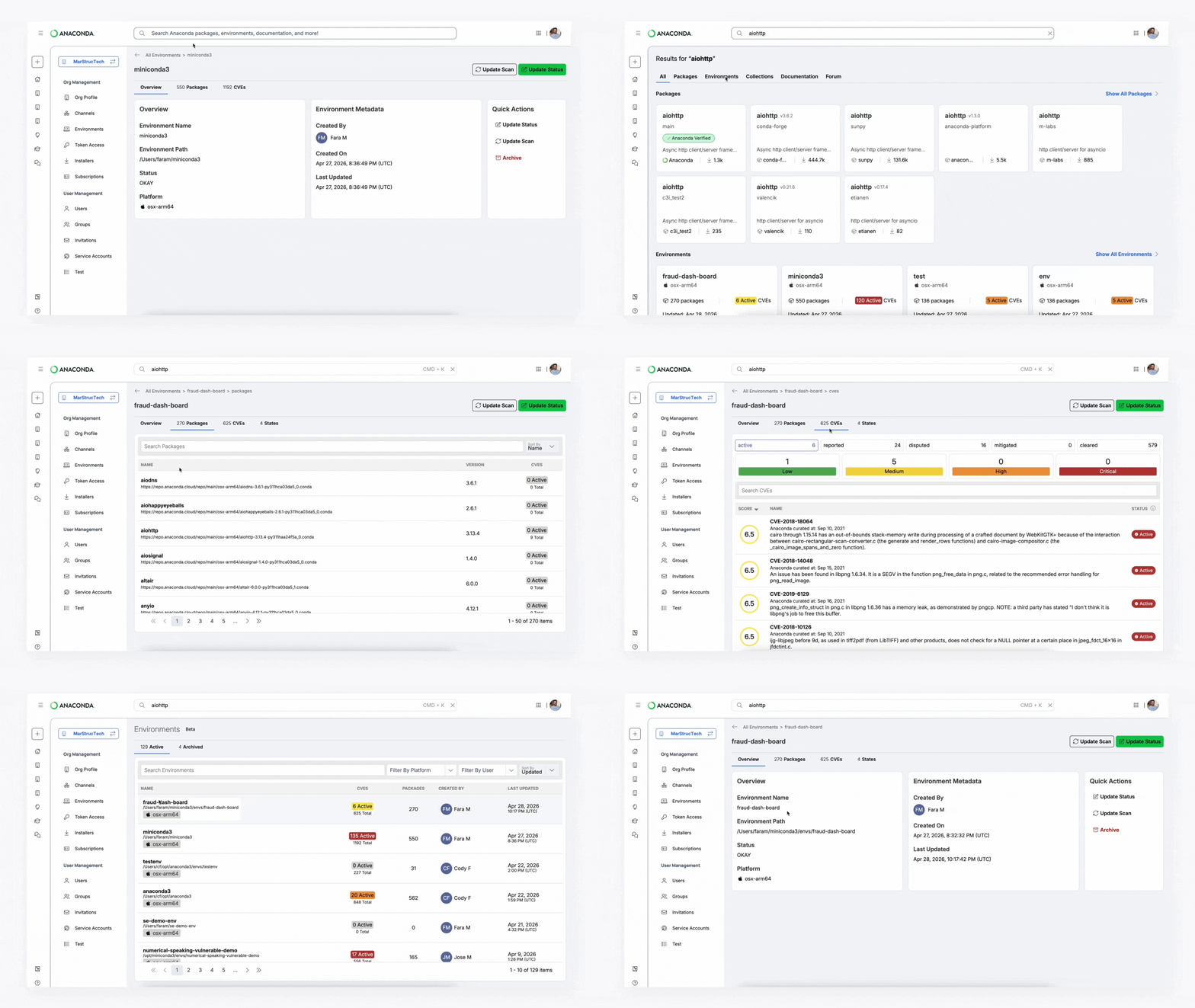
- Use Unified Search and select the Environments tab to search across your org’s environment configurations by name, Python version, owner, or package.
- Try CVE-based search: enter a CVE ID in the search bar to see which environments in your organization are affected.
If you have questions or feedback, reach out to your Customer Success contact or visit anaconda.com/support.