Instance types
- Minimum:
m5.2xlarge - Recommended:
m5.4xlargeor larger
Storage
EKS supports the use of both EBS and EFS storage for persistence. In theory, EBS can be employed for theanaconda-storage volume; but because EBS is
limited to the ReadWriteOnce access mode, only EFS is acceptable for the
anaconda-persistence volume. For this reason, Anaconda recommends provisioning
a single volume that is large and performant enough to accommodate both
storage requirements, to simplify management.
Please refer to the following pages for information on provisioning an EFS volume:
Anaconda recommends the following configuration parameters for this volume:
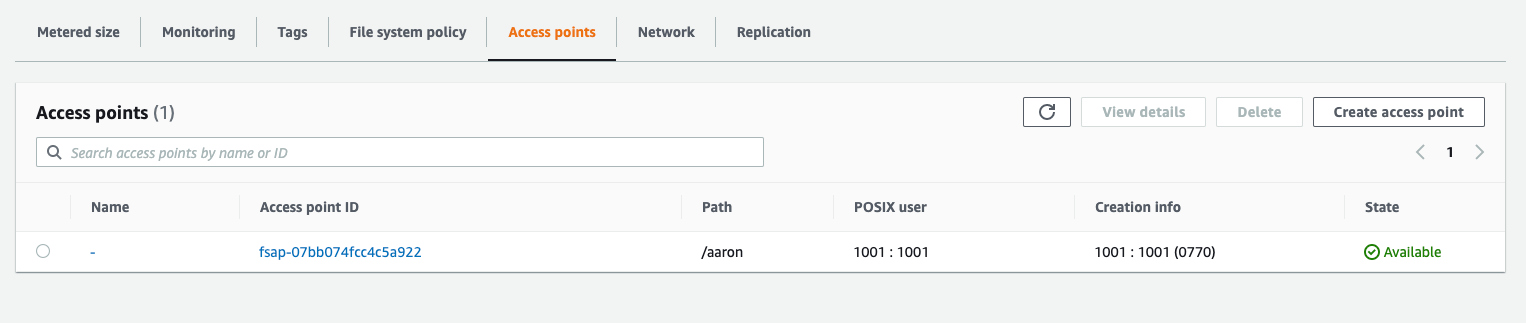
OwnerUid: Anaconda recommends this be set to the same UID selected to run the Anaconda Enterprise containers.OwnerGid: Anaconda recommends a value of0, which simplifies access from Kubernetes containers whose primary group is0by default. If you choose a different GID, it will be necessary to incorporate that into thePersistentVolumespecification.Permissions:770or775. It is important that the directory be group writable.
You can create an EFS access point using the UID/GID defined above.
Network
If you are using the Ingress controller that ships with Anaconda Enterprise, and you are using an internal/private VPC or subnet you will need to add annotations to the ingress service: