

Before you begin
Anaconda highly recommends you have knowledge of your LDAP server and organizational structure to complete this procedure. Configuring identity and access management is complex, and each enterprise has a unique LDAP directory structure. While your implementation will be based on the specific structure and needs of your organization, the principals and processes described here will enable you to:- Gather directory information about your LDAP server.
- Establish a connection to your LDAP server in Keycloak.
- Reduce the number of users that need to be mapped into Anaconda through the use of groups and roles.
- Reduce the number of groups that need to be mapped into Anaconda by filtering groups.
- Automate importing new groups for team memberships based on filters.
- Automate the provisioning of permissions to users based on group membership.
Prerequisites
You must have credentials for the “bind user” service account to perform these tasks. If you do not have the proper credentials, get them from your LDAP Server Administrator.Gathering directory structure information
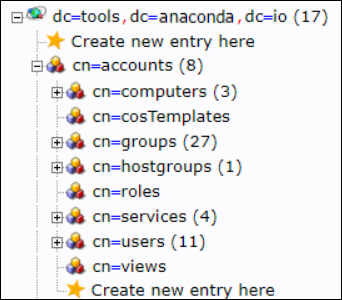
In order to configure Keycloak to validate credentials from your external LDAP server, you need to gather some information about your LDAP directory structure. You’ll use this information to link user attributes (object classes, email, user ID, password, and so on) for use in Anaconda. While you cannot discern a complete picture of your LDAP directory structure from the bind user credentials, you can make some general assumptions about it based on them. For example, if the bind user distinguished name (DN) is:dc=tools,dc=anaconda,dc=io. From there we can discern the rest of the tree structure. In this example, we can see that the uid attribute is stored in the users folder, which is stored in the accounts folder.
If you prefer, tools are available to help visualize, navigate, and update your organization’s LDAP directory server, such as phpldapadmin, which was used to generate the following view. This provides additional information about the LDAP structure that you can’t discern from just looking at the bind credentials, such as the location of groups, which is also stored in the accounts folder.
ldapsearch tool, along with the bind user credentials, to learn details about an individual user based on their user ID. For more information about the ldapsearch tool, see the official documentation.
Gather the information you’ll need to configure user federation within Keycloak by running the following command against a known user ID:
User1 the command would look like this:
Setting up LDAP user federation
Now that you have gathered information about your directory, you need to tell Keycloak how to interpret that information, so it can use it with Anaconda software.These attributes can be remapped later, if necessary.
- Log in to your Keycloak console using an account that has administrator privileges.
- Select User federation from the left-hand navigation menu.
- Select ldap from the Add provider… dropdown menu.
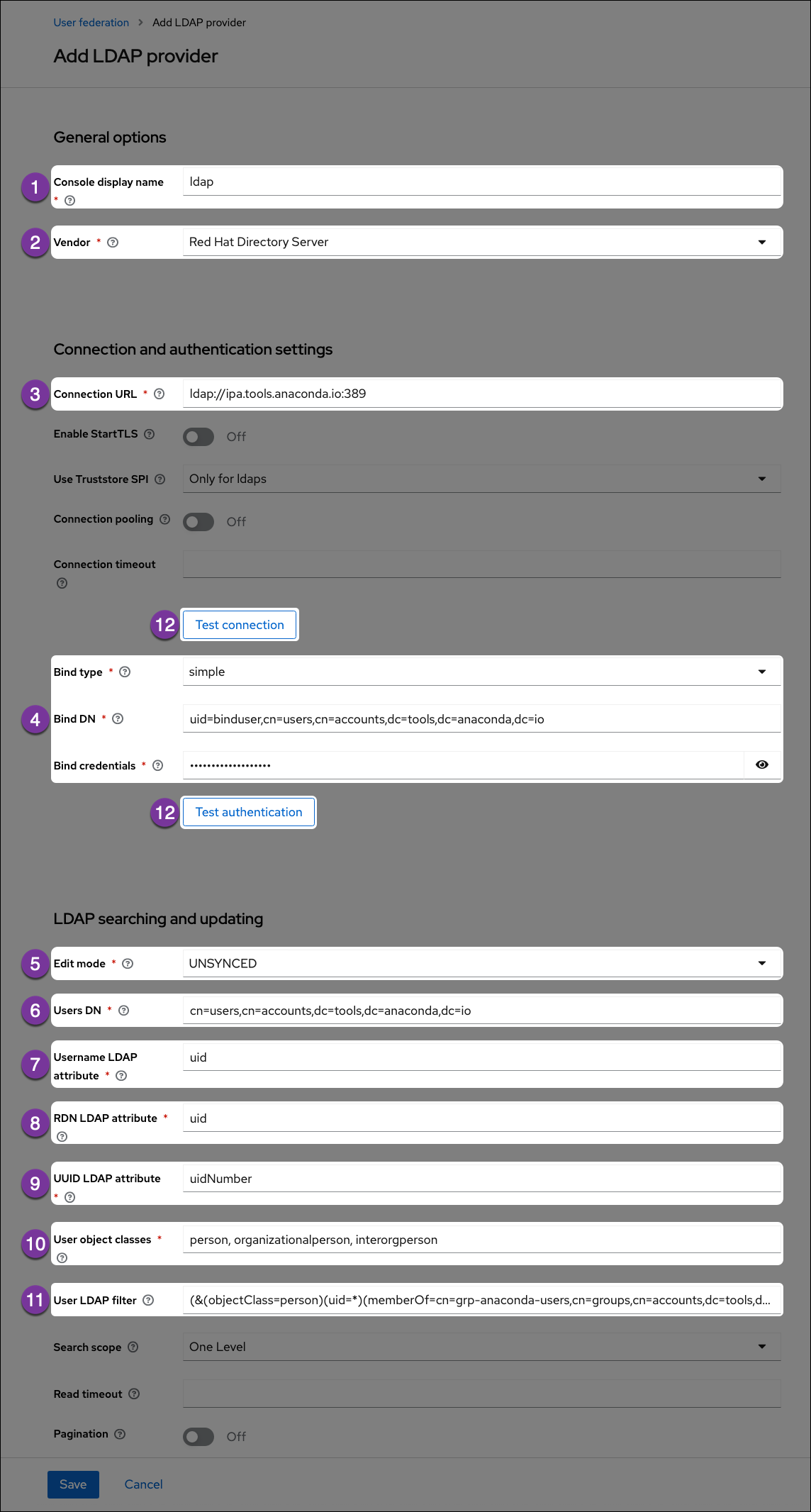
Vendor
Select your LDAP server vendor from the dropdown menu. If you do not know your vendor, ask your LDAP server administrator.
Edit Mode
Set the edit mode to
UNSYNCED so you can view and import user information but not have to worry about making unwanted changes to your LDAP server.Username LDAP attribute
Get this information from your
ldapsearch return. This attribute determines what is displayed as your user’s name when they sign into Anaconda. In this example, the username attribute is uid.RDN LDAP attribute
Get this information from your
ldapsearch return. Usually, the relative distinguished name (RDN) attribute is the same as the username attribute, but this field may default to something else depending on your vendor.UUID LDAP attribute
Get this information from your
ldapsearch return. Your users’ unique identifiers (UUID).User object classes
Get this information from your
ldapsearch return. Generally, the user object classes field will have more than one entry, separated by a comma.User LDAP filter
The user LDAP filter restricts which users are returned from your LDAP directory. In the example, we only want users with the attribute
objectClass=person that also have a uid and are in the group cn=grp-anaconda-users.Because users must explicitly be added to the group, unauthorized access is prevented, and license management is simplified.Filters also limit the need to synchronize a large number of objects from LDAP, which will help prevent out-of-memory errors in the auth pod.Test buttons
Use the Test connection and Test authentication buttons to verify that Anaconda can connect to the provider with the credentials provided. You’ll need to resolve any errors before continuing.By default, users will not be synced from LDAP until they log in. To test whether the custom user LDAP Filter is working correctly, add or remove users in LDAP, then enable the sync settings to see if your changes are picked up and user authentication works as expected.
Configuring group mappers
Once user federation is established, you can set up a group mapper for Keycloak to import your LDAP server’s groups automatically for you. Once again, use theldapsearch tool to gather information about your LDAP directory, only this time, look for information pertaining to your organization’s groups.
To gather information about groups in your LDAP directory, run the following command against a known group DN:
- Select User Federation from the left-hand navigation menu.
- Select your LDAP server.
- Click the Mappers tab.
- Click Create or Add mapper.
- Enter a name for your group mapper, such as ldap_group_mapper.
- Select group-ldap-mapper from the Mapper Type dropdown menu. More options appear based on your dropdown selection.
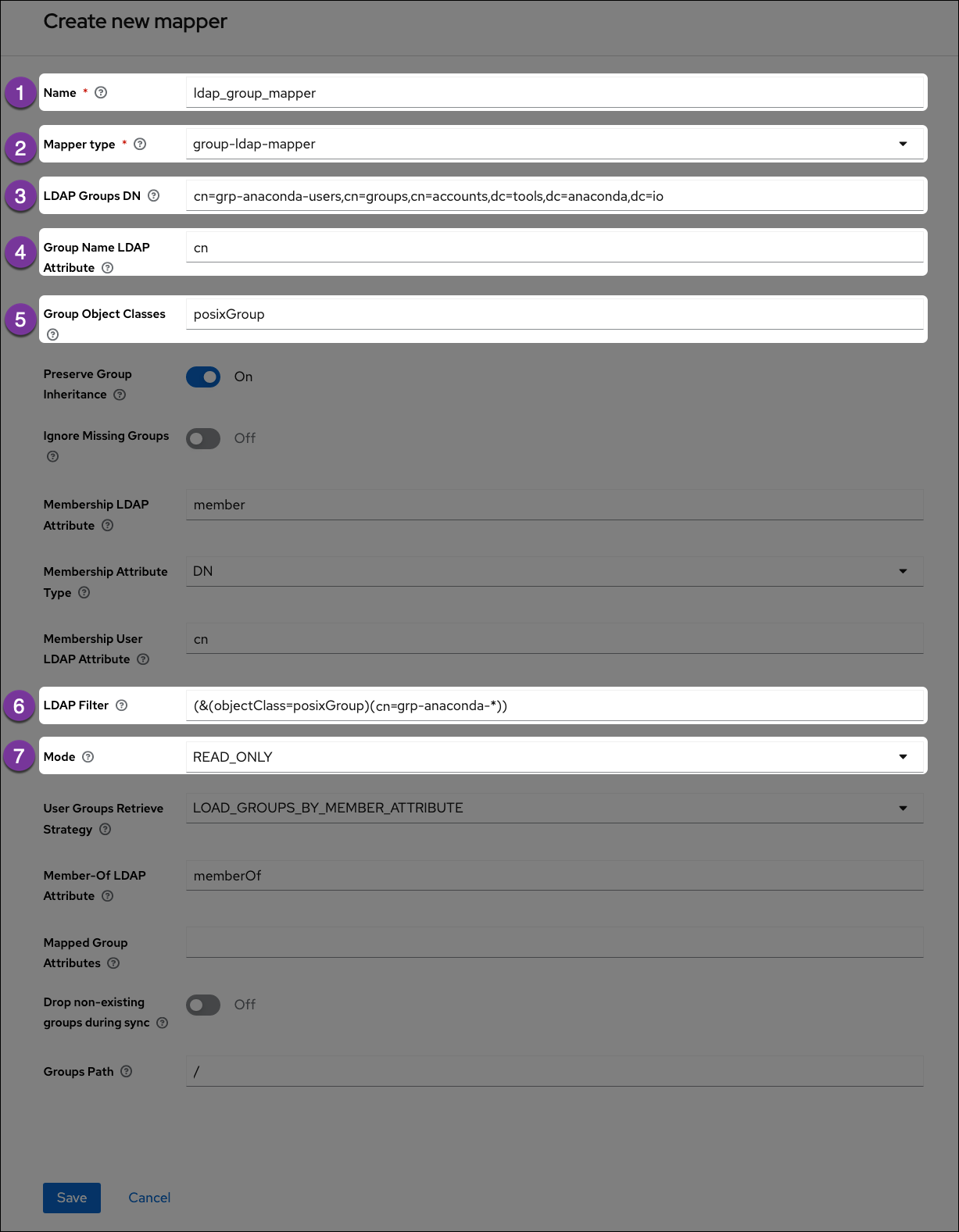
LDAP Groups DN
Get this information from your
ldapsearch return. Provide the distinguished name of the group you would like to map.Group Name LDAP Attribute
Get this information from your
ldapsearch return. Enter the attribute that is associated with groups. In this example, the attribute is cn.Group Object Classes
Get this information from your
ldapsearch return. This field will often have multiple entries, separated by a comma.LDAP Filter
If you have established groups of users in your LDAP server that you plan to provide with access to Anaconda, you can import those specific groups by providing search filter criteria here. However, depending on how your LDAP server is structured, filtering to the correct groups can be complicated.
The search filter utilizes regular expressions (that is, it supports the use of wildcard characters). This example shows the search filter as
cn=grp-anaconda-*, which will reach out to the LDAP server and import all groups that begin with cn=grp-anaconda-.Mapping group roles
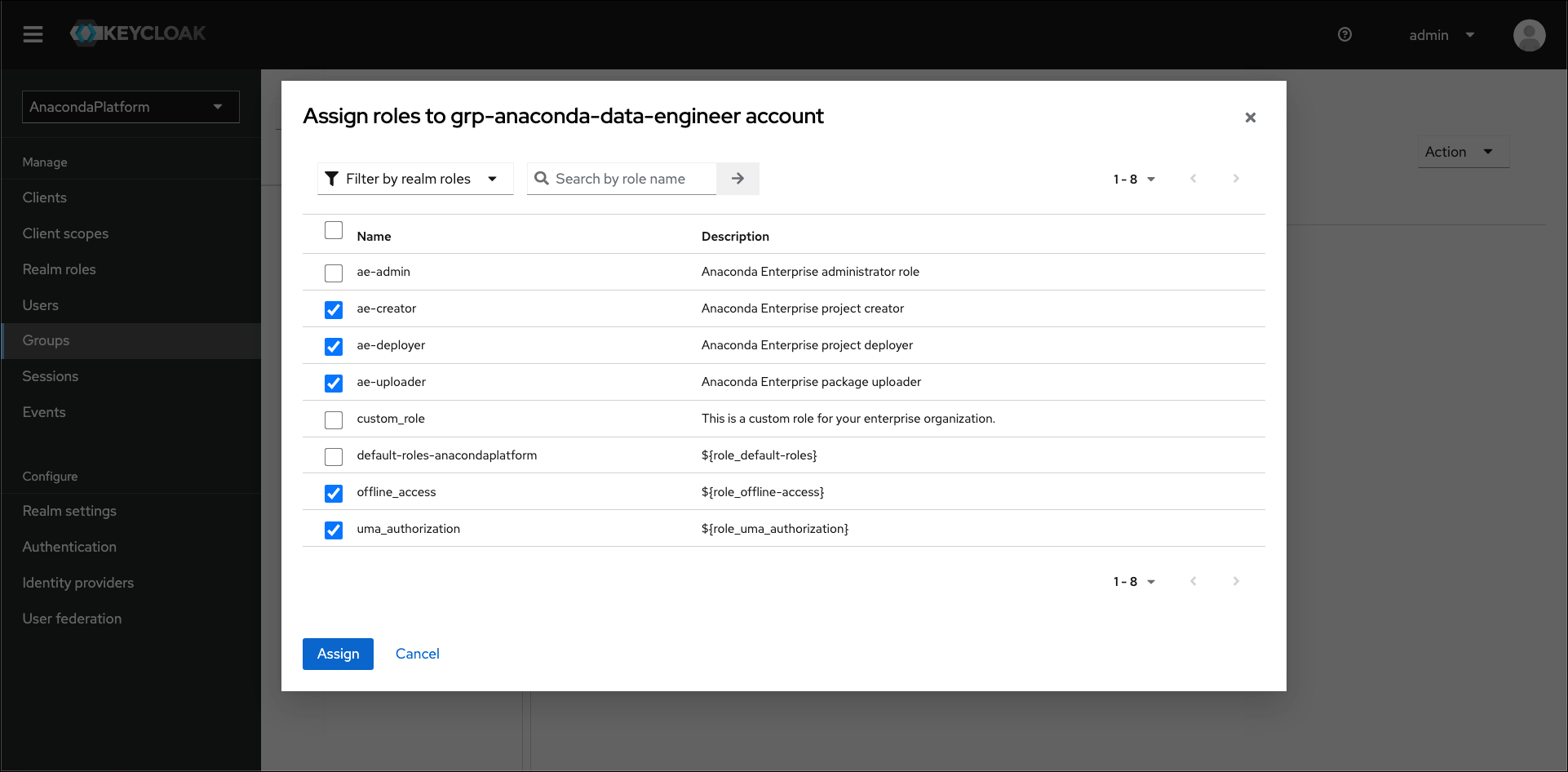
If you have groups of users that you plan to provide with access to Anaconda, you can import them using the LDAP filter as described above. Once complete, you need to provide your groups of users with permissions to work within Anaconda. Roles determine a user’s permissions within Anaconda, and a set of “realm” roles are established for you by default when you install. As a final step in establishing a connection to your LDAP server, you can map these provided roles to groups within your LDAP server to provide your team members with the permissions they need to work within Anaconda. Once the group roles are established, if a new team member arrives, adding them to the correct LDAP group provides them with all the correct permissions they need to use Anaconda right away. For more information about roles, see User management and permissions. To map a role to a group of users imported from your LDAP server, complete the following steps:- Select Groups from the left-hand navigation menu.
- Select your group from the list.
- Click the Role mappings tab.
- Click Assign role.
- Select the roles you want to provide to this group of users, then click Assign.
LDAPS
LDAP over SSL, or LDAPS, allows you to encrypt your LDAP server data while it travels during communications, in order to protect it from attacks like certificate theft. For more information, see the official Keycloak documentation on LDAPS.Prerequisites
You must have the Javajre package installed to complete this procedure.
Establishing LDAPS
- Open a terminal and connect to your instance of Package Security Manager (On-prem).
-
Generate a truststore on your host by running the following command:
-
Copy the
truststore.jksfile you just generated to the following location: -
Find and open your
docker-compose.ymlfile in your installer directory using your preferred file editor. -
Find the
services: keycloak:section of the file and add the following lines:Here is an example of what yourdocker-compose.ymlfile should look like when you are finished adding these lines: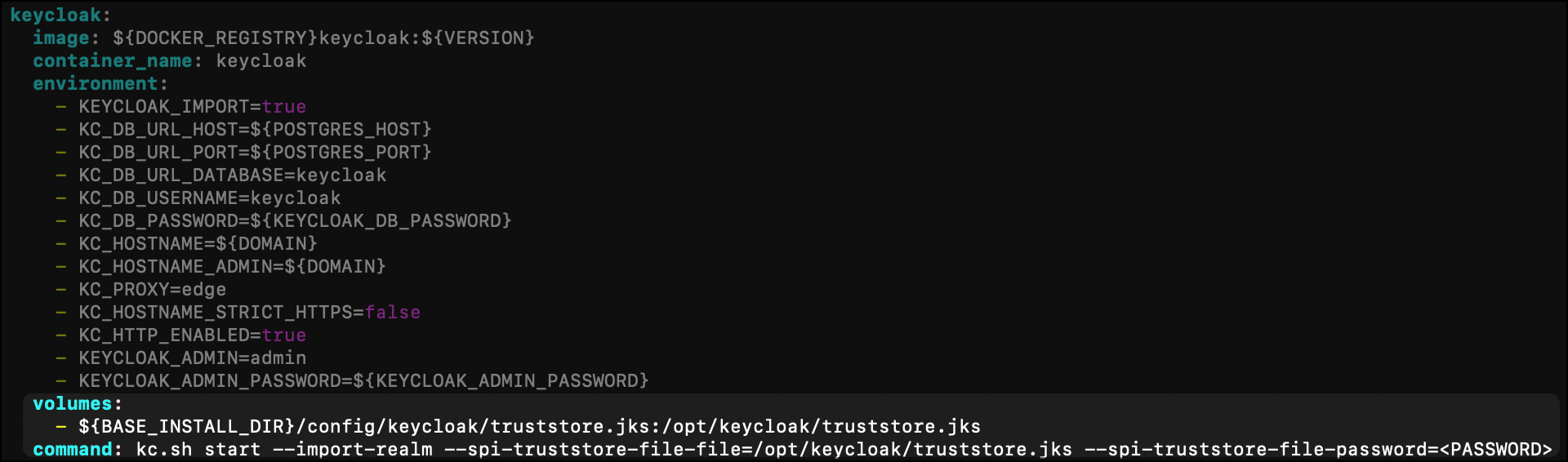
-
Enter your base installer directory by running the following command:
-
Restart your containers by running the following command: