

What are assets
Consider assets as the core interfaces of your projects: your key inputs, outputs, and pluggable components. Unlike code, which is versioned through systems like Git and rolled out with CI/CD, assets often evolve automatically. For example, data assets can refresh continuously via ETL pipelines, while models can be retrained and finetuned on a regular cadence through automated training workflows. Asset tracking helps answer three key questions:- What are the core assets consumed and produced by the project?
- Which project components (flows and deployments) are responsible for producing and consuming each asset?
- When was the asset last refreshed, and what are the key metrics for its latest version?
Defining an asset
Every asset is defined through a configuration file,asset_config.toml, placed in a subdirectory under model and data in your project structure.
For instance, you could define a fraud detection model, trained with financial transaction data, and a churn model trained with product_events as follows:
models
fraud
churn
data
transactions
product_events
If
models/ or data/ conflicts with existing folders in your project, you can customize these names via [obproject_dirs] in obproject.toml. See Project structure for details.nameis a human-readable name of the asset.idis an unambiguous ID used to refer to the asset.descriptionis shown in the UI.
[properties]. This can be handy, for instance, when working with models (LLMs) accessed through external inference providers, each of which has their own ID for the model:
Updating an asset instance
Think of asset definitions as containers for asset instances. Every time an asset updates, a new versioned asset instance is created. It is possible to have an asset with no instances, just metadata, like references to external models as shown above, but in most cases you want to populate an asset programmatically. Assets are typically updated in a flow, for instance, in an ETL workflow or a model retraining pipeline. The easiest way is to register an artifact, likeimg_url below, as an asset, as shown in this snippet from XKCDData:
Assets are references.Assets are not used to store the data or model itself. Rather, they store a reference to the actual entity, such as a data artifact or an external model endpoint.
ob-project-starter, the latest comic strip is a core entity being processed, so it makes sense to elevate the corresponding artifact as an asset. This allows you to observe the asset conveniently in the asset view:
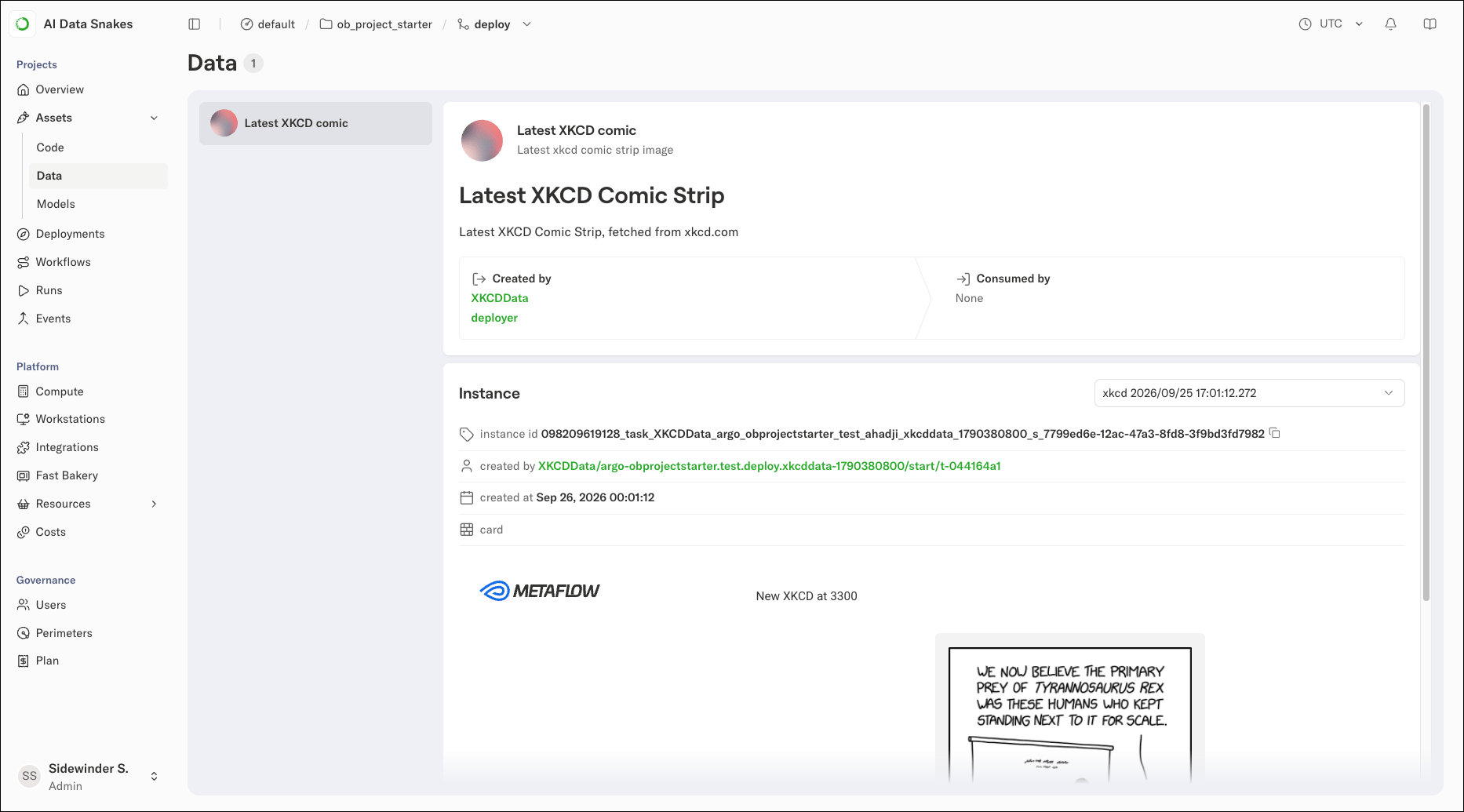
@card, produced by the task registering an asset instance with register_data. Customize the card to show metrics that matter for the asset instance, for instance, data or model quality metrics.
Importantly, the asset UI contains a pointer to the exact task that produced each asset instance (by calling register_data), allowing you to track data lineage from producers to consumers.
Asset metadata: properties, annotations, and tags
Assets support three types of metadata, each serving a different purpose: Properties are defined inasset_config.toml and are static; they describe the asset definition and don’t change between instances. Use them for things like model provider IDs or data source descriptions.
Annotations are passed when registering an asset instance and are dynamic; they can vary with each instance. Use them for metrics like accuracy scores, row counts, or processing timestamps:
Consuming assets
Using an asset is straightforward. In a task, callget_data for data assets or get_model for model assets:
XKCDExplainer workflow, get_data fetches the latest instance of an asset and automatically resolves the reference to the corresponding data item. Similarly, get_model fetches the model artifact.
Importantly, both methods register the task as a consumer of the asset, contributing to data lineage tracking.
External assets.
get_data() and get_model() work for artifact-based assets registered with register_data() and register_model(). For external assets (S3 paths, checkpoints, HuggingFace models), use the low-level prj.asset.consume_data_asset() or prj.asset.consume_model_asset() methods, which return a reference containing the blobs list you can load manually.Asset branch resolution
TL;DR: Deployed flows use git branches for assets. Local runs use Metaflow branches (user namespaces). Use[dev-assets] to read production data while developing.
Assets are scoped to branches, with different resolution depending on context:
- Deployed flows (via CI/CD): Use git branches, providing a 1:1 mapping between your code branch and asset branch
- Local runs (
python flow.py run): Use Metaflow branches (such asuser.alice), providing user isolation
[dev-assets] configuration in obproject.toml enables the read-from-main patterns above:
- Develop locally against production assets without affecting them
- Deploy feature branches that validate new code against real data
- Iterate safely before merging changes to main
Local vs Deployed branch resolution.Local runs use Metaflow’s
@project branch (such as user.alice) for asset isolation, ensuring local experiments don’t interfere with deployed flows. Deployed flows use git branches, captured at deploy time via obproject-deploy.Deleting individual assets
Asset names are not reusable in place; a rename creates a new asset and orphans the old name in the catalog. Prune orphans from a flow step:DeleteResult(catalog_deleted, metadata_updated), so that callers can tell whether anything actually changed. Idempotent reruns return (False, False). Deletion is irreversible; the catalog has no deprecate or hide state.
To mark an asset superseded without removing it, tag a new instance, for instance, tags={"status": "deprecated"}, and have consumers filter via list_data_assets(tags=...). See prj.asset.delete_data_asset() for the full spec.
The same methods are available from a standalone script (admin tools, CI cleanup, notebooks) by constructing Asset directly with an explicit entity_ref:
What happens when a branch is deleted
When a feature branch is torn down withteardown-branch, its asset metadata is deleted. The underlying data and model weights in S3 persist, but the catalog entries pointing to them are gone. If you trained a model on a feature branch and want it available on main, use promote_assets() before teardown to copy the metadata pointers across branches. See Promoting assets before teardown for details and CI/CD integration.