

- Scale vertically by requesting larger cloud instances for individual tasks
- Scale horizontally by running tasks in parallel
- Access GPU instances
- Spin up clusters for distributed computing
Scaling up and out
This example trains a model that requires 2 CPU cores and 16GB of memory. To demonstrate parallelism, the flow trains a separate model for each country in a list, running all four training tasks simultaneously. TheScalableFlow flow uses two Metaflow constructs for scalability:
- The
foreachargument spawns a separate task for each item in thecountrieslist. For details, see running many tasks in parallel. - The
@resourcesdecorator requests compute resources for a step. In this case, it requests 2 CPU cores and 16GB of memory for each training task. For details, see requesting compute resources.
join step receives the results and selects the best-performing model. For details, see branching and joining.
scaleflow.py. You can run it locally with python scaleflow.py run to test the logic before scaling. To run it on cloud compute with the requested resources and parallelism, use run --with kubernetes:
To run the flow in the cloud, you need a compute pool created with the Metaflow Tasks purpose. If you are unsure, contact your administrator.
Observing the cluster status
Anaconda Platform launches cloud instances automatically to execute your workload. To monitor cluster behavior and view cluster status, select Compute in the left-hand navigation. The Cluster Demand chart shows total compute demand across all running tasks. When demand exceeds available resources, indicated by the red line, the cluster auto-scales to launch more instances.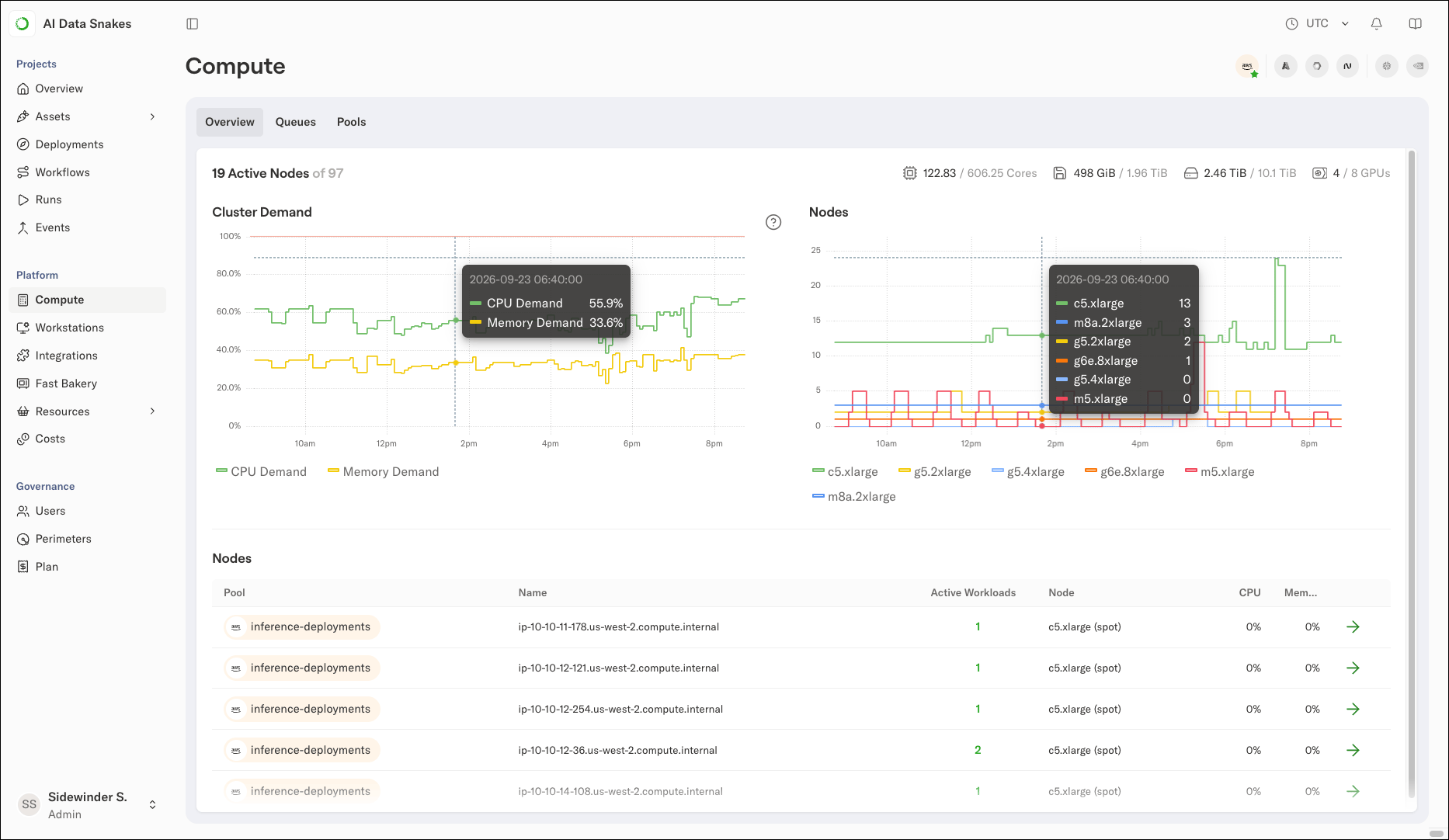
What kind of compute resources can I request?
Available resources depend on your cluster configuration. To check available compute pools, click the Pools tab on the Compute page. If you request resources that are not available, the flow fails with an error message. For example, you can request 512GB of memory for all steps in a flow:Configuring compute poolsAnaconda Platform can federate compute pools from various sources:
- Cloud instances in your primary cloud account
- Cloud instances from other providers, such as AWS, Azure, and GCP
- GPU instances from neo-clouds such as CoreWeave and Nebius
- On-prem resources as part of the unified cluster