

Packaging software
A typical Metaflow project consists of five layers of software: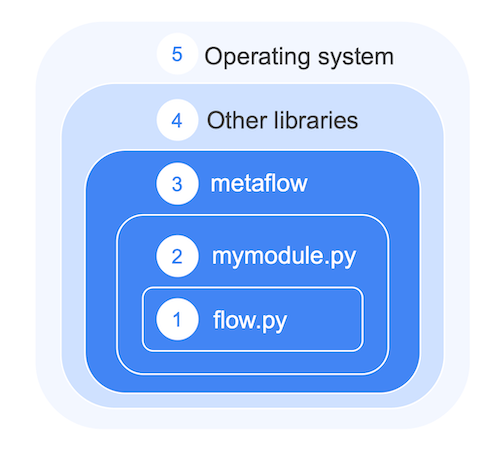
- A Metaflow flow defined in a Python file.
- Custom Python modules and packages that contain the project-specific code.
- The Metaflow library itself and any installed Metaflow extensions.
- Third-party libraries and frameworks used by the project.
- The underlying operating system and hardware drivers, especially CUDA for GPUs.
Structuring a project
To demonstrate a typical project structure, the following example creates a flow that visualizes a fractal using two off-the-shelf libraries,pyfracgen and matplotlib.
Follow Python best practices when designing your project: use Python modules and packages to modularize your code into logical components.
For instance, it makes sense to create a dedicated module for all the logic related to fractal generation. Save the following in a file named myfractal.py:
Why separate modules and packages?
Creating a separate module, or a package composed of multiple modules, offers several benefits:-
You can develop each module independently. For example, you can test
make_fractalin a notebook by adding a cell: -
You can use standard Python testing tools, such as
pytest, to unit test the module. - You can share the module between multiple flows and other systems, encouraging reusability and consistent business logic across projects.
Using a custom module in a flow
Save this flow infractalflow.py, in the same directory as myfractal.py:
- The
@pypidecorator declares the environment for theplotstep: the Python version and the packages it needs. - The
myfractalimport works because Metaflow packages the flow file and everything in its directory (and subdirectories) automatically.
metaflow library itself and all installed extensions.
Including libraries and frameworks
Themyfractal.py module only works if it can import the pyfracgen and matplotlib packages. You could install them manually with pip install pyfracgen matplotlib, but that approach has problems:
- Nothing in the code records which packages it needs. A colleague, or you on a new laptop, cannot reproduce the project without outside knowledge.
- Cloud executions cannot rely on your local installation. Each run needs its own environment.
- Production deployments are exposed to upstream changes. A new
matplotlibrelease can break the code at any time.
@pypi decorator on the plot step addresses all three: the dependencies are declared in the code, built into an isolated environment for every run, and pinned to specific versions. For the full range of dependency management options, see Managing dependencies.
To run the flow locally:
@card.
To run the same flow on cloud compute, no code changes are needed:
@pypi decorator does not pip install the packages individually at run time. It creates and caches a stable, production-ready execution environment, isolated from any changes in the upstream libraries.