

A workstation is an interactive, cloud-based development environment that runs on the compute in your data plane. It works like a personal machine in the cloud, giving you a place to explore data, write code, and develop and run flows without setting up an environment on your own laptop. Workstations are optional. You can also work with the platform from your existing local or cloud development environment. They exist to give you a consistent, ready-to-use environment when you want one.

Why workstations matter

Developing on a cloud workstation solves several problems that come with developing on a laptop:
  • Your data stays in the cloud. Because a workstation runs in your data plane, you work next to your data instead of copying it down to a laptop, which keeps data inside your organization’s cloud account.
  • The environment matches production. Workstations run on Linux, the same as the compute your flows run on in production, so you avoid the surprises that come from developing on a different operating system.
  • You can scale beyond the workstation. A workstation is a launchpad, not a limit. You develop on a modestly sized workstation and scale out to larger compute, including GPUs, when a flow needs it, so the workstation itself doesn’t need to be oversized.

How workstations work
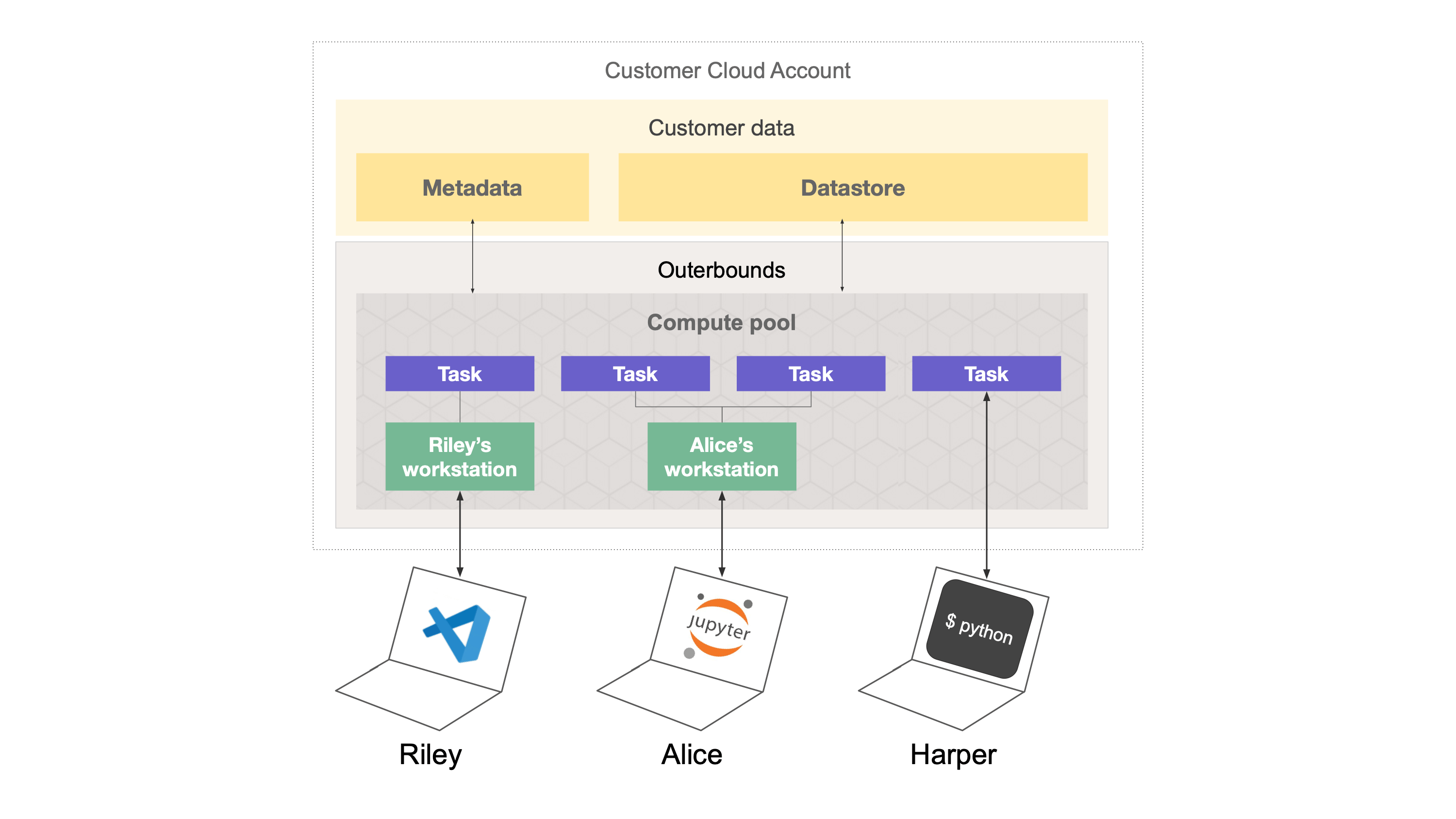
Diagram showing how cloud workstations fit into the platform architecture
Each workstation belongs to a specific user and is provisioned from the compute pools available on the platform. Because workstations draw on the same compute as other work, an administrator can back them with anything your compute pools offer, including GPU instances. Workstations integrate with the rest of the platform automatically. Artifacts are stored and runs are tracked as you work, and access is governed by the same roles as everything else on the platform. Workstations automatically hibernate after a period of inactivity and restart the next time you use them. Workstations also integrate with the platform’s dependency management tooling, including custom images. You can connect to a workstation through Visual Studio Code using the Outerbounds extension, or through a browser-based version of the same interface.

Working with workstations

Any organization user can create a workstation for themselves from the platform UI. Admins can create workstations and assign access for them to other users. For more information, see Setting up a cloud workstation.