Setting resource limits for sessions and deployments
You can separate system-level pods from user-level sessions and deployments as long as you have a multi-node setup (that is, a master node and at least one worker node). Contact support to complete this operation.
Each project editor session and deployment uses compute resources on the Anaconda Enterprise cluster. If Anaconda Enterprise users need to run applications which require more memory or compute power than provided by default, you can customize your installation to include these resources and allow users to access them while working within AE.After the server resources are installed as nodes in the cluster, you create custom resource profiles to configure the number of cores and amount of memory/RAM available to users—so that it corresponds to your specific system configuration and the needs of your users.For example, if your installation includes nodes with GPUs, add a GPU resource profile so users can use the GPUs to accelerate computation within their projects—essential for machine learning model training. For installation requirements, see Installation requirements.Resource profiles apply to all nodes, users, editor sessions, and deployments in the cluster. So if your installation includes nodes with GPUs that you want to make available for users to acclerate computation within their projects, you’d create a GPU resource profile. Any resource profiles you configure are listed for users to select from when configuring a project and deploying a project. Anaconda Enterprise finds the node that matches their request.To add a resource profile for a resource you have installed:
Log in to Anaconda Enterprise, select the Menu icon in the top right corner and click the Administrative Console link displayed at the bottom of the slide out window.
Use the Config map drop-down menu to select the anaconda-enterprise-anaconda-platform.yml configuration file.
Make a manual backup copy of this file before editing it, as any changes you make will impact how Anaconda Enterprise functions.
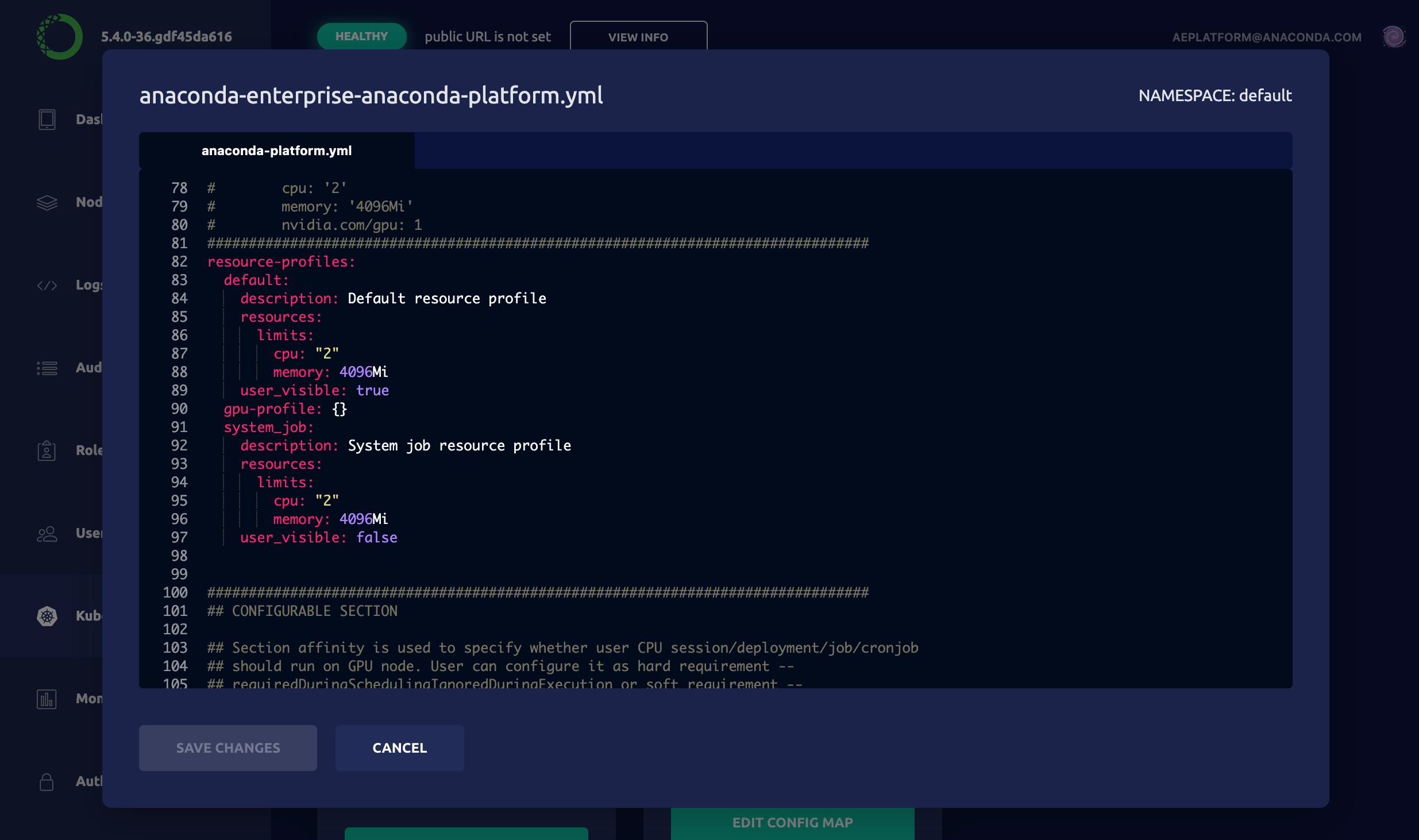
Scroll down to the resource-profiles section:
Add an additional resource following the format of the default specification. For example, to create a GPU resource profile, add the following to the resource-profiles section of the Config map:
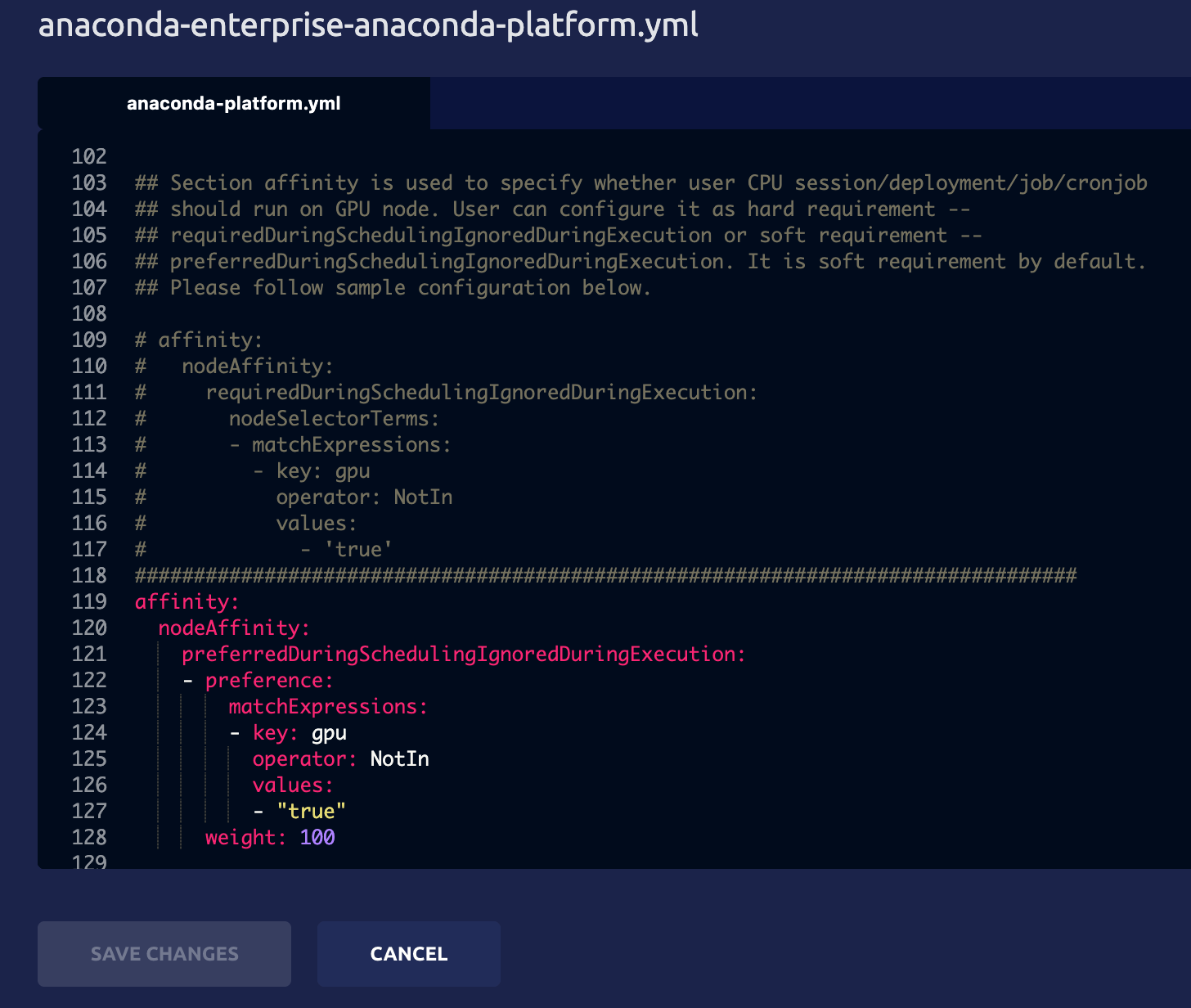
By default, CPU sessions and deployments are also allowed to run on GPU nodes. To reserve GPU nodes for only those sessions and deployments that require a GPU—by preventing CPU sessions and deployments from accessing GPU nodes—comment out the following additional specification included after the gpu-profile entry:
Resource profiles are listed in alphabetical order—after any defaults—so if you want them to appear in a particular order in the drop-down list that users see, be sure to name them accordingly.
Click Apply to save your changes.
To update the Anaconda Enterprise server with your changes, you’ll need to do the following:Restart the workspace and deploy services by running the following command:
kubectl delete pods -l 'app in (ap-workspace, ap-deploy)'
Then check the project Settings and Deploy UI to verify that each resource profile you added or edited appears in the Resource Profile drop-down menu.
Was this page helpful?
{"docsConfig":{"theme":"mint","$schema":"https://mintlify.com/docs.json","name":"Anaconda","description":"Guides, tutorials, and reference material for Anaconda's Python, data science, and AI tools","colors":{"primary":"#1d6cf7","light":"#1d6cf7","dark":"#96f778"},"logo":{"light":"https://mintcdn.com/anaconda-29683c67/s-9WR15r5rZoaPqb/logo/light.svg?fit=max\u0026auto=format\u0026n=s-9WR15r5rZoaPqb\u0026q=85\u0026s=5996719b8530aaf065dc1ee1f39b2e67","dark":"https://mintcdn.com/anaconda-29683c67/s-9WR15r5rZoaPqb/logo/dark.svg?fit=max\u0026auto=format\u0026n=s-9WR15r5rZoaPqb\u0026q=85\u0026s=db482b1eac6af589d234160a76de3400","href":"https://www.anaconda.com/docs/main"},"favicon":"https://mintcdn.com/anaconda-29683c67/p8JNFuYYvTL8gfpM/favicon.png?fit=max\u0026auto=format\u0026n=p8JNFuYYvTL8gfpM\u0026q=85\u0026s=51a585758330bbe8f1ea032113854252","api":{"playground":{"display":"simple"}},"background":{"color":{"light":"#F7F8F9","dark":"#10121a"}},"navbar":{},"footer":{"socials":{"linkedin":"https://www.linkedin.com/company/anacondainc","github":"https://github.com/ContinuumIO","youtube":"https://www.youtube.com/c/ContinuumIo"},"links":[{"header":"Company","items":[{"label":"Anaconda Newsletter","href":"https://www.anaconda.com/newsletter"}]}]},"seo":{"metatags":{"canonical":"https://www.anaconda.com/docs"}},"styling":{"eyebrows":"breadcrumbs","latex":false},"integrations":{"ga4":{"measurementId":"G-VQTY6YKM6J"},"heap":{"appId":"758475466"}},"contextual":{"options":["claude","chatgpt","perplexity","cursor","vscode","add-mcp","copy"],"display":"header"},"navigation":{"pages":[]}},"deployment":{"deploymentMetadataValue":{"subdomain":"anaconda-29683c67","hasAudioNarration":false,"actualSubdomain":"anaconda-29683c67","customDomains":["anaconda.com"],"gitSource":{"type":"github","owner":"anaconda","repo":"documentation","deployBranch":"main","contentDirectory":"","isPrivate":true,"mountPath":"","label":""},"feedback":{"thumbs":true,"contextualFeedback":{"allowEmail":true,"emailDisclaimer":"Your email will only be used to follow up on this feedback."}},"entitlements":{"AI_CHAT":{"status":"ENABLED"},"REMOVE_BRANDING":{"status":"ENABLED"},"CONTEXTUAL_FEEDBACK":{"status":"ENABLED"},"CODE_SNIPPET_FEEDBACK":{"status":"ENABLED"},"WEB_MCP":{"status":"ENABLED"},"NARRATION":{"status":"ENABLED"}},"buildId":"6af738125dcd64e14d2f7b94","clientVersion":"0.0.4143","searchFilterCounts":[{"language":"default","tag":"Data Science \u0026 AI Workbench","count":240},{"language":"default","tag":"Anaconda Platform","count":152},{"language":"default","tag":"Package Security Manager","count":128},{"language":"default","tag":"Anaconda CLI","count":112},{"language":"default","tag":"Guides","count":105},{"language":"default","tag":"Anaconda CLI \u0026 MCP","count":104},{"language":"default","tag":"Plugins","count":93},{"language":"default","tag":"Commands","count":91},{"language":"default","tag":"Platform Guides","count":86},{"language":"default","tag":"Anaconda Desktop","count":82}],"searchSettings":{"isFiltersEnabled":true}},"assistantConfig":{"enableAskAiButton":false,"enableStarterQuestions":true,"enableContextualStarterQuestions":true,"deflection":{"enabled":true,"email":"support@anaconda.com"}},"basePath":"/docs","hasChatPermissions":true,"hasWebMcpPermissions":true,"toggles":[{"name":"kill-isr","enabled":true,"variant":{"name":"disabled","enabled":false,"feature_enabled":true},"impressionData":false},{"name":"custom-rbac-roles","enabled":true,"variant":{"name":"disabled","enabled":false,"feature_enabled":true},"impressionData":false},{"name":"agent-mintlify-slack","enabled":true,"variant":{"name":"disabled","enabled":false,"feature_enabled":true},"impressionData":false},{"name":"agent-integrations-settings","enabled":true,"variant":{"name":"disabled","enabled":false,"feature_enabled":true},"impressionData":false},{"name":"rbac-expansion","enabled":true,"variant":{"name":"disabled","enabled":false,"feature_enabled":true},"impressionData":false},{"name":"automations-pr-grouping","enabled":true,"variant":{"name":"disabled","enabled":false,"feature_enabled":true},"impressionData":false},{"name":"custom-prefix","enabled":true,"variant":{"name":"disabled","enabled":false,"feature_enabled":true},"impressionData":false},{"name":"analytics-v7","enabled":true,"variant":{"name":"disabled","enabled":false,"feature_enabled":true},"impressionData":false},{"name":"user-flows-analytics","enabled":true,"variant":{"name":"disabled","enabled":false,"feature_enabled":true},"impressionData":false},{"name":"no-publish-flow","enabled":true,"variant":{"name":"disabled","enabled":false,"feature_enabled":true},"impressionData":false},{"name":"workos-onboarding","enabled":true,"variant":{"name":"disabled","enabled":false,"feature_enabled":true},"impressionData":false},{"name":"snapshot-serving-live","enabled":true,"variant":{"name":"disabled","enabled":false,"feature_enabled":true},"impressionData":false},{"name":"stripTemperatureMiddleware","enabled":true,"variant":{"name":"disabled","enabled":false,"feature_enabled":true},"impressionData":false},{"name":"support-platform-pylon-zendesk","enabled":true,"variant":{"name":"disabled","enabled":false,"feature_enabled":true},"impressionData":false},{"name":"snapshot-serving","enabled":true,"variant":{"name":"disabled","enabled":false,"feature_enabled":true},"impressionData":false},{"name":"instant-rollback","enabled":true,"variant":{"name":"disabled","enabled":false,"feature_enabled":true},"impressionData":false},{"name":"granular-notifications-server","enabled":true,"variant":{"name":"disabled","enabled":false,"feature_enabled":true},"impressionData":false},{"name":"granular-notifications","enabled":true,"variant":{"name":"disabled","enabled":false,"feature_enabled":true},"impressionData":false},{"name":"automations-fable","enabled":true,"variant":{"name":"disabled","enabled":false,"feature_enabled":true},"impressionData":false},{"name":"fixed-ai-action-pricing","enabled":true,"variant":{"name":"disabled","enabled":false,"feature_enabled":true},"impressionData":false},{"name":"automation-resolve-merge-conflict","enabled":true,"variant":{"name":"disabled","enabled":false,"feature_enabled":true},"impressionData":false},{"name":"scoped-publishing","enabled":true,"variant":{"name":"disabled","enabled":false,"feature_enabled":true},"impressionData":false},{"name":"mintql","enabled":true,"variant":{"name":"disabled","enabled":false,"feature_enabled":true},"impressionData":false},{"name":"page-level-analytics","enabled":true,"variant":{"name":"disabled","enabled":false,"feature_enabled":true},"impressionData":false},{"name":"editor-version-history-v2","enabled":true,"variant":{"name":"disabled","enabled":false,"feature_enabled":true},"impressionData":false},{"name":"billing-page-v2","enabled":true,"variant":{"name":"disabled","enabled":false,"feature_enabled":true},"impressionData":false},{"name":"full-page-search","enabled":true,"variant":{"name":"disabled","enabled":false,"feature_enabled":true},"impressionData":false},{"name":"workspace-projects","enabled":true,"variant":{"name":"disabled","enabled":false,"feature_enabled":true},"impressionData":false},{"name":"assistant-v5","enabled":true,"variant":{"name":"disabled","enabled":false,"feature_enabled":true},"impressionData":false},{"name":"fork-pr-previews","enabled":true,"variant":{"name":"disabled","enabled":false,"feature_enabled":true},"impressionData":false},{"name":"revalidation-jwt","enabled":true,"variant":{"name":"disabled","enabled":false,"feature_enabled":true},"impressionData":false},{"name":"workos-sso-scim","enabled":true,"variant":{"name":"disabled","enabled":false,"feature_enabled":true},"impressionData":false},{"name":"hobby-abuse-scan","enabled":true,"variant":{"name":"disabled","enabled":false,"feature_enabled":true},"impressionData":false},{"name":"dashboard-inbox","enabled":true,"variant":{"name":"disabled","enabled":false,"feature_enabled":true},"impressionData":false},{"name":"workos-signup","enabled":true,"variant":{"name":"disabled","enabled":false,"feature_enabled":true},"impressionData":false},{"name":"turbopuffer-dual-write","enabled":true,"variant":{"name":"disabled","enabled":false,"feature_enabled":true},"impressionData":false},{"name":"workos-enabled","enabled":true,"variant":{"name":"disabled","enabled":false,"feature_enabled":true},"impressionData":false},{"name":"approve-review-flow","enabled":true,"variant":{"name":"disabled","enabled":false,"feature_enabled":true},"impressionData":false},{"name":"editor-metadata","enabled":true,"variant":{"name":"disabled","enabled":false,"feature_enabled":true},"impressionData":false},{"name":"sso-setup-deadline-banner","enabled":true,"variant":{"name":"disabled","enabled":false,"feature_enabled":true},"impressionData":false},{"name":"turbopuffer-serve","enabled":true,"variant":{"name":"disabled","enabled":false,"feature_enabled":true},"impressionData":false},{"name":"live-agents","enabled":true,"variant":{"name":"disabled","enabled":false,"feature_enabled":true},"impressionData":false},{"name":"llms-txt-v2","enabled":true,"variant":{"name":"disabled","enabled":false,"feature_enabled":true},"impressionData":false}],"googleFontsInlined":false},"customCss":[{"filePath":"custom.css","href":"/docs/_mintlify/custom/anaconda-29683c67/eb7540b1d8a9e65b/custom.css"}],"page":{"pagePath":"data-science/5.5.1/admin/resources/resource-profile","slug":"/data-science/5.5.1/admin/resources/resource-profile","pageMetadata":{"noindex":true,"title":"Setting resource limits for sessions and deployments","keywords":["resource","limits","profiles","resources","session","deployment"],"description":null,"href":"/data-science/5.5.1/admin/resources/resource-profile"},"pageType":"default","mdx":{"mdxSource":{"compiledSource":"\"use strict\";const{Fragment:_Fragment,jsx:_jsx,jsxs:_jsxs}=arguments[0];const{useMDXComponents:_provideComponents}=arguments[0];function _createMdxContent(props){const _components={a:`a`,code:`code`,em:`em`,li:`li`,ol:`ol`,p:`p`,pre:`pre`,span:`span`,strong:`strong`,..._provideComponents(),...props.components},{CodeBlock,Frame,Icon,Note,OptimizedImage}=_components;if(!CodeBlock)_missingMdxReference(`CodeBlock`,true);if(!Frame)_missingMdxReference(`Frame`,true);if(!Icon)_missingMdxReference(`Icon`,true);if(!Note)_missingMdxReference(`Note`,true);if(!OptimizedImage)_missingMdxReference(`OptimizedImage`,true);return _jsxs(_Fragment,{children:[_jsx(Note,{children:_jsx(_components.p,{children:`You can separate system-level pods from user-level sessions and deployments as long as you have a multi-node setup (that is, a master node and at least one worker node). Contact support to complete this operation.`})}),`\n`,_jsx(_components.p,{children:`Each project editor session and deployment uses compute resources on the Anaconda Enterprise cluster. If Anaconda Enterprise users need to run applications which require more memory or compute power than provided by default, you can customize your installation to include these resources and allow users to access them while working within AE.`}),`\n`,_jsxs(_components.p,{children:[`After the server resources are installed as nodes in the cluster, you create custom `,_jsx(_components.em,{children:`resource profiles`}),` to configure the number of cores and amount of memory/RAM available to users—so that it corresponds to your specific system configuration and the needs of your users.`]}),`\n`,_jsxs(_components.p,{children:[`For example, if your installation includes nodes with GPUs, add a GPU resource profile so users can use the GPUs to accelerate computation within their projects—essential for machine learning model training. For installation requirements, see `,_jsx(_components.a,{href:`/data-science/5.5.1/install/reqs`,children:`Installation requirements`}),`.`]}),`\n`,_jsxs(_components.p,{children:[`Resource profiles apply to all nodes, users, editor sessions, and deployments in the cluster. So if your installation includes nodes with GPUs that you want to make available for users to acclerate computation within their projects, you’d create a GPU resource profile. Any resource profiles you configure are listed for users to select from when `,_jsx(_components.a,{href:`/data-science/5.5.1/data-science-workflows/projects/dependencies`,children:`configuring a project`}),` and `,_jsx(_components.a,{href:`/data-science/5.5.1/data-science-workflows/deployments/project`,children:`deploying a project`}),`. Anaconda Enterprise finds the node that matches their request.`]}),`\n`,_jsx(_components.p,{children:_jsx(_components.strong,{children:`To add a resource profile for a resource you have installed:`})}),`\n`,_jsxs(_components.ol,{children:[`\n`,_jsxs(_components.li,{children:[`\n`,_jsxs(_components.p,{children:[`Log in to Anaconda Enterprise, select the `,_jsx(_components.strong,{children:`Menu`}),` icon `,_jsx(Icon,{icon:`user`,iconType:`regular`}),` in the top right corner and click the `,_jsx(_components.strong,{children:`Administrative Console`}),` link displayed at the bottom of the slide out window.`]}),`\n`]}),`\n`,_jsxs(_components.li,{children:[`\n`,_jsxs(_components.p,{children:[`Click `,_jsx(_components.strong,{children:`Manage Resources`}),`.`]}),`\n`]}),`\n`,_jsxs(_components.li,{children:[`\n`,_jsxs(_components.p,{children:[`Log in to the Operations Center using the Administrator credentials `,_jsx(_components.a,{href:`/data-science/5.5.1/install/config`,children:`configured after installation`}),`.`]}),`\n`]}),`\n`,_jsxs(_components.li,{children:[`\n`,_jsxs(_components.p,{children:[`Select `,_jsx(_components.strong,{children:`Configuration`}),` from the menu on the left.`]}),`\n`]}),`\n`,_jsxs(_components.li,{children:[`\n`,_jsxs(_components.p,{children:[`Use the `,_jsx(_components.strong,{children:`Config map`}),` drop-down menu to select the `,_jsx(_components.code,{children:`anaconda-enterprise-anaconda-platform.yml`}),` configuration file.`]}),`\n`]}),`\n`,_jsxs(_components.li,{children:[`\n`,_jsxs(_components.p,{children:[_jsx(_components.strong,{children:`Make a manual backup copy of this file before editing it`}),`, as any changes you make will impact how Anaconda Enterprise functions.`]}),`\n`]}),`\n`,_jsxs(_components.li,{children:[`\n`,_jsxs(_components.p,{children:[`Scroll down to the `,_jsx(_components.code,{children:`resource-profiles`}),` section:`]}),`\n`,_jsx(Frame,{children:_jsx(OptimizedImage,{src:`https://mintcdn.com/anaconda-29683c67/Jbxn1KJ0XaeZeGhX/images/data-science/resource_profiles.png?fit=max\u0026auto=format\u0026n=Jbxn1KJ0XaeZeGhX\u0026q=85\u0026s=80fcd7c80809a56d775a5b63d9d3cc0d`,alt:``,\"data-og-width\":`2470`,width:`2470`,\"data-og-height\":`1462`,height:`1462`,\"data-path\":`images/data-science/resource_profiles.png`,\"data-optimize\":`true`,\"data-opv\":`3`,srcset:`https://mintcdn.com/anaconda-29683c67/Jbxn1KJ0XaeZeGhX/images/data-science/resource_profiles.png?w=280\u0026fit=max\u0026auto=format\u0026n=Jbxn1KJ0XaeZeGhX\u0026q=85\u0026s=5be1423039e115d98262e878b43dc61c 280w, https://mintcdn.com/anaconda-29683c67/Jbxn1KJ0XaeZeGhX/images/data-science/resource_profiles.png?w=560\u0026fit=max\u0026auto=format\u0026n=Jbxn1KJ0XaeZeGhX\u0026q=85\u0026s=edc792116c548fd38c9a694159e6f22e 560w, https://mintcdn.com/anaconda-29683c67/Jbxn1KJ0XaeZeGhX/images/data-science/resource_profiles.png?w=840\u0026fit=max\u0026auto=format\u0026n=Jbxn1KJ0XaeZeGhX\u0026q=85\u0026s=d67733a585406d707f9ce79851b79b6d 840w, https://mintcdn.com/anaconda-29683c67/Jbxn1KJ0XaeZeGhX/images/data-science/resource_profiles.png?w=1100\u0026fit=max\u0026auto=format\u0026n=Jbxn1KJ0XaeZeGhX\u0026q=85\u0026s=c10da3c7c6e6355c5f96ba399ff8983e 1100w, https://mintcdn.com/anaconda-29683c67/Jbxn1KJ0XaeZeGhX/images/data-science/resource_profiles.png?w=1650\u0026fit=max\u0026auto=format\u0026n=Jbxn1KJ0XaeZeGhX\u0026q=85\u0026s=9c9c385eef00a247cecb19eb6055c298 1650w, https://mintcdn.com/anaconda-29683c67/Jbxn1KJ0XaeZeGhX/images/data-science/resource_profiles.png?w=2500\u0026fit=max\u0026auto=format\u0026n=Jbxn1KJ0XaeZeGhX\u0026q=85\u0026s=9eb11f492ad8466cbc09cffec31181fe 2500w`})}),`\n`]}),`\n`,_jsxs(_components.li,{children:[`\n`,_jsxs(_components.p,{children:[`Add an additional resource following the format of the default specification. For example, to create a GPU resource profile, add the following to the `,_jsx(_components.code,{children:`resource-profiles`}),` section of the Config map:`]}),`\n`,_jsx(CodeBlock,{numberOfLines:`9`,language:`text`,children:_jsx(_components.pre,{className:`shiki shiki-themes github-light-default dark-plus`,style:{backgroundColor:`#ffffff`,\"--shiki-dark-bg\":`#0B0C0E`,color:`#1f2328`,\"--shiki-dark\":`#D4D4D4`},language:`text`,children:_jsxs(_components.code,{language:`text`,numberOfLines:`9`,children:[_jsx(_components.span,{className:`line`,children:_jsx(_components.span,{children:`gpu-profile:`})}),`\n`,_jsx(_components.span,{className:`line`,children:_jsx(_components.span,{children:` description: 'GPU resource profile'`})}),`\n`,_jsx(_components.span,{className:`line`,children:_jsx(_components.span,{children:` user_visible: true`})}),`\n`,_jsx(_components.span,{className:`line`,children:_jsx(_components.span,{children:` resources:`})}),`\n`,_jsx(_components.span,{className:`line`,children:_jsx(_components.span,{children:` limits:`})}),`\n`,_jsx(_components.span,{className:`line`,children:_jsx(_components.span,{children:` cpu: '4'`})}),`\n`,_jsx(_components.span,{className:`line`,children:_jsx(_components.span,{children:` memory: '8Gi'`})}),`\n`,_jsx(_components.span,{className:`line`,children:_jsx(_components.span,{children:` nvidia.com/gpu: 1`})}),`\n`,_jsx(_components.span,{className:`line`,children:_jsx(_components.span,{})})]})})}),`\n`]}),`\n`]}),`\n`,_jsxs(_components.p,{children:[`By default, CPU sessions and deployments are also allowed to run on GPU nodes. `,_jsx(_components.em,{children:`To reserve GPU nodes for only those sessions and deployments that require a GPU`}),`—by preventing CPU sessions and deployments from accessing GPU nodes—comment out the following additional specification included after the `,_jsx(_components.code,{children:`gpu-profile`}),` entry:`]}),`\n`,_jsx(Frame,{children:_jsx(OptimizedImage,{src:`https://mintcdn.com/anaconda-29683c67/yg2lVfLe5JTI9sv-/images/data-science/node_affinity.png?fit=max\u0026auto=format\u0026n=yg2lVfLe5JTI9sv-\u0026q=85\u0026s=bbbc15ce841f7390273b5a5c1952d616`,alt:``,\"data-og-width\":`1456`,width:`1456`,\"data-og-height\":`1232`,height:`1232`,\"data-path\":`images/data-science/node_affinity.png`,\"data-optimize\":`true`,\"data-opv\":`3`,srcset:`https://mintcdn.com/anaconda-29683c67/yg2lVfLe5JTI9sv-/images/data-science/node_affinity.png?w=280\u0026fit=max\u0026auto=format\u0026n=yg2lVfLe5JTI9sv-\u0026q=85\u0026s=380fafc83d08ce18995c720153d97a14 280w, https://mintcdn.com/anaconda-29683c67/yg2lVfLe5JTI9sv-/images/data-science/node_affinity.png?w=560\u0026fit=max\u0026auto=format\u0026n=yg2lVfLe5JTI9sv-\u0026q=85\u0026s=4ce4e601b59cd68a6352d14dfb9090d2 560w, https://mintcdn.com/anaconda-29683c67/yg2lVfLe5JTI9sv-/images/data-science/node_affinity.png?w=840\u0026fit=max\u0026auto=format\u0026n=yg2lVfLe5JTI9sv-\u0026q=85\u0026s=b7f17c57ca86b5d98436b7780260f789 840w, https://mintcdn.com/anaconda-29683c67/yg2lVfLe5JTI9sv-/images/data-science/node_affinity.png?w=1100\u0026fit=max\u0026auto=format\u0026n=yg2lVfLe5JTI9sv-\u0026q=85\u0026s=11f7d43ee300d647267d8ec46ab23643 1100w, https://mintcdn.com/anaconda-29683c67/yg2lVfLe5JTI9sv-/images/data-science/node_affinity.png?w=1650\u0026fit=max\u0026auto=format\u0026n=yg2lVfLe5JTI9sv-\u0026q=85\u0026s=e8efcca4802fb2406e88329040c904e5 1650w, https://mintcdn.com/anaconda-29683c67/yg2lVfLe5JTI9sv-/images/data-science/node_affinity.png?w=2500\u0026fit=max\u0026auto=format\u0026n=yg2lVfLe5JTI9sv-\u0026q=85\u0026s=3b8c5fa0538978cc264afe7fca3789d5 2500w`})}),`\n`,_jsx(Note,{children:_jsx(_components.p,{children:`Resource profiles are listed in alphabetical order—after any defaults—so if you want them to appear in a particular order in the drop-down list that users see, be sure to name them accordingly.`})}),`\n`,_jsxs(_components.ol,{start:`9`,children:[`\n`,_jsxs(_components.li,{children:[`Click `,_jsx(_components.strong,{children:`Apply`}),` to save your changes.`]}),`\n`]}),`\n`,_jsx(_components.p,{children:_jsx(_components.strong,{children:`To update the Anaconda Enterprise server with your changes, you’ll need to do the following:`})}),`\n`,_jsx(_components.p,{children:`Restart the workspace and deploy services by running the following command:`}),`\n`,_jsx(CodeBlock,{numberOfLines:`2`,language:`text`,children:_jsx(_components.pre,{className:`shiki shiki-themes github-light-default dark-plus`,style:{backgroundColor:`#ffffff`,\"--shiki-dark-bg\":`#0B0C0E`,color:`#1f2328`,\"--shiki-dark\":`#D4D4D4`},language:`text`,children:_jsxs(_components.code,{language:`text`,numberOfLines:`2`,children:[_jsx(_components.span,{className:`line`,children:_jsx(_components.span,{children:`kubectl delete pods -l 'app in (ap-workspace, ap-deploy)'`})}),`\n`,_jsx(_components.span,{className:`line`,children:_jsx(_components.span,{})})]})})}),`\n`,_jsxs(_components.p,{children:[`Then check the project `,_jsx(_components.strong,{children:`Settings`}),` and `,_jsx(_components.strong,{children:`Deploy`}),` UI to verify that each resource profile you added or edited appears in the `,_jsx(_components.strong,{children:`Resource Profile`}),` drop-down menu.`]})]})}function MDXContent(props={}){const{wrapper:MDXLayout}={..._provideComponents(),...props.components};return MDXLayout?_jsx(MDXLayout,{...props,children:_jsx(_createMdxContent,{...props})}):_createMdxContent(props)}return{default:MDXContent};function _missingMdxReference(id,component){throw new Error(`Expected `+(component?`component`:`object`)+\" `\"+id+\"` to be defined: you likely forgot to import, pass, or provide it.\")}","frontmatter":{},"scope":{"config":{},"pageMetadata":{"noindex":true,"title":"Setting resource limits for sessions and deployments","keywords":["resource","limits","profiles","resources","session","deployment"],"description":null,"href":"/data-science/5.5.1/admin/resources/resource-profile"}}},"mdxSourceWithNoJs":null},"mdxExtracts":{"tableOfContents":[],"codeExamples":{}},"jsLinks":["/docs/_mintlify/custom/anaconda-29683c67/b738e1eb47e9934c/_transcend.js","/docs/_mintlify/custom/anaconda-29683c67/3ca111da84ffed5d/docs-dropdown-tooltip.js","/docs/_mintlify/custom/anaconda-29683c67/a3d1c2dd97aa6593/toc-indicator.js"],"subdomain":"anaconda-29683c67","siteName":"Anaconda","title":"Setting resource limits for sessions and deployments - Anaconda","contextualStarterQuestions":[{"_id":"6af60d4d4e8bc908169b72e4","deploymentId":"6781700c5f1e7d2ac00fcc4a","questionText":"How do I create resource profiles?","status":"active","generatedBy":"contextual","path":"data-science/5.5.1/admin/resources/resource-profile","createdAt":"2026-11-12T19:02:37.073Z","updatedAt":"2026-11-12T19:02:37.073Z","__v":0},{"_id":"6af60d4d4e8bc908169b72e6","deploymentId":"6781700c5f1e7d2ac00fcc4a","questionText":"Can I add GPU resource profiles?","status":"active","generatedBy":"contextual","path":"data-science/5.5.1/admin/resources/resource-profile","createdAt":"2026-11-12T19:02:37.073Z","updatedAt":"2026-11-12T19:02:37.073Z","__v":0},{"_id":"6af60d4d4e8bc908169b72e5","deploymentId":"6781700c5f1e7d2ac00fcc4a","questionText":"What are resource profiles used for?","status":"active","generatedBy":"contextual","path":"data-science/5.5.1/admin/resources/resource-profile","createdAt":"2026-11-12T19:02:37.073Z","updatedAt":"2026-11-12T19:02:37.073Z","__v":0}],"navMaps":{"firstHrefInVersion":{"5.9.0":{"href":"/data-science/latest/admin/resources/resource-profile","matchLevel":1},"5.8.1":{"href":"/data-science/5.8.1/admin/resources/resource-profile","matchLevel":1,"noindex":true},"5.8.0":{"href":"/data-science/5.8.0/admin/resources/resource-profile","matchLevel":1,"noindex":true},"5.7.1":{"href":"/data-science/5.7.1/admin/resources/resource-profile","matchLevel":1,"noindex":true},"5.7.0":{"href":"/data-science/5.7.0/admin/resources/resource-profile","matchLevel":1,"noindex":true},"5.6.2":{"href":"/data-science/5.6.2/admin/resources/resource-profile","matchLevel":1,"noindex":true},"5.6.1":{"href":"/data-science/5.6.1/admin/resources/resource-profile","matchLevel":1,"noindex":true},"5.6.0":{"href":"/data-science/5.6.0/admin/resources/resource-profile","matchLevel":1,"noindex":true},"5.5.2":{"href":"/data-science/5.5.2/admin/resources/resource-profile","matchLevel":1,"noindex":true},"5.5.1":{"href":"/data-science/5.5.1/admin/resources/resource-profile","matchLevel":0},"6.8.0":{"href":"/psm-on-prem/6.8.0/main","matchLevel":4},"6.7.2":{"href":"/psm-on-prem/6.7.2/main","matchLevel":4},"6.7.1":{"href":"/psm-on-prem/6.7.1/main","matchLevel":4},"6.7.0":{"href":"/psm-on-prem/6.7.0/main","matchLevel":4},"6.6.5":{"href":"/psm-on-prem/6.6.5/main","matchLevel":4},"6.6.4":{"href":"/psm-on-prem/6.6.4/main","matchLevel":4},"6.6.3":{"href":"/psm-on-prem/6.6.3/main","matchLevel":4},"6.6.2":{"href":"/psm-on-prem/6.6.2/main","matchLevel":4},"6.6.1":{"href":"/psm-on-prem/6.6.1/main","matchLevel":4},"6.6.0":{"href":"/psm-on-prem/6.6.0/main","matchLevel":4},"6.5.3":{"href":"/psm-on-prem/6.5.3/main","matchLevel":4},"6.5.2":{"href":"/psm-on-prem/6.5.2/main","matchLevel":4},"6.5.1":{"href":"/psm-on-prem/6.5.1/main","matchLevel":4},"6.4.0":{"href":"/psm-on-prem/6.4.0/main","matchLevel":4},"6.3.1":{"href":"/psm-on-prem/6.3.1/main","matchLevel":4},"6.3.0":{"href":"/psm-on-prem/6.3.0/main","matchLevel":4},"6.2.0":{"href":"/psm-on-prem/6.2.0/main","matchLevel":4},"6.1.9":{"href":"/psm-on-prem/6.1.9/main","matchLevel":4},"6.1.8":{"href":"/psm-on-prem/6.1.8/main","matchLevel":4},"6.1.7":{"href":"/psm-on-prem/6.1.7/main","matchLevel":4},"6.1.6":{"href":"/psm-on-prem/6.1.6/main","matchLevel":4},"6.1.4":{"href":"/psm-on-prem/6.1.4/main","matchLevel":4}},"firstHrefInLanguage":{}},"lastModified":"2026-11-12T18:58:16.436Z","originalFileLocation":"data-science/5.5.1/admin/resources/resource-profile.mdx"},"headHtml":"\u003cscript data-mint-head>(function(){var d=document.documentElement,p=null;if(!p){try{p=localStorage.getItem(\"isDarkMode\")}catch(e){}if(p==='true')p='dark';else if(p==='false')p='light';if(p!=='light'\u0026\u0026p!=='dark'\u0026\u0026p!=='system')p=\"system\"}var r=p==='system'?(matchMedia(\"(prefers-color-scheme: dark)\").matches?'dark':'light'):p;d.classList.remove(r==='dark'?'light':'dark');d.classList.add(r);d.setAttribute(\"data-theme-preference\",p)})();\u003c/script>\u003cmeta data-mint-head name=\"application-name\" content=\"Anaconda\">\u003cmeta data-mint-head name=\"generator\" content=\"Mintlify\">\u003cmeta data-mint-head name=\"robots\" content=\"noindex\">\u003clink data-mint-head rel=\"icon\" type=\"image/png\" sizes=\"192x192\" href=\"/docs/mintlify-assets/_mintlify/favicons/anaconda-29683c67/Q6mS5k5M0lNdBscF/_generated/favicon/android-chrome-192x192.png\" media=\"(prefers-color-scheme: light)\">\u003clink data-mint-head rel=\"apple-touch-icon\" type=\"image/png\" sizes=\"180x180\" href=\"/docs/mintlify-assets/_mintlify/favicons/anaconda-29683c67/Q6mS5k5M0lNdBscF/_generated/favicon/apple-touch-icon.png\">\u003clink data-mint-head rel=\"icon\" type=\"image/png\" sizes=\"16x16\" href=\"/docs/mintlify-assets/_mintlify/favicons/anaconda-29683c67/Q6mS5k5M0lNdBscF/_generated/favicon/favicon-16x16.png\" media=\"(prefers-color-scheme: light)\">\u003clink data-mint-head rel=\"icon\" type=\"image/png\" sizes=\"32x32\" href=\"/docs/mintlify-assets/_mintlify/favicons/anaconda-29683c67/Q6mS5k5M0lNdBscF/_generated/favicon/favicon-32x32.png\" media=\"(prefers-color-scheme: light)\">\u003clink data-mint-head rel=\"shortcut icon\" type=\"image/x-icon\" href=\"/docs/mintlify-assets/_mintlify/favicons/anaconda-29683c67/Q6mS5k5M0lNdBscF/_generated/favicon/favicon.ico\" media=\"(prefers-color-scheme: light)\">\u003clink data-mint-head rel=\"icon\" type=\"image/png\" sizes=\"192x192\" href=\"/docs/mintlify-assets/_mintlify/favicons/anaconda-29683c67/Q6mS5k5M0lNdBscF/_generated/favicon-dark/android-chrome-192x192.png\" media=\"(prefers-color-scheme: dark)\">\u003clink data-mint-head rel=\"icon\" type=\"image/png\" sizes=\"16x16\" href=\"/docs/mintlify-assets/_mintlify/favicons/anaconda-29683c67/Q6mS5k5M0lNdBscF/_generated/favicon-dark/favicon-16x16.png\" media=\"(prefers-color-scheme: dark)\">\u003clink data-mint-head rel=\"icon\" type=\"image/png\" sizes=\"32x32\" href=\"/docs/mintlify-assets/_mintlify/favicons/anaconda-29683c67/Q6mS5k5M0lNdBscF/_generated/favicon-dark/favicon-32x32.png\" media=\"(prefers-color-scheme: dark)\">\u003clink data-mint-head rel=\"shortcut icon\" type=\"image/x-icon\" href=\"/docs/mintlify-assets/_mintlify/favicons/anaconda-29683c67/Q6mS5k5M0lNdBscF/_generated/favicon-dark/favicon.ico\" media=\"(prefers-color-scheme: dark)\">\u003cmeta data-mint-head property=\"og:title\" content=\"Setting resource limits for sessions and deployments - Anaconda\">\u003cmeta data-mint-head property=\"og:site_name\" content=\"Anaconda\">\u003cmeta data-mint-head property=\"og:url\" content=\"https://www.anaconda.com/docs/data-science/5.5.1/admin/resources/resource-profile\">\u003cmeta data-mint-head property=\"og:type\" content=\"website\">\u003cmeta data-mint-head property=\"og:image\" content=\"https://anaconda-29683c67.mintlify.site/docs/_mintlify/api/og/v2?division=Managing+Cluster+Resources\u0026amp;title=Setting+resource+limits+for+sessions+and+deployments\u0026amp;theme=7f7b55efd41022d147e41c35\u0026amp;signature=b8a20d042385665d242a1d4d420d9a346cb77265ed071f9ac49535ca662416dc\">\u003cmeta data-mint-head property=\"og:image:width\" content=\"1200\">\u003cmeta data-mint-head property=\"og:image:height\" content=\"630\">\u003cmeta data-mint-head name=\"twitter:card\" content=\"summary_large_image\">\u003cmeta data-mint-head name=\"twitter:title\" content=\"Setting resource limits for sessions and deployments - Anaconda\">\u003cmeta data-mint-head name=\"twitter:image\" content=\"https://anaconda-29683c67.mintlify.site/docs/_mintlify/api/og/v2?division=Managing+Cluster+Resources\u0026amp;title=Setting+resource+limits+for+sessions+and+deployments\u0026amp;theme=7f7b55efd41022d147e41c35\u0026amp;signature=b8a20d042385665d242a1d4d420d9a346cb77265ed071f9ac49535ca662416dc\">\u003cmeta data-mint-head name=\"twitter:image:width\" content=\"1200\">\u003cmeta data-mint-head name=\"twitter:image:height\" content=\"630\">\u003cmeta data-mint-head name=\"msapplication-config\" content=\"/docs/mintlify-assets/_mintlify/favicons/anaconda-29683c67/Q6mS5k5M0lNdBscF/_generated/favicon/browserconfig.xml\">\u003cmeta data-mint-head name=\"apple-mobile-web-app-title\" content=\"Anaconda\">\u003cmeta data-mint-head name=\"msapplication-TileColor\" content=\"#1d6cf7\">\u003clink data-mint-head rel=\"canonical\" href=\"https://www.anaconda.com/docs/data-science/5.5.1/admin/resources/resource-profile\">\u003clink data-mint-head rel=\"alternate\" type=\"application/xml\" href=\"/docs/sitemap.xml\">\u003clink data-mint-head rel=\"alternate\" type=\"text/markdown\" href=\"/docs/data-science/5.5.1/admin/resources/resource-profile.md\">","agentPointerHref":"/docs/data-science/5.5.1/admin/resources/resource-profile.md","siteName":"Anaconda","nav":{"global":null,"products":[{"product":"Anaconda Docs","icon":"https://mintlify.s3.us-west-1.amazonaws.com/anaconda-29683c67/images/anaconda-icon.svg","pages":[{"title":"Anaconda Docs","href":"/main"}]},{"product":"Getting Started","icon":"rocket-launch","pages":[{"title":"Getting Started","href":"/getting-started/main"}]},{"product":"Anaconda.org","icon":"globe","pages":[{"title":"Anaconda.org","href":"/anaconda-org/key-features"}]},{"product":"Anaconda Desktop","icon":"desktop","pages":[{"title":"Anaconda Desktop","href":"/anaconda-desktop/key-features"}]},{"product":"Package Security Manager","icon":"shield-check","versions":[{"version":"6.8.0"},{"version":"6.7.2"},{"version":"6.7.1"},{"version":"6.7.0"},{"version":"6.6.5"},{"version":"6.6.4"},{"version":"6.6.3"},{"version":"6.6.2"},{"version":"6.6.1"},{"version":"6.6.0"},{"version":"6.5.3"},{"version":"6.5.2"},{"version":"6.5.1"},{"version":"6.4.0"},{"version":"6.3.1"},{"version":"6.3.0"},{"version":"6.2.0"},{"version":"6.1.9"},{"version":"6.1.8"},{"version":"6.1.7"},{"version":"6.1.6"},{"version":"6.1.4"}],"pages":[{"title":"Package Security Manager","href":"/anaconda-platform/main"}]},{"product":"Anaconda Platform","icon":"layer-group","pages":[{"title":"Anaconda Platform","href":"/platform/main"}]},{"product":"Data Science \u0026 AI Workbench","icon":"chart-network","versions":[{"version":"5.9.0","pages":[{"title":"5.9.0","href":"/data-science/latest/admin/resources/resource-profile"}]},{"version":"5.8.1","pages":[{"title":"5.8.1","href":"/data-science/5.8.1/admin/resources/resource-profile"}]},{"version":"5.8.0","pages":[{"title":"5.8.0","href":"/data-science/5.8.0/admin/resources/resource-profile"}]},{"version":"5.7.1","pages":[{"title":"5.7.1","href":"/data-science/5.7.1/admin/resources/resource-profile"}]},{"version":"5.7.0","pages":[{"title":"5.7.0","href":"/data-science/5.7.0/admin/resources/resource-profile"}]},{"version":"5.6.2","pages":[{"title":"5.6.2","href":"/data-science/5.6.2/admin/resources/resource-profile"}]},{"version":"5.6.1","pages":[{"title":"5.6.1","href":"/data-science/5.6.1/admin/resources/resource-profile"}]},{"version":"5.6.0","pages":[{"title":"5.6.0","href":"/data-science/5.6.0/admin/resources/resource-profile"}]},{"version":"5.5.2","pages":[{"title":"5.5.2","href":"/data-science/5.5.2/admin/resources/resource-profile"}]},{"version":"5.5.1","groups":[{"group":"Data Science \u0026 AI Workbench (5.5.1)","pages":[{"title":"Anaconda Enterprise 5","sidebarTitle":"Overview","href":"/data-science/5.5.1/main"},{"group":"Installing Workbench","pages":[{"title":"Installing Anaconda Enterprise","href":"/data-science/5.5.1/install/main"},{"title":"Post-install configuration","href":"/data-science/5.5.1/install/config"},{"title":"Updating TLS/SSL certificates","href":"/data-science/5.5.1/install/certs"},{"group":"Upgrading Workbench","pages":[{"title":"Upgrading Anaconda Enterprise","href":"/data-science/5.5.1/install/migrate/main"},{"title":"Upgrading between versions of AE5","href":"/data-science/5.5.1/install/migrate/upgrade"},{"title":"Backing up and restoring AE","href":"/data-science/5.5.1/install/migrate/backup-restore"},{"title":"Uninstalling AE","href":"/data-science/5.5.1/install/migrate/uninstall"},{"title":"Pre-install checklist","href":"/data-science/5.5.1/install/checklist"},{"title":"Cloud performance requirements","href":"/data-science/5.5.1/install/cloud-reqs"},{"title":"Installing the cluster","href":"/data-science/5.5.1/install/on-prem"},{"title":"Installation requirements","href":"/data-science/5.5.1/install/reqs"},{"title":"“Bring your own Kubernetes” installation guide","href":"/data-science/5.5.1/install/zero-g"}]}]},{"group":"Administering Workbench","pages":[{"title":"Administering Anaconda Enterprise","href":"/data-science/5.5.1/admin/main"},{"group":"Managing Cluster Resources","pages":[{"title":"Managing cluster resources","href":"/data-science/5.5.1/admin/resources/main"},{"title":"Adding and removing nodes","href":"/data-science/5.5.1/admin/resources/add-remove-node"},{"title":"Monitoring cluster utilization","href":"/data-science/5.5.1/admin/resources/monitor-cluster"},{"title":"Monitoring sessions and deployments","href":"/data-science/5.5.1/admin/resources/monitor-sessions-deps"},{"title":"Viewing system logs","href":"/data-science/5.5.1/admin/resources/logging"},{"title":"Viewing activity logs","description":null,"href":"/data-science/5.5.1/admin/resources/activity"},{"title":"Setting resource limits for sessions and deployments","href":"/data-science/5.5.1/admin/resources/resource-profile"},{"title":"Fault tolerance in Anaconda Enterprise","description":null,"href":"/data-science/5.5.1/admin/resources/fault-tolerance"}]},{"group":"Configuring user access","pages":[{"title":"Configuring user access","href":"/data-science/5.5.1/admin/user-mgmt/main"},{"title":"Managing users","href":"/data-science/5.5.1/admin/user-mgmt/users"},{"title":"Managing roles and groups","href":"/data-science/5.5.1/admin/user-mgmt/groups"},{"title":"Managing System Administrators","href":"/data-science/5.5.1/admin/user-mgmt/admins"},{"title":"Configuring session timeouts","href":"/data-science/5.5.1/admin/user-mgmt/session-timeout"},{"title":"LDAP setup example","href":"/data-science/5.5.1/admin/user-mgmt/ldap-setup"},{"title":"Google IAM setup example","href":"/data-science/5.5.1/admin/user-mgmt/google-setup"}]},{"group":"Configuring channels and mirrors","pages":[{"title":"Configuring channels and packages","href":"/data-science/5.5.1/admin/chan-pkg/main"},{"title":"Accessing remote package repositories","href":"/data-science/5.5.1/admin/chan-pkg/config-repo-access"},{"title":"Managing channels and packages","href":"/data-science/5.5.1/admin/chan-pkg/manage"},{"title":"Using a proxy for conda packages","href":"/data-science/5.5.1/admin/chan-pkg/proxy"},{"title":"Pointing conda to an on-premises repository","href":"/data-science/5.5.1/admin/chan-pkg/condarc"},{"title":"Mirroring channels and packages","href":"/data-science/5.5.1/admin/chan-pkg/mirror"}]},{"title":"Generating custom Anaconda installers","href":"/data-science/5.5.1/admin/custom-installer"},{"group":"Advanced platform settings","pages":[{"title":"Advanced platform settings","href":"/data-science/5.5.1/admin/advanced/main"},{"title":"Editing platform settings","href":"/data-science/5.5.1/admin/advanced/settings"},{"title":"Setting global config variables","href":"/data-science/5.5.1/admin/advanced/global_config"},{"title":"Changing the database password","href":"/data-science/5.5.1/admin/advanced/db-passwd"},{"title":"Changing the platform redirect URLs","href":"/data-science/5.5.1/admin/advanced/redirect-urls"},{"title":"Configuring Livy server for Hadoop Spark access","href":"/data-science/5.5.1/admin/advanced/config-livy-server"},{"title":"Connecting to an external version control repository","href":"/data-science/5.5.1/admin/advanced/config-repo"},{"title":"Migrating projects between version control repositories","href":"/data-science/5.5.1/admin/advanced/migrate-projects"},{"title":"Mounting an external file share","href":"/data-science/5.5.1/admin/advanced/nfs"},{"title":"Disabling sudo for yum","href":"/data-science/5.5.1/admin/advanced/sudo-yum"},{"title":"Specifying alternate wildcard domains","href":"/data-science/5.5.1/admin/advanced/domains"}]}]},{"group":"Using Workbench","pages":[{"title":"Using Anaconda Enterprise","href":"/data-science/5.5.1/data-science-workflows/main"},{"group":"Projects","pages":[{"title":"Working with projects","href":"/data-science/5.5.1/data-science-workflows/projects/main"},{"title":"Collaborating on projects","href":"/data-science/5.5.1/data-science-workflows/projects/collaborate"},{"title":"Saving and committing changes in a project","href":"/data-science/5.5.1/data-science-workflows/projects/commit-changes"},{"title":"Developing a project","href":"/data-science/5.5.1/data-science-workflows/projects/dependencies"},{"title":"Editing a project","href":"/data-science/5.5.1/data-science-workflows/projects/edit-session"}]},{"group":"Templates","pages":[{"title":"Using project templates","href":"/data-science/5.5.1/data-science-workflows/templates/main"},{"title":"Python templates","href":"/data-science/5.5.1/data-science-workflows/templates/python"},{"title":"R templates","href":"/data-science/5.5.1/data-science-workflows/templates/r"},{"title":"Hadoop / Spark","href":"/data-science/5.5.1/data-science-workflows/templates/spark-hadoop"}]},{"group":"Packages","pages":[{"title":"Working with packages","href":"/data-science/5.5.1/data-science-workflows/packages/main"},{"title":"Building a conda package","href":"/data-science/5.5.1/data-science-workflows/packages/build"},{"title":"Sharing channels and packages","href":"/data-science/5.5.1/data-science-workflows/packages/share"},{"title":"Uploading a conda package","href":"/data-science/5.5.1/data-science-workflows/packages/upload"},{"title":"Configuring conda","href":"/data-science/5.5.1/data-science-workflows/packages/conda"}]},{"title":"Using installers, parcels and management packs","href":"/data-science/5.5.1/data-science-workflows/installers"},{"group":"Data","pages":[{"title":"Working with data","href":"/data-science/5.5.1/data-science-workflows/data/main"},{"title":"Loading data into your project","href":"/data-science/5.5.1/data-science-workflows/data/load"},{"title":"Exploring project data","href":"/data-science/5.5.1/data-science-workflows/data/explore"},{"title":"Data preparation","href":"/data-science/5.5.1/data-science-workflows/data/prep"},{"title":"Using statistics","href":"/data-science/5.5.1/data-science-workflows/data/stats"}]},{"group":"Deployments","pages":[{"title":"Working with deployments","href":"/data-science/5.5.1/data-science-workflows/deployments/main"},{"title":"Deploying a REST API","href":"/data-science/5.5.1/data-science-workflows/deployments/rest-api"},{"title":"Scheduling deployments","href":"/data-science/5.5.1/data-science-workflows/deployments/schedule-deploy"},{"title":"Deploying a project","href":"/data-science/5.5.1/data-science-workflows/deployments/project"},{"title":"Terminating a deployment","href":"/data-science/5.5.1/data-science-workflows/deployments/terminate"},{"title":"Deploying a Flask application","href":"/data-science/5.5.1/data-science-workflows/deployments/deploy-flask"},{"title":"Sharing deployments","href":"/data-science/5.5.1/data-science-workflows/deployments/share"}]},{"title":"Using GPUs in sessions and deployments","href":"/data-science/5.5.1/data-science-workflows/gpu"},{"title":"Configuring your user settings","href":"/data-science/5.5.1/data-science-workflows/user-settings"},{"title":"Visualizations and dashboards","href":"/data-science/5.5.1/data-science-workflows/viz"},{"group":"Ml Deep Learn","pages":[{"title":"Machine learning and deep learning","href":"/data-science/5.5.1/data-science-workflows/ml-deep-learn/main"},{"title":"Developing models","href":"/data-science/5.5.1/data-science-workflows/ml-deep-learn/dev-model"},{"title":"Training models","href":"/data-science/5.5.1/data-science-workflows/ml-deep-learn/train-model"},{"title":"Deploying models as endpoints","href":"/data-science/5.5.1/data-science-workflows/ml-deep-learn/deploy-model"},{"title":"Querying and scoring models","href":"/data-science/5.5.1/data-science-workflows/ml-deep-learn/query-score-model"}]}]},{"title":"Troubleshooting","href":"/data-science/5.5.1/troubleshoot"},{"group":"Reference","pages":[{"title":"Reference materials","href":"/data-science/5.5.1/reference/main"},{"title":"Known issues","href":"/data-science/5.5.1/reference/known-issues"},{"title":"Frequently asked questions","href":"/data-science/5.5.1/reference/faq"},{"title":"Understanding Anaconda Enterprise system requirements","href":"/data-science/5.5.1/reference/understanding-ae5"},{"title":"Glossary","href":"/data-science/5.5.1/reference/glossary"},{"title":"Release notes","href":"/data-science/5.5.1/reference/release-notes"}]}]}]}]},{"product":"Anaconda CLI \u0026 MCP","icon":"terminal","pages":[{"title":"Anaconda CLI \u0026 MCP","href":"/cli-reference/anaconda-cli/getting-started"}]},{"product":"Legacy applications","icon":"window-restore","pages":[{"title":"Legacy applications","href":"/legacy/anaconda-navigator/main"}]},{"product":"Reference","icon":"book","pages":[{"title":"Reference","href":"/reference/release-notes"}]},{"product":"Support \u0026 Troubleshooting","icon":"headset","pages":[{"title":"Support \u0026 Troubleshooting","href":"/reference/help-support"}]},{"product":"Repository Managers","hidden":true,"pages":[{"title":"Repository Managers","href":"/repo-managers/main"}]}]},"basePath":"","title":"Setting resource limits for sessions and deployments - Anaconda","buildId":"dpl_Aw98ji4XvBsgtZwL1VrkUF9ehFqz","deploymentId":"dpl_Aw98ji4XvBsgtZwL1VrkUF9ehFqz","dynamics":["07c022d89b","a74be98ba7"],"chunks":["Frame-0domioUa.js","DynamicMarkdown-BcGRTrw6.js","zoom-image-lightbox-DsiWwPWR.js","lightbox-handle-r17bVUz3.js"]}