Anaconda Enterprise provides detailed logs and monitoring information related to the Kubernetes services and containers it uses. You can use the Operations Center and Kubernetes CLI to access this information, to help diagnose and debug errors that you or other users may encounter while using the platform.
The Anaconda Enterprise cluster
As an Operations Center Admin, you can use the Operations Center to configure and monitor the platform.To access the Operations Center:
Log in to Anaconda Enterprise, select the Menu icon in the top right corner, and click the Administrative Console link displayed at the bottom of the slide out window.
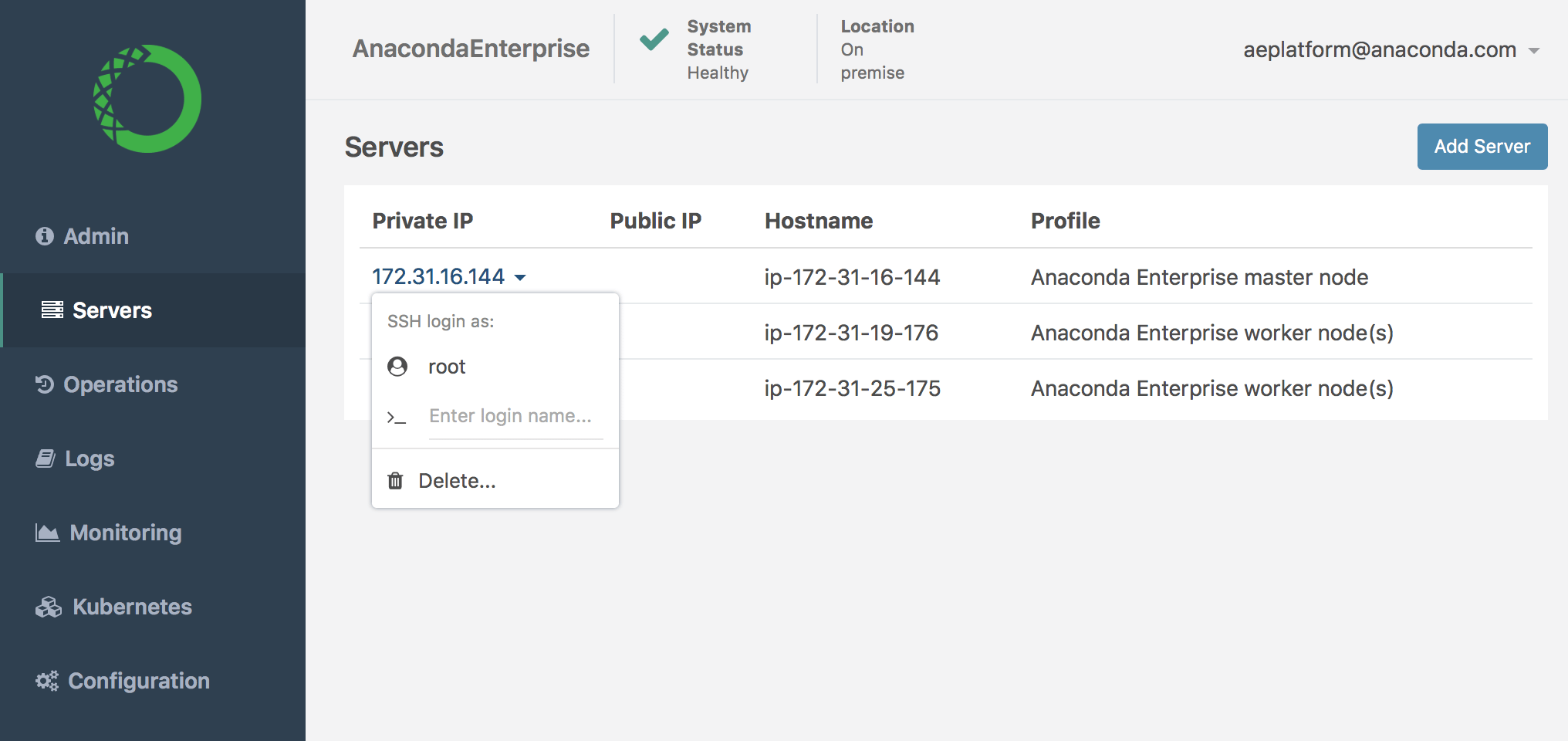
Click on the Private IP address of the Anaconda Enterprise master node, and select SSH login as root.
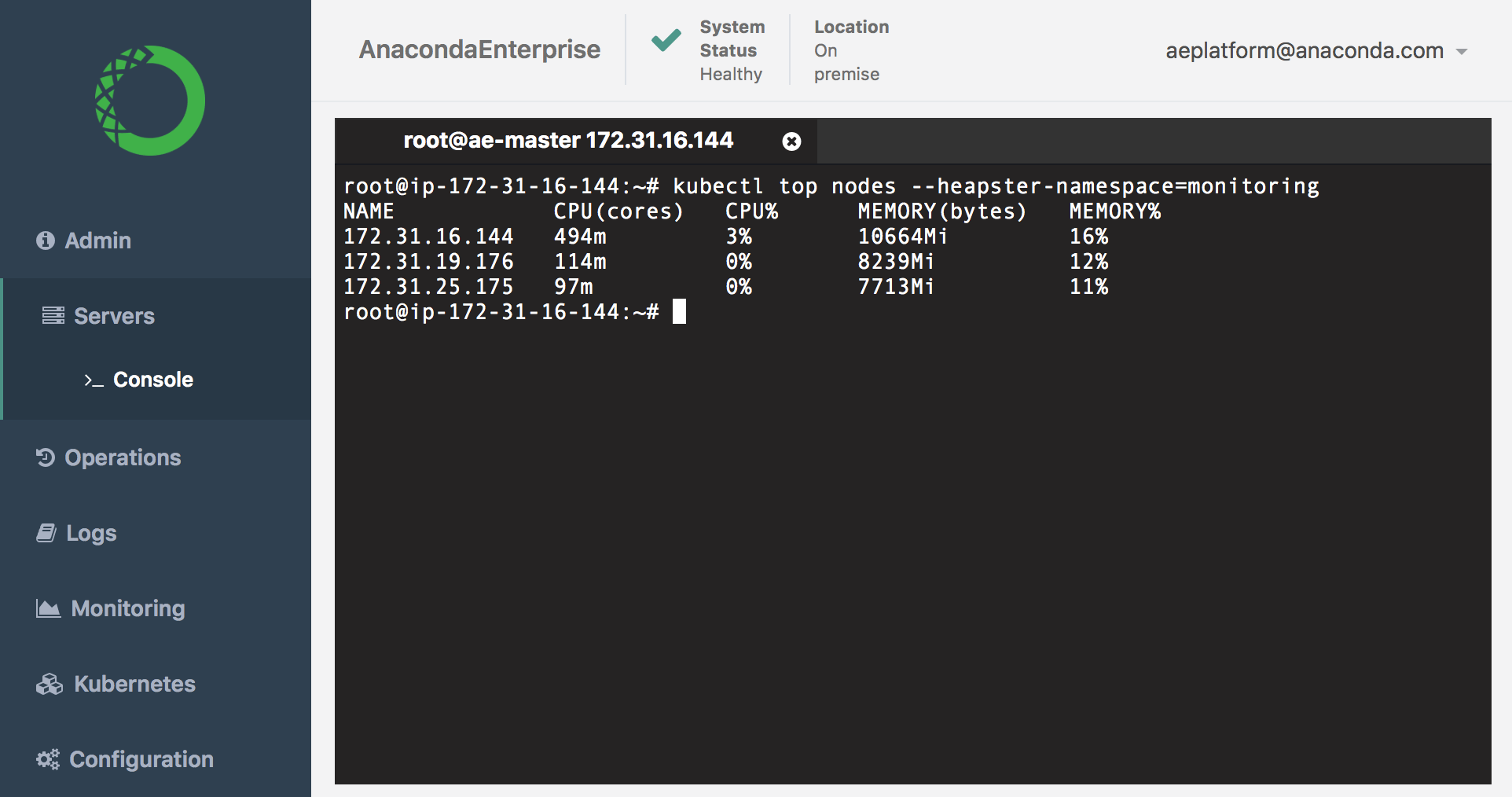
To display the current resource utilization of each node in the cluster, run this command:
kubectl top nodes --heapster-namespace=monitoring
This is actual resource utilization, not limits or requests.
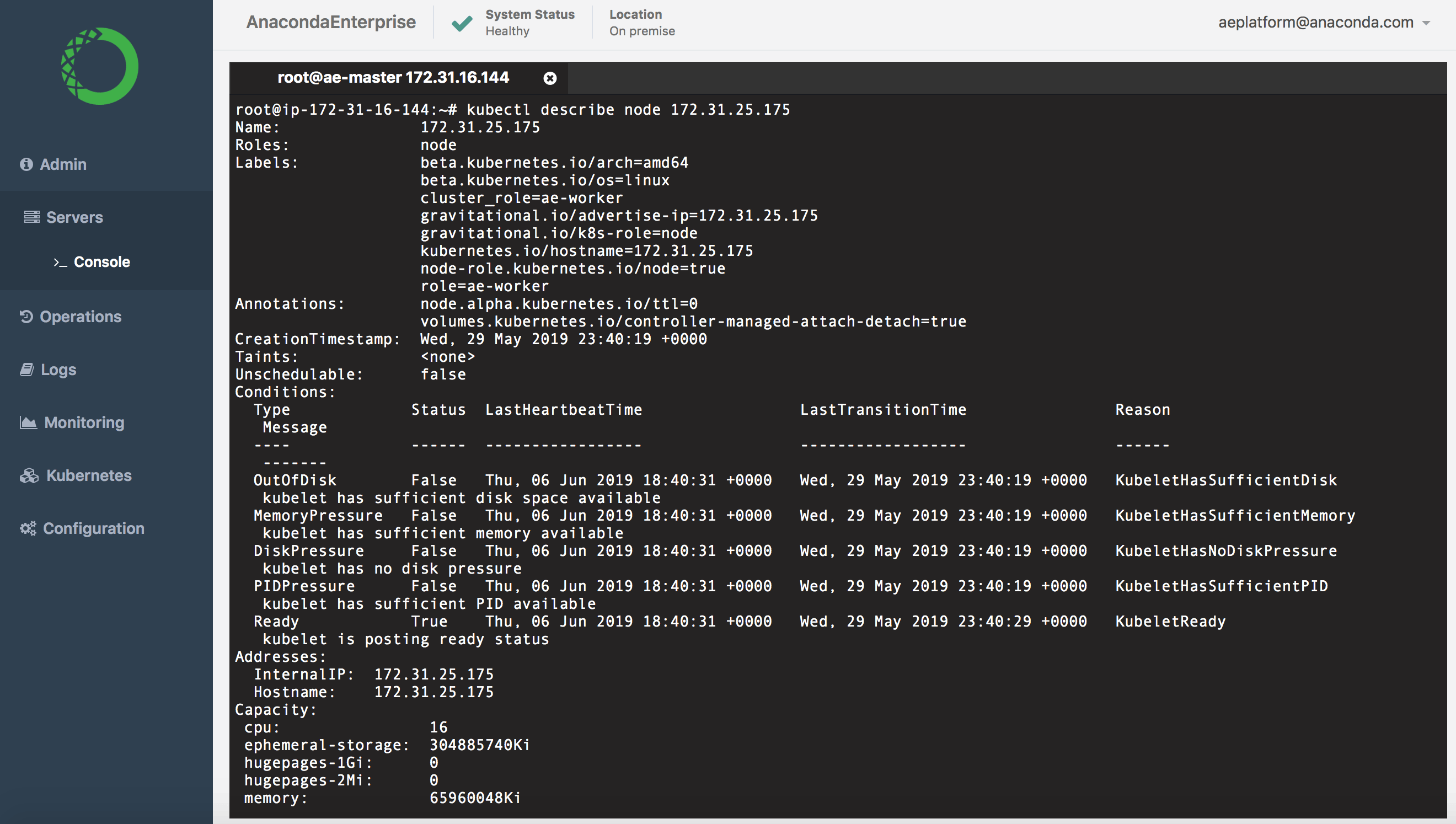
To view utilization and requests for a particular node, run the kubectl describe node command against the IP address for the node (listed under NAME). For example:
kubectl describe node 172.31.25.175
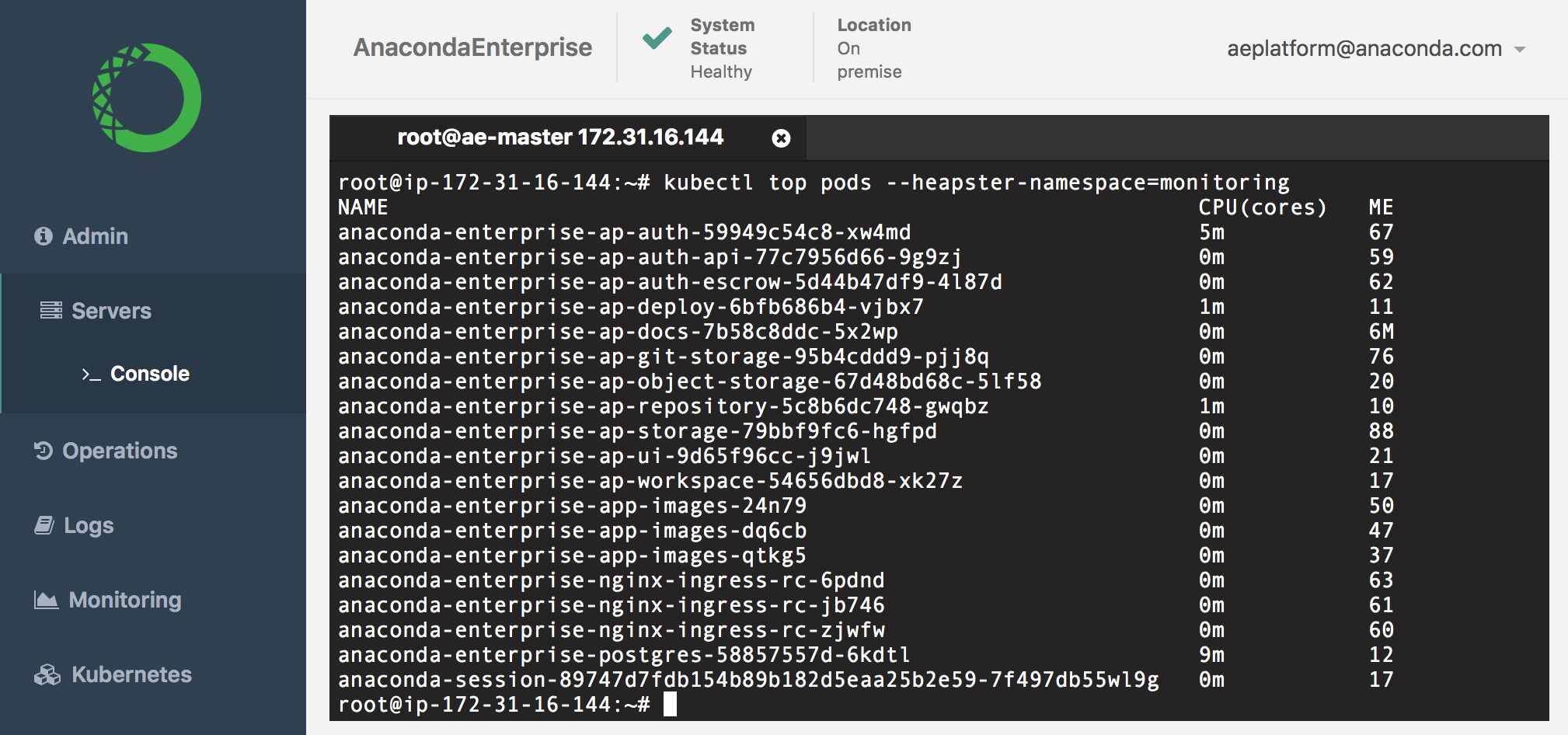
To view the resource utilization per pod, run this command:
kubectl top pods --heapster-namespace=monitoring
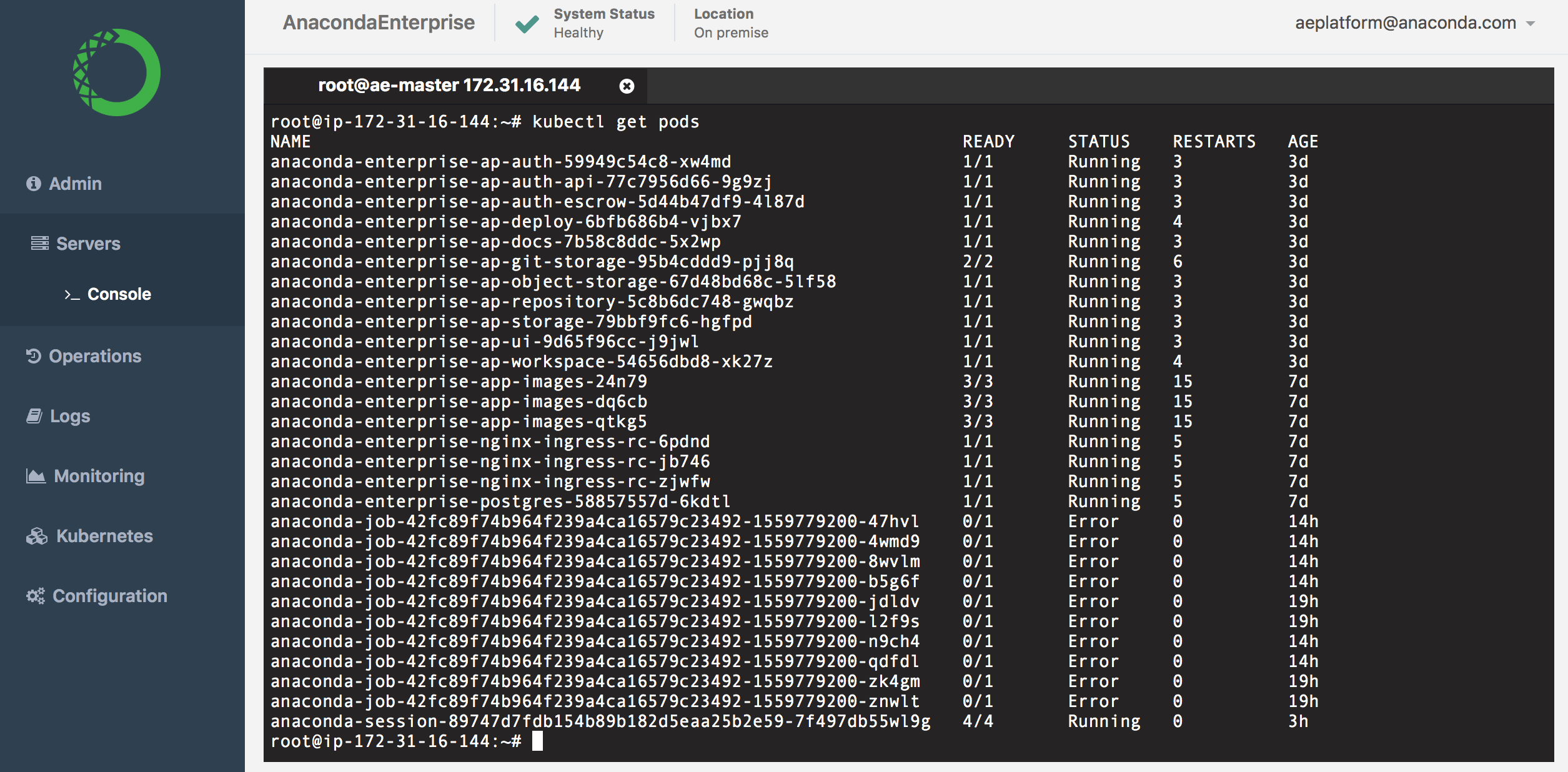
To view the current status of all pods in the cluster, run kubectl get pods.
The following table summarizes common pod states:
Status
Description
Running
The pod has been bound to a node, and at least one container is running.
Pending
The pod is waiting for one or more container images to be created.
Terminating
The pod is in the process of being terminated.
Error
An error has occurred with the pod.
Init:CrashLoopBackoff
The pod failed to start, and will make another attempt in a few minutes.
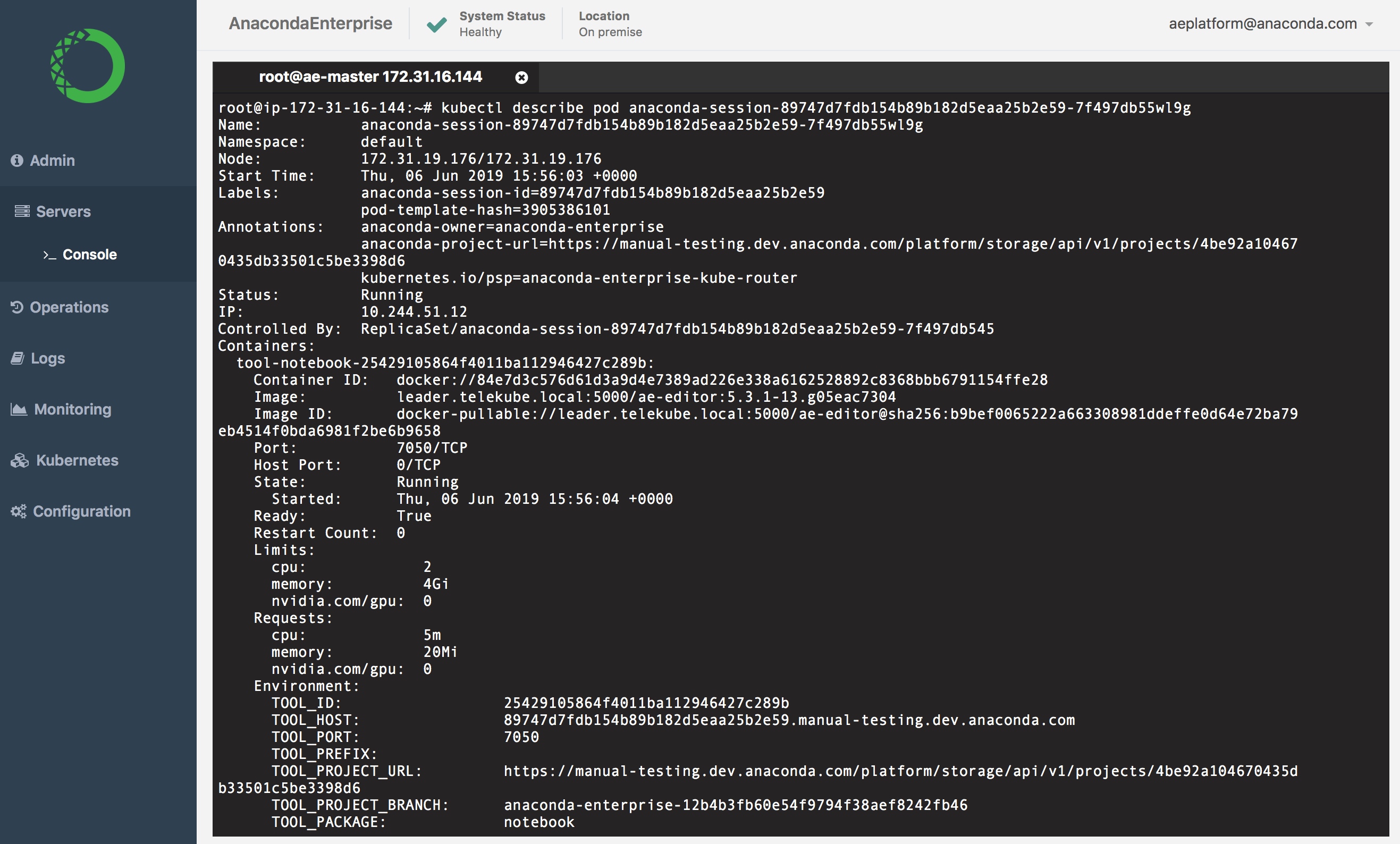
To view information for a particular pod, run the kubectl describe pod command against the pod (listed under NAME). For example:
kubectl describe pod anaconda-session-89747d7fdb154b89b182d5eaa25b2e59-7f497db55wl9g
You can also use the Operations Center Logs to gain insights into pod behavior and troubleshoot issues. See logging for more information.
User errors
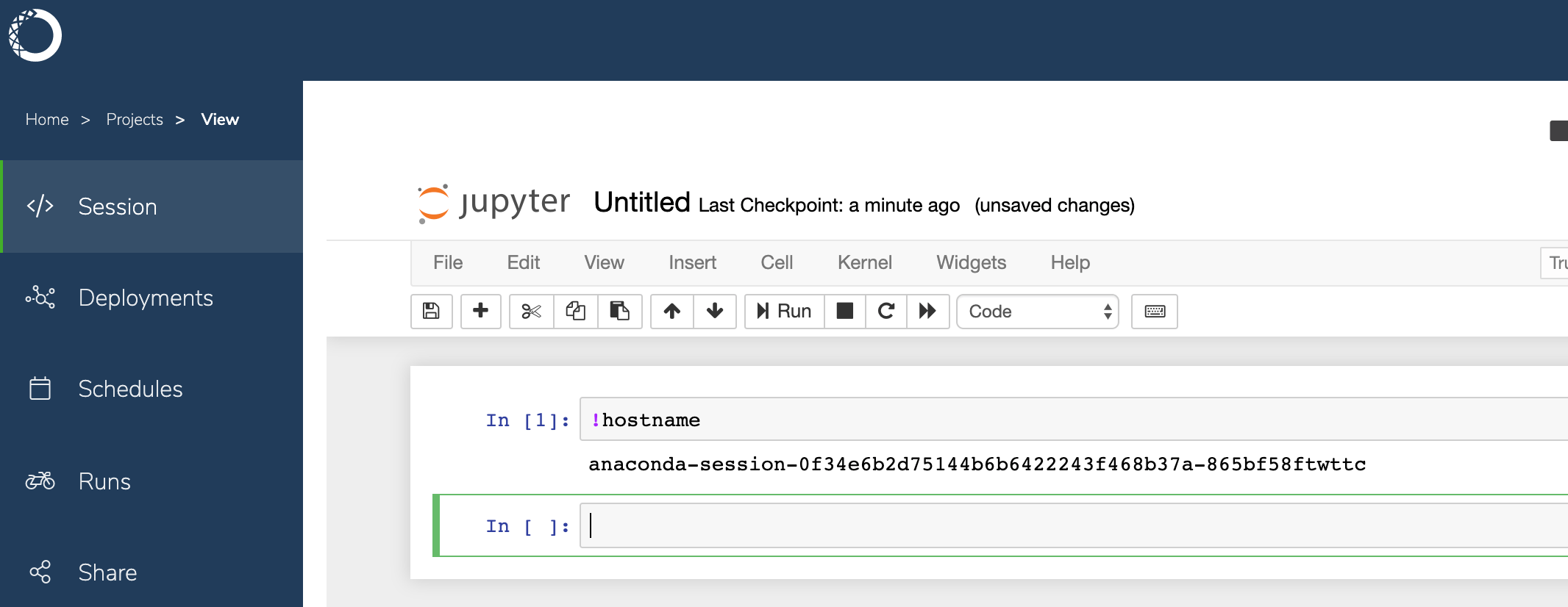
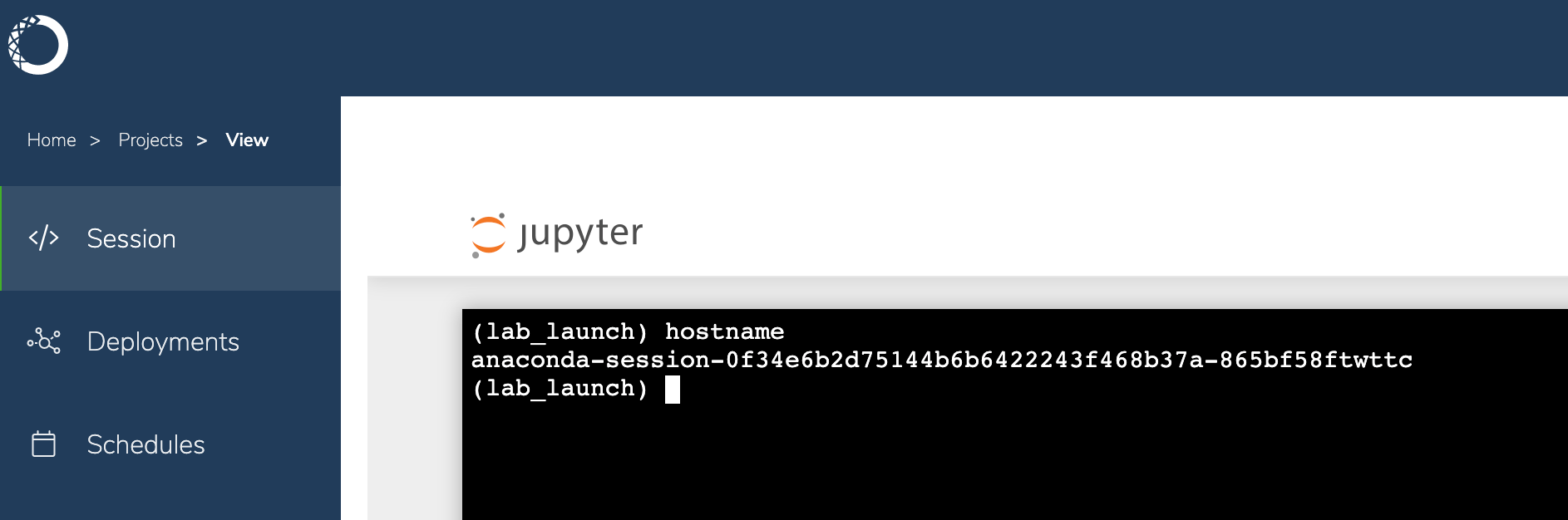
If a user experiences issues within a Notebook session, have them send you the name of the pod associated with their project session. They can obtain this information by running the hostname command from within a Jupyter Notebook or terminal window.
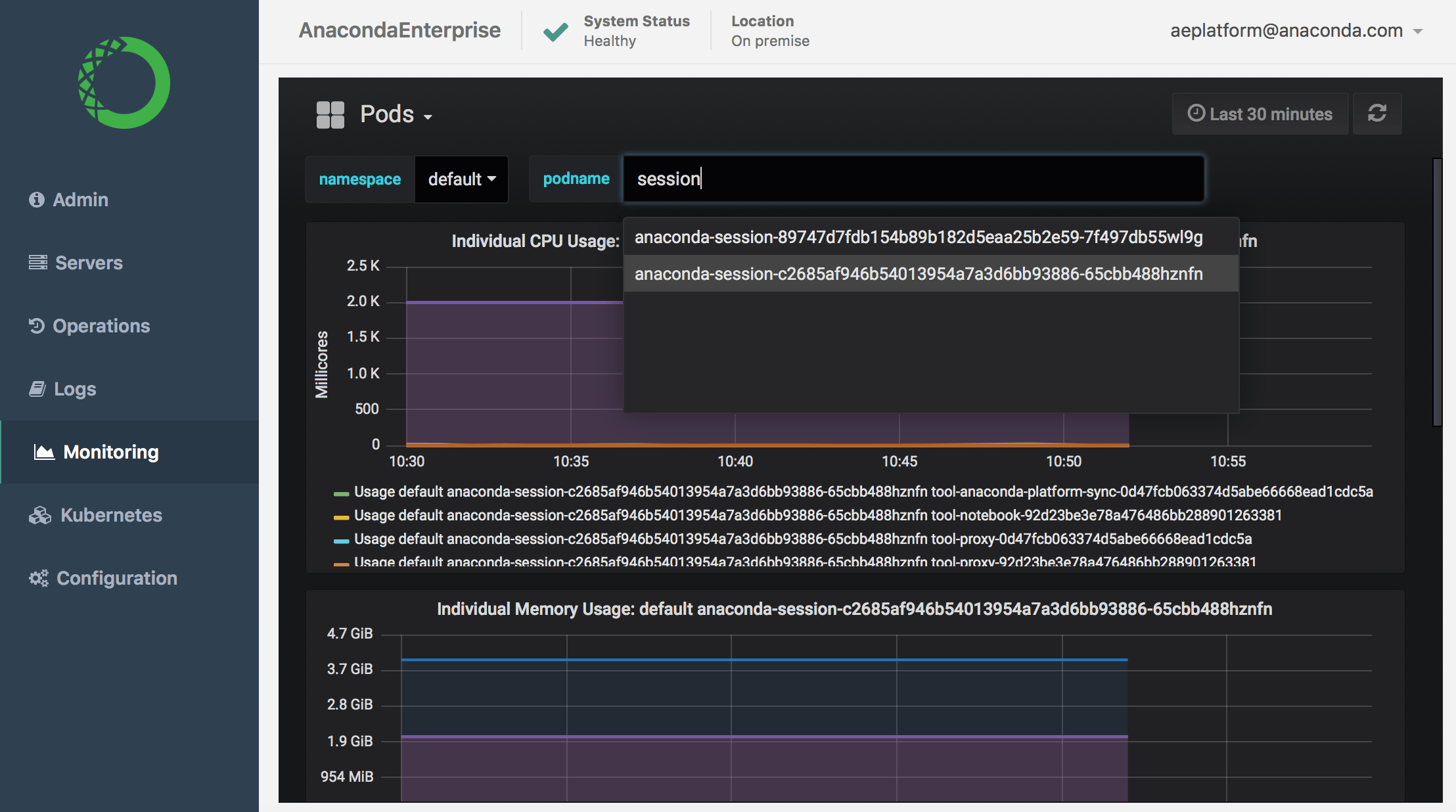
You can then use the commands described above or the Operation Center’s Monitoring and Logs features to investigate the issue. See Monitoring sessions and deployments for more information.
As an Administrator, you can also use the Authentication Center to impersonate a user to try to reproduce the problem they are experiencing.
To access the Authentication Center:
Login to Anaconda Enterprise, click the Menu icon in the top right corner, then click the Administrative Console link in the bottom of the slideout menu.
Click Manage Users.
In the Manage menu on the left, click Users.
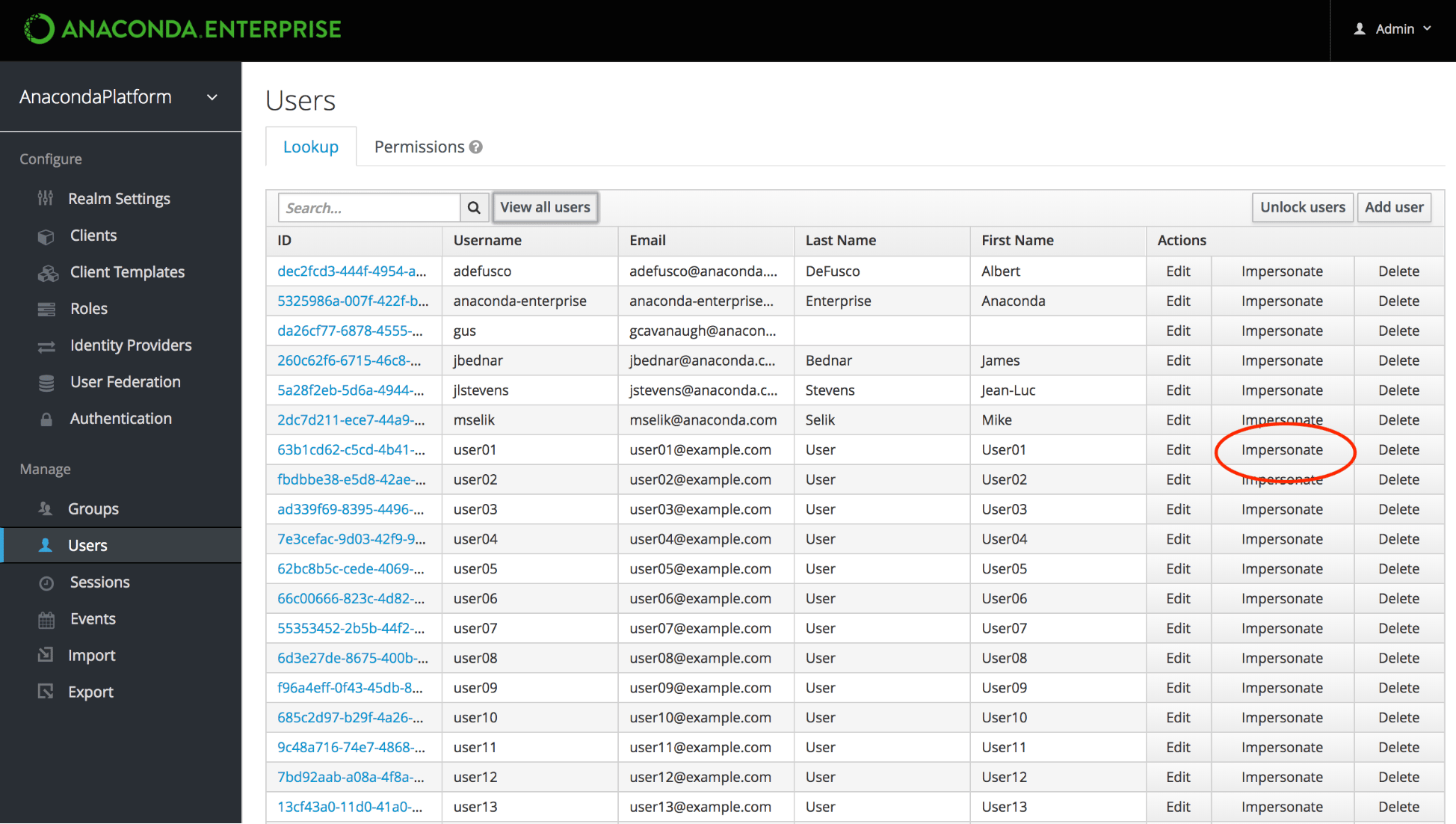
On the Lookup tab, click View all users to list every user in the system, or search the user database for all users that match the criteria you enter, based on their first name, last name, or email address.
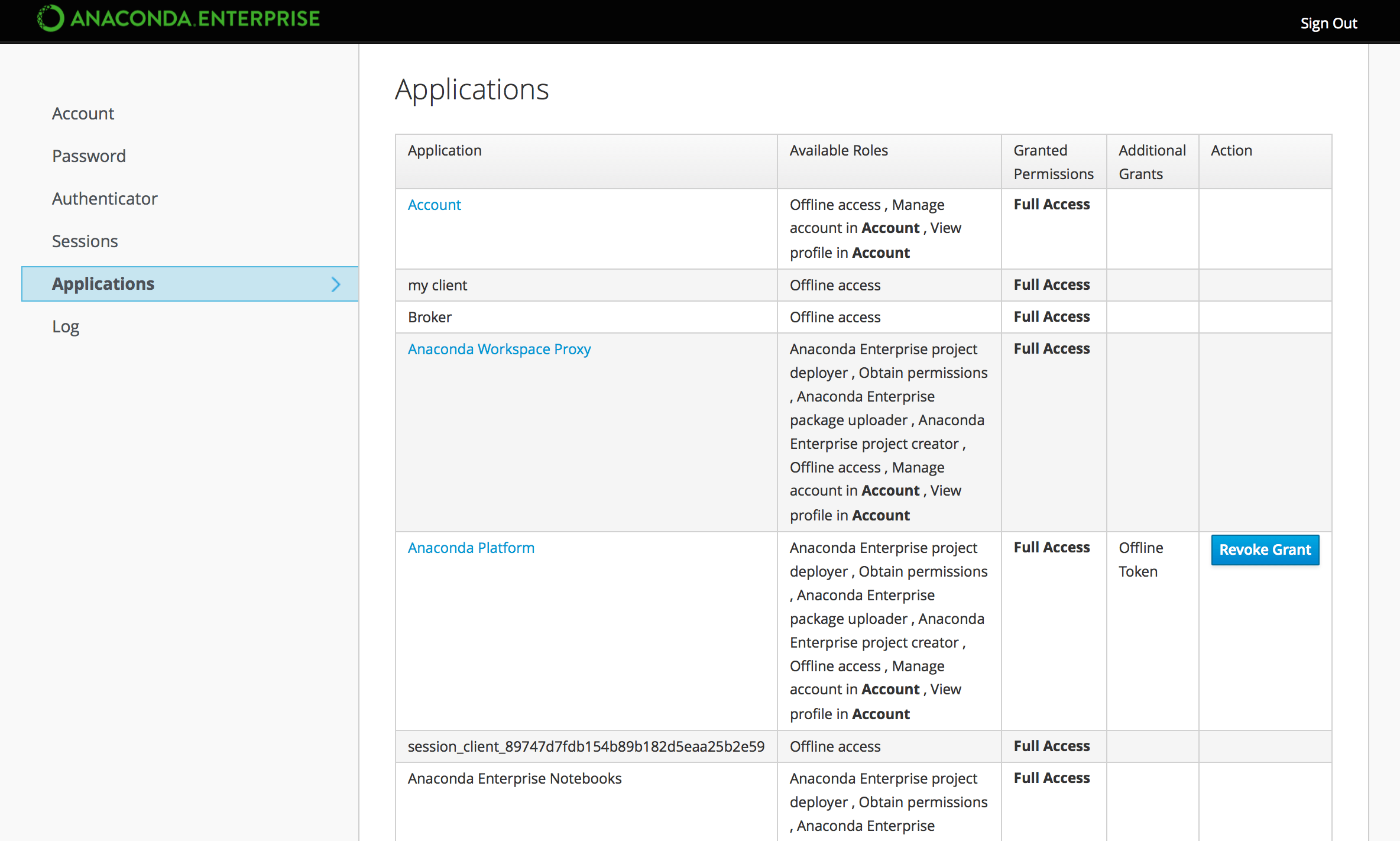
Click Impersonate in the row of Actions for the user to display a table of all Applications this user has interacted with on the platform, including editor sessions and deployments.
Click the Anaconda Platform lik to interact with Anaconda Enterprise as the user.
See Managing users for more information on managing users.
Editor sessions
To help you troubleshoot issues with editor sessions, it might be helpful to understand what is happening “behind the scenes”.
When a user starts a session, Anaconda Enterprise launches the appropriate editor for them to work with their project files. In the background, the editor environment and other services are running in Docker containers.
To improve startup time for projects, the editor container includes conda environments for each of the project template environments provided by the platform. These environments are stored in /opt/continuum/anaconda/envs, along with any custom environments created during the editor session.
The project repository is cloned into /opt/continuum/project. (Only changes to files in this directory can be saved to the repository.)
The anaconda-project prepare command runs, scans the project’s anaconda-project.yml file for new packages and environments, and installs them into the running session.During this phase, you can monitor the progress by watching the output of /opt/continuum/preparing.When this process completes, the /opt/continuum/prepare.log is created.
Any changes made to the container image will be lost when the session stops, so any packages installed from the command line are available during the current session only. To persist package installs across sessions, they must be added to the project’s anaconda-project.yml file.
Was this page helpful?
{"docsConfig":{"theme":"mint","$schema":"https://mintlify.com/docs.json","name":"Anaconda","description":"Guides, tutorials, and reference material for Anaconda's Python, data science, and AI tools","colors":{"primary":"#1d6cf7","light":"#1d6cf7","dark":"#96f778"},"logo":{"light":"https://mintcdn.com/anaconda-29683c67/s-9WR15r5rZoaPqb/logo/light.svg?fit=max\u0026auto=format\u0026n=s-9WR15r5rZoaPqb\u0026q=85\u0026s=5996719b8530aaf065dc1ee1f39b2e67","dark":"https://mintcdn.com/anaconda-29683c67/s-9WR15r5rZoaPqb/logo/dark.svg?fit=max\u0026auto=format\u0026n=s-9WR15r5rZoaPqb\u0026q=85\u0026s=db482b1eac6af589d234160a76de3400","href":"https://www.anaconda.com/docs/main"},"favicon":"https://mintcdn.com/anaconda-29683c67/p8JNFuYYvTL8gfpM/favicon.png?fit=max\u0026auto=format\u0026n=p8JNFuYYvTL8gfpM\u0026q=85\u0026s=51a585758330bbe8f1ea032113854252","api":{"playground":{"display":"simple"}},"background":{"color":{"light":"#F7F8F9","dark":"#10121a"}},"navbar":{},"footer":{"socials":{"linkedin":"https://www.linkedin.com/company/anacondainc","github":"https://github.com/ContinuumIO","youtube":"https://www.youtube.com/c/ContinuumIo"},"links":[{"header":"Company","items":[{"label":"Anaconda Newsletter","href":"https://www.anaconda.com/newsletter"}]}]},"seo":{"metatags":{"canonical":"https://www.anaconda.com/docs"}},"styling":{"eyebrows":"breadcrumbs","latex":false},"integrations":{"ga4":{"measurementId":"G-VQTY6YKM6J"},"heap":{"appId":"758475466"}},"contextual":{"options":["claude","chatgpt","perplexity","cursor","vscode","add-mcp","copy"],"display":"header"},"navigation":{"pages":[]}},"deployment":{"deploymentMetadataValue":{"subdomain":"anaconda-29683c67","hasAudioNarration":false,"actualSubdomain":"anaconda-29683c67","customDomains":["anaconda.com"],"gitSource":{"type":"github","owner":"anaconda","repo":"documentation","deployBranch":"main","contentDirectory":"","isPrivate":true,"mountPath":"","label":""},"feedback":{"thumbs":true,"contextualFeedback":{"allowEmail":true,"emailDisclaimer":"Your email will only be used to follow up on this feedback."}},"entitlements":{"AI_CHAT":{"status":"ENABLED"},"REMOVE_BRANDING":{"status":"ENABLED"},"CONTEXTUAL_FEEDBACK":{"status":"ENABLED"},"CODE_SNIPPET_FEEDBACK":{"status":"ENABLED"},"WEB_MCP":{"status":"ENABLED"},"NARRATION":{"status":"ENABLED"}},"buildId":"6af738125dcd64e14d2f7b94","clientVersion":"0.0.4143","searchFilterCounts":[{"language":"default","tag":"Data Science \u0026 AI Workbench","count":240},{"language":"default","tag":"Anaconda Platform","count":152},{"language":"default","tag":"Package Security Manager","count":128},{"language":"default","tag":"Anaconda CLI","count":112},{"language":"default","tag":"Guides","count":105},{"language":"default","tag":"Anaconda CLI \u0026 MCP","count":104},{"language":"default","tag":"Plugins","count":93},{"language":"default","tag":"Commands","count":91},{"language":"default","tag":"Platform Guides","count":86},{"language":"default","tag":"Anaconda Desktop","count":82}],"searchSettings":{"isFiltersEnabled":true}},"assistantConfig":{"enableAskAiButton":false,"enableStarterQuestions":true,"enableContextualStarterQuestions":true,"deflection":{"enabled":true,"email":"support@anaconda.com"}},"basePath":"/docs","hasChatPermissions":true,"hasWebMcpPermissions":true,"toggles":[{"name":"kill-isr","enabled":true,"variant":{"name":"disabled","enabled":false,"feature_enabled":true},"impressionData":false},{"name":"custom-rbac-roles","enabled":true,"variant":{"name":"disabled","enabled":false,"feature_enabled":true},"impressionData":false},{"name":"agent-mintlify-slack","enabled":true,"variant":{"name":"disabled","enabled":false,"feature_enabled":true},"impressionData":false},{"name":"agent-integrations-settings","enabled":true,"variant":{"name":"disabled","enabled":false,"feature_enabled":true},"impressionData":false},{"name":"rbac-expansion","enabled":true,"variant":{"name":"disabled","enabled":false,"feature_enabled":true},"impressionData":false},{"name":"automations-pr-grouping","enabled":true,"variant":{"name":"disabled","enabled":false,"feature_enabled":true},"impressionData":false},{"name":"custom-prefix","enabled":true,"variant":{"name":"disabled","enabled":false,"feature_enabled":true},"impressionData":false},{"name":"analytics-v7","enabled":true,"variant":{"name":"disabled","enabled":false,"feature_enabled":true},"impressionData":false},{"name":"user-flows-analytics","enabled":true,"variant":{"name":"disabled","enabled":false,"feature_enabled":true},"impressionData":false},{"name":"no-publish-flow","enabled":true,"variant":{"name":"disabled","enabled":false,"feature_enabled":true},"impressionData":false},{"name":"workos-onboarding","enabled":true,"variant":{"name":"disabled","enabled":false,"feature_enabled":true},"impressionData":false},{"name":"snapshot-serving-live","enabled":true,"variant":{"name":"disabled","enabled":false,"feature_enabled":true},"impressionData":false},{"name":"stripTemperatureMiddleware","enabled":true,"variant":{"name":"disabled","enabled":false,"feature_enabled":true},"impressionData":false},{"name":"support-platform-pylon-zendesk","enabled":true,"variant":{"name":"disabled","enabled":false,"feature_enabled":true},"impressionData":false},{"name":"snapshot-serving","enabled":true,"variant":{"name":"disabled","enabled":false,"feature_enabled":true},"impressionData":false},{"name":"instant-rollback","enabled":true,"variant":{"name":"disabled","enabled":false,"feature_enabled":true},"impressionData":false},{"name":"granular-notifications-server","enabled":true,"variant":{"name":"disabled","enabled":false,"feature_enabled":true},"impressionData":false},{"name":"granular-notifications","enabled":true,"variant":{"name":"disabled","enabled":false,"feature_enabled":true},"impressionData":false},{"name":"automations-fable","enabled":true,"variant":{"name":"disabled","enabled":false,"feature_enabled":true},"impressionData":false},{"name":"fixed-ai-action-pricing","enabled":true,"variant":{"name":"disabled","enabled":false,"feature_enabled":true},"impressionData":false},{"name":"automation-resolve-merge-conflict","enabled":true,"variant":{"name":"disabled","enabled":false,"feature_enabled":true},"impressionData":false},{"name":"scoped-publishing","enabled":true,"variant":{"name":"disabled","enabled":false,"feature_enabled":true},"impressionData":false},{"name":"mintql","enabled":true,"variant":{"name":"disabled","enabled":false,"feature_enabled":true},"impressionData":false},{"name":"page-level-analytics","enabled":true,"variant":{"name":"disabled","enabled":false,"feature_enabled":true},"impressionData":false},{"name":"editor-version-history-v2","enabled":true,"variant":{"name":"disabled","enabled":false,"feature_enabled":true},"impressionData":false},{"name":"billing-page-v2","enabled":true,"variant":{"name":"disabled","enabled":false,"feature_enabled":true},"impressionData":false},{"name":"full-page-search","enabled":true,"variant":{"name":"disabled","enabled":false,"feature_enabled":true},"impressionData":false},{"name":"workspace-projects","enabled":true,"variant":{"name":"disabled","enabled":false,"feature_enabled":true},"impressionData":false},{"name":"assistant-v5","enabled":true,"variant":{"name":"disabled","enabled":false,"feature_enabled":true},"impressionData":false},{"name":"fork-pr-previews","enabled":true,"variant":{"name":"disabled","enabled":false,"feature_enabled":true},"impressionData":false},{"name":"revalidation-jwt","enabled":true,"variant":{"name":"disabled","enabled":false,"feature_enabled":true},"impressionData":false},{"name":"workos-sso-scim","enabled":true,"variant":{"name":"disabled","enabled":false,"feature_enabled":true},"impressionData":false},{"name":"hobby-abuse-scan","enabled":true,"variant":{"name":"disabled","enabled":false,"feature_enabled":true},"impressionData":false},{"name":"dashboard-inbox","enabled":true,"variant":{"name":"disabled","enabled":false,"feature_enabled":true},"impressionData":false},{"name":"workos-signup","enabled":true,"variant":{"name":"disabled","enabled":false,"feature_enabled":true},"impressionData":false},{"name":"turbopuffer-dual-write","enabled":true,"variant":{"name":"disabled","enabled":false,"feature_enabled":true},"impressionData":false},{"name":"workos-enabled","enabled":true,"variant":{"name":"disabled","enabled":false,"feature_enabled":true},"impressionData":false},{"name":"approve-review-flow","enabled":true,"variant":{"name":"disabled","enabled":false,"feature_enabled":true},"impressionData":false},{"name":"editor-metadata","enabled":true,"variant":{"name":"disabled","enabled":false,"feature_enabled":true},"impressionData":false},{"name":"sso-setup-deadline-banner","enabled":true,"variant":{"name":"disabled","enabled":false,"feature_enabled":true},"impressionData":false},{"name":"turbopuffer-serve","enabled":true,"variant":{"name":"disabled","enabled":false,"feature_enabled":true},"impressionData":false},{"name":"live-agents","enabled":true,"variant":{"name":"disabled","enabled":false,"feature_enabled":true},"impressionData":false},{"name":"llms-txt-v2","enabled":true,"variant":{"name":"disabled","enabled":false,"feature_enabled":true},"impressionData":false}],"googleFontsInlined":false},"customCss":[{"filePath":"custom.css","href":"/docs/_mintlify/custom/anaconda-29683c67/eb7540b1d8a9e65b/custom.css"}],"page":{"pagePath":"data-science/5.5.1/troubleshoot","slug":"/data-science/5.5.1/troubleshoot","pageMetadata":{"noindex":true,"title":"Troubleshooting","keywords":["troubleshooting","debugging","user","errors"],"description":null,"href":"/data-science/5.5.1/troubleshoot"},"pageType":"default","mdx":{"mdxSource":{"compiledSource":"\"use strict\";const{Fragment:_Fragment,jsx:_jsx,jsxs:_jsxs}=arguments[0];const{useMDXComponents:_provideComponents}=arguments[0];function _createMdxContent(props){const _components={a:`a`,code:`code`,em:`em`,hr:`hr`,li:`li`,ol:`ol`,p:`p`,pre:`pre`,span:`span`,strong:`strong`,tbody:`tbody`,td:`td`,th:`th`,thead:`thead`,tr:`tr`,ul:`ul`,..._provideComponents(),...props.components},{CodeBlock,Frame,Heading,Icon,Note,OptimizedImage,Table,Tip,Warning}=_components;if(!CodeBlock)_missingMdxReference(`CodeBlock`,true);if(!Frame)_missingMdxReference(`Frame`,true);if(!Heading)_missingMdxReference(`Heading`,true);if(!Icon)_missingMdxReference(`Icon`,true);if(!Note)_missingMdxReference(`Note`,true);if(!OptimizedImage)_missingMdxReference(`OptimizedImage`,true);if(!Table)_missingMdxReference(`Table`,true);if(!Tip)_missingMdxReference(`Tip`,true);if(!Warning)_missingMdxReference(`Warning`,true);return _jsxs(_Fragment,{children:[_jsx(_components.p,{children:`Anaconda Enterprise provides detailed logs and monitoring information related to the Kubernetes services and containers it uses. You can use the Operations Center and Kubernetes CLI to access this information, to help diagnose and debug errors that you or other users may encounter while using the platform.`}),`\n`,_jsx(_components.hr,{}),`\n`,_jsx(Heading,{level:`2`,id:`the-anaconda-enterprise-cluster`,children:`The Anaconda Enterprise cluster`}),`\n`,_jsxs(_components.p,{children:[`As an Operations Center Admin, you can use the `,_jsx(_components.a,{href:`/data-science/5.5.1/admin/consoles#the-operations-center`,children:`Operations Center`}),` to configure and monitor the platform.`]}),`\n`,_jsx(_components.p,{children:_jsx(_components.strong,{children:`To access the Operations Center:`})}),`\n`,_jsxs(_components.ol,{children:[`\n`,_jsxs(_components.li,{children:[`\n`,_jsxs(_components.p,{children:[`Log in to Anaconda Enterprise, select the `,_jsx(_components.strong,{children:`Menu`}),` icon `,_jsx(Icon,{icon:`user`,iconType:`regular`}),` in the top right corner, and click the `,_jsx(_components.strong,{children:`Administrative Console`}),` link displayed at the bottom of the slide out window.`]}),`\n`]}),`\n`,_jsxs(_components.li,{children:[`\n`,_jsxs(_components.p,{children:[`Click `,_jsx(_components.strong,{children:`Manage Resources`}),`.`]}),`\n`]}),`\n`,_jsxs(_components.li,{children:[`\n`,_jsxs(_components.p,{children:[`Login to the Operations Center using the Administrator credentials `,_jsx(_components.a,{href:`/data-science/5.5.1/install/config`,children:`configured after installation`}),`.`]}),`\n`]}),`\n`]}),`\n`,_jsx(_components.p,{children:_jsx(_components.strong,{children:`To view resource utilization:`})}),`\n`,_jsxs(_components.ol,{children:[`\n`,_jsxs(_components.li,{children:[`\n`,_jsxs(_components.p,{children:[`Select `,_jsx(_components.strong,{children:`Servers`}),` in the menu on the left.`]}),`\n`]}),`\n`,_jsxs(_components.li,{children:[`\n`,_jsxs(_components.p,{children:[`Click on the Private IP address of the Anaconda Enterprise master node, and select `,_jsx(_components.strong,{children:`SSH login as root`}),`.`]}),`\n`,_jsx(Frame,{children:_jsx(OptimizedImage,{src:`https://mintcdn.com/anaconda-29683c67/Jbxn1KJ0XaeZeGhX/images/data-science/ssh_master_node.png?fit=max\u0026auto=format\u0026n=Jbxn1KJ0XaeZeGhX\u0026q=85\u0026s=2788e68d14419a2b06dbfa0967f2e2ad`,alt:``,\"data-og-width\":`2032`,width:`2032`,\"data-og-height\":`960`,height:`960`,\"data-path\":`images/data-science/ssh_master_node.png`,\"data-optimize\":`true`,\"data-opv\":`3`,srcset:`https://mintcdn.com/anaconda-29683c67/Jbxn1KJ0XaeZeGhX/images/data-science/ssh_master_node.png?w=280\u0026fit=max\u0026auto=format\u0026n=Jbxn1KJ0XaeZeGhX\u0026q=85\u0026s=842cca6b3641842d13be6de81d2029ea 280w, https://mintcdn.com/anaconda-29683c67/Jbxn1KJ0XaeZeGhX/images/data-science/ssh_master_node.png?w=560\u0026fit=max\u0026auto=format\u0026n=Jbxn1KJ0XaeZeGhX\u0026q=85\u0026s=b13c83b98b31615484fd842929db78ce 560w, https://mintcdn.com/anaconda-29683c67/Jbxn1KJ0XaeZeGhX/images/data-science/ssh_master_node.png?w=840\u0026fit=max\u0026auto=format\u0026n=Jbxn1KJ0XaeZeGhX\u0026q=85\u0026s=879f5f4ceec3d89b64f1514ca342ed28 840w, https://mintcdn.com/anaconda-29683c67/Jbxn1KJ0XaeZeGhX/images/data-science/ssh_master_node.png?w=1100\u0026fit=max\u0026auto=format\u0026n=Jbxn1KJ0XaeZeGhX\u0026q=85\u0026s=8fcd2a3d6539ec39316bbcd84fa71fc7 1100w, https://mintcdn.com/anaconda-29683c67/Jbxn1KJ0XaeZeGhX/images/data-science/ssh_master_node.png?w=1650\u0026fit=max\u0026auto=format\u0026n=Jbxn1KJ0XaeZeGhX\u0026q=85\u0026s=16634b2cfacc1b836688f9717855503a 1650w, https://mintcdn.com/anaconda-29683c67/Jbxn1KJ0XaeZeGhX/images/data-science/ssh_master_node.png?w=2500\u0026fit=max\u0026auto=format\u0026n=Jbxn1KJ0XaeZeGhX\u0026q=85\u0026s=4de5c789793c7bb0ba6044ea5a7ba069 2500w`})}),`\n`]}),`\n`,_jsxs(_components.li,{children:[`\n`,_jsxs(_components.p,{children:[`To display the current resource utilization of each `,_jsx(_components.em,{children:`node`}),` in the cluster, run this command:`]}),`\n`,_jsx(CodeBlock,{numberOfLines:`3`,language:`text`,children:_jsx(_components.pre,{className:`shiki shiki-themes github-light-default dark-plus`,style:{backgroundColor:`#ffffff`,\"--shiki-dark-bg\":`#0B0C0E`,color:`#1f2328`,\"--shiki-dark\":`#D4D4D4`},language:`text`,children:_jsxs(_components.code,{language:`text`,numberOfLines:`3`,children:[_jsx(_components.span,{className:`line`,children:_jsx(_components.span,{children:`kubectl top nodes --heapster-namespace=monitoring`})}),`\n`,_jsx(_components.span,{className:`line`,children:_jsx(_components.span,{})}),`\n`,_jsx(_components.span,{className:`line`,children:_jsx(_components.span,{})})]})})}),`\n`,_jsx(Frame,{children:_jsx(OptimizedImage,{src:`https://mintcdn.com/anaconda-29683c67/yg2lVfLe5JTI9sv-/images/data-science/node_utilization.png?fit=max\u0026auto=format\u0026n=yg2lVfLe5JTI9sv-\u0026q=85\u0026s=ceed32b8bfb53d49691dc3dd04ed7eff`,alt:``,\"data-og-width\":`1924`,width:`1924`,\"data-og-height\":`1014`,height:`1014`,\"data-path\":`images/data-science/node_utilization.png`,\"data-optimize\":`true`,\"data-opv\":`3`,srcset:`https://mintcdn.com/anaconda-29683c67/yg2lVfLe5JTI9sv-/images/data-science/node_utilization.png?w=280\u0026fit=max\u0026auto=format\u0026n=yg2lVfLe5JTI9sv-\u0026q=85\u0026s=07127c03d0241fa28092f1ffbfd44a5a 280w, https://mintcdn.com/anaconda-29683c67/yg2lVfLe5JTI9sv-/images/data-science/node_utilization.png?w=560\u0026fit=max\u0026auto=format\u0026n=yg2lVfLe5JTI9sv-\u0026q=85\u0026s=01839c1788abbecf694b8e353896c01a 560w, https://mintcdn.com/anaconda-29683c67/yg2lVfLe5JTI9sv-/images/data-science/node_utilization.png?w=840\u0026fit=max\u0026auto=format\u0026n=yg2lVfLe5JTI9sv-\u0026q=85\u0026s=0fd962e0e81ec0ca80657fa4b687044a 840w, https://mintcdn.com/anaconda-29683c67/yg2lVfLe5JTI9sv-/images/data-science/node_utilization.png?w=1100\u0026fit=max\u0026auto=format\u0026n=yg2lVfLe5JTI9sv-\u0026q=85\u0026s=4036880763773c82f3316d2a1f47cec2 1100w, https://mintcdn.com/anaconda-29683c67/yg2lVfLe5JTI9sv-/images/data-science/node_utilization.png?w=1650\u0026fit=max\u0026auto=format\u0026n=yg2lVfLe5JTI9sv-\u0026q=85\u0026s=394de924addb60b6c58aee694ca8a525 1650w, https://mintcdn.com/anaconda-29683c67/yg2lVfLe5JTI9sv-/images/data-science/node_utilization.png?w=2500\u0026fit=max\u0026auto=format\u0026n=yg2lVfLe5JTI9sv-\u0026q=85\u0026s=8132c8bf26df1b2c20ed25a19fd3fc0c 2500w`})}),`\n`,_jsx(Note,{children:_jsx(_components.p,{children:`This is actual resource utilization, not limits or requests.`})}),`\n`]}),`\n`,_jsxs(_components.li,{children:[`\n`,_jsxs(_components.p,{children:[`To view utilization `,_jsx(_components.em,{children:`and requests`}),` for a particular node, run the `,_jsx(_components.code,{children:`kubectl describe node`}),` command against the IP address for the node (listed under `,_jsx(_components.code,{children:`NAME`}),`). For example:`]}),`\n`,_jsx(CodeBlock,{numberOfLines:`3`,language:`text`,children:_jsx(_components.pre,{className:`shiki shiki-themes github-light-default dark-plus`,style:{backgroundColor:`#ffffff`,\"--shiki-dark-bg\":`#0B0C0E`,color:`#1f2328`,\"--shiki-dark\":`#D4D4D4`},language:`text`,children:_jsxs(_components.code,{language:`text`,numberOfLines:`3`,children:[_jsx(_components.span,{className:`line`,children:_jsx(_components.span,{children:`kubectl describe node 172.31.25.175`})}),`\n`,_jsx(_components.span,{className:`line`,children:_jsx(_components.span,{})}),`\n`,_jsx(_components.span,{className:`line`,children:_jsx(_components.span,{})})]})})}),`\n`,_jsx(Frame,{children:_jsx(OptimizedImage,{src:`https://mintcdn.com/anaconda-29683c67/yg2lVfLe5JTI9sv-/images/data-science/node_requests.png?fit=max\u0026auto=format\u0026n=yg2lVfLe5JTI9sv-\u0026q=85\u0026s=643027e68663e422853ca731a1569fa4`,alt:``,\"data-og-width\":`2640`,width:`2640`,\"data-og-height\":`1494`,height:`1494`,\"data-path\":`images/data-science/node_requests.png`,\"data-optimize\":`true`,\"data-opv\":`3`,srcset:`https://mintcdn.com/anaconda-29683c67/yg2lVfLe5JTI9sv-/images/data-science/node_requests.png?w=280\u0026fit=max\u0026auto=format\u0026n=yg2lVfLe5JTI9sv-\u0026q=85\u0026s=fca652f1c7b775633568b6f84b70e226 280w, https://mintcdn.com/anaconda-29683c67/yg2lVfLe5JTI9sv-/images/data-science/node_requests.png?w=560\u0026fit=max\u0026auto=format\u0026n=yg2lVfLe5JTI9sv-\u0026q=85\u0026s=eee48641cb3a94cfe777fd232075cd74 560w, https://mintcdn.com/anaconda-29683c67/yg2lVfLe5JTI9sv-/images/data-science/node_requests.png?w=840\u0026fit=max\u0026auto=format\u0026n=yg2lVfLe5JTI9sv-\u0026q=85\u0026s=b00122fecbe4f9b93785ef03d8e5b854 840w, https://mintcdn.com/anaconda-29683c67/yg2lVfLe5JTI9sv-/images/data-science/node_requests.png?w=1100\u0026fit=max\u0026auto=format\u0026n=yg2lVfLe5JTI9sv-\u0026q=85\u0026s=bec1f360c2747a076f18abf18b765edd 1100w, https://mintcdn.com/anaconda-29683c67/yg2lVfLe5JTI9sv-/images/data-science/node_requests.png?w=1650\u0026fit=max\u0026auto=format\u0026n=yg2lVfLe5JTI9sv-\u0026q=85\u0026s=34b15f0e7b77b179e81448ba87da5dce 1650w, https://mintcdn.com/anaconda-29683c67/yg2lVfLe5JTI9sv-/images/data-science/node_requests.png?w=2500\u0026fit=max\u0026auto=format\u0026n=yg2lVfLe5JTI9sv-\u0026q=85\u0026s=1f24bc165774dfe26354f1786616b9c8 2500w`})}),`\n`]}),`\n`,_jsxs(_components.li,{children:[`\n`,_jsxs(_components.p,{children:[`To view the resource utilization per `,_jsx(_components.em,{children:`pod`}),`, run this command:`]}),`\n`,_jsx(CodeBlock,{numberOfLines:`3`,language:`text`,children:_jsx(_components.pre,{className:`shiki shiki-themes github-light-default dark-plus`,style:{backgroundColor:`#ffffff`,\"--shiki-dark-bg\":`#0B0C0E`,color:`#1f2328`,\"--shiki-dark\":`#D4D4D4`},language:`text`,children:_jsxs(_components.code,{language:`text`,numberOfLines:`3`,children:[_jsx(_components.span,{className:`line`,children:_jsx(_components.span,{children:`kubectl top pods --heapster-namespace=monitoring`})}),`\n`,_jsx(_components.span,{className:`line`,children:_jsx(_components.span,{})}),`\n`,_jsx(_components.span,{className:`line`,children:_jsx(_components.span,{})})]})})}),`\n`,_jsx(Frame,{children:_jsx(OptimizedImage,{src:`https://mintcdn.com/anaconda-29683c67/Jbxn1KJ0XaeZeGhX/images/data-science/pod_utilization.png?fit=max\u0026auto=format\u0026n=Jbxn1KJ0XaeZeGhX\u0026q=85\u0026s=bfd16da4a3820aa2faba63012d5bc77e`,alt:``,\"data-og-width\":`2018`,width:`2018`,\"data-og-height\":`946`,height:`946`,\"data-path\":`images/data-science/pod_utilization.png`,\"data-optimize\":`true`,\"data-opv\":`3`,srcset:`https://mintcdn.com/anaconda-29683c67/Jbxn1KJ0XaeZeGhX/images/data-science/pod_utilization.png?w=280\u0026fit=max\u0026auto=format\u0026n=Jbxn1KJ0XaeZeGhX\u0026q=85\u0026s=647048b5f7d90ee6e8fdeea6a330c1a8 280w, https://mintcdn.com/anaconda-29683c67/Jbxn1KJ0XaeZeGhX/images/data-science/pod_utilization.png?w=560\u0026fit=max\u0026auto=format\u0026n=Jbxn1KJ0XaeZeGhX\u0026q=85\u0026s=15879e4a0de417e0247e84ecc7d98e78 560w, https://mintcdn.com/anaconda-29683c67/Jbxn1KJ0XaeZeGhX/images/data-science/pod_utilization.png?w=840\u0026fit=max\u0026auto=format\u0026n=Jbxn1KJ0XaeZeGhX\u0026q=85\u0026s=c3e7c452dcadeb38e117251c7a4f8408 840w, https://mintcdn.com/anaconda-29683c67/Jbxn1KJ0XaeZeGhX/images/data-science/pod_utilization.png?w=1100\u0026fit=max\u0026auto=format\u0026n=Jbxn1KJ0XaeZeGhX\u0026q=85\u0026s=f265e0551a5d09f0fe473b114cf11c66 1100w, https://mintcdn.com/anaconda-29683c67/Jbxn1KJ0XaeZeGhX/images/data-science/pod_utilization.png?w=1650\u0026fit=max\u0026auto=format\u0026n=Jbxn1KJ0XaeZeGhX\u0026q=85\u0026s=e30080f82b045c8180369f066a82012c 1650w, https://mintcdn.com/anaconda-29683c67/Jbxn1KJ0XaeZeGhX/images/data-science/pod_utilization.png?w=2500\u0026fit=max\u0026auto=format\u0026n=Jbxn1KJ0XaeZeGhX\u0026q=85\u0026s=6531b8d540cbb2fe9318e7922b671b3b 2500w`})}),`\n`]}),`\n`,_jsxs(_components.li,{children:[`\n`,_jsxs(_components.p,{children:[`To view the current status of all pods in the cluster, run `,_jsx(_components.code,{children:`kubectl get pods`}),`.`]}),`\n`,_jsx(Frame,{children:_jsx(OptimizedImage,{src:`https://mintcdn.com/anaconda-29683c67/yg2lVfLe5JTI9sv-/images/data-science/get_pods.png?fit=max\u0026auto=format\u0026n=yg2lVfLe5JTI9sv-\u0026q=85\u0026s=be73b339295df86686b52d821d5435c4`,alt:``,\"data-og-width\":`2510`,width:`2510`,\"data-og-height\":`1236`,height:`1236`,\"data-path\":`images/data-science/get_pods.png`,\"data-optimize\":`true`,\"data-opv\":`3`,srcset:`https://mintcdn.com/anaconda-29683c67/yg2lVfLe5JTI9sv-/images/data-science/get_pods.png?w=280\u0026fit=max\u0026auto=format\u0026n=yg2lVfLe5JTI9sv-\u0026q=85\u0026s=8dcf2d38933ff536b2714a7954cc6362 280w, https://mintcdn.com/anaconda-29683c67/yg2lVfLe5JTI9sv-/images/data-science/get_pods.png?w=560\u0026fit=max\u0026auto=format\u0026n=yg2lVfLe5JTI9sv-\u0026q=85\u0026s=d80289a83b4231e09c00fdc491974c9e 560w, https://mintcdn.com/anaconda-29683c67/yg2lVfLe5JTI9sv-/images/data-science/get_pods.png?w=840\u0026fit=max\u0026auto=format\u0026n=yg2lVfLe5JTI9sv-\u0026q=85\u0026s=741165e877d6d89cb95d3b8325c8d7e6 840w, https://mintcdn.com/anaconda-29683c67/yg2lVfLe5JTI9sv-/images/data-science/get_pods.png?w=1100\u0026fit=max\u0026auto=format\u0026n=yg2lVfLe5JTI9sv-\u0026q=85\u0026s=177c97e1354fbc26f35108f6e2d40604 1100w, https://mintcdn.com/anaconda-29683c67/yg2lVfLe5JTI9sv-/images/data-science/get_pods.png?w=1650\u0026fit=max\u0026auto=format\u0026n=yg2lVfLe5JTI9sv-\u0026q=85\u0026s=dc79ae30d7347b867fb7adc03a5d0824 1650w, https://mintcdn.com/anaconda-29683c67/yg2lVfLe5JTI9sv-/images/data-science/get_pods.png?w=2500\u0026fit=max\u0026auto=format\u0026n=yg2lVfLe5JTI9sv-\u0026q=85\u0026s=0dd1ccd9ac1e91714d527e9b297de7e3 2500w`})}),`\n`,_jsx(_components.p,{children:`The following table summarizes common pod states:`}),`\n`,_jsxs(Table,{children:[_jsx(_components.thead,{children:_jsxs(_components.tr,{children:[_jsx(_components.th,{style:{textAlign:`left`},children:`Status`}),_jsx(_components.th,{style:{textAlign:`left`},children:`Description`})]})}),_jsxs(_components.tbody,{children:[_jsxs(_components.tr,{children:[_jsx(_components.td,{style:{textAlign:`left`},children:`Running`}),_jsx(_components.td,{style:{textAlign:`left`},children:`The pod has been bound to a node, and at least one container is running.`})]}),_jsxs(_components.tr,{children:[_jsx(_components.td,{style:{textAlign:`left`},children:`Pending`}),_jsx(_components.td,{style:{textAlign:`left`},children:`The pod is waiting for one or more container images to be created.`})]}),_jsxs(_components.tr,{children:[_jsx(_components.td,{style:{textAlign:`left`},children:`Terminating`}),_jsx(_components.td,{style:{textAlign:`left`},children:`The pod is in the process of being terminated.`})]}),_jsxs(_components.tr,{children:[_jsx(_components.td,{style:{textAlign:`left`},children:`Error`}),_jsx(_components.td,{style:{textAlign:`left`},children:`An error has occurred with the pod.`})]}),_jsxs(_components.tr,{children:[_jsx(_components.td,{style:{textAlign:`left`},children:`Init:CrashLoopBackoff`}),_jsx(_components.td,{style:{textAlign:`left`},children:`The pod failed to start, and will make another attempt in a few minutes.`})]})]})]}),`\n`]}),`\n`,_jsxs(_components.li,{children:[`\n`,_jsxs(_components.p,{children:[`To view information for a particular pod, run the `,_jsx(_components.code,{children:`kubectl describe pod`}),` command against the pod (listed under `,_jsx(_components.code,{children:`NAME`}),`). For example:`]}),`\n`,_jsx(CodeBlock,{numberOfLines:`2`,language:`text`,children:_jsx(_components.pre,{className:`shiki shiki-themes github-light-default dark-plus`,style:{backgroundColor:`#ffffff`,\"--shiki-dark-bg\":`#0B0C0E`,color:`#1f2328`,\"--shiki-dark\":`#D4D4D4`},language:`text`,children:_jsxs(_components.code,{language:`text`,numberOfLines:`2`,children:[_jsx(_components.span,{className:`line`,children:_jsx(_components.span,{children:`kubectl describe pod anaconda-session-89747d7fdb154b89b182d5eaa25b2e59-7f497db55wl9g`})}),`\n`,_jsx(_components.span,{className:`line`,children:_jsx(_components.span,{})})]})})}),`\n`,_jsx(Frame,{children:_jsx(OptimizedImage,{src:`https://mintcdn.com/anaconda-29683c67/yg2lVfLe5JTI9sv-/images/data-science/describe_pod.png?fit=max\u0026auto=format\u0026n=yg2lVfLe5JTI9sv-\u0026q=85\u0026s=9ec8345f392ad15c286c29c800c01f88`,alt:``,\"data-og-width\":`2634`,width:`2634`,\"data-og-height\":`1588`,height:`1588`,\"data-path\":`images/data-science/describe_pod.png`,\"data-optimize\":`true`,\"data-opv\":`3`,srcset:`https://mintcdn.com/anaconda-29683c67/yg2lVfLe5JTI9sv-/images/data-science/describe_pod.png?w=280\u0026fit=max\u0026auto=format\u0026n=yg2lVfLe5JTI9sv-\u0026q=85\u0026s=8a0fe899770b779fbee3560eb66b391b 280w, https://mintcdn.com/anaconda-29683c67/yg2lVfLe5JTI9sv-/images/data-science/describe_pod.png?w=560\u0026fit=max\u0026auto=format\u0026n=yg2lVfLe5JTI9sv-\u0026q=85\u0026s=765993f3e896a9e7619452831a08f615 560w, https://mintcdn.com/anaconda-29683c67/yg2lVfLe5JTI9sv-/images/data-science/describe_pod.png?w=840\u0026fit=max\u0026auto=format\u0026n=yg2lVfLe5JTI9sv-\u0026q=85\u0026s=941208f3dd06a0e4968b69da6b16f5e2 840w, https://mintcdn.com/anaconda-29683c67/yg2lVfLe5JTI9sv-/images/data-science/describe_pod.png?w=1100\u0026fit=max\u0026auto=format\u0026n=yg2lVfLe5JTI9sv-\u0026q=85\u0026s=a114a7e6f6164f801aee3f1f0c6c072c 1100w, https://mintcdn.com/anaconda-29683c67/yg2lVfLe5JTI9sv-/images/data-science/describe_pod.png?w=1650\u0026fit=max\u0026auto=format\u0026n=yg2lVfLe5JTI9sv-\u0026q=85\u0026s=e38d572e6a1dd8794e0bca6bcb61fc97 1650w, https://mintcdn.com/anaconda-29683c67/yg2lVfLe5JTI9sv-/images/data-science/describe_pod.png?w=2500\u0026fit=max\u0026auto=format\u0026n=yg2lVfLe5JTI9sv-\u0026q=85\u0026s=3af1d469d97e8f8182d804308d6e6cff 2500w`})}),`\n`]}),`\n`]}),`\n`,_jsxs(_components.p,{children:[`You can also use the Operations Center `,_jsx(_components.strong,{children:`Logs`}),` to gain insights into pod behavior and troubleshoot issues. See logging for more information.`]}),`\n`,_jsx(_components.hr,{}),`\n`,_jsx(Heading,{level:`2`,id:`user-errors`,children:`User errors`}),`\n`,_jsxs(_components.p,{children:[`If a user experiences issues within a Notebook session, have them send you the name of the pod associated with their project session. They can obtain this information by running the `,_jsx(_components.code,{children:`hostname`}),` command from within a Jupyter Notebook or terminal window.`]}),`\n`,_jsx(Frame,{children:_jsx(OptimizedImage,{src:`https://mintcdn.com/anaconda-29683c67/yg2lVfLe5JTI9sv-/images/data-science/notebook_hostname.png?fit=max\u0026auto=format\u0026n=yg2lVfLe5JTI9sv-\u0026q=85\u0026s=fd140ca43b05c999ef64b515320b966e`,alt:``,\"data-og-width\":`2132`,width:`2132`,\"data-og-height\":`826`,height:`826`,\"data-path\":`images/data-science/notebook_hostname.png`,\"data-optimize\":`true`,\"data-opv\":`3`,srcset:`https://mintcdn.com/anaconda-29683c67/yg2lVfLe5JTI9sv-/images/data-science/notebook_hostname.png?w=280\u0026fit=max\u0026auto=format\u0026n=yg2lVfLe5JTI9sv-\u0026q=85\u0026s=e38c2426bfbe8016aae3909f0bb48cad 280w, https://mintcdn.com/anaconda-29683c67/yg2lVfLe5JTI9sv-/images/data-science/notebook_hostname.png?w=560\u0026fit=max\u0026auto=format\u0026n=yg2lVfLe5JTI9sv-\u0026q=85\u0026s=4eff17a3fb0fc2cd5b74aaec284560c8 560w, https://mintcdn.com/anaconda-29683c67/yg2lVfLe5JTI9sv-/images/data-science/notebook_hostname.png?w=840\u0026fit=max\u0026auto=format\u0026n=yg2lVfLe5JTI9sv-\u0026q=85\u0026s=247cfa5465257fe86de36b32addce904 840w, https://mintcdn.com/anaconda-29683c67/yg2lVfLe5JTI9sv-/images/data-science/notebook_hostname.png?w=1100\u0026fit=max\u0026auto=format\u0026n=yg2lVfLe5JTI9sv-\u0026q=85\u0026s=1e868dce170a9acd295373537d216aba 1100w, https://mintcdn.com/anaconda-29683c67/yg2lVfLe5JTI9sv-/images/data-science/notebook_hostname.png?w=1650\u0026fit=max\u0026auto=format\u0026n=yg2lVfLe5JTI9sv-\u0026q=85\u0026s=9255d6f54a441be478d5ff30f42c6195 1650w, https://mintcdn.com/anaconda-29683c67/yg2lVfLe5JTI9sv-/images/data-science/notebook_hostname.png?w=2500\u0026fit=max\u0026auto=format\u0026n=yg2lVfLe5JTI9sv-\u0026q=85\u0026s=cd9c86a491a1c9a23fdb422c1a9ac723 2500w`})}),`\n`,_jsx(Frame,{children:_jsx(OptimizedImage,{src:`https://mintcdn.com/anaconda-29683c67/Jbxn1KJ0XaeZeGhX/images/data-science/terminal_hostname.png?fit=max\u0026auto=format\u0026n=Jbxn1KJ0XaeZeGhX\u0026q=85\u0026s=9ffc11383d56651b5b944347cc092cb8`,alt:``,\"data-og-width\":`1886`,width:`1886`,\"data-og-height\":`626`,height:`626`,\"data-path\":`images/data-science/terminal_hostname.png`,\"data-optimize\":`true`,\"data-opv\":`3`,srcset:`https://mintcdn.com/anaconda-29683c67/Jbxn1KJ0XaeZeGhX/images/data-science/terminal_hostname.png?w=280\u0026fit=max\u0026auto=format\u0026n=Jbxn1KJ0XaeZeGhX\u0026q=85\u0026s=f340decdc16db3a2597e160a42b74a37 280w, https://mintcdn.com/anaconda-29683c67/Jbxn1KJ0XaeZeGhX/images/data-science/terminal_hostname.png?w=560\u0026fit=max\u0026auto=format\u0026n=Jbxn1KJ0XaeZeGhX\u0026q=85\u0026s=72f21f2e25959e07eefab9c1a7f7a28a 560w, https://mintcdn.com/anaconda-29683c67/Jbxn1KJ0XaeZeGhX/images/data-science/terminal_hostname.png?w=840\u0026fit=max\u0026auto=format\u0026n=Jbxn1KJ0XaeZeGhX\u0026q=85\u0026s=b492dd0d300384cb59f0a3475be33442 840w, https://mintcdn.com/anaconda-29683c67/Jbxn1KJ0XaeZeGhX/images/data-science/terminal_hostname.png?w=1100\u0026fit=max\u0026auto=format\u0026n=Jbxn1KJ0XaeZeGhX\u0026q=85\u0026s=8e355d7a588523a3c4e9a9c1ad1eae86 1100w, https://mintcdn.com/anaconda-29683c67/Jbxn1KJ0XaeZeGhX/images/data-science/terminal_hostname.png?w=1650\u0026fit=max\u0026auto=format\u0026n=Jbxn1KJ0XaeZeGhX\u0026q=85\u0026s=e62934293f9ddef6b5e7144166dcc79c 1650w, https://mintcdn.com/anaconda-29683c67/Jbxn1KJ0XaeZeGhX/images/data-science/terminal_hostname.png?w=2500\u0026fit=max\u0026auto=format\u0026n=Jbxn1KJ0XaeZeGhX\u0026q=85\u0026s=d4fce5a1f3b1e87aae0e0436c3aa1ded 2500w`})}),`\n`,_jsxs(_components.p,{children:[`You can then use the commands described above or the Operation Center’s `,_jsx(_components.strong,{children:`Monitoring`}),` and `,_jsx(_components.strong,{children:`Logs`}),` features to investigate the issue. See Monitoring sessions and deployments for more information.`]}),`\n`,_jsx(Frame,{children:_jsx(OptimizedImage,{src:`https://mintcdn.com/anaconda-29683c67/yg2lVfLe5JTI9sv-/images/data-science/monitoring-pods.png?fit=max\u0026auto=format\u0026n=yg2lVfLe5JTI9sv-\u0026q=85\u0026s=5230f731f9e50f1948af4fa6ebd3601a`,alt:``,\"data-og-width\":`2216`,width:`2216`,\"data-og-height\":`1236`,height:`1236`,\"data-path\":`images/data-science/monitoring-pods.png`,\"data-optimize\":`true`,\"data-opv\":`3`,srcset:`https://mintcdn.com/anaconda-29683c67/yg2lVfLe5JTI9sv-/images/data-science/monitoring-pods.png?w=280\u0026fit=max\u0026auto=format\u0026n=yg2lVfLe5JTI9sv-\u0026q=85\u0026s=3fa17a26f54e22293e82d0ab09d5a3fb 280w, https://mintcdn.com/anaconda-29683c67/yg2lVfLe5JTI9sv-/images/data-science/monitoring-pods.png?w=560\u0026fit=max\u0026auto=format\u0026n=yg2lVfLe5JTI9sv-\u0026q=85\u0026s=1042f22474d6dd9dccccd57abcf3b124 560w, https://mintcdn.com/anaconda-29683c67/yg2lVfLe5JTI9sv-/images/data-science/monitoring-pods.png?w=840\u0026fit=max\u0026auto=format\u0026n=yg2lVfLe5JTI9sv-\u0026q=85\u0026s=a66b18a4965b5da2af109f5583049c1e 840w, https://mintcdn.com/anaconda-29683c67/yg2lVfLe5JTI9sv-/images/data-science/monitoring-pods.png?w=1100\u0026fit=max\u0026auto=format\u0026n=yg2lVfLe5JTI9sv-\u0026q=85\u0026s=75602bd50da1122af7cfd80c6e366bdd 1100w, https://mintcdn.com/anaconda-29683c67/yg2lVfLe5JTI9sv-/images/data-science/monitoring-pods.png?w=1650\u0026fit=max\u0026auto=format\u0026n=yg2lVfLe5JTI9sv-\u0026q=85\u0026s=c2dd4377bf1a151294dcb7712b431513 1650w, https://mintcdn.com/anaconda-29683c67/yg2lVfLe5JTI9sv-/images/data-science/monitoring-pods.png?w=2500\u0026fit=max\u0026auto=format\u0026n=yg2lVfLe5JTI9sv-\u0026q=85\u0026s=09927de7fbb1bb09441433cf6c0b853c 2500w`})}),`\n`,_jsx(Tip,{children:_jsxs(_components.p,{children:[`As an Administrator, you can also use the `,_jsx(_components.a,{href:`/data-science/5.5.1/admin/consoles#the-authentication-center`,children:`Authentication Center`}),` to impersonate a user to try to reproduce the problem they are experiencing.`]})}),`\n`,_jsx(_components.p,{children:_jsx(_components.strong,{children:`To access the Authentication Center:`})}),`\n`,_jsxs(_components.ol,{children:[`\n`,_jsxs(_components.li,{children:[`\n`,_jsxs(_components.p,{children:[`Login to Anaconda Enterprise, click the `,_jsx(_components.strong,{children:`Menu`}),` icon `,_jsx(Icon,{icon:`user`,iconType:`regular`}),` in the top right corner, then click the `,_jsx(_components.strong,{children:`Administrative Console`}),` link in the bottom of the slideout menu.`]}),`\n`]}),`\n`,_jsxs(_components.li,{children:[`\n`,_jsxs(_components.p,{children:[`Click `,_jsx(_components.strong,{children:`Manage Users`}),`.`]}),`\n`]}),`\n`,_jsxs(_components.li,{children:[`\n`,_jsxs(_components.p,{children:[`In the Manage menu on the left, click `,_jsx(_components.strong,{children:`Users`}),`.`]}),`\n`]}),`\n`,_jsxs(_components.li,{children:[`\n`,_jsxs(_components.p,{children:[`On the `,_jsx(_components.strong,{children:`Lookup`}),` tab, click `,_jsx(_components.strong,{children:`View all users`}),` to list every user in the system, or search the user database for all users that match the criteria you enter, based on their first name, last name, or email address.`]}),`\n`,_jsx(Frame,{children:_jsx(OptimizedImage,{src:`https://mintcdn.com/anaconda-29683c67/yg2lVfLe5JTI9sv-/images/data-science/impersonate_users.png?fit=max\u0026auto=format\u0026n=yg2lVfLe5JTI9sv-\u0026q=85\u0026s=fa06ebedb567fd68862dd568efed66fa`,alt:``,\"data-og-width\":`1948`,width:`1948`,\"data-og-height\":`1102`,height:`1102`,\"data-path\":`images/data-science/impersonate_users.png`,\"data-optimize\":`true`,\"data-opv\":`3`,srcset:`https://mintcdn.com/anaconda-29683c67/yg2lVfLe5JTI9sv-/images/data-science/impersonate_users.png?w=280\u0026fit=max\u0026auto=format\u0026n=yg2lVfLe5JTI9sv-\u0026q=85\u0026s=7a802a566f9a1e3aa5bbb19a975e2bd6 280w, https://mintcdn.com/anaconda-29683c67/yg2lVfLe5JTI9sv-/images/data-science/impersonate_users.png?w=560\u0026fit=max\u0026auto=format\u0026n=yg2lVfLe5JTI9sv-\u0026q=85\u0026s=36ce260485cd9f29c88b3a088da39ef4 560w, https://mintcdn.com/anaconda-29683c67/yg2lVfLe5JTI9sv-/images/data-science/impersonate_users.png?w=840\u0026fit=max\u0026auto=format\u0026n=yg2lVfLe5JTI9sv-\u0026q=85\u0026s=e7fb1ff52c3188bc4c72512c8ab621ad 840w, https://mintcdn.com/anaconda-29683c67/yg2lVfLe5JTI9sv-/images/data-science/impersonate_users.png?w=1100\u0026fit=max\u0026auto=format\u0026n=yg2lVfLe5JTI9sv-\u0026q=85\u0026s=6107bae91cd9c66d79c2047b9eb4eb01 1100w, https://mintcdn.com/anaconda-29683c67/yg2lVfLe5JTI9sv-/images/data-science/impersonate_users.png?w=1650\u0026fit=max\u0026auto=format\u0026n=yg2lVfLe5JTI9sv-\u0026q=85\u0026s=f5b44d9256b225644213bd837d5fea7c 1650w, https://mintcdn.com/anaconda-29683c67/yg2lVfLe5JTI9sv-/images/data-science/impersonate_users.png?w=2500\u0026fit=max\u0026auto=format\u0026n=yg2lVfLe5JTI9sv-\u0026q=85\u0026s=bc29bd699b52aef8d2e4fdfe23703517 2500w`})}),`\n`]}),`\n`,_jsxs(_components.li,{children:[`\n`,_jsxs(_components.p,{children:[`Click `,_jsx(_components.strong,{children:`Impersonate`}),` in the row of `,_jsx(_components.strong,{children:`Actions`}),` for the user to display a table of all `,_jsx(_components.strong,{children:`Applications`}),` this user has interacted with on the platform, including editor sessions and deployments.`]}),`\n`,_jsx(Frame,{children:_jsx(OptimizedImage,{src:`https://mintcdn.com/anaconda-29683c67/Jbxn1KJ0XaeZeGhX/images/data-science/user_applications.png?fit=max\u0026auto=format\u0026n=Jbxn1KJ0XaeZeGhX\u0026q=85\u0026s=078e6ccc8e1529dcdee23ec9fbef9ac2`,alt:``,\"data-og-width\":`2368`,width:`2368`,\"data-og-height\":`1422`,height:`1422`,\"data-path\":`images/data-science/user_applications.png`,\"data-optimize\":`true`,\"data-opv\":`3`,srcset:`https://mintcdn.com/anaconda-29683c67/Jbxn1KJ0XaeZeGhX/images/data-science/user_applications.png?w=280\u0026fit=max\u0026auto=format\u0026n=Jbxn1KJ0XaeZeGhX\u0026q=85\u0026s=ff149fe1f6e53f664a2d3e5d5121cd16 280w, https://mintcdn.com/anaconda-29683c67/Jbxn1KJ0XaeZeGhX/images/data-science/user_applications.png?w=560\u0026fit=max\u0026auto=format\u0026n=Jbxn1KJ0XaeZeGhX\u0026q=85\u0026s=8d99a5225551b21a61d7efaad5dfad03 560w, https://mintcdn.com/anaconda-29683c67/Jbxn1KJ0XaeZeGhX/images/data-science/user_applications.png?w=840\u0026fit=max\u0026auto=format\u0026n=Jbxn1KJ0XaeZeGhX\u0026q=85\u0026s=d6bf080dce359c37ca8fa8fbf09b4f27 840w, https://mintcdn.com/anaconda-29683c67/Jbxn1KJ0XaeZeGhX/images/data-science/user_applications.png?w=1100\u0026fit=max\u0026auto=format\u0026n=Jbxn1KJ0XaeZeGhX\u0026q=85\u0026s=f9695b9eabbcf805016199ec93f59596 1100w, https://mintcdn.com/anaconda-29683c67/Jbxn1KJ0XaeZeGhX/images/data-science/user_applications.png?w=1650\u0026fit=max\u0026auto=format\u0026n=Jbxn1KJ0XaeZeGhX\u0026q=85\u0026s=1a9c41db0345acaef8012527f03da442 1650w, https://mintcdn.com/anaconda-29683c67/Jbxn1KJ0XaeZeGhX/images/data-science/user_applications.png?w=2500\u0026fit=max\u0026auto=format\u0026n=Jbxn1KJ0XaeZeGhX\u0026q=85\u0026s=9aef49cf17b8198013e174c762df260d 2500w`})}),`\n`]}),`\n`,_jsxs(_components.li,{children:[`\n`,_jsxs(_components.p,{children:[`Click the `,_jsx(_components.strong,{children:`Anaconda Platform`}),` lik to interact with Anaconda Enterprise as the user.`]}),`\n`]}),`\n`]}),`\n`,_jsx(_components.p,{children:`See Managing users for more information on managing users.`}),`\n`,_jsx(_components.hr,{}),`\n`,_jsx(Heading,{level:`2`,id:`editor-sessions`,children:`Editor sessions`}),`\n`,_jsx(_components.p,{children:`To help you troubleshoot issues with editor sessions, it might be helpful to understand what is happening “behind the scenes”.`}),`\n`,_jsxs(_components.ul,{children:[`\n`,_jsxs(_components.li,{children:[`\n`,_jsx(_components.p,{children:`When a user starts a session, Anaconda Enterprise launches the appropriate editor for them to work with their project files. In the background, the editor environment and other services are running in Docker containers.`}),`\n`]}),`\n`,_jsxs(_components.li,{children:[`\n`,_jsxs(_components.p,{children:[`To improve startup time for projects, the editor container includes conda environments for each of the `,_jsx(_components.a,{href:`/data-science/5.5.1/data-science-workflows/templates/main`,children:`project template environments`}),` provided by the platform. These environments are stored in `,_jsx(_components.code,{children:`/opt/continuum/anaconda/envs`}),`, along with any custom environments created `,_jsx(_components.em,{children:`during the editor session`}),`.`]}),`\n`]}),`\n`,_jsxs(_components.li,{children:[`\n`,_jsxs(_components.p,{children:[`The project repository is cloned into `,_jsx(_components.code,{children:`/opt/continuum/project`}),`. (Only changes to files in this directory can be saved to the repository.)`]}),`\n`]}),`\n`,_jsxs(_components.li,{children:[`\n`,_jsxs(_components.p,{children:[`The `,_jsx(_components.code,{children:`anaconda-project prepare`}),` command runs, scans the project’s `,_jsx(_components.code,{children:`anaconda-project.yml`}),` file for new packages and environments, and installs them into the running session.`]}),`\n`,_jsxs(_components.p,{children:[`During this phase, you can monitor the progress by watching the output of `,_jsx(_components.code,{children:`/opt/continuum/preparing`}),`.`]}),`\n`,_jsxs(_components.p,{children:[`When this process completes, the `,_jsx(_components.code,{children:`/opt/continuum/prepare.log`}),` is created.`]}),`\n`]}),`\n`]}),`\n`,_jsx(Warning,{children:_jsxs(_components.p,{children:[`Any changes made to the container image will be lost when the session stops, so any packages installed from the command line are available during the current session only. To persist package installs across sessions, they must be added to the project’s `,_jsx(_components.code,{children:`anaconda-project.yml`}),` file.`]})})]})}function MDXContent(props={}){const{wrapper:MDXLayout}={..._provideComponents(),...props.components};return MDXLayout?_jsx(MDXLayout,{...props,children:_jsx(_createMdxContent,{...props})}):_createMdxContent(props)}return{default:MDXContent};function _missingMdxReference(id,component){throw new Error(`Expected `+(component?`component`:`object`)+\" `\"+id+\"` to be defined: you likely forgot to import, pass, or provide it.\")}","frontmatter":{},"scope":{"config":{},"pageMetadata":{"noindex":true,"title":"Troubleshooting","keywords":["troubleshooting","debugging","user","errors"],"description":null,"href":"/data-science/5.5.1/troubleshoot"}}},"mdxSourceWithNoJs":null},"mdxExtracts":{"tableOfContents":[{"title":"The Anaconda Enterprise cluster","slug":"the-anaconda-enterprise-cluster","depth":2,"children":[]},{"title":"User errors","slug":"user-errors","depth":2,"children":[]},{"title":"Editor sessions","slug":"editor-sessions","depth":2,"children":[]}],"codeExamples":{}},"jsLinks":["/docs/_mintlify/custom/anaconda-29683c67/b738e1eb47e9934c/_transcend.js","/docs/_mintlify/custom/anaconda-29683c67/3ca111da84ffed5d/docs-dropdown-tooltip.js","/docs/_mintlify/custom/anaconda-29683c67/a3d1c2dd97aa6593/toc-indicator.js"],"subdomain":"anaconda-29683c67","siteName":"Anaconda","title":"Troubleshooting - Anaconda","contextualStarterQuestions":[{"_id":"6af60d464e8bc908169b701a","deploymentId":"6781700c5f1e7d2ac00fcc4a","questionText":"How do I access the Operations Center?","status":"active","generatedBy":"contextual","path":"data-science/5.5.1/troubleshoot","createdAt":"2026-11-12T19:02:30.099Z","updatedAt":"2026-11-12T19:02:30.099Z","__v":0},{"_id":"6af60d464e8bc908169b701b","deploymentId":"6781700c5f1e7d2ac00fcc4a","questionText":"How do I view resource utilization?","status":"active","generatedBy":"contextual","path":"data-science/5.5.1/troubleshoot","createdAt":"2026-11-12T19:02:30.099Z","updatedAt":"2026-11-12T19:02:30.099Z","__v":0},{"_id":"6af60d464e8bc908169b701c","deploymentId":"6781700c5f1e7d2ac00fcc4a","questionText":"Where are cluster logs located?","status":"active","generatedBy":"contextual","path":"data-science/5.5.1/troubleshoot","createdAt":"2026-11-12T19:02:30.099Z","updatedAt":"2026-11-12T19:02:30.099Z","__v":0}],"navMaps":{"firstHrefInVersion":{"5.9.0":{"href":"/data-science/latest/troubleshoot","matchLevel":1},"5.8.1":{"href":"/data-science/5.8.1/troubleshoot","matchLevel":1,"noindex":true},"5.8.0":{"href":"/data-science/5.8.0/troubleshoot","matchLevel":1,"noindex":true},"5.7.1":{"href":"/data-science/5.7.1/troubleshoot","matchLevel":1,"noindex":true},"5.7.0":{"href":"/data-science/5.7.0/troubleshoot","matchLevel":1,"noindex":true},"5.6.2":{"href":"/data-science/5.6.2/troubleshoot","matchLevel":1,"noindex":true},"5.6.1":{"href":"/data-science/5.6.1/troubleshoot","matchLevel":1,"noindex":true},"5.6.0":{"href":"/data-science/5.6.0/troubleshoot","matchLevel":1,"noindex":true},"5.5.2":{"href":"/data-science/5.5.2/troubleshoot","matchLevel":1,"noindex":true},"5.5.1":{"href":"/data-science/5.5.1/troubleshoot","matchLevel":0},"6.8.0":{"href":"/psm-on-prem/6.8.0/main","matchLevel":4},"6.7.2":{"href":"/psm-on-prem/6.7.2/main","matchLevel":4},"6.7.1":{"href":"/psm-on-prem/6.7.1/main","matchLevel":4},"6.7.0":{"href":"/psm-on-prem/6.7.0/main","matchLevel":4},"6.6.5":{"href":"/psm-on-prem/6.6.5/main","matchLevel":4},"6.6.4":{"href":"/psm-on-prem/6.6.4/main","matchLevel":4},"6.6.3":{"href":"/psm-on-prem/6.6.3/main","matchLevel":4},"6.6.2":{"href":"/psm-on-prem/6.6.2/main","matchLevel":4},"6.6.1":{"href":"/psm-on-prem/6.6.1/main","matchLevel":4},"6.6.0":{"href":"/psm-on-prem/6.6.0/main","matchLevel":4},"6.5.3":{"href":"/psm-on-prem/6.5.3/main","matchLevel":4},"6.5.2":{"href":"/psm-on-prem/6.5.2/main","matchLevel":4},"6.5.1":{"href":"/psm-on-prem/6.5.1/main","matchLevel":4},"6.4.0":{"href":"/psm-on-prem/6.4.0/main","matchLevel":4},"6.3.1":{"href":"/psm-on-prem/6.3.1/main","matchLevel":4},"6.3.0":{"href":"/psm-on-prem/6.3.0/main","matchLevel":4},"6.2.0":{"href":"/psm-on-prem/6.2.0/main","matchLevel":4},"6.1.9":{"href":"/psm-on-prem/6.1.9/main","matchLevel":4},"6.1.8":{"href":"/psm-on-prem/6.1.8/main","matchLevel":4},"6.1.7":{"href":"/psm-on-prem/6.1.7/main","matchLevel":4},"6.1.6":{"href":"/psm-on-prem/6.1.6/main","matchLevel":4},"6.1.4":{"href":"/psm-on-prem/6.1.4/main","matchLevel":4}},"firstHrefInLanguage":{}},"lastModified":"2026-11-12T18:58:16.141Z","originalFileLocation":"data-science/5.5.1/troubleshoot.mdx"},"headHtml":"\u003cscript data-mint-head>(function(){var d=document.documentElement,p=null;if(!p){try{p=localStorage.getItem(\"isDarkMode\")}catch(e){}if(p==='true')p='dark';else if(p==='false')p='light';if(p!=='light'\u0026\u0026p!=='dark'\u0026\u0026p!=='system')p=\"system\"}var r=p==='system'?(matchMedia(\"(prefers-color-scheme: dark)\").matches?'dark':'light'):p;d.classList.remove(r==='dark'?'light':'dark');d.classList.add(r);d.setAttribute(\"data-theme-preference\",p)})();\u003c/script>\u003cmeta data-mint-head name=\"application-name\" content=\"Anaconda\">\u003cmeta data-mint-head name=\"generator\" content=\"Mintlify\">\u003cmeta data-mint-head name=\"robots\" content=\"noindex\">\u003clink data-mint-head rel=\"icon\" type=\"image/png\" sizes=\"192x192\" href=\"/docs/mintlify-assets/_mintlify/favicons/anaconda-29683c67/Q6mS5k5M0lNdBscF/_generated/favicon/android-chrome-192x192.png\" media=\"(prefers-color-scheme: light)\">\u003clink data-mint-head rel=\"apple-touch-icon\" type=\"image/png\" sizes=\"180x180\" href=\"/docs/mintlify-assets/_mintlify/favicons/anaconda-29683c67/Q6mS5k5M0lNdBscF/_generated/favicon/apple-touch-icon.png\">\u003clink data-mint-head rel=\"icon\" type=\"image/png\" sizes=\"16x16\" href=\"/docs/mintlify-assets/_mintlify/favicons/anaconda-29683c67/Q6mS5k5M0lNdBscF/_generated/favicon/favicon-16x16.png\" media=\"(prefers-color-scheme: light)\">\u003clink data-mint-head rel=\"icon\" type=\"image/png\" sizes=\"32x32\" href=\"/docs/mintlify-assets/_mintlify/favicons/anaconda-29683c67/Q6mS5k5M0lNdBscF/_generated/favicon/favicon-32x32.png\" media=\"(prefers-color-scheme: light)\">\u003clink data-mint-head rel=\"shortcut icon\" type=\"image/x-icon\" href=\"/docs/mintlify-assets/_mintlify/favicons/anaconda-29683c67/Q6mS5k5M0lNdBscF/_generated/favicon/favicon.ico\" media=\"(prefers-color-scheme: light)\">\u003clink data-mint-head rel=\"icon\" type=\"image/png\" sizes=\"192x192\" href=\"/docs/mintlify-assets/_mintlify/favicons/anaconda-29683c67/Q6mS5k5M0lNdBscF/_generated/favicon-dark/android-chrome-192x192.png\" media=\"(prefers-color-scheme: dark)\">\u003clink data-mint-head rel=\"icon\" type=\"image/png\" sizes=\"16x16\" href=\"/docs/mintlify-assets/_mintlify/favicons/anaconda-29683c67/Q6mS5k5M0lNdBscF/_generated/favicon-dark/favicon-16x16.png\" media=\"(prefers-color-scheme: dark)\">\u003clink data-mint-head rel=\"icon\" type=\"image/png\" sizes=\"32x32\" href=\"/docs/mintlify-assets/_mintlify/favicons/anaconda-29683c67/Q6mS5k5M0lNdBscF/_generated/favicon-dark/favicon-32x32.png\" media=\"(prefers-color-scheme: dark)\">\u003clink data-mint-head rel=\"shortcut icon\" type=\"image/x-icon\" href=\"/docs/mintlify-assets/_mintlify/favicons/anaconda-29683c67/Q6mS5k5M0lNdBscF/_generated/favicon-dark/favicon.ico\" media=\"(prefers-color-scheme: dark)\">\u003cmeta data-mint-head property=\"og:title\" content=\"Troubleshooting - Anaconda\">\u003cmeta data-mint-head property=\"og:site_name\" content=\"Anaconda\">\u003cmeta data-mint-head property=\"og:url\" content=\"https://www.anaconda.com/docs/data-science/5.5.1/troubleshoot\">\u003cmeta data-mint-head property=\"og:type\" content=\"website\">\u003cmeta data-mint-head property=\"og:image\" content=\"https://anaconda-29683c67.mintlify.site/docs/_mintlify/api/og/v2?division=Data+Science+%26+AI+Workbench+%285.5.1%29\u0026amp;title=Troubleshooting\u0026amp;theme=7f7b55efd41022d147e41c35\u0026amp;signature=cb26e949f3ff6f6d3e1f11bc1643dec9229c923fdc5a9ece85f503e624bfd6a0\">\u003cmeta data-mint-head property=\"og:image:width\" content=\"1200\">\u003cmeta data-mint-head property=\"og:image:height\" content=\"630\">\u003cmeta data-mint-head name=\"twitter:card\" content=\"summary_large_image\">\u003cmeta data-mint-head name=\"twitter:title\" content=\"Troubleshooting - Anaconda\">\u003cmeta data-mint-head name=\"twitter:image\" content=\"https://anaconda-29683c67.mintlify.site/docs/_mintlify/api/og/v2?division=Data+Science+%26+AI+Workbench+%285.5.1%29\u0026amp;title=Troubleshooting\u0026amp;theme=7f7b55efd41022d147e41c35\u0026amp;signature=cb26e949f3ff6f6d3e1f11bc1643dec9229c923fdc5a9ece85f503e624bfd6a0\">\u003cmeta data-mint-head name=\"twitter:image:width\" content=\"1200\">\u003cmeta data-mint-head name=\"twitter:image:height\" content=\"630\">\u003cmeta data-mint-head name=\"msapplication-config\" content=\"/docs/mintlify-assets/_mintlify/favicons/anaconda-29683c67/Q6mS5k5M0lNdBscF/_generated/favicon/browserconfig.xml\">\u003cmeta data-mint-head name=\"apple-mobile-web-app-title\" content=\"Anaconda\">\u003cmeta data-mint-head name=\"msapplication-TileColor\" content=\"#1d6cf7\">\u003clink data-mint-head rel=\"canonical\" href=\"https://www.anaconda.com/docs/data-science/5.5.1/troubleshoot\">\u003clink data-mint-head rel=\"alternate\" type=\"application/xml\" href=\"/docs/sitemap.xml\">\u003clink data-mint-head rel=\"alternate\" type=\"text/markdown\" href=\"/docs/data-science/5.5.1/troubleshoot.md\">","agentPointerHref":"/docs/data-science/5.5.1/troubleshoot.md","siteName":"Anaconda","nav":{"global":null,"products":[{"product":"Anaconda Docs","icon":"https://mintlify.s3.us-west-1.amazonaws.com/anaconda-29683c67/images/anaconda-icon.svg","pages":[{"title":"Anaconda Docs","href":"/main"}]},{"product":"Getting Started","icon":"rocket-launch","pages":[{"title":"Getting Started","href":"/getting-started/main"}]},{"product":"Anaconda.org","icon":"globe","pages":[{"title":"Anaconda.org","href":"/anaconda-org/key-features"}]},{"product":"Anaconda Desktop","icon":"desktop","pages":[{"title":"Anaconda Desktop","href":"/anaconda-desktop/key-features"}]},{"product":"Package Security Manager","icon":"shield-check","versions":[{"version":"6.8.0"},{"version":"6.7.2"},{"version":"6.7.1"},{"version":"6.7.0"},{"version":"6.6.5"},{"version":"6.6.4"},{"version":"6.6.3"},{"version":"6.6.2"},{"version":"6.6.1"},{"version":"6.6.0"},{"version":"6.5.3"},{"version":"6.5.2"},{"version":"6.5.1"},{"version":"6.4.0"},{"version":"6.3.1"},{"version":"6.3.0"},{"version":"6.2.0"},{"version":"6.1.9"},{"version":"6.1.8"},{"version":"6.1.7"},{"version":"6.1.6"},{"version":"6.1.4"}],"pages":[{"title":"Package Security Manager","href":"/anaconda-platform/main"}]},{"product":"Anaconda Platform","icon":"layer-group","pages":[{"title":"Anaconda Platform","href":"/platform/main"}]},{"product":"Data Science \u0026 AI Workbench","icon":"chart-network","versions":[{"version":"5.9.0","pages":[{"title":"5.9.0","href":"/data-science/latest/troubleshoot"}]},{"version":"5.8.1","pages":[{"title":"5.8.1","href":"/data-science/5.8.1/troubleshoot"}]},{"version":"5.8.0","pages":[{"title":"5.8.0","href":"/data-science/5.8.0/troubleshoot"}]},{"version":"5.7.1","pages":[{"title":"5.7.1","href":"/data-science/5.7.1/troubleshoot"}]},{"version":"5.7.0","pages":[{"title":"5.7.0","href":"/data-science/5.7.0/troubleshoot"}]},{"version":"5.6.2","pages":[{"title":"5.6.2","href":"/data-science/5.6.2/troubleshoot"}]},{"version":"5.6.1","pages":[{"title":"5.6.1","href":"/data-science/5.6.1/troubleshoot"}]},{"version":"5.6.0","pages":[{"title":"5.6.0","href":"/data-science/5.6.0/troubleshoot"}]},{"version":"5.5.2","pages":[{"title":"5.5.2","href":"/data-science/5.5.2/troubleshoot"}]},{"version":"5.5.1","groups":[{"group":"Data Science \u0026 AI Workbench (5.5.1)","pages":[{"title":"Anaconda Enterprise 5","sidebarTitle":"Overview","href":"/data-science/5.5.1/main"},{"group":"Installing Workbench","pages":[{"title":"Installing Anaconda Enterprise","href":"/data-science/5.5.1/install/main"},{"title":"Post-install configuration","href":"/data-science/5.5.1/install/config"},{"title":"Updating TLS/SSL certificates","href":"/data-science/5.5.1/install/certs"},{"group":"Upgrading Workbench","pages":[{"title":"Upgrading Anaconda Enterprise","href":"/data-science/5.5.1/install/migrate/main"},{"title":"Upgrading between versions of AE5","href":"/data-science/5.5.1/install/migrate/upgrade"},{"title":"Backing up and restoring AE","href":"/data-science/5.5.1/install/migrate/backup-restore"},{"title":"Uninstalling AE","href":"/data-science/5.5.1/install/migrate/uninstall"},{"title":"Pre-install checklist","href":"/data-science/5.5.1/install/checklist"},{"title":"Cloud performance requirements","href":"/data-science/5.5.1/install/cloud-reqs"},{"title":"Installing the cluster","href":"/data-science/5.5.1/install/on-prem"},{"title":"Installation requirements","href":"/data-science/5.5.1/install/reqs"},{"title":"“Bring your own Kubernetes” installation guide","href":"/data-science/5.5.1/install/zero-g"}]}]},{"group":"Administering Workbench","pages":[{"title":"Administering Anaconda Enterprise","href":"/data-science/5.5.1/admin/main"},{"group":"Managing Cluster Resources","pages":[{"title":"Managing cluster resources","href":"/data-science/5.5.1/admin/resources/main"},{"title":"Adding and removing nodes","href":"/data-science/5.5.1/admin/resources/add-remove-node"},{"title":"Monitoring cluster utilization","href":"/data-science/5.5.1/admin/resources/monitor-cluster"},{"title":"Monitoring sessions and deployments","href":"/data-science/5.5.1/admin/resources/monitor-sessions-deps"},{"title":"Viewing system logs","href":"/data-science/5.5.1/admin/resources/logging"},{"title":"Viewing activity logs","href":"/data-science/5.5.1/admin/resources/activity"},{"title":"Setting resource limits for sessions and deployments","href":"/data-science/5.5.1/admin/resources/resource-profile"},{"title":"Fault tolerance in Anaconda Enterprise","href":"/data-science/5.5.1/admin/resources/fault-tolerance"}]},{"group":"Configuring user access","pages":[{"title":"Configuring user access","href":"/data-science/5.5.1/admin/user-mgmt/main"},{"title":"Managing users","href":"/data-science/5.5.1/admin/user-mgmt/users"},{"title":"Managing roles and groups","href":"/data-science/5.5.1/admin/user-mgmt/groups"},{"title":"Managing System Administrators","href":"/data-science/5.5.1/admin/user-mgmt/admins"},{"title":"Configuring session timeouts","href":"/data-science/5.5.1/admin/user-mgmt/session-timeout"},{"title":"LDAP setup example","href":"/data-science/5.5.1/admin/user-mgmt/ldap-setup"},{"title":"Google IAM setup example","href":"/data-science/5.5.1/admin/user-mgmt/google-setup"}]},{"group":"Configuring channels and mirrors","pages":[{"title":"Configuring channels and packages","href":"/data-science/5.5.1/admin/chan-pkg/main"},{"title":"Accessing remote package repositories","href":"/data-science/5.5.1/admin/chan-pkg/config-repo-access"},{"title":"Managing channels and packages","href":"/data-science/5.5.1/admin/chan-pkg/manage"},{"title":"Using a proxy for conda packages","href":"/data-science/5.5.1/admin/chan-pkg/proxy"},{"title":"Pointing conda to an on-premises repository","href":"/data-science/5.5.1/admin/chan-pkg/condarc"},{"title":"Mirroring channels and packages","href":"/data-science/5.5.1/admin/chan-pkg/mirror"}]},{"title":"Generating custom Anaconda installers","href":"/data-science/5.5.1/admin/custom-installer"},{"group":"Advanced platform settings","pages":[{"title":"Advanced platform settings","href":"/data-science/5.5.1/admin/advanced/main"},{"title":"Editing platform settings","href":"/data-science/5.5.1/admin/advanced/settings"},{"title":"Setting global config variables","href":"/data-science/5.5.1/admin/advanced/global_config"},{"title":"Changing the database password","href":"/data-science/5.5.1/admin/advanced/db-passwd"},{"title":"Changing the platform redirect URLs","href":"/data-science/5.5.1/admin/advanced/redirect-urls"},{"title":"Configuring Livy server for Hadoop Spark access","href":"/data-science/5.5.1/admin/advanced/config-livy-server"},{"title":"Connecting to an external version control repository","href":"/data-science/5.5.1/admin/advanced/config-repo"},{"title":"Migrating projects between version control repositories","href":"/data-science/5.5.1/admin/advanced/migrate-projects"},{"title":"Mounting an external file share","href":"/data-science/5.5.1/admin/advanced/nfs"},{"title":"Disabling sudo for yum","href":"/data-science/5.5.1/admin/advanced/sudo-yum"},{"title":"Specifying alternate wildcard domains","href":"/data-science/5.5.1/admin/advanced/domains"}]}]},{"group":"Using Workbench","pages":[{"title":"Using Anaconda Enterprise","href":"/data-science/5.5.1/data-science-workflows/main"},{"group":"Projects","pages":[{"title":"Working with projects","href":"/data-science/5.5.1/data-science-workflows/projects/main"},{"title":"Collaborating on projects","href":"/data-science/5.5.1/data-science-workflows/projects/collaborate"},{"title":"Saving and committing changes in a project","href":"/data-science/5.5.1/data-science-workflows/projects/commit-changes"},{"title":"Developing a project","href":"/data-science/5.5.1/data-science-workflows/projects/dependencies"},{"title":"Editing a project","href":"/data-science/5.5.1/data-science-workflows/projects/edit-session"}]},{"group":"Templates","pages":[{"title":"Using project templates","href":"/data-science/5.5.1/data-science-workflows/templates/main"},{"title":"Python templates","href":"/data-science/5.5.1/data-science-workflows/templates/python"},{"title":"R templates","href":"/data-science/5.5.1/data-science-workflows/templates/r"},{"title":"Hadoop / Spark","href":"/data-science/5.5.1/data-science-workflows/templates/spark-hadoop"}]},{"group":"Packages","pages":[{"title":"Working with packages","href":"/data-science/5.5.1/data-science-workflows/packages/main"},{"title":"Building a conda package","href":"/data-science/5.5.1/data-science-workflows/packages/build"},{"title":"Sharing channels and packages","href":"/data-science/5.5.1/data-science-workflows/packages/share"},{"title":"Uploading a conda package","href":"/data-science/5.5.1/data-science-workflows/packages/upload"},{"title":"Configuring conda","href":"/data-science/5.5.1/data-science-workflows/packages/conda"}]},{"title":"Using installers, parcels and management packs","href":"/data-science/5.5.1/data-science-workflows/installers"},{"group":"Data","pages":[{"title":"Working with data","href":"/data-science/5.5.1/data-science-workflows/data/main"},{"title":"Loading data into your project","href":"/data-science/5.5.1/data-science-workflows/data/load"},{"title":"Exploring project data","href":"/data-science/5.5.1/data-science-workflows/data/explore"},{"title":"Data preparation","href":"/data-science/5.5.1/data-science-workflows/data/prep"},{"title":"Using statistics","href":"/data-science/5.5.1/data-science-workflows/data/stats"}]},{"group":"Deployments","pages":[{"title":"Working with deployments","href":"/data-science/5.5.1/data-science-workflows/deployments/main"},{"title":"Deploying a REST API","href":"/data-science/5.5.1/data-science-workflows/deployments/rest-api"},{"title":"Scheduling deployments","href":"/data-science/5.5.1/data-science-workflows/deployments/schedule-deploy"},{"title":"Deploying a project","href":"/data-science/5.5.1/data-science-workflows/deployments/project"},{"title":"Terminating a deployment","href":"/data-science/5.5.1/data-science-workflows/deployments/terminate"},{"title":"Deploying a Flask application","href":"/data-science/5.5.1/data-science-workflows/deployments/deploy-flask"},{"title":"Sharing deployments","href":"/data-science/5.5.1/data-science-workflows/deployments/share"}]},{"title":"Using GPUs in sessions and deployments","href":"/data-science/5.5.1/data-science-workflows/gpu"},{"title":"Configuring your user settings","href":"/data-science/5.5.1/data-science-workflows/user-settings"},{"title":"Visualizations and dashboards","href":"/data-science/5.5.1/data-science-workflows/viz"},{"group":"Ml Deep Learn","pages":[{"title":"Machine learning and deep learning","href":"/data-science/5.5.1/data-science-workflows/ml-deep-learn/main"},{"title":"Developing models","href":"/data-science/5.5.1/data-science-workflows/ml-deep-learn/dev-model"},{"title":"Training models","href":"/data-science/5.5.1/data-science-workflows/ml-deep-learn/train-model"},{"title":"Deploying models as endpoints","href":"/data-science/5.5.1/data-science-workflows/ml-deep-learn/deploy-model"},{"title":"Querying and scoring models","description":null,"href":"/data-science/5.5.1/data-science-workflows/ml-deep-learn/query-score-model"}]}]},{"title":"Troubleshooting","href":"/data-science/5.5.1/troubleshoot"},{"group":"Reference","pages":[{"title":"Reference materials","description":null,"href":"/data-science/5.5.1/reference/main"},{"title":"Known issues","href":"/data-science/5.5.1/reference/known-issues"},{"title":"Frequently asked questions","href":"/data-science/5.5.1/reference/faq"},{"title":"Understanding Anaconda Enterprise system requirements","href":"/data-science/5.5.1/reference/understanding-ae5"},{"title":"Glossary","href":"/data-science/5.5.1/reference/glossary"},{"title":"Release notes","href":"/data-science/5.5.1/reference/release-notes"}]}]}]}]},{"product":"Anaconda CLI \u0026 MCP","icon":"terminal","pages":[{"title":"Anaconda CLI \u0026 MCP","href":"/cli-reference/anaconda-cli/getting-started"}]},{"product":"Legacy applications","icon":"window-restore","pages":[{"title":"Legacy applications","href":"/legacy/anaconda-navigator/main"}]},{"product":"Reference","icon":"book","pages":[{"title":"Reference","href":"/reference/release-notes"}]},{"product":"Support \u0026 Troubleshooting","icon":"headset","pages":[{"title":"Support \u0026 Troubleshooting","href":"/reference/help-support"}]},{"product":"Repository Managers","hidden":true,"pages":[{"title":"Repository Managers","href":"/repo-managers/main"}]}]},"basePath":"","title":"Troubleshooting - Anaconda","buildId":"dpl_Aw98ji4XvBsgtZwL1VrkUF9ehFqz","deploymentId":"dpl_Aw98ji4XvBsgtZwL1VrkUF9ehFqz","dynamics":["07c022d89b","a74be98ba7"],"chunks":["Frame-0domioUa.js","DynamicMarkdown-BcGRTrw6.js","zoom-image-lightbox-DsiWwPWR.js","lightbox-handle-r17bVUz3.js"]}


 This is actual resource utilization, not limits or requests.