Jupyter notebooks allow data scientists to explore data, train models, and test hypotheses. Being able to run Jupyter is crucial for data science workflows, but individually configuring Jupyter on every workstation can create headaches around authentication, collaboration, and running big jobs.On-prem Notebooks, available as an add-on to Anaconda’s on-premises repository (Anaconda Server), solves this problem through centrally administered Jupyter notebooks. Authentication, shared environments, storage, and access to computing resources are all set up for you during implementation. Additionally, notebooks are automatically configured to use the secure and trusted packages from your Anaconda Server instance, so your users can focus on business needs instead of installation and configuration.On-prem Notebooks also includes ongoing maintenance and support, ensuring your team gets all the benefits of centralized notebooks without the IT burden of maintaining JupyterHub.
What do I get with on-prem Notebooks?
On-prem Notebooks provides you with a method of managing a JupyterHub instance using the tools that power Anaconda Server. You can create and manage groups of users, assign them roles, and supply them with custom channels populated with safe, Anaconda-curated packages, based on their specific needs.
Is on-prem Notebooks different from JupyterHub?
On-prem Notebooks is JupyterHub combined with the added authentication, security, and management capabilities of Anaconda Server, all in one centralized location.
How do I access on-prem Notebooks?
You can log in to your on-prem Notebooks by using your Anaconda Server credentials. Get the web address for your on-prem Notebooks from your IT administrator. If you do not have Anaconda Server credentials, ask your Anaconda Server administrator.
Can I share my notebooks?
Yes! For now, the easiest way to share a notebook is to download and share it as you would any other file. However, a key feature on our near-term roadmap is the ability to share notebooks directly from our platform. Stay tuned!
How do I upload a notebook to the service?
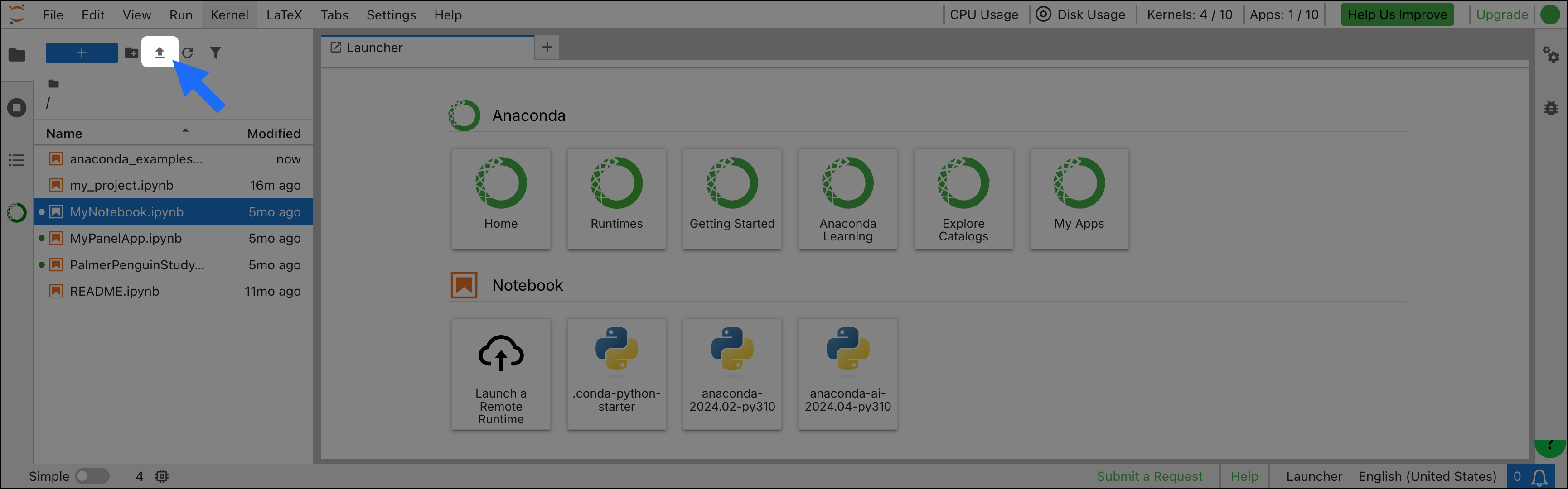
In the JupyterLab interface, click Upload files in the File Browser to browse for a local .ipynb file. Then, click Open. The notebook will appear in the left-hand menu.
You can also drag and drop a notebook from a folder on your system to the file browser to upload it.
How do I save my notebooks?
Like most IDEs or editors, JupyterLab has the standard “Save” and “Save As…” functions that saves a notebook in your directory on the remote server. You can also download a notebook file from the File menu to save it locally on the machine where your browser is running.
Where are my packages coming from?
The packages available to your JupyterHub users are supplied by your instance of Anaconda Server. If you need any additional packages, you must contact the administrators of your Anaconda Server instance.
Can I upload new packages or create custom environments in Anaconda Notebooks?
My notebook is trying to import a package, but I’m getting an error
The most common cause of errors is a lack of required package(s) installed in your environment. The packages available to you are provided through your Anaconda Server channel. If the packages you need are unavailable, talk to your Anaconda Server administrator to mirror the packages you need to your channel. You must create a custom environment prior to installing packages.Here are a couple of steps to help resolve this:Make sure you have the right kernel/environment selectedSeparate environments are represented as “kernels” in JupyterLab. You can view and switch between available kernels by clicking the kernel name in the upper-right corner of the content pane.List the packages available in an environmentYou can view which packages are available in your current environment from the terminal by running the conda list command. If you want to view the packages of a specific environment, run the command conda list -n <ENV_NAME>. If you need to see a list of available environments, you can run the conda env list command. An asterisk will appear next to your current active environment.
You can run those commands directly in a code cell within your notebook just by adding a “!” to the front of the command (for example, !conda env list).
Was this page helpful?
{"docsConfig":{"theme":"mint","$schema":"https://mintlify.com/docs.json","name":"Anaconda","description":"Guides, tutorials, and reference material for Anaconda's Python, data science, and AI tools","colors":{"primary":"#1d6cf7","light":"#1d6cf7","dark":"#96f778"},"logo":{"light":"https://mintcdn.com/anaconda-29683c67/s-9WR15r5rZoaPqb/logo/light.svg?fit=max\u0026auto=format\u0026n=s-9WR15r5rZoaPqb\u0026q=85\u0026s=5996719b8530aaf065dc1ee1f39b2e67","dark":"https://mintcdn.com/anaconda-29683c67/s-9WR15r5rZoaPqb/logo/dark.svg?fit=max\u0026auto=format\u0026n=s-9WR15r5rZoaPqb\u0026q=85\u0026s=db482b1eac6af589d234160a76de3400","href":"https://www.anaconda.com/docs/main"},"favicon":"https://mintcdn.com/anaconda-29683c67/p8JNFuYYvTL8gfpM/favicon.png?fit=max\u0026auto=format\u0026n=p8JNFuYYvTL8gfpM\u0026q=85\u0026s=51a585758330bbe8f1ea032113854252","api":{"playground":{"display":"simple"}},"background":{"color":{"light":"#F7F8F9","dark":"#10121a"}},"navbar":{},"footer":{"socials":{"linkedin":"https://www.linkedin.com/company/anacondainc","github":"https://github.com/ContinuumIO","youtube":"https://www.youtube.com/c/ContinuumIo"},"links":[{"header":"Company","items":[{"label":"Anaconda Newsletter","href":"https://www.anaconda.com/newsletter"}]}]},"seo":{"metatags":{"canonical":"https://www.anaconda.com/docs"}},"styling":{"eyebrows":"breadcrumbs","latex":false},"integrations":{"ga4":{"measurementId":"G-VQTY6YKM6J"},"heap":{"appId":"758475466"}},"contextual":{"options":["claude","chatgpt","perplexity","cursor","vscode","add-mcp","copy"],"display":"header"},"navigation":{"pages":[]}},"deployment":{"deploymentMetadataValue":{"subdomain":"anaconda-29683c67","hasAudioNarration":false,"actualSubdomain":"anaconda-29683c67","customDomains":["anaconda.com"],"gitSource":{"type":"github","owner":"anaconda","repo":"documentation","deployBranch":"main","contentDirectory":"","isPrivate":true,"mountPath":"","label":""},"feedback":{"thumbs":true,"contextualFeedback":{"allowEmail":true,"emailDisclaimer":"Your email will only be used to follow up on this feedback."}},"entitlements":{"AI_CHAT":{"status":"ENABLED"},"REMOVE_BRANDING":{"status":"ENABLED"},"CONTEXTUAL_FEEDBACK":{"status":"ENABLED"},"CODE_SNIPPET_FEEDBACK":{"status":"ENABLED"},"WEB_MCP":{"status":"ENABLED"},"NARRATION":{"status":"ENABLED"}},"buildId":"6b00649f6c736afc6845f454","clientVersion":"0.0.4270","searchFilterCounts":[{"language":"default","tag":"Data Science \u0026 AI Workbench","count":240},{"language":"default","tag":"Package Security Manager","count":152},{"language":"default","tag":"Anaconda Platform","count":152},{"language":"default","tag":"Anaconda CLI","count":126},{"language":"default","tag":"Guides","count":105},{"language":"default","tag":"Platform Guides","count":86},{"language":"default","tag":"Package Security Manager (On-prem)","count":85},{"language":"default","tag":"Package Security Manager (6.8.0)","count":85},{"language":"default","tag":"Anaconda Desktop","count":82},{"language":"default","tag":"Anaconda CLI \u0026 MCP","count":79}],"searchSettings":{"isFiltersEnabled":true}},"assistantConfig":{"enableAskAiButton":false,"enableStarterQuestions":true,"enableContextualStarterQuestions":true,"deflection":{"enabled":true,"email":"support@anaconda.com"}},"basePath":"/docs","hasChatPermissions":true,"hasWebMcpPermissions":true,"toggles":[],"googleFontsInlined":false},"customCss":[{"filePath":"custom.css","href":"/docs/_mintlify/custom/anaconda-29683c67/68c5081e7d29c6a7/custom.css"}]}
{"page":{"pagePath":"psm-on-prem/6.4.0/anaconda-notebooks-onprem/faq","slug":"/psm-on-prem/6.4.0/anaconda-notebooks-onprem/faq","pageMetadata":{"noindex":true,"title":"Frequently asked questions","keywords":["team","notebooks","jupyterhub","faq"],"description":null,"href":"/psm-on-prem/6.4.0/anaconda-notebooks-onprem/faq"},"pageType":"default","mdx":{"mdxSource":{"compiledSource":"\"use strict\";const{Fragment:_Fragment,jsx:_jsx,jsxs:_jsxs}=arguments[0];const{useMDXComponents:_provideComponents}=arguments[0];function _createMdxContent(props){const _components={a:`a`,code:`code`,li:`li`,p:`p`,strong:`strong`,ul:`ul`,..._provideComponents(),...props.components},{Frame,Heading,OptimizedImage,Tip}=_components;if(!Frame)_missingMdxReference(`Frame`,true);if(!Heading)_missingMdxReference(`Heading`,true);if(!OptimizedImage)_missingMdxReference(`OptimizedImage`,true);if(!Tip)_missingMdxReference(`Tip`,true);return _jsxs(_Fragment,{children:[_jsx(_components.p,{children:_jsx(_components.strong,{children:`On this page:`})}),`\n`,_jsxs(_components.ul,{children:[`\n`,_jsxs(_components.li,{children:[`\n`,_jsx(_components.p,{children:_jsx(_components.a,{href:`#general-faq`,children:`General FAQ`})}),`\n`,_jsxs(_components.ul,{children:[`\n`,_jsx(_components.li,{children:_jsx(_components.a,{href:`#what-is-on-premises-notebooks`,children:`What is on-premises Notebooks?`})}),`\n`,_jsx(_components.li,{children:_jsx(_components.a,{href:`#what-do-i-get-with-on-prem-notebooks`,children:`What do I get with on-prem Notebooks?`})}),`\n`,_jsx(_components.li,{children:_jsx(_components.a,{href:`#is-on-prem-notebooks-different-from-jupyterhub`,children:`Is on-prem Notebooks different from JupyterHub?`})}),`\n`,_jsx(_components.li,{children:_jsx(_components.a,{href:`#how-do-i-access-on-prem-notebooks`,children:`How do I access on-prem Notebooks?`})}),`\n`,_jsx(_components.li,{children:_jsx(_components.a,{href:`#can-i-share-my-notebooks`,children:`Can I share my notebooks?`})}),`\n`,_jsx(_components.li,{children:_jsx(_components.a,{href:`#how-do-i-upload-a-notebook-to-the-service`,children:`How do I upload a notebook to the service?`})}),`\n`,_jsx(_components.li,{children:_jsx(_components.a,{href:`#how-do-i-save-my-notebooks`,children:`How do I save my notebooks?`})}),`\n`,_jsx(_components.li,{children:_jsx(_components.a,{href:`#where-are-my-packages-coming-from`,children:`Where are my packages coming from?`})}),`\n`,_jsx(_components.li,{children:_jsx(_components.a,{href:`#can-i-upload-new-packages-or-create-custom-environments-in-anaconda-notebooks`,children:`Can I upload new packages or create custom environments in Anaconda Notebooks?`})}),`\n`]}),`\n`]}),`\n`,_jsxs(_components.li,{children:[`\n`,_jsx(_components.p,{children:_jsx(_components.a,{href:`#troubleshooting`,children:`Troubleshooting`})}),`\n`,_jsxs(_components.ul,{children:[`\n`,_jsx(_components.li,{children:_jsx(_components.a,{href:`#my-notebook-is-trying-to-import-a-package-but-im-getting-an-error`,children:`My notebook is trying to import a package, but I’m getting an error`})}),`\n`]}),`\n`]}),`\n`]}),`\n`,_jsx(Heading,{level:`2`,id:`general-faq`,children:`General FAQ`}),`\n`,_jsx(Heading,{level:`3`,id:`what-is-on-premises-notebooks`,children:`What is on-premises Notebooks?`}),`\n`,_jsx(_components.p,{children:`Jupyter notebooks allow data scientists to explore data, train models, and test hypotheses. Being able to run Jupyter is crucial for data science workflows, but individually configuring Jupyter on every workstation can create headaches around authentication, collaboration, and running big jobs.`}),`\n`,_jsx(_components.p,{children:`On-prem Notebooks, available as an add-on to Anaconda’s on-premises repository (Anaconda Server), solves this problem through centrally administered Jupyter notebooks. Authentication, shared environments, storage, and access to computing resources are all set up for you during implementation. Additionally, notebooks are automatically configured to use the secure and trusted packages from your Anaconda Server instance, so your users can focus on business needs instead of installation and configuration.`}),`\n`,_jsx(_components.p,{children:`On-prem Notebooks also includes ongoing maintenance and support, ensuring your team gets all the benefits of centralized notebooks without the IT burden of maintaining JupyterHub.`}),`\n`,_jsx(Heading,{level:`3`,id:`what-do-i-get-with-on-prem-notebooks`,children:`What do I get with on-prem Notebooks?`}),`\n`,_jsx(_components.p,{children:`On-prem Notebooks provides you with a method of managing a JupyterHub instance using the tools that power Anaconda Server. You can create and manage groups of users, assign them roles, and supply them with custom channels populated with safe, Anaconda-curated packages, based on their specific needs.`}),`\n`,_jsx(Heading,{level:`3`,id:`is-on-prem-notebooks-different-from-jupyterhub`,children:`Is on-prem Notebooks different from JupyterHub?`}),`\n`,_jsx(_components.p,{children:`On-prem Notebooks is JupyterHub combined with the added authentication, security, and management capabilities of Anaconda Server, all in one centralized location.`}),`\n`,_jsx(Heading,{level:`3`,id:`how-do-i-access-on-prem-notebooks`,children:`How do I access on-prem Notebooks?`}),`\n`,_jsx(_components.p,{children:`You can log in to your on-prem Notebooks by using your Anaconda Server credentials. Get the web address for your on-prem Notebooks from your IT administrator. If you do not have Anaconda Server credentials, ask your Anaconda Server administrator.`}),`\n`,_jsx(Heading,{level:`3`,id:`can-i-share-my-notebooks`,children:`Can I share my notebooks?`}),`\n`,_jsx(_components.p,{children:`Yes! For now, the easiest way to share a notebook is to download and share it as you would any other file. However, a key feature on our near-term roadmap is the ability to share notebooks directly from our platform. Stay tuned!`}),`\n`,_jsx(Heading,{level:`3`,id:`how-do-i-upload-a-notebook-to-the-service`,children:`How do I upload a notebook to the service?`}),`\n`,_jsxs(_components.p,{children:[`In the JupyterLab interface, click `,_jsx(_components.strong,{children:`Upload files`}),` in the File Browser to browse for a local `,_jsx(_components.code,{children:`.ipynb`}),` file. Then, click `,_jsx(_components.strong,{children:`Open`}),`. The notebook will appear in the left-hand menu.`]}),`\n`,_jsx(Frame,{children:_jsx(OptimizedImage,{src:`https://mintcdn.com/anaconda-29683c67/ghAcs1Rv_eiLtpni/images/anaconda-platform/jupyter-notebook-upload.png?fit=max\u0026auto=format\u0026n=ghAcs1Rv_eiLtpni\u0026q=85\u0026s=aa329f230b4e17aeae2654ddeaefe61b`,alt:``,\"data-og-width\":`3460`,width:`3460`,\"data-og-height\":`1080`,height:`1080`,\"data-path\":`images/anaconda-platform/jupyter-notebook-upload.png`,\"data-optimize\":`true`,\"data-opv\":`3`,srcset:`https://mintcdn.com/anaconda-29683c67/ghAcs1Rv_eiLtpni/images/anaconda-platform/jupyter-notebook-upload.png?w=280\u0026fit=max\u0026auto=format\u0026n=ghAcs1Rv_eiLtpni\u0026q=85\u0026s=73dc996b44b93f9a1c60c8b25987933a 280w, https://mintcdn.com/anaconda-29683c67/ghAcs1Rv_eiLtpni/images/anaconda-platform/jupyter-notebook-upload.png?w=560\u0026fit=max\u0026auto=format\u0026n=ghAcs1Rv_eiLtpni\u0026q=85\u0026s=193131e9741712f8dd3c436e69de70a9 560w, https://mintcdn.com/anaconda-29683c67/ghAcs1Rv_eiLtpni/images/anaconda-platform/jupyter-notebook-upload.png?w=840\u0026fit=max\u0026auto=format\u0026n=ghAcs1Rv_eiLtpni\u0026q=85\u0026s=652751ca9b2126456413336c242f21ed 840w, https://mintcdn.com/anaconda-29683c67/ghAcs1Rv_eiLtpni/images/anaconda-platform/jupyter-notebook-upload.png?w=1100\u0026fit=max\u0026auto=format\u0026n=ghAcs1Rv_eiLtpni\u0026q=85\u0026s=6cc7c868b386c5fe95a34b1ed3fedf1b 1100w, https://mintcdn.com/anaconda-29683c67/ghAcs1Rv_eiLtpni/images/anaconda-platform/jupyter-notebook-upload.png?w=1650\u0026fit=max\u0026auto=format\u0026n=ghAcs1Rv_eiLtpni\u0026q=85\u0026s=283d9efbaa2038bf8400dcd827521bf6 1650w, https://mintcdn.com/anaconda-29683c67/ghAcs1Rv_eiLtpni/images/anaconda-platform/jupyter-notebook-upload.png?w=2500\u0026fit=max\u0026auto=format\u0026n=ghAcs1Rv_eiLtpni\u0026q=85\u0026s=7b238543d71713ea291839bc8fd40dc6 2500w`})}),`\n`,_jsx(_components.p,{children:`You can also drag and drop a notebook from a folder on your system to the file browser to upload it.`}),`\n`,_jsx(Heading,{level:`3`,id:`how-do-i-save-my-notebooks`,children:`How do I save my notebooks?`}),`\n`,_jsx(_components.p,{children:`Like most IDEs or editors, JupyterLab has the standard “Save” and “Save As…” functions that saves a notebook in your directory on the remote server. You can also download a notebook file from the File menu to save it locally on the machine where your browser is running.`}),`\n`,_jsx(Heading,{level:`3`,id:`where-are-my-packages-coming-from`,children:`Where are my packages coming from?`}),`\n`,_jsx(_components.p,{children:`The packages available to your JupyterHub users are supplied by your instance of Anaconda Server. If you need any additional packages, you must contact the administrators of your Anaconda Server instance.`}),`\n`,_jsx(Heading,{level:`3`,id:`can-i-upload-new-packages-or-create-custom-environments-in-anaconda-notebooks`,children:`Can I upload new packages or create custom environments in Anaconda Notebooks?`}),`\n`,_jsxs(_components.p,{children:[`It is possible to upload packages and environments for your JuypterHub users. For more information, see `,_jsx(_components.a,{href:`/psm-on-prem/6.8.0/main`,children:`the official Anaconda Server documentation`}),`.`]}),`\n`,_jsx(Heading,{level:`2`,id:`troubleshooting`,children:`Troubleshooting`}),`\n`,_jsx(Heading,{level:`3`,id:`my-notebook-is-trying-to-import-a-package-but-im-getting-an-error`,children:`My notebook is trying to import a package, but I’m getting an error`}),`\n`,_jsx(_components.p,{children:`The most common cause of errors is a lack of required package(s) installed in your environment. The packages available to you are provided through your Anaconda Server channel. If the packages you need are unavailable, talk to your Anaconda Server administrator to mirror the packages you need to your channel. You must create a custom environment prior to installing packages.`}),`\n`,_jsx(_components.p,{children:`Here are a couple of steps to help resolve this:`}),`\n`,_jsx(_components.p,{children:_jsx(_components.strong,{children:`Make sure you have the right kernel/environment selected`})}),`\n`,_jsx(_components.p,{children:`Separate environments are represented as “kernels” in JupyterLab. You can view and switch between available kernels by clicking the kernel name in the upper-right corner of the content pane.`}),`\n`,_jsx(_components.p,{children:_jsx(_components.strong,{children:`List the packages available in an environment`})}),`\n`,_jsxs(_components.p,{children:[`You can view which packages are available in your current environment from the terminal by running the `,_jsx(_components.code,{children:`conda list`}),` command. If you want to view the packages of a specific environment, run the command `,_jsx(_components.code,{children:`conda list -n \u003cENV_NAME>`}),`. If you need to see a list of available environments, you can run the `,_jsx(_components.code,{children:`conda env list`}),` command. An asterisk will appear next to your current active environment.`]}),`\n`,_jsx(Tip,{children:_jsxs(_components.p,{children:[`You can run those commands directly in a code cell within your notebook just by adding a “!” to the front of the command (for example, `,_jsx(_components.code,{children:`!conda env list`}),`).`]})})]})}function MDXContent(props={}){const{wrapper:MDXLayout}={..._provideComponents(),...props.components};return MDXLayout?_jsx(MDXLayout,{...props,children:_jsx(_createMdxContent,{...props})}):_createMdxContent(props)}return{default:MDXContent};function _missingMdxReference(id,component){throw new Error(`Expected `+(component?`component`:`object`)+\" `\"+id+\"` to be defined: you likely forgot to import, pass, or provide it.\")}","frontmatter":{},"scope":{"config":{},"pageMetadata":{"noindex":true,"title":"Frequently asked questions","keywords":["team","notebooks","jupyterhub","faq"],"description":null,"href":"/psm-on-prem/6.4.0/anaconda-notebooks-onprem/faq"}}},"mdxSourceWithNoJs":null},"mdxExtracts":{"tableOfContents":[{"title":"General FAQ","slug":"general-faq","depth":2,"children":[{"title":"What is on-premises Notebooks?","slug":"what-is-on-premises-notebooks","depth":3,"children":[]},{"title":"What do I get with on-prem Notebooks?","slug":"what-do-i-get-with-on-prem-notebooks","depth":3,"children":[]},{"title":"Is on-prem Notebooks different from JupyterHub?","slug":"is-on-prem-notebooks-different-from-jupyterhub","depth":3,"children":[]},{"title":"How do I access on-prem Notebooks?","slug":"how-do-i-access-on-prem-notebooks","depth":3,"children":[]},{"title":"Can I share my notebooks?","slug":"can-i-share-my-notebooks","depth":3,"children":[]},{"title":"How do I upload a notebook to the service?","slug":"how-do-i-upload-a-notebook-to-the-service","depth":3,"children":[]},{"title":"How do I save my notebooks?","slug":"how-do-i-save-my-notebooks","depth":3,"children":[]},{"title":"Where are my packages coming from?","slug":"where-are-my-packages-coming-from","depth":3,"children":[]},{"title":"Can I upload new packages or create custom environments in Anaconda Notebooks?","slug":"can-i-upload-new-packages-or-create-custom-environments-in-anaconda-notebooks","depth":3,"children":[]}]},{"title":"Troubleshooting","slug":"troubleshooting","depth":2,"children":[{"title":"My notebook is trying to import a package, but I’m getting an error","slug":"my-notebook-is-trying-to-import-a-package-but-im-getting-an-error","depth":3,"children":[]}]}],"codeExamples":{}},"jsLinks":["/docs/_mintlify/custom/anaconda-29683c67/b738e1eb47e9934c/_transcend.js","/docs/_mintlify/custom/anaconda-29683c67/3ca111da84ffed5d/docs-dropdown-tooltip.js","/docs/_mintlify/custom/anaconda-29683c67/a3d1c2dd97aa6593/toc-indicator.js"],"subdomain":"anaconda-29683c67","siteName":"Anaconda","title":"Frequently asked questions - Anaconda","contextualStarterQuestions":[{"_id":"6af60caa4e8bc908169b3422","deploymentId":"6781700c5f1e7d2ac00fcc4a","questionText":"Can I share my notebooks?","status":"active","generatedBy":"contextual","path":"psm-on-prem/6.4.0/anaconda-notebooks-onprem/faq","createdAt":"2026-11-12T18:59:54.537Z","updatedAt":"2026-11-12T18:59:54.537Z","__v":0},{"_id":"6af60caa4e8bc908169b3420","deploymentId":"6781700c5f1e7d2ac00fcc4a","questionText":"What is on-premises Notebooks?","status":"active","generatedBy":"contextual","path":"psm-on-prem/6.4.0/anaconda-notebooks-onprem/faq","createdAt":"2026-11-12T18:59:54.537Z","updatedAt":"2026-11-12T18:59:54.537Z","__v":0},{"_id":"6af60caa4e8bc908169b3421","deploymentId":"6781700c5f1e7d2ac00fcc4a","questionText":"How do I access on-prem Notebooks?","status":"active","generatedBy":"contextual","path":"psm-on-prem/6.4.0/anaconda-notebooks-onprem/faq","createdAt":"2026-11-12T18:59:54.537Z","updatedAt":"2026-11-12T18:59:54.537Z","__v":0}],"navMaps":{"firstHrefInVersion":{"6.8.0":{"href":"/psm-on-prem/6.8.0/main","matchLevel":3},"6.7.2":{"href":"/psm-on-prem/6.7.2/anaconda-notebooks-onprem/faq","matchLevel":1,"noindex":true},"6.7.1":{"href":"/psm-on-prem/6.7.1/anaconda-notebooks-onprem/faq","matchLevel":1,"noindex":true},"6.7.0":{"href":"/psm-on-prem/6.7.0/anaconda-notebooks-onprem/faq","matchLevel":1,"noindex":true},"6.6.5":{"href":"/psm-on-prem/6.6.5/anaconda-notebooks-onprem/faq","matchLevel":1,"noindex":true},"6.6.4":{"href":"/psm-on-prem/6.6.4/anaconda-notebooks-onprem/faq","matchLevel":1,"noindex":true},"6.6.3":{"href":"/psm-on-prem/6.6.3/anaconda-notebooks-onprem/faq","matchLevel":1,"noindex":true},"6.6.2":{"href":"/psm-on-prem/6.6.2/anaconda-notebooks-onprem/faq","matchLevel":1,"noindex":true},"6.6.1":{"href":"/psm-on-prem/6.6.1/anaconda-notebooks-onprem/faq","matchLevel":1,"noindex":true},"6.6.0":{"href":"/psm-on-prem/6.6.0/anaconda-notebooks-onprem/faq","matchLevel":1,"noindex":true},"6.5.3":{"href":"/psm-on-prem/6.5.3/anaconda-notebooks-onprem/faq","matchLevel":1,"noindex":true},"6.5.2":{"href":"/psm-on-prem/6.5.2/anaconda-notebooks-onprem/faq","matchLevel":1,"noindex":true},"6.5.1":{"href":"/psm-on-prem/6.5.1/anaconda-notebooks-onprem/faq","matchLevel":1,"noindex":true},"6.4.0":{"href":"/psm-on-prem/6.4.0/anaconda-notebooks-onprem/faq","matchLevel":0},"6.3.1":{"href":"/psm-on-prem/6.3.1/main","matchLevel":3},"6.3.0":{"href":"/psm-on-prem/6.3.0/main","matchLevel":3},"6.2.0":{"href":"/psm-on-prem/6.2.0/main","matchLevel":3},"6.1.9":{"href":"/psm-on-prem/6.1.9/main","matchLevel":3},"6.1.8":{"href":"/psm-on-prem/6.1.8/main","matchLevel":3},"6.1.7":{"href":"/psm-on-prem/6.1.7/main","matchLevel":3},"6.1.6":{"href":"/psm-on-prem/6.1.6/main","matchLevel":3},"6.1.4":{"href":"/psm-on-prem/6.1.4/main","matchLevel":3},"5.9.0":{"href":"/data-science/latest/main","matchLevel":4},"5.8.1":{"href":"/data-science/5.8.1/main","matchLevel":4},"5.8.0":{"href":"/data-science/5.8.0/main","matchLevel":4},"5.7.1":{"href":"/data-science/5.7.1/main","matchLevel":4},"5.7.0":{"href":"/data-science/5.7.0/main","matchLevel":4},"5.6.2":{"href":"/data-science/5.6.2/main","matchLevel":4},"5.6.1":{"href":"/data-science/5.6.1/main","matchLevel":4},"5.6.0":{"href":"/data-science/5.6.0/main","matchLevel":4},"5.5.2":{"href":"/data-science/5.5.2/main","matchLevel":4},"5.5.1":{"href":"/data-science/5.5.1/main","matchLevel":4}},"firstHrefInLanguage":{},"searchTabScopes":[{"product":"Getting Started","tab":"About Anaconda"},{"product":"Getting Started","tab":"Installation"},{"product":"Getting Started","tab":"Getting started guides"},{"product":"Getting Started","tab":"Working with conda"},{"product":"Package Security Manager","tab":"Package Security Manager (Cloud)"},{"product":"Package Security Manager","tab":"Package Security Manager (On-prem)","version":"6.8.0"},{"product":"Package Security Manager","tab":"Package Security Manager (On-prem)","version":"6.7.2"},{"product":"Package Security Manager","tab":"Package Security Manager (On-prem)","version":"6.7.1"},{"product":"Package Security Manager","tab":"Package Security Manager (On-prem)","version":"6.7.0"},{"product":"Package Security Manager","tab":"Package Security Manager (On-prem)","version":"6.6.5"},{"product":"Package Security Manager","tab":"Package Security Manager (On-prem)","version":"6.6.4"},{"product":"Package Security Manager","tab":"Package Security Manager (On-prem)","version":"6.6.3"},{"product":"Package Security Manager","tab":"Package Security Manager (On-prem)","version":"6.6.2"},{"product":"Package Security Manager","tab":"Package Security Manager (On-prem)","version":"6.6.1"},{"product":"Package Security Manager","tab":"Package Security Manager (On-prem)","version":"6.6.0"},{"product":"Package Security Manager","tab":"Package Security Manager (On-prem)","version":"6.5.3"},{"product":"Package Security Manager","tab":"Package Security Manager (On-prem)","version":"6.5.2"},{"product":"Package Security Manager","tab":"Package Security Manager (On-prem)","version":"6.5.1"},{"product":"Package Security Manager","tab":"Package Security Manager (On-prem)","version":"6.4.0"},{"product":"Package Security Manager","tab":"Package Security Manager (On-prem)","version":"6.3.1"},{"product":"Package Security Manager","tab":"Package Security Manager (On-prem)","version":"6.3.0"},{"product":"Package Security Manager","tab":"Package Security Manager (On-prem)","version":"6.2.0"},{"product":"Package Security Manager","tab":"Package Security Manager (On-prem)","version":"6.1.9"},{"product":"Package Security Manager","tab":"Package Security Manager (On-prem)","version":"6.1.8"},{"product":"Package Security Manager","tab":"Package Security Manager (On-prem)","version":"6.1.7"},{"product":"Package Security Manager","tab":"Package Security Manager (On-prem)","version":"6.1.6"},{"product":"Package Security Manager","tab":"Package Security Manager (On-prem)","version":"6.1.4"},{"product":"Anaconda Platform","tab":"Guides"},{"product":"Anaconda Platform","tab":"Tutorials"},{"product":"Anaconda Platform","tab":"CLI Reference"},{"product":"Anaconda CLI \u0026 MCP","tab":"Anaconda CLI"},{"product":"Anaconda CLI \u0026 MCP","tab":"Anaconda MCP"},{"product":"Legacy applications","tab":"Anaconda Navigator"},{"product":"Legacy applications","tab":"Anaconda Toolbox Excel Add-in"}]},"lastModified":"2026-11-12T18:57:53.744Z","originalFileLocation":"psm-on-prem/6.4.0/anaconda-notebooks-onprem/faq.mdx"},"headHtml":"\u003cscript data-mint-head>(function(){var d=document.documentElement,p=null;if(!p){try{p=localStorage.getItem(\"isDarkMode\")}catch(e){}if(p==='true')p='dark';else if(p==='false')p='light';if(p!=='light'\u0026\u0026p!=='dark'\u0026\u0026p!=='system')p=\"system\"}var r=p==='system'?(matchMedia(\"(prefers-color-scheme: dark)\").matches?'dark':'light'):p;d.classList.remove(r==='dark'?'light':'dark');d.classList.add(r);d.setAttribute(\"data-theme-preference\",p)})();\u003c/script>\u003cmeta data-mint-head name=\"application-name\" content=\"Anaconda\">\u003cmeta data-mint-head name=\"generator\" content=\"Mintlify\">\u003cmeta data-mint-head name=\"robots\" content=\"noindex\">\u003clink data-mint-head rel=\"icon\" type=\"image/png\" sizes=\"192x192\" href=\"/docs/mintlify-assets/_mintlify/favicons/anaconda-29683c67/Q6mS5k5M0lNdBscF/_generated/favicon/android-chrome-192x192.png\" media=\"(prefers-color-scheme: light)\">\u003clink data-mint-head rel=\"apple-touch-icon\" type=\"image/png\" sizes=\"180x180\" href=\"/docs/mintlify-assets/_mintlify/favicons/anaconda-29683c67/Q6mS5k5M0lNdBscF/_generated/favicon/apple-touch-icon.png\">\u003clink data-mint-head rel=\"icon\" type=\"image/png\" sizes=\"16x16\" href=\"/docs/mintlify-assets/_mintlify/favicons/anaconda-29683c67/Q6mS5k5M0lNdBscF/_generated/favicon/favicon-16x16.png\" media=\"(prefers-color-scheme: light)\">\u003clink data-mint-head rel=\"icon\" type=\"image/png\" sizes=\"32x32\" href=\"/docs/mintlify-assets/_mintlify/favicons/anaconda-29683c67/Q6mS5k5M0lNdBscF/_generated/favicon/favicon-32x32.png\" media=\"(prefers-color-scheme: light)\">\u003clink data-mint-head rel=\"shortcut icon\" type=\"image/x-icon\" href=\"/docs/mintlify-assets/_mintlify/favicons/anaconda-29683c67/Q6mS5k5M0lNdBscF/_generated/favicon/favicon.ico\" media=\"(prefers-color-scheme: light)\">\u003clink data-mint-head rel=\"icon\" type=\"image/png\" sizes=\"192x192\" href=\"/docs/mintlify-assets/_mintlify/favicons/anaconda-29683c67/Q6mS5k5M0lNdBscF/_generated/favicon-dark/android-chrome-192x192.png\" media=\"(prefers-color-scheme: dark)\">\u003clink data-mint-head rel=\"icon\" type=\"image/png\" sizes=\"16x16\" href=\"/docs/mintlify-assets/_mintlify/favicons/anaconda-29683c67/Q6mS5k5M0lNdBscF/_generated/favicon-dark/favicon-16x16.png\" media=\"(prefers-color-scheme: dark)\">\u003clink data-mint-head rel=\"icon\" type=\"image/png\" sizes=\"32x32\" href=\"/docs/mintlify-assets/_mintlify/favicons/anaconda-29683c67/Q6mS5k5M0lNdBscF/_generated/favicon-dark/favicon-32x32.png\" media=\"(prefers-color-scheme: dark)\">\u003clink data-mint-head rel=\"shortcut icon\" type=\"image/x-icon\" href=\"/docs/mintlify-assets/_mintlify/favicons/anaconda-29683c67/Q6mS5k5M0lNdBscF/_generated/favicon-dark/favicon.ico\" media=\"(prefers-color-scheme: dark)\">\u003cmeta data-mint-head property=\"og:title\" content=\"Frequently asked questions - Anaconda\">\u003cmeta data-mint-head property=\"og:site_name\" content=\"Anaconda\">\u003cmeta data-mint-head property=\"og:url\" content=\"https://www.anaconda.com/docs/psm-on-prem/6.4.0/anaconda-notebooks-onprem/faq\">\u003cmeta data-mint-head property=\"og:type\" content=\"website\">\u003cmeta data-mint-head property=\"og:image\" content=\"https://anaconda-29683c67.mintlify.site/docs/_mintlify/api/og/v2?division=Team+Notebooks\u0026amp;title=Frequently+asked+questions\u0026amp;theme=7f7b55efd41022d147e41c35\u0026amp;signature=2ed96292c9faa9433d13d2c3728d01b890c525e3d25a2324a0f4fafc66c5f624\">\u003cmeta data-mint-head property=\"og:image:width\" content=\"1200\">\u003cmeta data-mint-head property=\"og:image:height\" content=\"630\">\u003cmeta data-mint-head name=\"twitter:card\" content=\"summary_large_image\">\u003cmeta data-mint-head name=\"twitter:title\" content=\"Frequently asked questions - Anaconda\">\u003cmeta data-mint-head name=\"twitter:image\" content=\"https://anaconda-29683c67.mintlify.site/docs/_mintlify/api/og/v2?division=Team+Notebooks\u0026amp;title=Frequently+asked+questions\u0026amp;theme=7f7b55efd41022d147e41c35\u0026amp;signature=2ed96292c9faa9433d13d2c3728d01b890c525e3d25a2324a0f4fafc66c5f624\">\u003cmeta data-mint-head name=\"twitter:image:width\" content=\"1200\">\u003cmeta data-mint-head name=\"twitter:image:height\" content=\"630\">\u003cmeta data-mint-head name=\"msapplication-config\" content=\"/docs/mintlify-assets/_mintlify/favicons/anaconda-29683c67/Q6mS5k5M0lNdBscF/_generated/favicon/browserconfig.xml\">\u003cmeta data-mint-head name=\"apple-mobile-web-app-title\" content=\"Anaconda\">\u003cmeta data-mint-head name=\"msapplication-TileColor\" content=\"#1d6cf7\">\u003clink data-mint-head rel=\"canonical\" href=\"https://www.anaconda.com/docs/psm-on-prem/6.4.0/anaconda-notebooks-onprem/faq\">\u003clink data-mint-head rel=\"alternate\" type=\"application/xml\" href=\"/docs/sitemap.xml\">\u003clink data-mint-head rel=\"alternate\" type=\"text/markdown\" href=\"/docs/psm-on-prem/6.4.0/anaconda-notebooks-onprem/faq.md\">","agentPointerHref":"/docs/psm-on-prem/6.4.0/anaconda-notebooks-onprem/faq.md","siteName":"Anaconda","nav":{"global":null,"products":[{"product":"Anaconda Docs","icon":"https://mintlify.s3.us-west-1.amazonaws.com/anaconda-29683c67/images/anaconda-icon.svg","pages":[{"title":"Anaconda Docs","href":"/main"}]},{"product":"Getting Started","icon":"rocket-launch","pages":[{"title":"Getting Started","href":"/getting-started/main"}]},{"product":"Anaconda.org","icon":"globe","pages":[{"title":"Anaconda.org","href":"/anaconda-org/key-features"}]},{"product":"Anaconda Desktop","icon":"desktop","pages":[{"title":"Anaconda Desktop","href":"/anaconda-desktop/key-features"}]},{"product":"Package Security Manager","icon":"shield-check","tabs":[{"tab":"Package Security Manager (Cloud)","pages":[{"title":"Package Security Manager (Cloud)","href":"/anaconda-platform/main"}]},{"tab":"Package Security Manager (On-prem)","versions":[{"version":"6.8.0","pages":[{"title":"6.8.0","href":"/psm-on-prem/6.8.0/main"}]},{"version":"6.7.2","pages":[{"title":"6.7.2","href":"/psm-on-prem/6.7.2/anaconda-notebooks-onprem/faq"}]},{"version":"6.7.1","pages":[{"title":"6.7.1","href":"/psm-on-prem/6.7.1/anaconda-notebooks-onprem/faq"}]},{"version":"6.7.0","pages":[{"title":"6.7.0","href":"/psm-on-prem/6.7.0/anaconda-notebooks-onprem/faq"}]},{"version":"6.6.5","pages":[{"title":"6.6.5","href":"/psm-on-prem/6.6.5/anaconda-notebooks-onprem/faq"}]},{"version":"6.6.4","pages":[{"title":"6.6.4","href":"/psm-on-prem/6.6.4/anaconda-notebooks-onprem/faq"}]},{"version":"6.6.3","pages":[{"title":"6.6.3","href":"/psm-on-prem/6.6.3/anaconda-notebooks-onprem/faq"}]},{"version":"6.6.2","pages":[{"title":"6.6.2","href":"/psm-on-prem/6.6.2/anaconda-notebooks-onprem/faq"}]},{"version":"6.6.1","pages":[{"title":"6.6.1","href":"/psm-on-prem/6.6.1/anaconda-notebooks-onprem/faq"}]},{"version":"6.6.0","pages":[{"title":"6.6.0","href":"/psm-on-prem/6.6.0/anaconda-notebooks-onprem/faq"}]},{"version":"6.5.3","pages":[{"title":"6.5.3","href":"/psm-on-prem/6.5.3/anaconda-notebooks-onprem/faq"}]},{"version":"6.5.2","pages":[{"title":"6.5.2","href":"/psm-on-prem/6.5.2/anaconda-notebooks-onprem/faq"}]},{"version":"6.5.1","pages":[{"title":"6.5.1","href":"/psm-on-prem/6.5.1/anaconda-notebooks-onprem/faq"}]},{"version":"6.4.0","groups":[{"group":"Anaconda Server (6.4.0)","boost":0.1,"pages":[{"title":"Anaconda Server","sidebarTitle":"Key Features","href":"/psm-on-prem/6.4.0/main"},{"group":"Preparing Environment for Anaconda Server","pages":[{"title":"Preparing Environment for Anaconda Server","href":"/psm-on-prem/6.4.0/prep/main"},{"title":"Standard environment preparation","href":"/psm-on-prem/6.4.0/prep/standard-prep"},{"title":"Air-gapped environment preparation","href":"/psm-on-prem/6.4.0/prep/airgap-prep"}]},{"group":"Installing Anaconda Server","pages":[{"title":"Installing Anaconda Server","href":"/psm-on-prem/6.4.0/install/main"},{"title":"Standard installation","href":"/psm-on-prem/6.4.0/install/instructions"},{"title":"Air-gapped installation","href":"/psm-on-prem/6.4.0/install/airgap-install"},{"title":"Licenses","href":"/psm-on-prem/6.4.0/install/license"},{"title":"Backup and restore","href":"/psm-on-prem/6.4.0/install/restore"},{"title":"Stopping and Uninstalling Anaconda Server","href":"/psm-on-prem/6.4.0/install/uninstall"}]},{"group":"Administering Anaconda Server","pages":[{"title":"Administering Anaconda Server","href":"/psm-on-prem/6.4.0/admin/main"},{"group":"User management and configuration","pages":[{"title":"User management and configuration","href":"/psm-on-prem/6.4.0/admin/Keycloak_config/main"},{"title":"User management","href":"/psm-on-prem/6.4.0/admin/Keycloak_config/user_roles"},{"title":"Establishing an LDAP connection","href":"/psm-on-prem/6.4.0/admin/Keycloak_config/ldap_setup"},{"title":"Enabling brute force protection","href":"/psm-on-prem/6.4.0/admin/Keycloak_config/brute_force"},{"title":"Enabling two-factor authentication","href":"/psm-on-prem/6.4.0/admin/Keycloak_config/2fa"},{"title":"Okta integration using OpenID Connect Provider (OIDC)","href":"/psm-on-prem/6.4.0/admin/Keycloak_config/okta"},{"title":"Create a dev-users-admin role","href":"/psm-on-prem/6.4.0/admin/Keycloak_config/create_dev"},{"title":"Social login integration (GitHub)","href":"/psm-on-prem/6.4.0/admin/Keycloak_config/social"},{"title":"Configuring a proxy for outgoing Keycloak HTTP requests","href":"/psm-on-prem/6.4.0/admin/Keycloak_config/saml_proxy"},{"title":"Updating your SAML username attribute in Keycloak","href":"/psm-on-prem/6.4.0/admin/Keycloak_config/saml_username"},{"title":"Viewing user login activity","href":"/psm-on-prem/6.4.0/admin/Keycloak_config/view_user_logins"}]},{"title":"Role provisioning: Keycloak admin user with restricted rights","href":"/psm-on-prem/6.4.0/admin/create_key"},{"title":"Proxy mirroring","href":"/psm-on-prem/6.4.0/admin/proxy"},{"title":"Enable and configure SSL post installation","href":"/psm-on-prem/6.4.0/admin/ssl"},{"title":"LDAPS","href":"/psm-on-prem/6.4.0/admin/LDAPS"},{"title":"Updating your domain","href":"/psm-on-prem/6.4.0/admin/domain_rename"},{"title":"Configure realm email settings","href":"/psm-on-prem/6.4.0/admin/smtp"},{"title":"Common Vulnerabilities and Exposures (CVEs)","href":"/psm-on-prem/6.4.0/admin/cve"},{"title":"Mirrors","href":"/psm-on-prem/6.4.0/admin/mirrors"},{"title":"CVE mirror troubleshooting","href":"/psm-on-prem/6.4.0/admin/cve_mirror_troubleshooting"},{"title":"System metrics with Prometheus","href":"/psm-on-prem/6.4.0/admin/metrics"},{"title":"Upgrading Anaconda Server","href":"/psm-on-prem/6.4.0/admin/upgrade"},{"title":"Switching from Docker to Podman","href":"/psm-on-prem/6.4.0/admin/docker_to_podman"}]},{"group":"Using Anaconda Server","pages":[{"title":"Using Anaconda Server","sidebarTitle":"Overview","href":"/psm-on-prem/6.4.0/user/main"},{"title":"Using conda with Anaconda Server","href":"/psm-on-prem/6.4.0/user/conda"},{"title":"Configuring Navigator to work with Anaconda Server","href":"/psm-on-prem/6.4.0/user/navigator"},{"title":"Accessing tooltips","href":"/psm-on-prem/6.4.0/user/help"},{"title":"Logging in/out of Anaconda Server","href":"/psm-on-prem/6.4.0/user/logging"},{"title":"Anaconda Server CLI","href":"/psm-on-prem/6.4.0/user/cli"},{"title":"Channels","href":"/psm-on-prem/6.4.0/user/channel"},{"title":"Using packages within channels/subchannels","href":"/psm-on-prem/6.4.0/user/pack_chan"},{"title":"Packages","href":"/psm-on-prem/6.4.0/user/package"},{"title":"Environments","href":"/psm-on-prem/6.4.0/user/environment"},{"title":"Jupyter Notebooks","href":"/psm-on-prem/6.4.0/user/notebook"},{"title":"Anaconda Project","href":"/psm-on-prem/6.4.0/user/project"},{"title":"Authorization tokens","href":"/psm-on-prem/6.4.0/user/auth_token"},{"title":"History","href":"/psm-on-prem/6.4.0/user/history"},{"title":"Software Bill of Materials (SBOM)","href":"/psm-on-prem/6.4.0/user/sbom"},{"title":"Working with private channels using third-party tools","href":"/psm-on-prem/6.4.0/user/3rdParty"}]},{"group":"Team Notebooks","pages":[{"title":"On-premises Notebooks","href":"/psm-on-prem/6.4.0/anaconda-notebooks-onprem/main"},{"title":"Preinstallation Preparation","href":"/psm-on-prem/6.4.0/anaconda-notebooks-onprem/prep"},{"title":"Installing Anaconda on-premises Notebooks","href":"/psm-on-prem/6.4.0/anaconda-notebooks-onprem/install"},{"title":"Integrating with Anaconda Server","href":"/psm-on-prem/6.4.0/anaconda-notebooks-onprem/integrate"},{"group":"Administering on-premises Notebooks","pages":[{"title":"Administering on-premises Notebooks","href":"/psm-on-prem/6.4.0/anaconda-notebooks-onprem/admin/main"},{"title":"Adding a user to your JupyterHub","href":"/psm-on-prem/6.4.0/anaconda-notebooks-onprem/admin/adduser"}]},{"title":"Quickstart guide for on-premises Notebooks","description":null,"href":"/psm-on-prem/6.4.0/anaconda-notebooks-onprem/quickstart"},{"title":"Frequently asked questions","href":"/psm-on-prem/6.4.0/anaconda-notebooks-onprem/faq"},{"title":"Help and support","description":null,"href":"/psm-on-prem/6.4.0/anaconda-notebooks-onprem/help-support"}]},{"group":"Reference materials","pages":[{"title":"Reference materials","sidebarTitle":"Overview","href":"/psm-on-prem/6.4.0/reference/main"},{"title":"Release notes","href":"/psm-on-prem/6.4.0/reference/release"},{"title":"License types","href":"/psm-on-prem/6.4.0/reference/licensetypes"},{"title":"Troubleshooting","href":"/psm-on-prem/6.4.0/reference/troubleshooting"},{"title":"Frequently asked questions","href":"/psm-on-prem/6.4.0/reference/faq"}]}]}]},{"version":"6.3.1","pages":[{"title":"6.3.1","href":"/psm-on-prem/6.3.1/main"}]},{"version":"6.3.0","pages":[{"title":"6.3.0","href":"/psm-on-prem/6.3.0/main"}]},{"version":"6.2.0","pages":[{"title":"6.2.0","href":"/psm-on-prem/6.2.0/main"}]},{"version":"6.1.9","pages":[{"title":"6.1.9","href":"/psm-on-prem/6.1.9/main"}]},{"version":"6.1.8","pages":[{"title":"6.1.8","href":"/psm-on-prem/6.1.8/main"}]},{"version":"6.1.7","pages":[{"title":"6.1.7","href":"/psm-on-prem/6.1.7/main"}]},{"version":"6.1.6","pages":[{"title":"6.1.6","href":"/psm-on-prem/6.1.6/main"}]},{"version":"6.1.4","pages":[{"title":"6.1.4","href":"/psm-on-prem/6.1.4/main"}]}]}]},{"product":"Anaconda Platform","icon":"layer-group","pages":[{"title":"Anaconda Platform","href":"/platform/main"}]},{"product":"Data Science \u0026 AI Workbench","icon":"chart-network","versions":[{"version":"5.9.0"},{"version":"5.8.1"},{"version":"5.8.0"},{"version":"5.7.1"},{"version":"5.7.0"},{"version":"5.6.2"},{"version":"5.6.1"},{"version":"5.6.0"},{"version":"5.5.2"},{"version":"5.5.1"}],"pages":[{"title":"Data Science \u0026 AI Workbench","href":"/data-science/latest/main"}]},{"product":"Anaconda CLI \u0026 MCP","icon":"terminal","pages":[{"title":"Anaconda CLI \u0026 MCP","href":"/cli-reference/anaconda-cli/getting-started"}]},{"product":"Legacy applications","icon":"window-restore","pages":[{"title":"Legacy applications","href":"/legacy/anaconda-navigator/main"}]},{"product":"Reference","icon":"book","pages":[{"title":"Reference","href":"/reference/release-notes"}]},{"product":"Support \u0026 Troubleshooting","icon":"headset","pages":[{"title":"Support \u0026 Troubleshooting","href":"/reference/help-support"}]},{"product":"Repository Managers","hidden":true,"pages":[{"title":"Repository Managers","href":"/repo-managers/main"}]}]},"basePath":"","title":"Frequently asked questions - Anaconda","deploymentId":"dpl_53YqbBPsHdrqSGqXiWPGU7csRVod","buildId":"dpl_53YqbBPsHdrqSGqXiWPGU7csRVod","dynamics":["07c022d89b","a74be98ba7"],"chunks":["Frame-BrWhOrIJ.js","DynamicMarkdown-CsgNpZb1.js","zoom-image-lightbox-BVW4Axcm.js","lightbox-handle-r17bVUz3.js"]}