The silent installation does not display a progress bar or confirmation message. It might take a few minutes to complete.
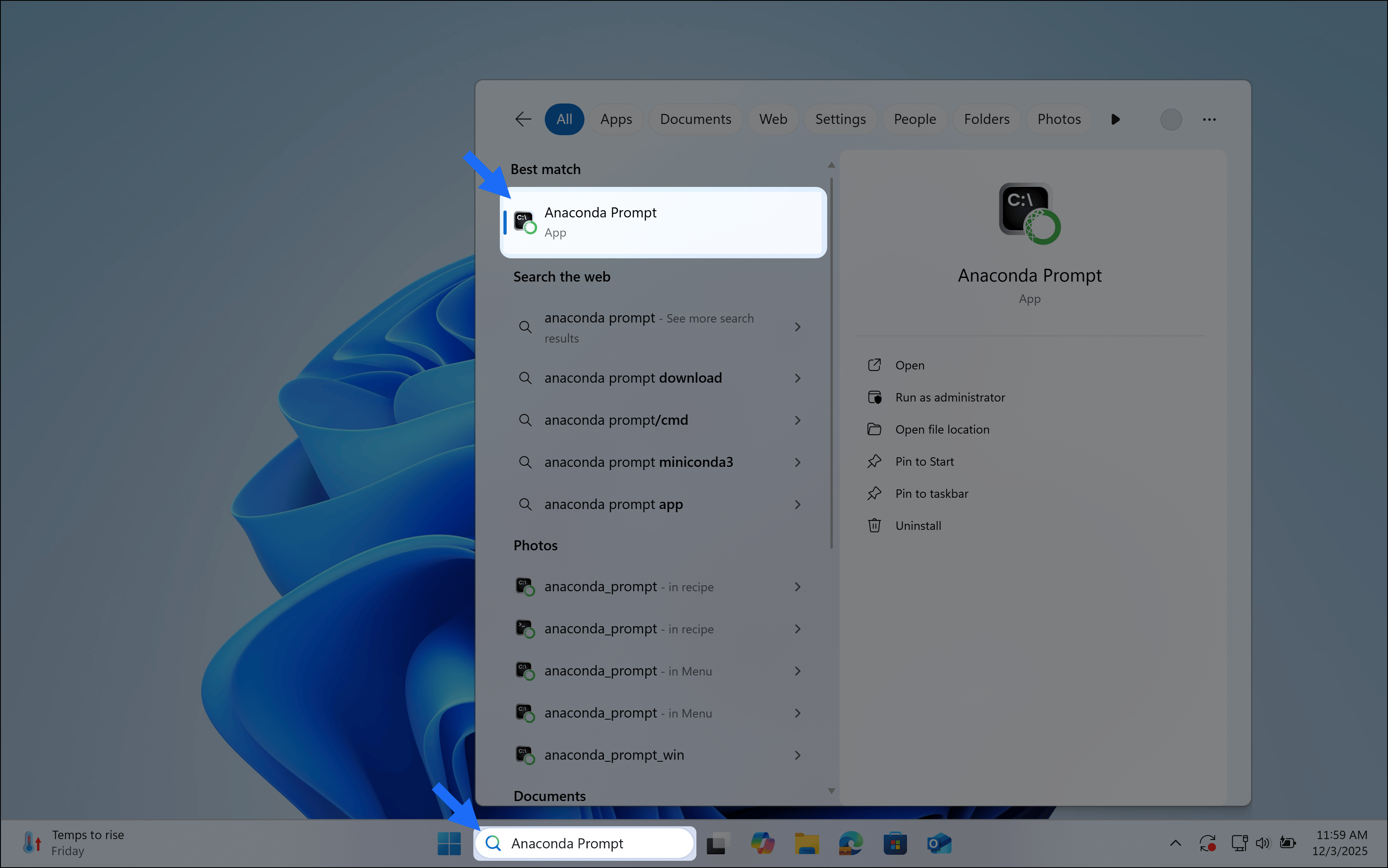
Verify your installation was successful by opening , a command-line shell application that is included with conda installations for Windows.To open Anaconda Prompt, type “Anaconda Prompt” in the Windows search bar, then select the application.
Your window displays something like the following, with your base environment activated by default:
(base) C:\Users\myusername>
Was this page helpful?
{"docsConfig":{"theme":"mint","$schema":"https://mintlify.com/docs.json","name":"Anaconda","description":"Guides, tutorials, and reference material for Anaconda's Python, data science, and AI tools","colors":{"primary":"#1d6cf7","light":"#1d6cf7","dark":"#96f778"},"logo":{"light":"https://mintcdn.com/anaconda-29683c67/s-9WR15r5rZoaPqb/logo/light.svg?fit=max\u0026auto=format\u0026n=s-9WR15r5rZoaPqb\u0026q=85\u0026s=5996719b8530aaf065dc1ee1f39b2e67","dark":"https://mintcdn.com/anaconda-29683c67/s-9WR15r5rZoaPqb/logo/dark.svg?fit=max\u0026auto=format\u0026n=s-9WR15r5rZoaPqb\u0026q=85\u0026s=db482b1eac6af589d234160a76de3400","href":"https://www.anaconda.com/docs/main"},"favicon":"https://mintcdn.com/anaconda-29683c67/p8JNFuYYvTL8gfpM/favicon.png?fit=max\u0026auto=format\u0026n=p8JNFuYYvTL8gfpM\u0026q=85\u0026s=51a585758330bbe8f1ea032113854252","api":{"playground":{"display":"simple"}},"background":{"color":{"light":"#f4f5f8","dark":"#10121a"}},"navbar":{},"footer":{"socials":{"linkedin":"https://www.linkedin.com/company/anacondainc","github":"https://github.com/ContinuumIO","youtube":"https://www.youtube.com/c/ContinuumIo"},"links":[{"header":"Company","items":[{"label":"Anaconda Newsletter","href":"https://www.anaconda.com/newsletter"}]}]},"seo":{"metatags":{"canonical":"https://www.anaconda.com/docs"}},"styling":{"eyebrows":"breadcrumbs","latex":false},"integrations":{"ga4":{"measurementId":"G-VQTY6YKM6J"},"heap":{"appId":"758475466"}},"contextual":{"options":["claude","chatgpt","perplexity","cursor","vscode","add-mcp","copy"],"display":"header"},"navigation":{"pages":[]}},"deployment":{"deploymentMetadataValue":{"subdomain":"anaconda-29683c67","hasAudioNarration":false,"actualSubdomain":"anaconda-29683c67","customDomains":["anaconda.com"],"gitSource":{"type":"github","owner":"anaconda","repo":"documentation","deployBranch":"main","contentDirectory":"","isPrivate":true,"mountPath":"","label":""},"chroma":{"liveDeploymentHistoryId":"6ae8f409f4303c0fff7395e2","collectionId":"1dea6bd5-33cd-40b4-a0cf-b503cf611aef","schemaVersion":"v3","latestBuiltDeploymentHistoryId":"6ae8f409f4303c0fff7395e2"},"feedback":{"thumbs":true,"contextualFeedback":{"allowEmail":true,"emailDisclaimer":"Your email will only be used to follow up on this feedback."}},"entitlements":{"AI_CHAT":{"status":"ENABLED"},"REMOVE_BRANDING":{"status":"ENABLED"},"CONTEXTUAL_FEEDBACK":{"status":"ENABLED"},"CODE_SNIPPET_FEEDBACK":{"status":"ENABLED"},"WEB_MCP":{"status":"ENABLED"},"NARRATION":{"status":"ENABLED"}},"buildId":"6ae8f409f4303c0fff7395e2","clientVersion":"0.0.4045","searchFilterCounts":[{"language":"default","tag":"Data Science \u0026 AI Workbench","count":240},{"language":"default","tag":"Anaconda Platform","count":150},{"language":"default","tag":"Package Security Manager","count":128},{"language":"default","tag":"Anaconda CLI","count":112},{"language":"default","tag":"Guides","count":105},{"language":"default","tag":"Anaconda CLI \u0026 MCP","count":104},{"language":"default","tag":"Plugins","count":93},{"language":"default","tag":"Commands","count":91},{"language":"default","tag":"Anaconda Desktop","count":86},{"language":"default","tag":"Platform Guides","count":86}],"searchSettings":{"isFiltersEnabled":true}},"assistantConfig":{"enableAskAiButton":false,"enableStarterQuestions":true,"enableContextualStarterQuestions":true,"deflection":{"enabled":true,"email":"support@anaconda.com"}},"basePath":"/docs","hasChatPermissions":true,"hasWebMcpPermissions":true,"toggles":[{"name":"kill-isr","enabled":true,"variant":{"name":"disabled","enabled":false,"feature_enabled":true},"impressionData":false},{"name":"agent-mintlify-slack","enabled":true,"variant":{"name":"disabled","enabled":false,"feature_enabled":true},"impressionData":false},{"name":"agent-integrations-settings","enabled":true,"variant":{"name":"disabled","enabled":false,"feature_enabled":true},"impressionData":false},{"name":"automations-pr-grouping","enabled":true,"variant":{"name":"disabled","enabled":false,"feature_enabled":true},"impressionData":false},{"name":"custom-prefix","enabled":true,"variant":{"name":"disabled","enabled":false,"feature_enabled":true},"impressionData":false},{"name":"analytics-v7","enabled":true,"variant":{"name":"disabled","enabled":false,"feature_enabled":true},"impressionData":false},{"name":"user-flows-analytics","enabled":true,"variant":{"name":"disabled","enabled":false,"feature_enabled":true},"impressionData":false},{"name":"no-publish-flow","enabled":true,"variant":{"name":"disabled","enabled":false,"feature_enabled":true},"impressionData":false},{"name":"workos-onboarding","enabled":true,"variant":{"name":"disabled","enabled":false,"feature_enabled":true},"impressionData":false},{"name":"llms-txt-v2","enabled":true,"variant":{"name":"disabled","enabled":false,"feature_enabled":true},"impressionData":false},{"name":"snapshot-serving-live","enabled":true,"variant":{"name":"disabled","enabled":false,"feature_enabled":true},"impressionData":false},{"name":"stripTemperatureMiddleware","enabled":true,"variant":{"name":"disabled","enabled":false,"feature_enabled":true},"impressionData":false},{"name":"support-platform-pylon-zendesk","enabled":true,"variant":{"name":"disabled","enabled":false,"feature_enabled":true},"impressionData":false},{"name":"snapshot-serving","enabled":true,"variant":{"name":"disabled","enabled":false,"feature_enabled":true},"impressionData":false},{"name":"instant-rollback","enabled":true,"variant":{"name":"disabled","enabled":false,"feature_enabled":true},"impressionData":false},{"name":"granular-notifications-server","enabled":true,"variant":{"name":"disabled","enabled":false,"feature_enabled":true},"impressionData":false},{"name":"granular-notifications","enabled":true,"variant":{"name":"disabled","enabled":false,"feature_enabled":true},"impressionData":false},{"name":"automations-fable","enabled":true,"variant":{"name":"disabled","enabled":false,"feature_enabled":true},"impressionData":false},{"name":"fixed-ai-action-pricing","enabled":true,"variant":{"name":"disabled","enabled":false,"feature_enabled":true},"impressionData":false},{"name":"automation-resolve-merge-conflict","enabled":true,"variant":{"name":"disabled","enabled":false,"feature_enabled":true},"impressionData":false},{"name":"scoped-publishing","enabled":true,"variant":{"name":"disabled","enabled":false,"feature_enabled":true},"impressionData":false},{"name":"mintql","enabled":true,"variant":{"name":"disabled","enabled":false,"feature_enabled":true},"impressionData":false},{"name":"page-level-analytics","enabled":true,"variant":{"name":"disabled","enabled":false,"feature_enabled":true},"impressionData":false},{"name":"editor-version-history-v2","enabled":true,"variant":{"name":"disabled","enabled":false,"feature_enabled":true},"impressionData":false},{"name":"billing-page-v2","enabled":true,"variant":{"name":"disabled","enabled":false,"feature_enabled":true},"impressionData":false},{"name":"full-page-search","enabled":true,"variant":{"name":"disabled","enabled":false,"feature_enabled":true},"impressionData":false},{"name":"workspace-projects","enabled":true,"variant":{"name":"disabled","enabled":false,"feature_enabled":true},"impressionData":false},{"name":"assistant-v5","enabled":true,"variant":{"name":"disabled","enabled":false,"feature_enabled":true},"impressionData":false},{"name":"byok-sep-25","enabled":true,"variant":{"name":"disabled","enabled":false,"feature_enabled":true},"impressionData":false},{"name":"fork-pr-previews","enabled":true,"variant":{"name":"disabled","enabled":false,"feature_enabled":true},"impressionData":false},{"name":"revalidation-jwt","enabled":true,"variant":{"name":"disabled","enabled":false,"feature_enabled":true},"impressionData":false},{"name":"vite-origin","enabled":true,"variant":{"name":"disabled","enabled":false,"feature_enabled":true},"impressionData":false},{"name":"billing-updated-9-15","enabled":true,"variant":{"name":"disabled","enabled":false,"feature_enabled":true},"impressionData":false},{"name":"workos-sso-scim","enabled":true,"variant":{"name":"disabled","enabled":false,"feature_enabled":true},"impressionData":false},{"name":"hobby-abuse-scan","enabled":true,"variant":{"name":"disabled","enabled":false,"feature_enabled":true},"impressionData":false},{"name":"dashboard-inbox","enabled":true,"variant":{"name":"disabled","enabled":false,"feature_enabled":true},"impressionData":false},{"name":"workos-signup","enabled":true,"variant":{"name":"disabled","enabled":false,"feature_enabled":true},"impressionData":false},{"name":"turbopuffer-dual-write","enabled":true,"variant":{"name":"disabled","enabled":false,"feature_enabled":true},"impressionData":false},{"name":"workos-enabled","enabled":true,"variant":{"name":"disabled","enabled":false,"feature_enabled":true},"impressionData":false},{"name":"approve-review-flow","enabled":true,"variant":{"name":"disabled","enabled":false,"feature_enabled":true},"impressionData":false},{"name":"sso-setup-deadline-banner","enabled":true,"variant":{"name":"disabled","enabled":false,"feature_enabled":true},"impressionData":false}],"googleFontsInlined":false},"customCss":[{"filePath":"custom.css","href":"/docs/_mintlify/custom/anaconda-29683c67/8e7e337189353d6a/custom.css"}],"page":{"pagePath":"getting-started/msi-installer-beta/install/silent-install","slug":"/getting-started/msi-installer-beta/install/silent-install","pageMetadata":{"title":"Silent installation","keywords":["miniconda","install","windows","msi","silent","msiexec","enterprise","automation"],"searchDescription":"Install the Miniconda MSI installer silently using msiexec with configurable properties for automated deployments.","description":null,"href":"/getting-started/msi-installer-beta/install/silent-install"},"pageType":"default","mdx":{"mdxSource":{"compiledSource":"\"use strict\";const{Fragment:_Fragment,jsx:_jsx,jsxs:_jsxs}=arguments[0];const{useMDXComponents:_provideComponents}=arguments[0];const GCell=({children,className})=>_jsx(`div`,{className:`grid-table-cell ${className||``}`,role:`cell`,children});const GTH=({children,className})=>_jsx(`div`,{className:`grid-table-th ${className||``}`,role:`columnheader`,children});const GRow=({children})=>_jsx(`div`,{className:`grid-table-row`,role:`row`,children});const GBody=({children})=>_jsx(`div`,{className:`grid-table-body`,role:`rowgroup`,children});const GHead=({children})=>_jsx(`div`,{className:`grid-table-head`,role:`rowgroup`,children});const GTable=({children,className,cols})=>_jsx(`div`,{className:`grid-table not-prose mint-overflow-hidden mint-rounded-2xl ${className||``}`,style:{\"--grid-table-cols\":cols},role:`table`,children});const Comments=({children})=>{return _jsxs(`div`,{class:`mint-my-4 mint-px-5 mint-py-4 mint-overflow-hidden mint-rounded-2xl mint-flex mint-gap-3 mint-border mint-border-zinc-500/20 mint-bg-zinc-50/50 dark:mint-border-zinc-500/30 dark:mint-bg-zinc-500/10`,\"data-callout-type\":`comments`,children:[_jsx(`div`,{class:`mint-w-4`,children:_jsx(`svg`,{width:`14`,height:`14`,viewBox:`0 0 640 640`,fill:`currentColor`,xmlns:`http://www.w3.org/2000/svg`,class:`mint-w-5 mint-h-5`,\"aria-label\":`Comments`,children:_jsx(`path`,{d:`M320 112C434.9 112 528 205.1 528 320C528 434.9 434.9 528 320 528C205.1 528 112 434.9 112 320C112 205.1 205.1 112 320 112zM320 576C461.4 576 576 461.4 576 320C576 178.6 461.4 64 320 64C178.6 64 64 178.6 64 320C64 461.4 178.6 576 320 576zM280 400C266.7 400 256 410.7 256 424C256 437.3 266.7 448 280 448L360 448C373.3 448 384 437.3 384 424C384 410.7 373.3 400 360 400L352 400L352 312C352 298.7 341.3 288 328 288L280 288C266.7 288 256 298.7 256 312C256 325.3 266.7 336 280 336L304 336L304 400L280 400zM320 256C337.7 256 352 241.7 352 224C352 206.3 337.7 192 320 192C302.3 192 288 206.3 288 224C288 241.7 302.3 256 320 256z`})})}),_jsx(`div`,{class:`mint-text-sm prose mint-min-w-0 mint-w-full`,children})]})};function _createMdxContent(props){const _components={a:`a`,code:`code`,p:`p`,pre:`pre`,span:`span`,..._provideComponents(),...props.components},{CodeBlock,Frame,Heading,Note,OptimizedImage,Tab,Tabs,Tooltip,Warning,_MdxComponentBoundary}=_components;if(!CodeBlock)_missingMdxReference(`CodeBlock`,true);if(!Frame)_missingMdxReference(`Frame`,true);if(!Heading)_missingMdxReference(`Heading`,true);if(!Note)_missingMdxReference(`Note`,true);if(!OptimizedImage)_missingMdxReference(`OptimizedImage`,true);if(!Tab)_missingMdxReference(`Tab`,true);if(!Tabs)_missingMdxReference(`Tabs`,true);if(!Tooltip)_missingMdxReference(`Tooltip`,true);if(!Warning)_missingMdxReference(`Warning`,true);if(!_MdxComponentBoundary)_missingMdxReference(`_MdxComponentBoundary`,true);return _jsxs(_Fragment,{children:[_jsxs(_components.p,{children:[`MSI installers can be installed silently using the Windows `,_jsx(_components.code,{children:`msiexec`}),` tool. This is useful for automated deployments and enterprise fleet management.`]}),`\n`,_jsx(Note,{children:_jsxs(_components.p,{children:[`The MSI installer is in beta. For information about differences from the standard EXE installer, see `,_jsx(_components.a,{href:`/getting-started/msi-installer-beta/overview`,children:`MSI Windows installer`}),`.`]})}),`\n`,_jsx(Heading,{level:`2`,id:`syntax`,children:`Syntax`}),`\n`,_jsx(CodeBlock,{filename:``,numberOfLines:`1`,language:`shellscript`,children:_jsx(_components.pre,{className:`shiki shiki-themes github-light-default dark-plus`,style:{backgroundColor:`#ffffff`,\"--shiki-dark-bg\":`#0B0C0E`,color:`#1f2328`,\"--shiki-dark\":`#D4D4D4`},language:`shellscript`,children:_jsxs(_components.code,{language:`shellscript`,numberOfLines:`1`,children:[_jsxs(_components.span,{className:`line`,children:[_jsx(_components.span,{style:{color:`#953800`,\"--shiki-dark\":`#DCDCAA`},children:`msiexec`}),_jsx(_components.span,{style:{color:`#0A3069`,\"--shiki-dark\":`#CE9178`},children:` /i`}),_jsx(_components.span,{style:{color:`#CF222E`,\"--shiki-dark\":`#D4D4D4`},children:` \u003c`}),_jsx(_components.span,{style:{color:`#0A3069`,\"--shiki-dark\":`#CE9178`},children:`MSI_FIL`}),_jsx(_components.span,{style:{color:`#0A3069`,\"--shiki-dark\":`#CE9178`},children:`E`}),_jsx(_components.span,{style:{color:`#CF222E`,\"--shiki-dark\":`#D4D4D4`},children:`>`}),_jsx(_components.span,{style:{color:`#0A3069`,\"--shiki-dark\":`#CE9178`},children:` /qn`}),_jsx(_components.span,{style:{color:`#1F2328`,\"--shiki-dark\":`#D4D4D4`},children:` [PROPERTY=value]`})]}),`\n`]})})}),`\n`,_jsx(_MdxComponentBoundary,{name:`Comments`,children:_jsx(Comments,{children:_jsxs(_components.p,{children:[`Replace \u003cMSI_FILE> with the path to the downloaded `,_jsx(_components.code,{children:`.msi`}),` installer file.`,_jsx(`br`,{}),`\nReplace [PROPERTY=value] with any optional properties you want to set for the installation, as defined in the Installer properties table below.`]})})}),`\n`,_jsx(_MdxComponentBoundary,{name:`GTable`,children:_jsxs(GTable,{cols:`34% 26% 42%`,children:[_jsx(_MdxComponentBoundary,{name:`GHead`,children:_jsx(GHead,{children:_jsx(_MdxComponentBoundary,{name:`GRow`,children:_jsxs(GRow,{children:[_jsx(_MdxComponentBoundary,{name:`GTH`,children:_jsx(GTH,{children:`Property`})}),_jsx(_MdxComponentBoundary,{name:`GTH`,children:_jsx(GTH,{children:`Description`})}),_jsx(_MdxComponentBoundary,{name:`GTH`,children:_jsx(GTH,{children:`Default`})})]})})})}),_jsx(_MdxComponentBoundary,{name:`GBody`,children:_jsxs(GBody,{children:[_jsx(_MdxComponentBoundary,{name:`GRow`,children:_jsxs(GRow,{children:[_jsx(_MdxComponentBoundary,{name:`GCell`,children:_jsx(GCell,{children:_jsx(_components.code,{children:`ALLUSERS`})})}),_jsx(_MdxComponentBoundary,{name:`GCell`,children:_jsxs(GCell,{children:[_jsx(_components.code,{children:`1`}),` for all users, `,_jsx(_components.code,{children:`0`}),` for current user`]})}),_jsx(_MdxComponentBoundary,{name:`GCell`,children:_jsx(GCell,{children:`Current user`})})]})}),_jsx(_MdxComponentBoundary,{name:`GRow`,children:_jsxs(GRow,{children:[_jsx(_MdxComponentBoundary,{name:`GCell`,children:_jsx(GCell,{children:_jsx(_components.code,{children:`INSTALLFOLDER`})})}),_jsx(_MdxComponentBoundary,{name:`GCell`,children:_jsx(GCell,{children:`Installation directory`})}),_jsx(_MdxComponentBoundary,{name:`GCell`,children:_jsxs(GCell,{children:[_jsx(_components.code,{children:`%LOCALAPPDATA%\\\\Programs\\\\Miniconda3-PBE \u003cCONDA-VERSION>`}),` (per-user) or `,_jsx(_components.code,{children:`%PROGRAMFILES%\\\\Miniconda3-PBE \u003cCONDA-VERSION>`}),` (all users)`]})})]})}),_jsx(_MdxComponentBoundary,{name:`GRow`,children:_jsxs(GRow,{children:[_jsx(_MdxComponentBoundary,{name:`GCell`,children:_jsx(GCell,{children:_jsx(_components.code,{children:`OPTION_ENABLE_SHORTCUTS`})})}),_jsx(_MdxComponentBoundary,{name:`GCell`,children:_jsxs(GCell,{children:[`Create Start Menu shortcuts (`,_jsx(_components.code,{children:`1`}),` or `,_jsx(_components.code,{children:`0`}),`)`]})}),_jsx(_MdxComponentBoundary,{name:`GCell`,children:_jsx(GCell,{children:_jsx(_components.code,{children:`1`})})})]})}),_jsx(_MdxComponentBoundary,{name:`GRow`,children:_jsxs(GRow,{children:[_jsx(_MdxComponentBoundary,{name:`GCell`,children:_jsx(GCell,{children:_jsx(_components.code,{children:`OPTION_INITIALIZE_CONDA`})})}),_jsx(_MdxComponentBoundary,{name:`GCell`,children:_jsxs(GCell,{children:[`Add conda to PATH (`,_jsx(_components.code,{children:`1`}),` or `,_jsx(_components.code,{children:`0`}),`)`]})}),_jsx(_MdxComponentBoundary,{name:`GCell`,children:_jsx(GCell,{children:_jsx(_components.code,{children:`0`})})})]})}),_jsx(_MdxComponentBoundary,{name:`GRow`,children:_jsxs(GRow,{children:[_jsx(_MdxComponentBoundary,{name:`GCell`,children:_jsx(GCell,{children:_jsx(_components.code,{children:`OPTION_REGISTER_PYTHON`})})}),_jsx(_MdxComponentBoundary,{name:`GCell`,children:_jsxs(GCell,{children:[`Register as system Python (`,_jsx(_components.code,{children:`1`}),` or `,_jsx(_components.code,{children:`0`}),`)`]})}),_jsx(_MdxComponentBoundary,{name:`GCell`,children:_jsx(GCell,{children:_jsx(_components.code,{children:`0`})})})]})}),_jsx(_MdxComponentBoundary,{name:`GRow`,children:_jsxs(GRow,{children:[_jsx(_MdxComponentBoundary,{name:`GCell`,children:_jsx(GCell,{children:_jsx(_components.code,{children:`OPTION_CLEAR_PACKAGE_CACHE`})})}),_jsx(_MdxComponentBoundary,{name:`GCell`,children:_jsxs(GCell,{children:[`Clear package cache after install (`,_jsx(_components.code,{children:`1`}),` or `,_jsx(_components.code,{children:`0`}),`)`]})}),_jsx(_MdxComponentBoundary,{name:`GCell`,children:_jsx(GCell,{children:_jsx(_components.code,{children:`1`})})})]})})]})})]})}),`\n`,_jsx(Warning,{children:_jsxs(_components.p,{children:[`Anaconda does not recommend setting `,_jsx(_components.code,{children:`OPTION_INITIALIZE_CONDA=1`}),`. Adding conda directories to your PATH can lead to conflicts with other applications.`]})}),`\n`,_jsx(Heading,{level:`2`,id:`examples`,children:`Examples`}),`\n`,_jsx(Note,{children:_jsxs(_components.p,{children:[`The following examples use the x86_64 installer filename. If you are installing on an Arm64 device, replace `,_jsx(_components.code,{children:`x86_64`}),` with `,_jsx(_components.code,{children:`arm64`}),` in the filename.`]})}),`\n`,_jsx(_components.p,{children:`Install silently for the current user with default options:`}),`\n`,_jsxs(Tabs,{children:[_jsx(Tab,{title:`Command Prompt`,id:`command-prompt`,children:_jsx(CodeBlock,{filename:``,numberOfLines:`1`,language:`shellscript`,children:_jsx(_components.pre,{className:`shiki shiki-themes github-light-default dark-plus`,style:{backgroundColor:`#ffffff`,\"--shiki-dark-bg\":`#0B0C0E`,color:`#1f2328`,\"--shiki-dark\":`#D4D4D4`},language:`shellscript`,children:_jsxs(_components.code,{language:`shellscript`,numberOfLines:`1`,children:[_jsxs(_components.span,{className:`line`,children:[_jsx(_components.span,{style:{color:`#953800`,\"--shiki-dark\":`#DCDCAA`},children:`msiexec`}),_jsx(_components.span,{style:{color:`#0A3069`,\"--shiki-dark\":`#CE9178`},children:` /i`}),_jsx(_components.span,{style:{color:`#0A3069`,\"--shiki-dark\":`#CE9178`},children:` Miniconda3-PBE-26.9.4.beta1-Windows-x86_64.msi`}),_jsx(_components.span,{style:{color:`#0A3069`,\"--shiki-dark\":`#CE9178`},children:` /qn`})]}),`\n`]})})})}),_jsx(Tab,{title:`PowerShell`,id:`powershell`,children:_jsx(CodeBlock,{filename:``,numberOfLines:`1`,language:`powershell`,children:_jsx(_components.pre,{className:`shiki shiki-themes github-light-default dark-plus`,style:{backgroundColor:`#ffffff`,\"--shiki-dark-bg\":`#0B0C0E`,color:`#1f2328`,\"--shiki-dark\":`#D4D4D4`},language:`powershell`,children:_jsxs(_components.code,{language:`powershell`,numberOfLines:`1`,children:[_jsxs(_components.span,{className:`line`,children:[_jsx(_components.span,{style:{color:`#0550AE`,\"--shiki-dark\":`#DCDCAA`},children:`Start-Process`}),_jsx(_components.span,{style:{color:`#1F2328`,\"--shiki-dark\":`#D4D4D4`},children:` msiexec `}),_jsx(_components.span,{style:{color:`#CF222E`,\"--shiki-dark\":`#D4D4D4`},children:`-`}),_jsx(_components.span,{style:{color:`#1F2328`,\"--shiki-dark\":`#D4D4D4`},children:`ArgumentList `}),_jsx(_components.span,{style:{color:`#0A3069`,\"--shiki-dark\":`#CE9178`},children:`\"/i .\\\\Miniconda3-PBE-26.9.4.beta1-Windows-x86_64.msi /qn\"`}),_jsx(_components.span,{style:{color:`#CF222E`,\"--shiki-dark\":`#D4D4D4`},children:` -`}),_jsx(_components.span,{style:{color:`#1F2328`,\"--shiki-dark\":`#D4D4D4`},children:`NoNewWindow `}),_jsx(_components.span,{style:{color:`#CF222E`,\"--shiki-dark\":`#D4D4D4`},children:`-`}),_jsx(_components.span,{style:{color:`#1F2328`,\"--shiki-dark\":`#D4D4D4`},children:`Wait`})]}),`\n`]})})})})]}),`\n`,_jsx(_components.p,{children:`Install silently for all users to a custom directory:`}),`\n`,_jsxs(Tabs,{children:[_jsx(Tab,{title:`Command Prompt`,id:`command-prompt-2`,children:_jsx(CodeBlock,{filename:``,numberOfLines:`1`,language:`shellscript`,children:_jsx(_components.pre,{className:`shiki shiki-themes github-light-default dark-plus`,style:{backgroundColor:`#ffffff`,\"--shiki-dark-bg\":`#0B0C0E`,color:`#1f2328`,\"--shiki-dark\":`#D4D4D4`},language:`shellscript`,children:_jsxs(_components.code,{language:`shellscript`,numberOfLines:`1`,children:[_jsxs(_components.span,{className:`line`,children:[_jsx(_components.span,{style:{color:`#953800`,\"--shiki-dark\":`#DCDCAA`},children:`msiexec`}),_jsx(_components.span,{style:{color:`#0A3069`,\"--shiki-dark\":`#CE9178`},children:` /i`}),_jsx(_components.span,{style:{color:`#0A3069`,\"--shiki-dark\":`#CE9178`},children:` Miniconda3-PBE-26.9.4.beta1-Windows-x86_64.msi`}),_jsx(_components.span,{style:{color:`#0A3069`,\"--shiki-dark\":`#CE9178`},children:` /qn`}),_jsx(_components.span,{style:{color:`#0A3069`,\"--shiki-dark\":`#CE9178`},children:` ALLUSERS=`}),_jsx(_components.span,{style:{color:`#0550AE`,\"--shiki-dark\":`#B5CEA8`},children:`1`}),_jsx(_components.span,{style:{color:`#0A3069`,\"--shiki-dark\":`#CE9178`},children:` INSTALLFOLDER=\"C:\\\\Program Files\\\\Miniconda3\"`})]}),`\n`]})})})}),_jsx(Tab,{title:`PowerShell`,id:`powershell-2`,children:_jsx(CodeBlock,{filename:``,numberOfLines:`1`,language:`powershell`,children:_jsx(_components.pre,{className:`shiki shiki-themes github-light-default dark-plus`,style:{backgroundColor:`#ffffff`,\"--shiki-dark-bg\":`#0B0C0E`,color:`#1f2328`,\"--shiki-dark\":`#D4D4D4`},language:`powershell`,children:_jsxs(_components.code,{language:`powershell`,numberOfLines:`1`,children:[_jsxs(_components.span,{className:`line`,children:[_jsx(_components.span,{style:{color:`#0550AE`,\"--shiki-dark\":`#DCDCAA`},children:`Start-Process`}),_jsx(_components.span,{style:{color:`#1F2328`,\"--shiki-dark\":`#D4D4D4`},children:` msiexec `}),_jsx(_components.span,{style:{color:`#CF222E`,\"--shiki-dark\":`#D4D4D4`},children:`-`}),_jsx(_components.span,{style:{color:`#1F2328`,\"--shiki-dark\":`#D4D4D4`},children:`ArgumentList `}),_jsx(_components.span,{style:{color:`#0A3069`,\"--shiki-dark\":`#CE9178`},children:`'/i .\\\\Miniconda3-PBE-26.9.4.beta1-Windows-x86_64.msi /qn ALLUSERS=1 INSTALLFOLDER=\"C:\\\\Program Files\\\\Miniconda3\"'`}),_jsx(_components.span,{style:{color:`#CF222E`,\"--shiki-dark\":`#D4D4D4`},children:` -`}),_jsx(_components.span,{style:{color:`#1F2328`,\"--shiki-dark\":`#D4D4D4`},children:`NoNewWindow `}),_jsx(_components.span,{style:{color:`#CF222E`,\"--shiki-dark\":`#D4D4D4`},children:`-`}),_jsx(_components.span,{style:{color:`#1F2328`,\"--shiki-dark\":`#D4D4D4`},children:`Wait`})]}),`\n`]})})})})]}),`\n`,_jsx(_components.p,{children:`Install silently with verbose logging, registering Python and creating shortcuts:`}),`\n`,_jsxs(Tabs,{children:[_jsx(Tab,{title:`Command Prompt`,id:`command-prompt-3`,children:_jsx(CodeBlock,{filename:``,numberOfLines:`1`,language:`shellscript`,children:_jsx(_components.pre,{className:`shiki shiki-themes github-light-default dark-plus`,style:{backgroundColor:`#ffffff`,\"--shiki-dark-bg\":`#0B0C0E`,color:`#1f2328`,\"--shiki-dark\":`#D4D4D4`},language:`shellscript`,children:_jsxs(_components.code,{language:`shellscript`,numberOfLines:`1`,children:[_jsxs(_components.span,{className:`line`,children:[_jsx(_components.span,{style:{color:`#953800`,\"--shiki-dark\":`#DCDCAA`},children:`msiexec`}),_jsx(_components.span,{style:{color:`#0A3069`,\"--shiki-dark\":`#CE9178`},children:` /i`}),_jsx(_components.span,{style:{color:`#0A3069`,\"--shiki-dark\":`#CE9178`},children:` Miniconda3-PBE-26.9.4.beta1-Windows-x86_64.msi`}),_jsx(_components.span,{style:{color:`#0A3069`,\"--shiki-dark\":`#CE9178`},children:` /qn`}),_jsx(_components.span,{style:{color:`#0A3069`,\"--shiki-dark\":`#CE9178`},children:` /l`}),_jsx(_components.span,{style:{color:`#0550AE`,\"--shiki-dark\":`#569CD6`},children:`*`}),_jsx(_components.span,{style:{color:`#0A3069`,\"--shiki-dark\":`#CE9178`},children:`v`}),_jsx(_components.span,{style:{color:`#0A3069`,\"--shiki-dark\":`#CE9178`},children:` install.log`}),_jsx(_components.span,{style:{color:`#0A3069`,\"--shiki-dark\":`#CE9178`},children:` OPTION_REGISTER_PYTHON=`}),_jsx(_components.span,{style:{color:`#0550AE`,\"--shiki-dark\":`#B5CEA8`},children:`1`}),_jsx(_components.span,{style:{color:`#0A3069`,\"--shiki-dark\":`#CE9178`},children:` OPTION_ENABLE_SHORTCUTS=`}),_jsx(_components.span,{style:{color:`#0550AE`,\"--shiki-dark\":`#B5CEA8`},children:`1`})]}),`\n`]})})})}),_jsx(Tab,{title:`PowerShell`,id:`powershell-3`,children:_jsx(CodeBlock,{filename:``,numberOfLines:`1`,language:`powershell`,children:_jsx(_components.pre,{className:`shiki shiki-themes github-light-default dark-plus`,style:{backgroundColor:`#ffffff`,\"--shiki-dark-bg\":`#0B0C0E`,color:`#1f2328`,\"--shiki-dark\":`#D4D4D4`},language:`powershell`,children:_jsxs(_components.code,{language:`powershell`,numberOfLines:`1`,children:[_jsxs(_components.span,{className:`line`,children:[_jsx(_components.span,{style:{color:`#0550AE`,\"--shiki-dark\":`#DCDCAA`},children:`Start-Process`}),_jsx(_components.span,{style:{color:`#1F2328`,\"--shiki-dark\":`#D4D4D4`},children:` msiexec `}),_jsx(_components.span,{style:{color:`#CF222E`,\"--shiki-dark\":`#D4D4D4`},children:`-`}),_jsx(_components.span,{style:{color:`#1F2328`,\"--shiki-dark\":`#D4D4D4`},children:`ArgumentList `}),_jsx(_components.span,{style:{color:`#0A3069`,\"--shiki-dark\":`#CE9178`},children:`\"/i .\\\\Miniconda3-PBE-26.9.4.beta1-Windows-x86_64.msi /qn /l*v install.log OPTION_REGISTER_PYTHON=1 OPTION_ENABLE_SHORTCUTS=1\"`}),_jsx(_components.span,{style:{color:`#CF222E`,\"--shiki-dark\":`#D4D4D4`},children:` -`}),_jsx(_components.span,{style:{color:`#1F2328`,\"--shiki-dark\":`#D4D4D4`},children:`NoNewWindow `}),_jsx(_components.span,{style:{color:`#CF222E`,\"--shiki-dark\":`#D4D4D4`},children:`-`}),_jsx(_components.span,{style:{color:`#1F2328`,\"--shiki-dark\":`#D4D4D4`},children:`Wait`})]}),`\n`]})})})})]}),`\n`,_jsx(Heading,{level:`2`,id:`verify-your-install`,children:`Verify your install`}),`\n`,_jsx(Note,{children:_jsx(_components.p,{children:`The silent installation does not display a progress bar or confirmation message. It might take a few minutes to complete.`})}),`\n`,_jsxs(_components.p,{children:[`Verify your installation was successful by opening `,_jsx(Tooltip,{tip:`A command-line application included with Windows installations of Anaconda Distribution and Miniconda. Find it by searching 'Anaconda Prompt' in the Windows Start menu.`,children:`Anaconda Prompt`}),`, a command-line shell application that is included with conda installations for Windows.`]}),`\n`,_jsx(_components.p,{children:`To open Anaconda Prompt, type “Anaconda Prompt” in the Windows search bar, then select the application.`}),`\n`,_jsx(Frame,{children:_jsx(OptimizedImage,{src:`https://mintcdn.com/anaconda-29683c67/r-i16GgDcvoHQ-Uq/images/getting-started/anaconda_prompt.png?fit=max\u0026auto=format\u0026n=r-i16GgDcvoHQ-Uq\u0026q=85\u0026s=a5adced30d17c0a7d98f1b3d07d4423c`,alt:`Windows desktop with Anaconda Prompt in the taskbar search field.`,\"data-og-width\":`3460`,width:`3460`,\"data-og-height\":`2164`,height:`2164`,\"data-path\":`images/getting-started/anaconda_prompt.png`,\"data-optimize\":`true`,\"data-opv\":`3`,srcset:`https://mintcdn.com/anaconda-29683c67/r-i16GgDcvoHQ-Uq/images/getting-started/anaconda_prompt.png?w=280\u0026fit=max\u0026auto=format\u0026n=r-i16GgDcvoHQ-Uq\u0026q=85\u0026s=caa11fac7a3cb5df96d6e7d8e1f9a47a 280w, https://mintcdn.com/anaconda-29683c67/r-i16GgDcvoHQ-Uq/images/getting-started/anaconda_prompt.png?w=560\u0026fit=max\u0026auto=format\u0026n=r-i16GgDcvoHQ-Uq\u0026q=85\u0026s=30f2bc1169c251d2089b456d4d841999 560w, https://mintcdn.com/anaconda-29683c67/r-i16GgDcvoHQ-Uq/images/getting-started/anaconda_prompt.png?w=840\u0026fit=max\u0026auto=format\u0026n=r-i16GgDcvoHQ-Uq\u0026q=85\u0026s=b0e1e9baee39c946ef0597f057667e3f 840w, https://mintcdn.com/anaconda-29683c67/r-i16GgDcvoHQ-Uq/images/getting-started/anaconda_prompt.png?w=1100\u0026fit=max\u0026auto=format\u0026n=r-i16GgDcvoHQ-Uq\u0026q=85\u0026s=959d310e05a39a7f4659f3362f67b0f8 1100w, https://mintcdn.com/anaconda-29683c67/r-i16GgDcvoHQ-Uq/images/getting-started/anaconda_prompt.png?w=1650\u0026fit=max\u0026auto=format\u0026n=r-i16GgDcvoHQ-Uq\u0026q=85\u0026s=5e9da319302a499ea8ffdfa6d0d165f2 1650w, https://mintcdn.com/anaconda-29683c67/r-i16GgDcvoHQ-Uq/images/getting-started/anaconda_prompt.png?w=2500\u0026fit=max\u0026auto=format\u0026n=r-i16GgDcvoHQ-Uq\u0026q=85\u0026s=2e9e49c8d2adaa6a7eaf6b9188bb4589 2500w`})}),`\n`,_jsxs(_components.p,{children:[`Your `,_jsx(Tooltip,{tip:`A command-line application included with Windows installations of Anaconda Distribution and Miniconda. Find it by searching 'Anaconda Prompt' in the Windows Start menu.`,children:`Anaconda Prompt`}),` window displays something like the following, with your base environment activated by default:`]}),`\n`,_jsx(CodeBlock,{filename:``,numberOfLines:`1`,language:`shellscript`,children:_jsx(_components.pre,{className:`shiki shiki-themes github-light-default dark-plus`,style:{backgroundColor:`#ffffff`,\"--shiki-dark-bg\":`#0B0C0E`,color:`#1f2328`,\"--shiki-dark\":`#D4D4D4`},language:`shellscript`,children:_jsxs(_components.code,{language:`shellscript`,numberOfLines:`1`,children:[_jsxs(_components.span,{className:`line`,children:[_jsx(_components.span,{style:{color:`#1F2328`,\"--shiki-dark\":`#D4D4D4`},children:`(`}),_jsx(_components.span,{style:{color:`#953800`,\"--shiki-dark\":`#DCDCAA`},children:`base`}),_jsx(_components.span,{style:{color:`#1F2328`,\"--shiki-dark\":`#D4D4D4`},children:`) `}),_jsx(_components.span,{style:{color:`#953800`,\"--shiki-dark\":`#DCDCAA`},children:`C:\\\\Users\\\\myusername`}),_jsx(_components.span,{style:{color:`#1F2328`,\"--shiki-dark\":`#D4D4D4`},children:`>`})]}),`\n`]})})})]})}function MDXContent(props={}){const{wrapper:MDXLayout}={..._provideComponents(),...props.components};return MDXLayout?_jsx(MDXLayout,{...props,children:_jsx(_createMdxContent,{...props})}):_createMdxContent(props)}return{GCell,GTH,GRow,GBody,GHead,GTable,Comments,default:MDXContent};function _missingMdxReference(id,component){throw new Error(`Expected `+(component?`component`:`object`)+\" `\"+id+\"` to be defined: you likely forgot to import, pass, or provide it.\")}","frontmatter":{},"scope":{"config":{},"pageMetadata":{"title":"Silent installation","keywords":["miniconda","install","windows","msi","silent","msiexec","enterprise","automation"],"searchDescription":"Install the Miniconda MSI installer silently using msiexec with configurable properties for automated deployments.","description":null,"href":"/getting-started/msi-installer-beta/install/silent-install"}}},"mdxSourceWithNoJs":null,"noJsSplices":[[141,371,")=>null;const GTH=()=>null;const GTable=()=>null;const Comments=()=>null;const G"],[636,2062,""],[21685,21725,"Table,Comments,GRow,GBody,GHead,default:"]]},"mdxExtracts":{"tableOfContents":[{"title":"Syntax","slug":"syntax","depth":2,"children":[]},{"title":"Examples","slug":"examples","depth":2,"children":[]},{"title":"Verify your install","slug":"verify-your-install","depth":2,"children":[]}],"codeExamples":{}},"jsLinks":["/docs/_mintlify/custom/anaconda-29683c67/b738e1eb47e9934c/_transcend.js","/docs/_mintlify/custom/anaconda-29683c67/3ca111da84ffed5d/docs-dropdown-tooltip.js","/docs/_mintlify/custom/anaconda-29683c67/a3d1c2dd97aa6593/toc-indicator.js"],"dynamicCss":".mint-my-4 {\n margin-top: 1rem;\n margin-bottom: 1rem\n}\n.mint-flex {\n display: flex\n}\n.mint-h-5 {\n height: 1.25rem\n}\n.mint-w-4 {\n width: 1rem\n}\n.mint-w-5 {\n width: 1.25rem\n}\n.mint-w-full {\n width: 100%\n}\n.mint-min-w-0 {\n min-width: 0px\n}\n.mint-gap-3 {\n gap: 0.75rem\n}\n.mint-overflow-hidden {\n overflow: hidden\n}\n.mint-rounded-2xl {\n border-radius: 1rem\n}\n.mint-border {\n border-width: 1px\n}\n.mint-border-zinc-500\\/20 {\n border-color: rgb(113 113 122 / 0.2)\n}\n.mint-bg-zinc-50\\/50 {\n background-color: rgb(250 250 250 / 0.5)\n}\n.mint-px-5 {\n padding-left: 1.25rem;\n padding-right: 1.25rem\n}\n.mint-py-4 {\n padding-top: 1rem;\n padding-bottom: 1rem\n}\n.mint-text-sm {\n font-size: 0.875rem;\n line-height: 1.25rem\n}\n.dark\\:mint-border-zinc-500\\/30:is(.dark *) {\n border-color: rgb(113 113 122 / 0.3)\n}\n.dark\\:mint-bg-zinc-500\\/10:is(.dark *) {\n background-color: rgb(113 113 122 / 0.1)\n}","subdomain":"anaconda-29683c67","siteName":"Anaconda","title":"Silent installation - Anaconda","contextualStarterQuestions":[{"_id":"6ae8f0984fbd311bae8d05d5","deploymentId":"6781700c5f1e7d2ac00fcc4a","questionText":"What are the installation parameters?","status":"active","generatedBy":"contextual","path":"getting-started/msi-installer-beta/install/silent-install","createdAt":"2026-11-02T20:20:40.331Z","updatedAt":"2026-11-02T20:20:40.331Z","__v":0},{"_id":"6ae8f0984fbd311bae8d05d4","deploymentId":"6781700c5f1e7d2ac00fcc4a","questionText":"How do I run silent install?","status":"active","generatedBy":"contextual","path":"getting-started/msi-installer-beta/install/silent-install","createdAt":"2026-11-02T20:20:40.331Z","updatedAt":"2026-11-02T20:20:40.331Z","__v":0},{"_id":"6ae8f0984fbd311bae8d05d6","deploymentId":"6781700c5f1e7d2ac00fcc4a","questionText":"How do I automate MSI setup?","status":"active","generatedBy":"contextual","path":"getting-started/msi-installer-beta/install/silent-install","createdAt":"2026-11-02T20:20:40.331Z","updatedAt":"2026-11-02T20:20:40.331Z","__v":0}],"navMaps":{"firstHrefInVersion":{},"firstHrefInLanguage":{}},"lastModified":"2026-11-02T20:20:24.365Z","originalFileLocation":"getting-started/msi-installer-beta/install/silent-install.mdx"},"headHtml":"\u003cscript data-mint-head>(function(){var d=document.documentElement,p=null;if(!p){try{p=localStorage.getItem(\"isDarkMode\")}catch(e){}if(p==='true')p='dark';else if(p==='false')p='light';if(p!=='light'\u0026\u0026p!=='dark'\u0026\u0026p!=='system')p=\"system\"}var r=p==='system'?(matchMedia(\"(prefers-color-scheme: dark)\").matches?'dark':'light'):p;d.classList.remove(r==='dark'?'light':'dark');d.classList.add(r);d.setAttribute(\"data-theme-preference\",p)})();\u003c/script>\u003cmeta data-mint-head name=\"application-name\" content=\"Anaconda\">\u003cmeta data-mint-head name=\"generator\" content=\"Mintlify\">\u003clink data-mint-head rel=\"icon\" type=\"image/png\" sizes=\"192x192\" href=\"/docs/mintlify-assets/_mintlify/favicons/anaconda-29683c67/Q6mS5k5M0lNdBscF/_generated/favicon/android-chrome-192x192.png\" media=\"(prefers-color-scheme: light)\">\u003clink data-mint-head rel=\"apple-touch-icon\" type=\"image/png\" sizes=\"180x180\" href=\"/docs/mintlify-assets/_mintlify/favicons/anaconda-29683c67/Q6mS5k5M0lNdBscF/_generated/favicon/apple-touch-icon.png\">\u003clink data-mint-head rel=\"icon\" type=\"image/png\" sizes=\"16x16\" href=\"/docs/mintlify-assets/_mintlify/favicons/anaconda-29683c67/Q6mS5k5M0lNdBscF/_generated/favicon/favicon-16x16.png\" media=\"(prefers-color-scheme: light)\">\u003clink data-mint-head rel=\"icon\" type=\"image/png\" sizes=\"32x32\" href=\"/docs/mintlify-assets/_mintlify/favicons/anaconda-29683c67/Q6mS5k5M0lNdBscF/_generated/favicon/favicon-32x32.png\" media=\"(prefers-color-scheme: light)\">\u003clink data-mint-head rel=\"shortcut icon\" type=\"image/x-icon\" href=\"/docs/mintlify-assets/_mintlify/favicons/anaconda-29683c67/Q6mS5k5M0lNdBscF/_generated/favicon/favicon.ico\" media=\"(prefers-color-scheme: light)\">\u003clink data-mint-head rel=\"icon\" type=\"image/png\" sizes=\"192x192\" href=\"/docs/mintlify-assets/_mintlify/favicons/anaconda-29683c67/Q6mS5k5M0lNdBscF/_generated/favicon-dark/android-chrome-192x192.png\" media=\"(prefers-color-scheme: dark)\">\u003clink data-mint-head rel=\"icon\" type=\"image/png\" sizes=\"16x16\" href=\"/docs/mintlify-assets/_mintlify/favicons/anaconda-29683c67/Q6mS5k5M0lNdBscF/_generated/favicon-dark/favicon-16x16.png\" media=\"(prefers-color-scheme: dark)\">\u003clink data-mint-head rel=\"icon\" type=\"image/png\" sizes=\"32x32\" href=\"/docs/mintlify-assets/_mintlify/favicons/anaconda-29683c67/Q6mS5k5M0lNdBscF/_generated/favicon-dark/favicon-32x32.png\" media=\"(prefers-color-scheme: dark)\">\u003clink data-mint-head rel=\"shortcut icon\" type=\"image/x-icon\" href=\"/docs/mintlify-assets/_mintlify/favicons/anaconda-29683c67/Q6mS5k5M0lNdBscF/_generated/favicon-dark/favicon.ico\" media=\"(prefers-color-scheme: dark)\">\u003cmeta data-mint-head property=\"og:title\" content=\"Silent installation - Anaconda\">\u003cmeta data-mint-head property=\"og:site_name\" content=\"Anaconda\">\u003cmeta data-mint-head property=\"og:url\" content=\"https://www.anaconda.com/docs/getting-started/msi-installer-beta/install/silent-install\">\u003cmeta data-mint-head property=\"og:type\" content=\"website\">\u003cmeta data-mint-head property=\"og:image\" content=\"https://anaconda-29683c67.mintlify.app/_mintlify/api/og/v2?division=MSI+Windows+installer\u0026amp;title=Silent+installation\u0026amp;theme=a631e829865976b88c6af112\u0026amp;signature=4e221beccc704eafee7518f09ef4a49ec79c8f8d427bb750f95391e5d01653b4\">\u003cmeta data-mint-head property=\"og:image:width\" content=\"1200\">\u003cmeta data-mint-head property=\"og:image:height\" content=\"630\">\u003cmeta data-mint-head name=\"twitter:card\" content=\"summary_large_image\">\u003cmeta data-mint-head name=\"twitter:title\" content=\"Silent installation - Anaconda\">\u003cmeta data-mint-head name=\"twitter:image\" content=\"https://anaconda-29683c67.mintlify.app/_mintlify/api/og/v2?division=MSI+Windows+installer\u0026amp;title=Silent+installation\u0026amp;theme=a631e829865976b88c6af112\u0026amp;signature=4e221beccc704eafee7518f09ef4a49ec79c8f8d427bb750f95391e5d01653b4\">\u003cmeta data-mint-head name=\"twitter:image:width\" content=\"1200\">\u003cmeta data-mint-head name=\"twitter:image:height\" content=\"630\">\u003cmeta data-mint-head name=\"msapplication-config\" content=\"/docs/mintlify-assets/_mintlify/favicons/anaconda-29683c67/Q6mS5k5M0lNdBscF/_generated/favicon/browserconfig.xml\">\u003cmeta data-mint-head name=\"apple-mobile-web-app-title\" content=\"Anaconda\">\u003cmeta data-mint-head name=\"msapplication-TileColor\" content=\"#1d6cf7\">\u003clink data-mint-head rel=\"canonical\" href=\"https://www.anaconda.com/docs/getting-started/msi-installer-beta/install/silent-install\">\u003clink data-mint-head rel=\"alternate\" type=\"application/xml\" href=\"/docs/sitemap.xml\">\u003clink data-mint-head rel=\"alternate\" type=\"text/markdown\" href=\"/docs/getting-started/msi-installer-beta/install/silent-install.md\">\u003cscript data-mint-head type=\"application/ld+json\">{\"@context\":\"https://schema.org\",\"@graph\":[{\"@type\":\"Organization\",\"@id\":\"https://www.anaconda.com/#organization\",\"name\":\"Anaconda\",\"url\":\"https://www.anaconda.com\",\"logo\":{\"@type\":\"ImageObject\",\"url\":\"https://mintcdn.com/anaconda-29683c67/s-9WR15r5rZoaPqb/logo/light.svg?fit=max\u0026auto=format\u0026n=s-9WR15r5rZoaPqb\u0026q=85\u0026s=5996719b8530aaf065dc1ee1f39b2e67\"}},{\"@type\":\"WebSite\",\"@id\":\"https://www.anaconda.com/docs#website\",\"name\":\"Anaconda\",\"url\":\"https://www.anaconda.com/docs\",\"publisher\":{\"@id\":\"https://www.anaconda.com/#organization\"}},{\"@type\":\"WebPage\",\"@id\":\"https://www.anaconda.com/docs/getting-started/msi-installer-beta/install/silent-install#webpage\",\"url\":\"https://www.anaconda.com/docs/getting-started/msi-installer-beta/install/silent-install\",\"name\":\"Silent installation\",\"dateModified\":\"2026-11-02T20:20:24.365Z\",\"isPartOf\":{\"@id\":\"https://www.anaconda.com/docs#website\"},\"breadcrumb\":{\"@id\":\"https://www.anaconda.com/docs/getting-started/msi-installer-beta/install/silent-install#breadcrumb\"}},{\"@type\":\"BreadcrumbList\",\"@id\":\"https://www.anaconda.com/docs/getting-started/msi-installer-beta/install/silent-install#breadcrumb\",\"itemListElement\":[{\"@type\":\"ListItem\",\"position\":1,\"name\":\"Beta installers\",\"item\":\"https://www.anaconda.com/docs/getting-started/protected-base-beta\"},{\"@type\":\"ListItem\",\"position\":2,\"name\":\"MSI Windows installer\",\"item\":\"https://www.anaconda.com/docs/getting-started/msi-installer-beta/overview\"},{\"@type\":\"ListItem\",\"position\":3,\"name\":\"Silent installation\",\"item\":\"https://www.anaconda.com/docs/getting-started/msi-installer-beta/install/silent-install\"}]},{\"@type\":[\"Article\",\"TechArticle\"],\"@id\":\"https://www.anaconda.com/docs/getting-started/msi-installer-beta/install/silent-install#article\",\"headline\":\"Silent installation\",\"name\":\"Silent installation\",\"url\":\"https://www.anaconda.com/docs/getting-started/msi-installer-beta/install/silent-install\",\"mainEntityOfPage\":{\"@id\":\"https://www.anaconda.com/docs/getting-started/msi-installer-beta/install/silent-install#webpage\"},\"dateModified\":\"2026-11-02T20:20:24.365Z\",\"keywords\":\"miniconda, install, windows, msi, silent, msiexec, enterprise, automation\",\"publisher\":{\"@id\":\"https://www.anaconda.com/#organization\"},\"isPartOf\":{\"@id\":\"https://www.anaconda.com/docs#website\"}}]}\u003c/script>","siteName":"Anaconda","nav":{"global":null,"products":[{"product":"Anaconda Docs","icon":"https://mintlify.s3.us-west-1.amazonaws.com/anaconda-29683c67/images/anaconda-icon.svg","pages":[{"title":"Anaconda Docs","href":"/main"}]},{"product":"Getting Started","icon":"rocket-launch","tabs":[{"tab":"About Anaconda","pages":[{"title":"About Anaconda","href":"/getting-started/main"}]},{"tab":"Installation","groups":[{"group":"Start here","pages":[{"title":"Find your install guide","sidebarTitle":"Find your install guide","href":"/getting-started/installation"}]},{"group":"Anaconda Distribution","pages":[{"title":"System requirements","href":"/getting-started/anaconda/system-requirements"},{"group":"Installing Anaconda Distribution","pages":[{"title":"Windows graphical installer","href":"/getting-started/anaconda/install/windows-gui-install"},{"title":"Windows shell installer","href":"/getting-started/anaconda/install/windows-cli-install"},{"title":"macOS graphical installer","href":"/getting-started/anaconda/install/mac-gui-install"},{"title":"macOS terminal installer","href":"/getting-started/anaconda/install/mac-cli-install"},{"title":"Linux installer","href":"/getting-started/anaconda/install/linux-install"}]},{"title":"Uninstalling Anaconda Distribution","href":"/getting-started/anaconda/uninstall"},{"group":"Release notes","root":{"title":"Anaconda Distribution release notes","sidebarTitle":"Overview","href":"/getting-started/anaconda/release-notes"},"pages":[{"title":"Anaconda Distribution 2026.x release notes","sidebarTitle":"2026.x","href":"/getting-started/anaconda/release/2026.x"},{"title":"Anaconda Distribution 2025.x release notes","sidebarTitle":"2025.x","href":"/getting-started/anaconda/release/2025.x"},{"title":"Anaconda Distribution 2024.x release notes","sidebarTitle":"2024.x","href":"/getting-started/anaconda/release/2024.x"},{"title":"Anaconda Distribution 2023.x release notes","sidebarTitle":"2023.x","href":"/getting-started/anaconda/release/2023.x"},{"title":"Anaconda Distribution 2022.x release notes","sidebarTitle":"2022.x","href":"/getting-started/anaconda/release/2022.x"},{"title":"Anaconda Distribution 2021.x release notes","sidebarTitle":"2021.x","href":"/getting-started/anaconda/release/2021.x"},{"title":"Anaconda Distribution 2020.x release notes","sidebarTitle":"2020.x","href":"/getting-started/anaconda/release/2020.x"},{"title":"Anaconda Distribution 2019.x release notes","sidebarTitle":"2019.x","href":"/getting-started/anaconda/release/2019.x"},{"title":"Anaconda Distribution 2018.x release notes","sidebarTitle":"2018.x","href":"/getting-started/anaconda/release/2018.x"},{"title":"Anaconda Distribution 5.x release notes","sidebarTitle":"5.x","href":"/getting-started/anaconda/release/5.x"},{"title":"Anaconda Distribution 4.x release notes","sidebarTitle":"4.x","href":"/getting-started/anaconda/release/4.x"},{"title":"Anaconda Distribution 2.x release notes","sidebarTitle":"2.x","href":"/getting-started/anaconda/release/2.x"},{"title":"Anaconda Distribution 1.x release notes","sidebarTitle":"1.x","href":"/getting-started/anaconda/release/1.x"},{"title":"Anaconda Distribution 0.x release notes","sidebarTitle":"0.x","href":"/getting-started/anaconda/release/0.x"}]}]},{"group":"Miniconda","pages":[{"title":"System requirements","href":"/getting-started/miniconda/system-requirements"},{"group":"Installing Miniconda","pages":[{"title":"Windows graphical installer","href":"/getting-started/miniconda/install/windows-gui-install"},{"title":"Windows shell installer","href":"/getting-started/miniconda/install/windows-cli-install"},{"title":"macOS graphical installer","href":"/getting-started/miniconda/install/mac-gui-install"},{"title":"macOS terminal installer","href":"/getting-started/miniconda/install/mac-cli-install"},{"title":"Linux installer","href":"/getting-started/miniconda/install/linux-install"}]},{"title":"Uninstalling Miniconda","href":"/getting-started/miniconda/uninstall"},{"group":"Release notes","root":{"title":"Miniconda release notes","sidebarTitle":"Overview","href":"/getting-started/miniconda/release-notes"},"pages":[{"title":"Miniconda 26.x release notes","sidebarTitle":"26.x","href":"/getting-started/miniconda/release/26.x"},{"title":"Miniconda 25.x release notes","sidebarTitle":"25.x","href":"/getting-started/miniconda/release/25.x"},{"title":"Miniconda 24.x release notes","sidebarTitle":"24.x","href":"/getting-started/miniconda/release/24.x"},{"title":"Miniconda 23.x release notes","sidebarTitle":"23.x","href":"/getting-started/miniconda/release/23.x"}]}]},{"group":"Beta installers","pages":[{"title":"Protected base installers","tag":"Beta","href":"/getting-started/protected-base-beta"},{"group":"MSI Windows installer","root":{"title":"MSI Windows installer","href":"/getting-started/msi-installer-beta/overview"},"tag":"Beta","pages":[{"title":"Windows graphical installer","href":"/getting-started/msi-installer-beta/install/windows-gui-install"},{"title":"Windows shell installer","description":null,"href":"/getting-started/msi-installer-beta/install/windows-cli-install"},{"title":"Silent installation","href":"/getting-started/msi-installer-beta/install/silent-install"},{"title":"Enterprise deployment","description":null,"href":"/getting-started/msi-installer-beta/enterprise-deployment"},{"title":"Uninstalling Miniconda (MSI)","href":"/getting-started/msi-installer-beta/uninstall"}]}]},{"group":"Advanced installation cases","pages":[{"title":"Installing with silent mode","href":"/getting-started/advanced-install/silent-mode"},{"title":"Using older installer versions","href":"/getting-started/advanced-install/old-os"},{"title":"Installing the anaconda metapackage","href":"/getting-started/advanced-install/install-metapackage"},{"title":"Installing for multiple users","href":"/getting-started/advanced-install/multi-user"},{"title":"Installing Anaconda on an air-gapped machine","href":"/getting-started/advanced-install/air-gap"}]},{"group":"Reference","pages":[{"title":"Frequently asked questions","href":"/getting-started/reference/faq"}]}]},{"tab":"Getting started guides","pages":[{"title":"Getting started guides","href":"/getting-started/guides"}]},{"tab":"Working with conda","pages":[{"title":"Working with conda","href":"/getting-started/working-with-conda/main"}]}]},{"product":"Anaconda.org","icon":"globe","pages":[{"title":"Anaconda.org","href":"/anaconda-org/key-features"}]},{"product":"Anaconda Desktop","icon":"desktop","pages":[{"title":"Anaconda Desktop","href":"/anaconda-desktop/key-features"}]},{"product":"Package Security Manager","icon":"shield-check","versions":[{"version":"6.8.0"},{"version":"6.7.2"},{"version":"6.7.1"},{"version":"6.7.0"},{"version":"6.6.5"},{"version":"6.6.4"},{"version":"6.6.3"},{"version":"6.6.2"},{"version":"6.6.1"},{"version":"6.6.0"},{"version":"6.5.3"},{"version":"6.5.2"},{"version":"6.5.1"},{"version":"6.4.0"},{"version":"6.3.1"},{"version":"6.3.0"},{"version":"6.2.0"},{"version":"6.1.9"},{"version":"6.1.8"},{"version":"6.1.7"},{"version":"6.1.6"},{"version":"6.1.4"}],"pages":[{"title":"Package Security Manager","href":"/anaconda-platform/main"}]},{"product":"Anaconda Platform","icon":"layer-group","pages":[{"title":"Anaconda Platform","href":"/platform/main"}]},{"product":"Data Science \u0026 AI Workbench","icon":"chart-network","versions":[{"version":"5.9.0"},{"version":"5.8.1"},{"version":"5.8.0"},{"version":"5.7.1"},{"version":"5.7.0"},{"version":"5.6.2"},{"version":"5.6.1"},{"version":"5.6.0"},{"version":"5.5.2"},{"version":"5.5.1"}],"pages":[{"title":"Data Science \u0026 AI Workbench","href":"/data-science/latest/main"}]},{"product":"Anaconda CLI \u0026 MCP","icon":"terminal","pages":[{"title":"Anaconda CLI \u0026 MCP","href":"/cli-reference/anaconda-cli/getting-started"}]},{"product":"Legacy applications","icon":"window-restore","pages":[{"title":"Legacy applications","href":"/legacy/anaconda-navigator/main"}]},{"product":"Reference","icon":"book","pages":[{"title":"Reference","href":"/reference/release-notes"}]},{"product":"Support \u0026 Troubleshooting","icon":"headset","pages":[{"title":"Support \u0026 Troubleshooting","href":"/reference/help-support"}]},{"product":"Repository Managers","hidden":true,"pages":[{"title":"Repository Managers","href":"/repo-managers/main"}]}]},"basePath":"","title":"Silent installation - Anaconda","buildId":"dpl_Acry4NrQAgjcikyFgVE2eJ7XQCAv","deploymentId":"dpl_Acry4NrQAgjcikyFgVE2eJ7XQCAv","dynamics":["07c022d89b","a74be98ba7"],"chunks":["Frame-D9VvKFqQ.js","DynamicMarkdown-BCpKo5ib.js","zoom-image-lightbox-DBRtNxbY.js","lightbox-handle-r17bVUz3.js"]}