Contact the Anaconda implementation team before you begin for assistance upgrading your version of Anaconda Enterprise 5. Follow along with these instructions as an Anaconda implementation team member guides you through the upgrade process.
You must have a service account with sudo access on your Kubernetes (K8s) master node.
Your K8s master node must be configured with a DNS A record. The A record sets the domain name you use for your Anaconda Enterprise instance.
If you are upgrading Anaconda Enterprise on a system with multiple nodes, you must verify the clock on each node is in sync with the others. Anaconda recommends using Network Time Protocol (NTP) to synchronize computer system clocks automatically over your network. For more information on installing and using Chrony to manage the NTP, see the instructions provided here.
Create a backup of your anaconda-enterprise-anaconda-platform.yml ConfigMap by running the following command:
kubectl get cm anaconda-enterprise-anaconda-platform.yml -o json | jq -r '.data["anaconda-platform.yml"]' > configmap-backup.yml
Anaconda recommends the use of managed persistence to ensure open sessions and deployments are captured by the upgrade process. If you are not using managed persistence, have all users save their work, stop any open sessions and deployments, and log out of the platform during the upgrade process.
After you have verified that your system meets all of the installation requirements, you’re ready to upgrade the cluster.There are two basic types of upgrades for Gravity users: in-place upgrades and fresh reinstallation upgrades. Follow along with the instructions here as your Anaconda implementation team member guides you through upgrading your software.
Project sessions are terminated during the upgrade process! Because of this, it is important to stop all sessions prior to upgrading. If you do not, sessions that are terminated as part of the upgrade process must be restarted manually post upgrade.
Sessions can be stopped programmatically using ae5-tools by running the following command in a terminal that has access your Workbench cluster over the network:
In-place upgrades are also not supported when upgrading from Anaconda Enterprise 5.6.x to 5.6.2. Please perform a fresh reinstallation to upgrade between these versions.In-place upgrades are performed while the software is still running. To perform an in-place upgrade:
Log in to a service account with sudo access on the master node running your Anaconda Enterprise software.
Download the installer file by running the following command:
# Replace <INSTALLER_LOCATION> with the provided location of the installer filecurl -O <INSTALLER_LOCATION>
Decompress the installer file by running the following command:
# Replace <INSTALLER> with the installer file you just downloadedtar xvzf <INSTALLER>
Enter the installer directory by running the following command:
# Replace <INSTALLER> with the version of your installercd <INSTALLER>
Run the following command to verify your environment is properly prepared:
ae-preflight
If the check returns an overall result of WARN, you can view the results of the check by running the following command:
cat results.txt
If necessary, make applicable corrections to properly prepare your environment to meet the Installation requirements. Once you’ve verified that your environment is properly configured, you can begin the upgrade process.
To start the upload and upgrade process, run the following commands:
sudo ./uploadsudo ./gravity upgrade
The upgrade process can take up to an hour or more to complete, primarily due to the upload step. You can view the status of the upgrade process at any time by running the following command:
sudo watch ./gravity plan
Once the upgrade process is complete, the pods will start to come up on their own, but this process also takes some time to finish. Monitor the pods status by running the following command:
sudo watch kubectl get pods
If you encounter errors while doing your in-place upgrade, you can view which phase of the upgrade failed by running the following command:
sudo ./gravity plan
You can return to any phase of the upgrade process by running the rollback command against the name of the phase as it’s listed in the Phase column of the ./gravity plan commands’ return:
# Replace <NAME_OF_PHASE> with the name listed in the Phase columnsudo ./gravity plan rollback --phase=/<NAME_OF_PHASE>
After addressing any errors, resume the upgrade by running the following command:
sudo ./gravity upgrade --resume --force
Once you have resolved your errors, or if no errors have occurred, it’s time to verify your installation.
A fresh reinstallation upgrade backs up your current Anaconda Enterprise software configurations and settings, then uninstalls and reinstalls the software. After installation is complete, you can apply your saved configurations and settings to the new software version.To perform a fresh reinstallation upgrade:
Log in to a service account with sudo access on the master node running your Anaconda Enterprise software.
Download the installer file by running the following command:
# Replace <INSTALLER_LOCATION> with the provided location of the installer filecurl -O <INSTALLER_LOCATION>
Decompress the installer file by running the following command:
# Replace <INSTALLER> with the installer file you just downloadedtar xvzf <INSTALLER>
Enter the installer directory by running the following command:
# Replace <INSTALLER> with the installer file you just decompressedcd <INSTALLER>
The installer bundle contains the extract_config.sh script, which retains
the following files when run: * anaconda-enterprise-certs.yaml *
anaconda-enterprise-keycloak.yaml * helm_values.yaml *
gravity_values.yaml
Create a directory to contain the configuration data extracted by the script and name it “reinstall”:
mkdir reinstall
Enter the directory you just created:
cd reinstall
Run the extract_config.sh script by running the following command:
sudo bash extract_config.sh
Once the script has completed, you will need to manually save some additional configurations and secrets to your reinstall directory.
Export your configmap to a .yaml file by running the following command:
sudo kubectl get cm -o yaml --export > configmap.yaml
Do not run the command sudo rm -rf /opt/anaconda/storage on the master node
as part of your uninstall process. If you do you, will lose your configuration
settings and user data.
Run the following command to verify your environment is properly prepared:
ae-preflight
If the check returns an overall result of WARN, you can view the results of the check by running the following command:
cat results.txt
If necessary, make applicable corrections to properly prepare your environment to meet the Installation requirements. Once you’ve verified that your environment is properly configured, you can begin the upgrade process.
Run the Gravity installation command using the gravity_values.yaml file stored in the reinstall directory you created earlier instead of creating a new file during installation:
# Replace <ADVERTISE-ADDR> with the IP address you want to be visible to the other nodes. If you have a private network and all nodes can communicate on it, use the private IP address for the advertise address# Replace <CLUSTERNAME> with the name you're giving to your cluster. Alphanumeric characters and periods only# Replace <VALUES_PATH> with the filepath to the gravity_values.yaml file created from running the extract_config.sh scriptsudo ./gravity install --advertise-addr=<ADVERTISE-ADDR> --cluster=<CLUSTERNAME> --config <VALUES_PATH> --service-uid=$(id -u) --cloud-provider=generic
Here is an example of what the installation command looks like for a single-node cluster:
Replace your user secrets by running the following command:
sudo kubectl create -f user-secrets.json
The configmap.yaml file that you created earlier contains settings that need to be restored to the anaconda-enterprise-anaconda-platform.yml file manually.
Open a web browser and log in to Anaconda Enterprise as an Administrator.
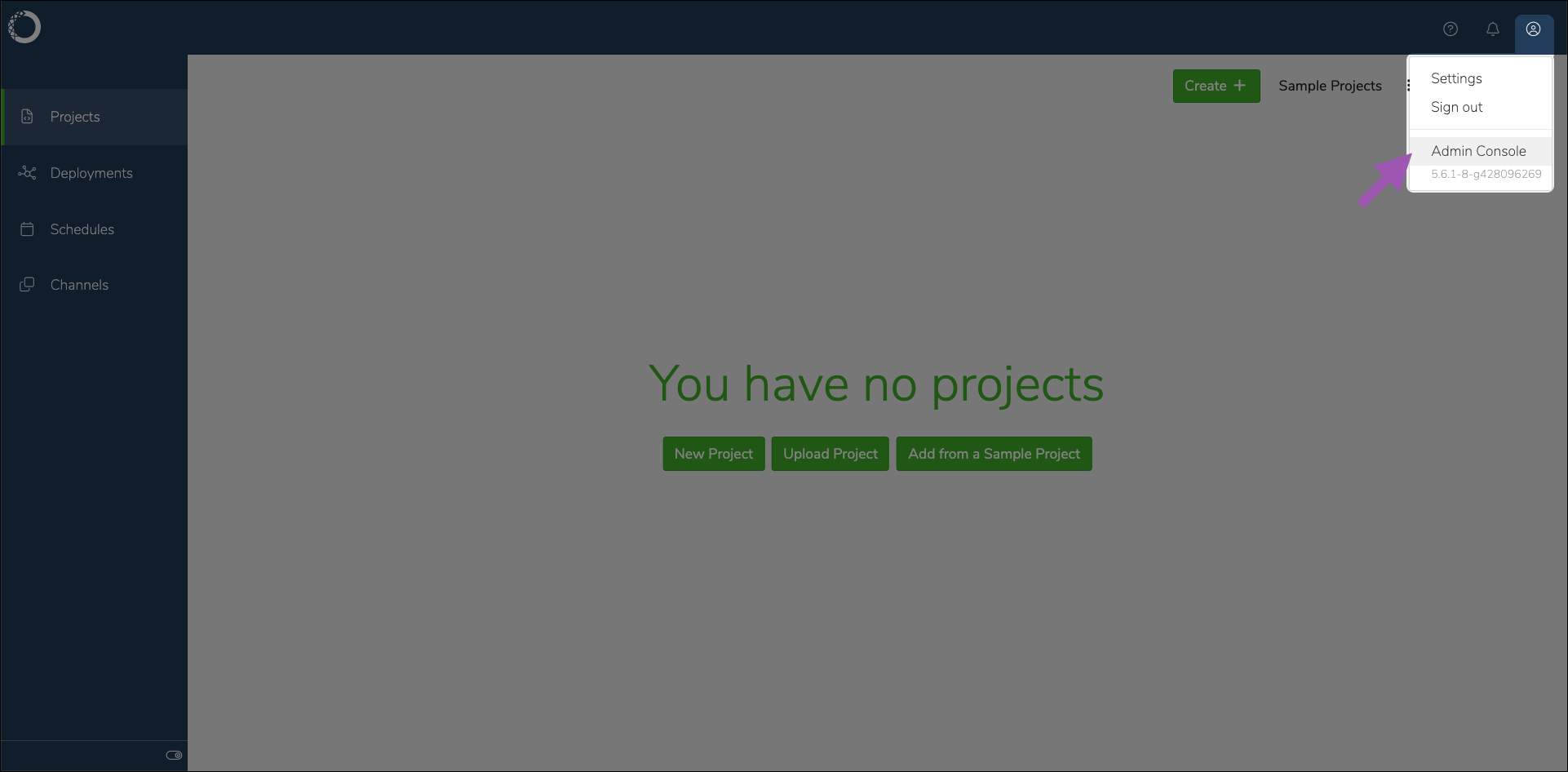
Open the User dropdown menu and select Admin Console.
Select Manage Resources to open your Gravity Ops Center.
Log in to your Gravity Ops Center. Contact your Gravity systems administrator if you need access.
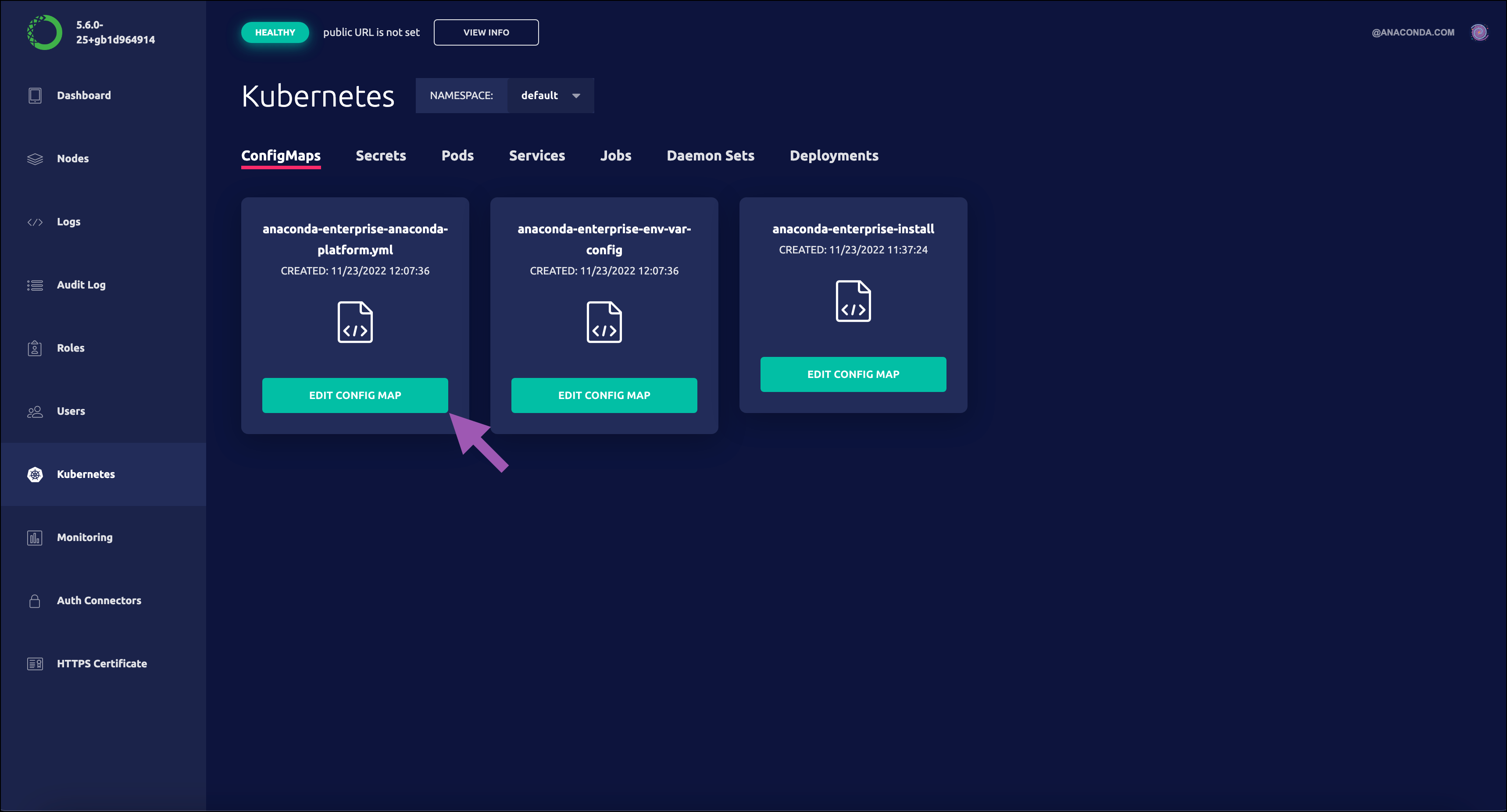
Select Kubernetes from the left-hand navigation menu.
Select Edit config map under anaconda-enterprise-anaconda-platform.yml to open the file. Leave this browser open for now.
Return to your terminal and view the contents of your configmap.yaml file by running the following command:
cat configmap.yaml
Review the contents of the anaconda-enterprise-anaconda-platform.yml file and verify that your configuration values have been properly restored. If necessary, replace the applicable sections of the anaconda-enterprise-anaconda-platform.yml file with the configurations saved in your configmap.yaml file.
Restart the Anaconda platform pods by running the following command:
If you did not configure SSL certificates as part of the post-install configuration, do so now. For more information, see Updating TLS/SSL certificates.
Anaconda Enterprise 5 uses configurable parameters in the External git section of the anaconda-enterprise-anaconda-platform.yml file to connect to external git repositories. Verify your parameters are mapped correctly, as described here.
After verifying your installation, run the following command on the master node of the Anaconda Enterprise server:
# Replace <PATH_TO_SECRETS.yaml> with the path to your anaconda secrets .yaml filesudo kubectl replace -f <PATH_TO_SECRETS.yaml>
To verify that your configuration upgraded correctly:
Log in to Anaconda Enterprise.
If your configuration uses Kerberos authentication, open a Hadoop terminal and authenticate yourself through Kerberos using the same credentials you used previously. For example, kinit <USERNAME>.
Open a Jupyter Notebook that uses Sparkmagic and verify that it behaves as expected by running the sc command to connect to Sparkmagic and start Spark.
As part of the upgrade process, the script you run automatically removes the unused packages and images from the previous installation and repopulates the registry to include only those images required by the current installation. This helps prevent the cluster from running out of disk space on the master node.
Was this page helpful?
{"docsConfig":{"theme":"mint","$schema":"https://mintlify.com/docs.json","name":"Anaconda","description":"Guides, tutorials, and reference material for Anaconda's Python, data science, and AI tools","colors":{"primary":"#1d6cf7","light":"#1d6cf7","dark":"#96f778"},"logo":{"light":"https://mintcdn.com/anaconda-29683c67/s-9WR15r5rZoaPqb/logo/light.svg?fit=max\u0026auto=format\u0026n=s-9WR15r5rZoaPqb\u0026q=85\u0026s=5996719b8530aaf065dc1ee1f39b2e67","dark":"https://mintcdn.com/anaconda-29683c67/s-9WR15r5rZoaPqb/logo/dark.svg?fit=max\u0026auto=format\u0026n=s-9WR15r5rZoaPqb\u0026q=85\u0026s=db482b1eac6af589d234160a76de3400","href":"https://www.anaconda.com/docs/main"},"favicon":"https://mintcdn.com/anaconda-29683c67/p8JNFuYYvTL8gfpM/favicon.png?fit=max\u0026auto=format\u0026n=p8JNFuYYvTL8gfpM\u0026q=85\u0026s=51a585758330bbe8f1ea032113854252","api":{"playground":{"display":"simple"}},"background":{"color":{"light":"#f4f5f8","dark":"#10121a"}},"navbar":{},"footer":{"socials":{"linkedin":"https://www.linkedin.com/company/anacondainc","github":"https://github.com/ContinuumIO","youtube":"https://www.youtube.com/c/ContinuumIo"},"links":[{"header":"Company","items":[{"label":"Anaconda Newsletter","href":"https://www.anaconda.com/newsletter"}]}]},"seo":{"metatags":{"canonical":"https://www.anaconda.com/docs"}},"styling":{"eyebrows":"breadcrumbs","latex":false},"integrations":{"ga4":{"measurementId":"G-VQTY6YKM6J"},"heap":{"appId":"758475466"}},"contextual":{"options":["claude","chatgpt","perplexity","cursor","vscode","add-mcp","copy"],"display":"header"},"navigation":{"pages":[]}},"deployment":{"deploymentMetadataValue":{"subdomain":"anaconda-29683c67","hasAudioNarration":false,"actualSubdomain":"anaconda-29683c67","customDomains":["anaconda.com"],"gitSource":{"type":"github","owner":"anaconda","repo":"documentation","deployBranch":"main","contentDirectory":"","isPrivate":true,"mountPath":"","label":""},"chroma":{"liveDeploymentHistoryId":"6ae3badbfe35d03727b2ed8f","collectionId":"273c23e4-7843-4a99-85fd-cbc8db8574a7","schemaVersion":"v3","latestBuiltDeploymentHistoryId":"6ae3badbfe35d03727b2ed8f"},"feedback":{"thumbs":true,"contextualFeedback":{"allowEmail":true,"emailDisclaimer":"Your email will only be used to follow up on this feedback."}},"entitlements":{"AI_CHAT":{"status":"ENABLED"},"REMOVE_BRANDING":{"status":"ENABLED"},"CONTEXTUAL_FEEDBACK":{"status":"ENABLED"},"CODE_SNIPPET_FEEDBACK":{"status":"ENABLED"},"WEB_MCP":{"status":"ENABLED"},"NARRATION":{"status":"ENABLED"}},"buildId":"6ae3badbfe35d03727b2ed8f","clientVersion":"0.0.4021","searchFilterCounts":[{"language":"default","tag":"Data Science \u0026 AI Workbench","count":240},{"language":"default","tag":"Anaconda Platform","count":150},{"language":"default","tag":"Package Security Manager","count":128},{"language":"default","tag":"Anaconda CLI","count":112},{"language":"default","tag":"Guides","count":105},{"language":"default","tag":"Anaconda CLI \u0026 MCP","count":104},{"language":"default","tag":"Plugins","count":93},{"language":"default","tag":"Commands","count":91},{"language":"default","tag":"Anaconda Desktop","count":86},{"language":"default","tag":"Platform Guides","count":86}],"searchSettings":{"isFiltersEnabled":true}},"assistantConfig":{"enableAskAiButton":false,"enableStarterQuestions":true,"enableContextualStarterQuestions":true,"deflection":{"enabled":true,"email":"support@anaconda.com"}},"basePath":"/docs","hasChatPermissions":true,"hasWebMcpPermissions":true,"toggles":[{"name":"kill-isr","enabled":true,"variant":{"name":"disabled","enabled":false,"feature_enabled":true},"impressionData":false},{"name":"agent-mintlify-slack","enabled":true,"variant":{"name":"disabled","enabled":false,"feature_enabled":true},"impressionData":false},{"name":"agent-integrations-settings","enabled":true,"variant":{"name":"disabled","enabled":false,"feature_enabled":true},"impressionData":false},{"name":"automations-pr-grouping","enabled":true,"variant":{"name":"disabled","enabled":false,"feature_enabled":true},"impressionData":false},{"name":"custom-prefix","enabled":true,"variant":{"name":"disabled","enabled":false,"feature_enabled":true},"impressionData":false},{"name":"analytics-v7","enabled":true,"variant":{"name":"disabled","enabled":false,"feature_enabled":true},"impressionData":false},{"name":"user-flows-analytics","enabled":true,"variant":{"name":"disabled","enabled":false,"feature_enabled":true},"impressionData":false},{"name":"no-publish-flow","enabled":true,"variant":{"name":"disabled","enabled":false,"feature_enabled":true},"impressionData":false},{"name":"workos-onboarding","enabled":true,"variant":{"name":"disabled","enabled":false,"feature_enabled":true},"impressionData":false},{"name":"llms-txt-v2","enabled":true,"variant":{"name":"disabled","enabled":false,"feature_enabled":true},"impressionData":false},{"name":"snapshot-serving-live","enabled":true,"variant":{"name":"disabled","enabled":false,"feature_enabled":true},"impressionData":false},{"name":"stripTemperatureMiddleware","enabled":true,"variant":{"name":"disabled","enabled":false,"feature_enabled":true},"impressionData":false},{"name":"per-site-search-delta","enabled":true,"variant":{"name":"disabled","enabled":false,"feature_enabled":true},"impressionData":false},{"name":"support-platform-pylon-zendesk","enabled":true,"variant":{"name":"disabled","enabled":false,"feature_enabled":true},"impressionData":false},{"name":"snapshot-serving","enabled":true,"variant":{"name":"disabled","enabled":false,"feature_enabled":true},"impressionData":false},{"name":"instant-rollback","enabled":true,"variant":{"name":"disabled","enabled":false,"feature_enabled":true},"impressionData":false},{"name":"granular-notifications-server","enabled":true,"variant":{"name":"disabled","enabled":false,"feature_enabled":true},"impressionData":false},{"name":"granular-notifications","enabled":true,"variant":{"name":"disabled","enabled":false,"feature_enabled":true},"impressionData":false},{"name":"editor-private-page-search","enabled":true,"variant":{"name":"disabled","enabled":false,"feature_enabled":true},"impressionData":false},{"name":"automations-fable","enabled":true,"variant":{"name":"disabled","enabled":false,"feature_enabled":true},"impressionData":false},{"name":"fixed-ai-action-pricing","enabled":true,"variant":{"name":"disabled","enabled":false,"feature_enabled":true},"impressionData":false},{"name":"automation-resolve-merge-conflict","enabled":true,"variant":{"name":"disabled","enabled":false,"feature_enabled":true},"impressionData":false},{"name":"scoped-publishing","enabled":true,"variant":{"name":"disabled","enabled":false,"feature_enabled":true},"impressionData":false},{"name":"mintql","enabled":true,"variant":{"name":"disabled","enabled":false,"feature_enabled":true},"impressionData":false},{"name":"page-level-analytics","enabled":true,"variant":{"name":"disabled","enabled":false,"feature_enabled":true},"impressionData":false},{"name":"editor-version-history-v2","enabled":true,"variant":{"name":"disabled","enabled":false,"feature_enabled":true},"impressionData":false},{"name":"billing-page-v2","enabled":true,"variant":{"name":"disabled","enabled":false,"feature_enabled":true},"impressionData":false},{"name":"workspace-projects","enabled":true,"variant":{"name":"disabled","enabled":false,"feature_enabled":true},"impressionData":false},{"name":"assistant-v5","enabled":true,"variant":{"name":"disabled","enabled":false,"feature_enabled":true},"impressionData":false},{"name":"byok-sep-25","enabled":true,"variant":{"name":"disabled","enabled":false,"feature_enabled":true},"impressionData":false},{"name":"fork-pr-previews","enabled":true,"variant":{"name":"disabled","enabled":false,"feature_enabled":true},"impressionData":false},{"name":"revalidation-jwt","enabled":true,"variant":{"name":"disabled","enabled":false,"feature_enabled":true},"impressionData":false},{"name":"vite-origin","enabled":true,"variant":{"name":"disabled","enabled":false,"feature_enabled":true},"impressionData":false},{"name":"billing-updated-9-15","enabled":true,"variant":{"name":"disabled","enabled":false,"feature_enabled":true},"impressionData":false},{"name":"workos-sso-scim","enabled":true,"variant":{"name":"disabled","enabled":false,"feature_enabled":true},"impressionData":false},{"name":"hobby-abuse-scan","enabled":true,"variant":{"name":"disabled","enabled":false,"feature_enabled":true},"impressionData":false},{"name":"dashboard-inbox","enabled":true,"variant":{"name":"disabled","enabled":false,"feature_enabled":true},"impressionData":false},{"name":"workos-signup","enabled":true,"variant":{"name":"disabled","enabled":false,"feature_enabled":true},"impressionData":false},{"name":"workos-enabled","enabled":true,"variant":{"name":"disabled","enabled":false,"feature_enabled":true},"impressionData":false}],"googleFontsInlined":false},"customCss":[{"filePath":"custom.css","href":"/docs/_mintlify/custom/anaconda-29683c67/8e7e337189353d6a/custom.css"}],"page":{"pagePath":"data-science/5.6.2/install/migrate/upgrade","slug":"/data-science/5.6.2/install/migrate/upgrade","pageMetadata":{"noindex":true,"title":"Upgrading Anaconda Enterprise 5 on Gravity","description":null,"href":"/data-science/5.6.2/install/migrate/upgrade"},"pageType":"default","mdx":{"mdxSource":{"compiledSource":"\"use strict\";const{Fragment:_Fragment,jsx:_jsx,jsxs:_jsxs}=arguments[0];const{useMDXComponents:_provideComponents}=arguments[0];const Danger=({children})=>{return _jsxs(`div`,{class:`callout mint-my-4 mint-px-5 mint-py-4 mint-overflow-hidden mint-rounded-2xl mint-flex mint-gap-3 mint-border danger-admonition dark:danger-admonition`,\"data-callout-type\":`danger`,children:[_jsx(`div`,{class:`mint-mt-0.5 mint-w-4`,children:_jsx(`svg`,{width:`14`,height:`14`,viewBox:`0 0 14 14`,fill:`rgb(239, 68, 68)`,xmlns:`http://www.w3.org/2000/svg`,class:`mint-w-4 mint-h-4 mint-text-sky-500`,\"aria-label\":`Danger`,children:_jsx(`path`,{\"fill-rule\":`evenodd`,\"clip-rule\":`evenodd`,d:`M7 1.3C10.14 1.3 12.7 3.86 12.7 7C12.7 10.14 10.14 12.7 7 12.7C5.48908 12.6974 4.0408 12.096 2.97241 11.0276C1.90403 9.9592 1.30264 8.51092 1.3 7C1.3 3.86 3.86 1.3 7 1.3ZM7 0C3.14 0 0 3.14 0 7C0 10.86 3.14 14 7 14C10.86 14 14 10.86 14 7C14 3.14 10.86 0 7 0ZM8 3H6V8H8V3ZM8 9H6V11H8V9Z`})})}),_jsx(`div`,{class:`mint-text-sm prose mint-min-w-0 mint-w-full`,children})]})};function _createMdxContent(props){const _components={a:`a`,code:`code`,em:`em`,li:`li`,ol:`ol`,p:`p`,pre:`pre`,span:`span`,strong:`strong`,ul:`ul`,..._provideComponents(),...props.components},{CodeBlock,Frame,Heading,Note,OptimizedImage,Warning,_MdxComponentBoundary}=_components;if(!CodeBlock)_missingMdxReference(`CodeBlock`,true);if(!Frame)_missingMdxReference(`Frame`,true);if(!Heading)_missingMdxReference(`Heading`,true);if(!Note)_missingMdxReference(`Note`,true);if(!OptimizedImage)_missingMdxReference(`OptimizedImage`,true);if(!Warning)_missingMdxReference(`Warning`,true);if(!_MdxComponentBoundary)_missingMdxReference(`_MdxComponentBoundary`,true);return _jsxs(_Fragment,{children:[_jsxs(_components.p,{children:[_jsx(_components.a,{href:`https://anaconda.zendesk.com/hc/en-us/requests/new`,children:`Contact the Anaconda implementation team`}),` before you begin for assistance upgrading your version of Anaconda Enterprise 5. Follow along with these instructions as an Anaconda implementation team member guides you through the upgrade process.`]}),`\n`,_jsx(Heading,{level:`2`,id:`prerequisites`,children:`Prerequisites`}),`\n`,_jsxs(_components.ul,{children:[`\n`,_jsxs(_components.li,{children:[`\n`,_jsxs(_components.p,{children:[`You must have `,_jsx(_components.code,{children:`jq`}),` installed.`]}),`\n`]}),`\n`,_jsxs(_components.li,{children:[`\n`,_jsxs(_components.p,{children:[`You must have a service account with `,_jsx(_components.code,{children:`sudo`}),` access on your Kubernetes (K8s) master node.`]}),`\n`]}),`\n`,_jsxs(_components.li,{children:[`\n`,_jsx(_components.p,{children:`Your K8s master node must be configured with a DNS A record. The A record sets the domain name you use for your Anaconda Enterprise instance.`}),`\n`]}),`\n`,_jsxs(_components.li,{children:[`\n`,_jsxs(_components.p,{children:[`If you are upgrading Anaconda Enterprise on a system with multiple nodes, you must verify the clock on each node is in sync with the others. Anaconda recommends using Network Time Protocol (NTP) to synchronize computer system clocks automatically over your network. For more information on installing and using `,_jsx(_components.code,{children:`Chrony`}),` to manage the NTP, see the instructions provided `,_jsx(_components.a,{href:`https://www.tecmint.com/synchronize-time-with-ntp-in-linux/`,children:`here`}),`.`]}),`\n`]}),`\n`,_jsxs(_components.li,{children:[`\n`,_jsxs(_components.p,{children:[`You must have the `,_jsx(_components.code,{children:`ae-preflight`}),` package installed. For more information, see `,_jsx(_components.a,{href:`/data-science/5.6.2/install/pre-flight`,children:`Anaconda Enterprise pre-flight check`}),`.`]}),`\n`]}),`\n`,_jsxs(_components.li,{children:[`\n`,_jsxs(_components.p,{children:[`Create a backup of your `,_jsx(_components.code,{children:`anaconda-enterprise-anaconda-platform.yml`}),` ConfigMap by running the following command:`]}),`\n`,_jsx(CodeBlock,{numberOfLines:`2`,language:`text`,children:_jsx(_components.pre,{className:`shiki shiki-themes github-light-default dark-plus`,style:{backgroundColor:`#ffffff`,\"--shiki-dark-bg\":`#0B0C0E`,color:`#1f2328`,\"--shiki-dark\":`#D4D4D4`},language:`text`,children:_jsxs(_components.code,{language:`text`,numberOfLines:`2`,children:[_jsx(_components.span,{className:`line`,children:_jsx(_components.span,{children:`kubectl get cm anaconda-enterprise-anaconda-platform.yml -o json | jq -r '.data[\"anaconda-platform.yml\"]' > configmap-backup.yml`})}),`\n`,_jsx(_components.span,{className:`line`,children:_jsx(_components.span,{})})]})})}),`\n`]}),`\n`]}),`\n`,_jsx(Warning,{children:_jsxs(_components.p,{children:[`Anaconda recommends the use of `,_jsx(_components.a,{href:`/data-science/5.6.2/reference/understanding-ae5#managed-persistence`,children:`managed persistence`}),` to ensure open sessions and deployments are captured by the upgrade process. If you are not using managed persistence, have all users save their work, stop any open sessions and deployments, and log out of the platform during the upgrade process.`]})}),`\n`,_jsx(Heading,{level:`2`,id:`upgrading`,children:`Upgrading`}),`\n`,_jsx(_components.p,{children:`After you have verified that your system meets all of the installation requirements, you’re ready to upgrade the cluster.`}),`\n`,_jsx(_components.p,{children:`There are two basic types of upgrades for Gravity users: in-place upgrades and fresh reinstallation upgrades. Follow along with the instructions here as your Anaconda implementation team member guides you through upgrading your software.`}),`\n`,_jsx(Warning,{children:_jsxs(_components.ul,{children:[`\n`,_jsxs(_components.li,{children:[`\n`,_jsx(_components.p,{children:`Project sessions are terminated during the upgrade process! Because of this, it is important to stop all sessions prior to upgrading. If you do not, sessions that are terminated as part of the upgrade process must be restarted manually post upgrade.`}),`\n`]}),`\n`,_jsxs(_components.li,{children:[`\n`,_jsxs(_components.p,{children:[`Sessions can be stopped programmatically using `,_jsx(_components.code,{children:`ae5-tools`}),` by running the following command in a terminal that has access your Workbench cluster over the network:`]}),`\n`,_jsx(CodeBlock,{numberOfLines:`2`,language:`text`,children:_jsx(_components.pre,{className:`shiki shiki-themes github-light-default dark-plus`,style:{backgroundColor:`#ffffff`,\"--shiki-dark-bg\":`#0B0C0E`,color:`#1f2328`,\"--shiki-dark\":`#D4D4D4`},language:`text`,children:_jsxs(_components.code,{language:`text`,numberOfLines:`2`,children:[_jsx(_components.span,{className:`line`,children:_jsx(_components.span,{children:`ae5 session list --columns=id --no-header | xargs -n1 ae5 session stop --yes`})}),`\n`,_jsx(_components.span,{className:`line`,children:_jsx(_components.span,{})})]})})}),`\n`]}),`\n`]})}),`\n`,_jsx(Heading,{level:`3`,id:`in-place-upgrade`,children:`In-place upgrade`}),`\n`,_jsx(_MdxComponentBoundary,{name:`Danger`,children:_jsx(Danger,{children:_jsx(_components.p,{children:`In-place upgrades of Anaconda Enterprise are not supported for versions that\nare moving from Gravity 6 to Gravity 7. Instead, you must perform a fresh\nreinstallation to upgrade your software. If you do not, your installation will\nbreak. Check the version of Gravity and Enterprise before you begin, and\nchoose the upgrade process that best suits your needs.`})})}),`\n`,_jsx(_components.p,{children:`In-place upgrades are also not supported when upgrading from Anaconda Enterprise 5.6.x to 5.6.2. Please perform a fresh reinstallation to upgrade between these versions.`}),`\n`,_jsx(_components.p,{children:`In-place upgrades are performed while the software is still running. To perform an in-place upgrade:`}),`\n`,_jsxs(_components.ol,{children:[`\n`,_jsxs(_components.li,{children:[`\n`,_jsxs(_components.p,{children:[`Log in to a service account with `,_jsx(_components.code,{children:`sudo`}),` access on the master node running your Anaconda Enterprise software.`]}),`\n`]}),`\n`,_jsxs(_components.li,{children:[`\n`,_jsx(_components.p,{children:`Download the installer file by running the following command:`}),`\n`,_jsx(CodeBlock,{numberOfLines:`3`,language:`text`,children:_jsx(_components.pre,{className:`shiki shiki-themes github-light-default dark-plus`,style:{backgroundColor:`#ffffff`,\"--shiki-dark-bg\":`#0B0C0E`,color:`#1f2328`,\"--shiki-dark\":`#D4D4D4`},language:`text`,children:_jsxs(_components.code,{language:`text`,numberOfLines:`3`,children:[_jsx(_components.span,{className:`line`,children:_jsx(_components.span,{children:`# Replace \u003cINSTALLER_LOCATION> with the provided location of the installer file`})}),`\n`,_jsx(_components.span,{className:`line`,children:_jsx(_components.span,{children:`curl -O \u003cINSTALLER_LOCATION>`})}),`\n`,_jsx(_components.span,{className:`line`,children:_jsx(_components.span,{})})]})})}),`\n`]}),`\n`,_jsxs(_components.li,{children:[`\n`,_jsx(_components.p,{children:`Decompress the installer file by running the following command:`}),`\n`,_jsx(CodeBlock,{numberOfLines:`3`,language:`text`,children:_jsx(_components.pre,{className:`shiki shiki-themes github-light-default dark-plus`,style:{backgroundColor:`#ffffff`,\"--shiki-dark-bg\":`#0B0C0E`,color:`#1f2328`,\"--shiki-dark\":`#D4D4D4`},language:`text`,children:_jsxs(_components.code,{language:`text`,numberOfLines:`3`,children:[_jsx(_components.span,{className:`line`,children:_jsx(_components.span,{children:`# Replace \u003cINSTALLER> with the installer file you just downloaded`})}),`\n`,_jsx(_components.span,{className:`line`,children:_jsx(_components.span,{children:`tar xvzf \u003cINSTALLER>`})}),`\n`,_jsx(_components.span,{className:`line`,children:_jsx(_components.span,{})})]})})}),`\n`]}),`\n`,_jsxs(_components.li,{children:[`\n`,_jsx(_components.p,{children:`Enter the installer directory by running the following command:`}),`\n`,_jsx(CodeBlock,{numberOfLines:`3`,language:`text`,children:_jsx(_components.pre,{className:`shiki shiki-themes github-light-default dark-plus`,style:{backgroundColor:`#ffffff`,\"--shiki-dark-bg\":`#0B0C0E`,color:`#1f2328`,\"--shiki-dark\":`#D4D4D4`},language:`text`,children:_jsxs(_components.code,{language:`text`,numberOfLines:`3`,children:[_jsx(_components.span,{className:`line`,children:_jsx(_components.span,{children:`# Replace \u003cINSTALLER> with the version of your installer`})}),`\n`,_jsx(_components.span,{className:`line`,children:_jsx(_components.span,{children:`cd \u003cINSTALLER>`})}),`\n`,_jsx(_components.span,{className:`line`,children:_jsx(_components.span,{})})]})})}),`\n`]}),`\n`,_jsxs(_components.li,{children:[`\n`,_jsx(_components.p,{children:`Run the following command to verify your environment is properly prepared:`}),`\n`,_jsx(CodeBlock,{numberOfLines:`2`,language:`text`,children:_jsx(_components.pre,{className:`shiki shiki-themes github-light-default dark-plus`,style:{backgroundColor:`#ffffff`,\"--shiki-dark-bg\":`#0B0C0E`,color:`#1f2328`,\"--shiki-dark\":`#D4D4D4`},language:`text`,children:_jsxs(_components.code,{language:`text`,numberOfLines:`2`,children:[_jsx(_components.span,{className:`line`,children:_jsx(_components.span,{children:`ae-preflight`})}),`\n`,_jsx(_components.span,{className:`line`,children:_jsx(_components.span,{})})]})})}),`\n`,_jsx(_components.p,{children:`If the check returns an overall result of WARN, you can view the results of the check by running the following command:`}),`\n`,_jsx(CodeBlock,{numberOfLines:`2`,language:`text`,children:_jsx(_components.pre,{className:`shiki shiki-themes github-light-default dark-plus`,style:{backgroundColor:`#ffffff`,\"--shiki-dark-bg\":`#0B0C0E`,color:`#1f2328`,\"--shiki-dark\":`#D4D4D4`},language:`text`,children:_jsxs(_components.code,{language:`text`,numberOfLines:`2`,children:[_jsx(_components.span,{className:`line`,children:_jsx(_components.span,{children:`cat results.txt`})}),`\n`,_jsx(_components.span,{className:`line`,children:_jsx(_components.span,{})})]})})}),`\n`,_jsxs(_components.p,{children:[`If necessary, make applicable corrections to properly prepare your environment to meet the `,_jsx(_components.a,{href:`/data-science/5.6.2/install/reqs`,children:`Installation requirements`}),`. Once you’ve verified that your environment is properly configured, you can begin the upgrade process.`]}),`\n`]}),`\n`,_jsxs(_components.li,{children:[`\n`,_jsx(_components.p,{children:`To start the upload and upgrade process, run the following commands:`}),`\n`,_jsx(CodeBlock,{numberOfLines:`3`,language:`text`,children:_jsx(_components.pre,{className:`shiki shiki-themes github-light-default dark-plus`,style:{backgroundColor:`#ffffff`,\"--shiki-dark-bg\":`#0B0C0E`,color:`#1f2328`,\"--shiki-dark\":`#D4D4D4`},language:`text`,children:_jsxs(_components.code,{language:`text`,numberOfLines:`3`,children:[_jsx(_components.span,{className:`line`,children:_jsx(_components.span,{children:`sudo ./upload`})}),`\n`,_jsx(_components.span,{className:`line`,children:_jsx(_components.span,{children:`sudo ./gravity upgrade`})}),`\n`,_jsx(_components.span,{className:`line`,children:_jsx(_components.span,{})})]})})}),`\n`,_jsx(_components.p,{children:`The upgrade process can take up to an hour or more to complete, primarily due to the upload step. You can view the status of the upgrade process at any time by running the following command:`}),`\n`,_jsx(CodeBlock,{numberOfLines:`2`,language:`text`,children:_jsx(_components.pre,{className:`shiki shiki-themes github-light-default dark-plus`,style:{backgroundColor:`#ffffff`,\"--shiki-dark-bg\":`#0B0C0E`,color:`#1f2328`,\"--shiki-dark\":`#D4D4D4`},language:`text`,children:_jsxs(_components.code,{language:`text`,numberOfLines:`2`,children:[_jsx(_components.span,{className:`line`,children:_jsx(_components.span,{children:`sudo watch ./gravity plan`})}),`\n`,_jsx(_components.span,{className:`line`,children:_jsx(_components.span,{})})]})})}),`\n`,_jsx(_components.p,{children:`Once the upgrade process is complete, the pods will start to come up on their own, but this process also takes some time to finish. Monitor the pods status by running the following command:`}),`\n`,_jsx(CodeBlock,{numberOfLines:`2`,language:`text`,children:_jsx(_components.pre,{className:`shiki shiki-themes github-light-default dark-plus`,style:{backgroundColor:`#ffffff`,\"--shiki-dark-bg\":`#0B0C0E`,color:`#1f2328`,\"--shiki-dark\":`#D4D4D4`},language:`text`,children:_jsxs(_components.code,{language:`text`,numberOfLines:`2`,children:[_jsx(_components.span,{className:`line`,children:_jsx(_components.span,{children:`sudo watch kubectl get pods`})}),`\n`,_jsx(_components.span,{className:`line`,children:_jsx(_components.span,{})})]})})}),`\n`,_jsx(_components.p,{children:`If you encounter errors while doing your in-place upgrade, you can view which phase of the upgrade failed by running the following command:`}),`\n`,_jsx(CodeBlock,{numberOfLines:`2`,language:`text`,children:_jsx(_components.pre,{className:`shiki shiki-themes github-light-default dark-plus`,style:{backgroundColor:`#ffffff`,\"--shiki-dark-bg\":`#0B0C0E`,color:`#1f2328`,\"--shiki-dark\":`#D4D4D4`},language:`text`,children:_jsxs(_components.code,{language:`text`,numberOfLines:`2`,children:[_jsx(_components.span,{className:`line`,children:_jsx(_components.span,{children:`sudo ./gravity plan`})}),`\n`,_jsx(_components.span,{className:`line`,children:_jsx(_components.span,{})})]})})}),`\n`,_jsxs(_components.p,{children:[`You can return to any phase of the upgrade process by running the rollback command against the name of the phase as it’s listed in the `,_jsx(_components.strong,{children:`Phase`}),` column of the `,_jsx(_components.code,{children:`./gravity plan`}),` commands’ return:`]}),`\n`,_jsx(CodeBlock,{numberOfLines:`3`,language:`text`,children:_jsx(_components.pre,{className:`shiki shiki-themes github-light-default dark-plus`,style:{backgroundColor:`#ffffff`,\"--shiki-dark-bg\":`#0B0C0E`,color:`#1f2328`,\"--shiki-dark\":`#D4D4D4`},language:`text`,children:_jsxs(_components.code,{language:`text`,numberOfLines:`3`,children:[_jsx(_components.span,{className:`line`,children:_jsx(_components.span,{children:`# Replace \u003cNAME_OF_PHASE> with the name listed in the Phase column`})}),`\n`,_jsx(_components.span,{className:`line`,children:_jsx(_components.span,{children:`sudo ./gravity plan rollback --phase=/\u003cNAME_OF_PHASE>`})}),`\n`,_jsx(_components.span,{className:`line`,children:_jsx(_components.span,{})})]})})}),`\n`,_jsx(_components.p,{children:`After addressing any errors, resume the upgrade by running the following command:`}),`\n`,_jsx(CodeBlock,{numberOfLines:`2`,language:`text`,children:_jsx(_components.pre,{className:`shiki shiki-themes github-light-default dark-plus`,style:{backgroundColor:`#ffffff`,\"--shiki-dark-bg\":`#0B0C0E`,color:`#1f2328`,\"--shiki-dark\":`#D4D4D4`},language:`text`,children:_jsxs(_components.code,{language:`text`,numberOfLines:`2`,children:[_jsx(_components.span,{className:`line`,children:_jsx(_components.span,{children:`sudo ./gravity upgrade --resume --force`})}),`\n`,_jsx(_components.span,{className:`line`,children:_jsx(_components.span,{})})]})})}),`\n`]}),`\n`]}),`\n`,_jsxs(_components.p,{children:[`Once you have resolved your errors, or if no errors have occurred, it’s time to `,_jsx(_components.a,{href:`#verify-your-installation`,children:`verify your installation`}),`.`]}),`\n`,_jsx(Heading,{level:`3`,id:`fresh-reinstallation-upgrade`,children:`Fresh reinstallation upgrade`}),`\n`,_jsx(_components.p,{children:`A fresh reinstallation upgrade backs up your current Anaconda Enterprise software configurations and settings, then uninstalls and reinstalls the software. After installation is complete, you can apply your saved configurations and settings to the new software version.`}),`\n`,_jsx(_components.p,{children:`To perform a fresh reinstallation upgrade:`}),`\n`,_jsxs(_components.ul,{children:[`\n`,_jsx(_components.li,{children:_jsx(_components.a,{href:`#back-up-your-configurations`,children:`Back up your configuration`})}),`\n`,_jsx(_components.li,{children:_jsx(_components.a,{href:`#uninstall`,children:`Uninstall`})}),`\n`,_jsx(_components.li,{children:_jsx(_components.a,{href:`#reinstall-and-apply-your-saved-settings`,children:`Reinstall and apply your saved settings`})}),`\n`]}),`\n`,_jsx(Heading,{level:`4`,id:`back-up-your-configurations`,children:`Back up your configurations`}),`\n`,_jsxs(_components.ol,{children:[`\n`,_jsxs(_components.li,{children:[`\n`,_jsxs(_components.p,{children:[`Log in to a service account with `,_jsx(_components.code,{children:`sudo`}),` access on the master node running your Anaconda Enterprise software.`]}),`\n`]}),`\n`,_jsxs(_components.li,{children:[`\n`,_jsx(_components.p,{children:`Download the installer file by running the following command:`}),`\n`,_jsx(CodeBlock,{numberOfLines:`3`,language:`text`,children:_jsx(_components.pre,{className:`shiki shiki-themes github-light-default dark-plus`,style:{backgroundColor:`#ffffff`,\"--shiki-dark-bg\":`#0B0C0E`,color:`#1f2328`,\"--shiki-dark\":`#D4D4D4`},language:`text`,children:_jsxs(_components.code,{language:`text`,numberOfLines:`3`,children:[_jsx(_components.span,{className:`line`,children:_jsx(_components.span,{children:`# Replace \u003cINSTALLER_LOCATION> with the provided location of the installer file`})}),`\n`,_jsx(_components.span,{className:`line`,children:_jsx(_components.span,{children:`curl -O \u003cINSTALLER_LOCATION>`})}),`\n`,_jsx(_components.span,{className:`line`,children:_jsx(_components.span,{})})]})})}),`\n`]}),`\n`,_jsxs(_components.li,{children:[`\n`,_jsx(_components.p,{children:`Decompress the installer file by running the following command:`}),`\n`,_jsx(CodeBlock,{numberOfLines:`4`,language:`text`,children:_jsx(_components.pre,{className:`shiki shiki-themes github-light-default dark-plus`,style:{backgroundColor:`#ffffff`,\"--shiki-dark-bg\":`#0B0C0E`,color:`#1f2328`,\"--shiki-dark\":`#D4D4D4`},language:`text`,children:_jsxs(_components.code,{language:`text`,numberOfLines:`4`,children:[_jsx(_components.span,{className:`line`,children:_jsx(_components.span,{children:`# Replace \u003cINSTALLER> with the installer file you just downloaded`})}),`\n`,_jsx(_components.span,{className:`line`,children:_jsx(_components.span,{children:`tar xvzf \u003cINSTALLER>`})}),`\n`,_jsx(_components.span,{className:`line`,children:_jsx(_components.span,{})}),`\n`,_jsx(_components.span,{className:`line`,children:_jsx(_components.span,{})})]})})}),`\n`]}),`\n`,_jsxs(_components.li,{children:[`\n`,_jsx(_components.p,{children:`Enter the installer directory by running the following command:`}),`\n`,_jsx(CodeBlock,{numberOfLines:`4`,language:`text`,children:_jsx(_components.pre,{className:`shiki shiki-themes github-light-default dark-plus`,style:{backgroundColor:`#ffffff`,\"--shiki-dark-bg\":`#0B0C0E`,color:`#1f2328`,\"--shiki-dark\":`#D4D4D4`},language:`text`,children:_jsxs(_components.code,{language:`text`,numberOfLines:`4`,children:[_jsx(_components.span,{className:`line`,children:_jsx(_components.span,{children:`# Replace \u003cINSTALLER> with the installer file you just decompressed`})}),`\n`,_jsx(_components.span,{className:`line`,children:_jsx(_components.span,{children:`cd \u003cINSTALLER>`})}),`\n`,_jsx(_components.span,{className:`line`,children:_jsx(_components.span,{})}),`\n`,_jsx(_components.span,{className:`line`,children:_jsx(_components.span,{})})]})})}),`\n`,_jsx(Note,{children:_jsxs(_components.p,{children:[`The installer bundle contains the `,_jsx(_components.code,{children:`extract_config.sh`}),` script, which retains\nthe following files when run: * `,_jsx(_components.code,{children:`anaconda-enterprise-certs.yaml`}),` *\n`,_jsx(_components.code,{children:`anaconda-enterprise-keycloak.yaml`}),` * `,_jsx(_components.code,{children:`helm_values.yaml`}),` *\n`,_jsx(_components.code,{children:`gravity_values.yaml`})]})}),`\n`]}),`\n`,_jsxs(_components.li,{children:[`\n`,_jsx(_components.p,{children:`Create a directory to contain the configuration data extracted by the script and name it “reinstall”:`}),`\n`,_jsx(CodeBlock,{numberOfLines:`2`,language:`text`,children:_jsx(_components.pre,{className:`shiki shiki-themes github-light-default dark-plus`,style:{backgroundColor:`#ffffff`,\"--shiki-dark-bg\":`#0B0C0E`,color:`#1f2328`,\"--shiki-dark\":`#D4D4D4`},language:`text`,children:_jsxs(_components.code,{language:`text`,numberOfLines:`2`,children:[_jsx(_components.span,{className:`line`,children:_jsx(_components.span,{children:`mkdir reinstall `})}),`\n`,_jsx(_components.span,{className:`line`,children:_jsx(_components.span,{})})]})})}),`\n`]}),`\n`,_jsxs(_components.li,{children:[`\n`,_jsx(_components.p,{children:`Enter the directory you just created:`}),`\n`,_jsx(CodeBlock,{numberOfLines:`2`,language:`text`,children:_jsx(_components.pre,{className:`shiki shiki-themes github-light-default dark-plus`,style:{backgroundColor:`#ffffff`,\"--shiki-dark-bg\":`#0B0C0E`,color:`#1f2328`,\"--shiki-dark\":`#D4D4D4`},language:`text`,children:_jsxs(_components.code,{language:`text`,numberOfLines:`2`,children:[_jsx(_components.span,{className:`line`,children:_jsx(_components.span,{children:`cd reinstall `})}),`\n`,_jsx(_components.span,{className:`line`,children:_jsx(_components.span,{})})]})})}),`\n`]}),`\n`,_jsxs(_components.li,{children:[`\n`,_jsxs(_components.p,{children:[`Run the `,_jsx(_components.code,{children:`extract_config.sh`}),` script by running the following command:`]}),`\n`,_jsx(CodeBlock,{numberOfLines:`2`,language:`text`,children:_jsx(_components.pre,{className:`shiki shiki-themes github-light-default dark-plus`,style:{backgroundColor:`#ffffff`,\"--shiki-dark-bg\":`#0B0C0E`,color:`#1f2328`,\"--shiki-dark\":`#D4D4D4`},language:`text`,children:_jsxs(_components.code,{language:`text`,numberOfLines:`2`,children:[_jsx(_components.span,{className:`line`,children:_jsx(_components.span,{children:`sudo bash extract_config.sh`})}),`\n`,_jsx(_components.span,{className:`line`,children:_jsx(_components.span,{})})]})})}),`\n`,_jsxs(_components.p,{children:[`Once the script has completed, you will need to manually save some additional configurations and secrets to your `,_jsx(_components.code,{children:`reinstall`}),` directory.`]}),`\n`]}),`\n`,_jsxs(_components.li,{children:[`\n`,_jsxs(_components.p,{children:[`Export your configmap to a `,_jsx(_components.code,{children:`.yaml`}),` file by running the following command:`]}),`\n`,_jsx(CodeBlock,{numberOfLines:`2`,language:`text`,children:_jsx(_components.pre,{className:`shiki shiki-themes github-light-default dark-plus`,style:{backgroundColor:`#ffffff`,\"--shiki-dark-bg\":`#0B0C0E`,color:`#1f2328`,\"--shiki-dark\":`#D4D4D4`},language:`text`,children:_jsxs(_components.code,{language:`text`,numberOfLines:`2`,children:[_jsx(_components.span,{className:`line`,children:_jsx(_components.span,{children:`sudo kubectl get cm -o yaml --export > configmap.yaml `})}),`\n`,_jsx(_components.span,{className:`line`,children:_jsx(_components.span,{})})]})})}),`\n`]}),`\n`]}),`\n`,_jsx(Heading,{level:`4`,id:`uninstall`,children:`Uninstall`}),`\n`,_jsxs(_components.p,{children:[_jsx(_components.a,{href:`/data-science/5.6.2/install/migrate/uninstall`,children:`Uninstall Anaconda Enterprise`}),` on all nodes and reboot your instance.`]}),`\n`,_jsx(Warning,{children:_jsxs(_components.p,{children:[`Do not run the command `,_jsx(_components.code,{children:`sudo rm -rf /opt/anaconda/storage`}),` on the master node\nas part of your uninstall process. If you do you, will lose your configuration\nsettings and user data.`]})}),`\n`,_jsx(Heading,{level:`4`,id:`reinstall-and-apply-your-saved-settings`,children:`Reinstall and apply your saved settings`}),`\n`,_jsxs(_components.ol,{children:[`\n`,_jsxs(_components.li,{children:[`\n`,_jsx(_components.p,{children:`Run the following command to verify your environment is properly prepared:`}),`\n`,_jsx(CodeBlock,{numberOfLines:`2`,language:`text`,children:_jsx(_components.pre,{className:`shiki shiki-themes github-light-default dark-plus`,style:{backgroundColor:`#ffffff`,\"--shiki-dark-bg\":`#0B0C0E`,color:`#1f2328`,\"--shiki-dark\":`#D4D4D4`},language:`text`,children:_jsxs(_components.code,{language:`text`,numberOfLines:`2`,children:[_jsx(_components.span,{className:`line`,children:_jsx(_components.span,{children:`ae-preflight`})}),`\n`,_jsx(_components.span,{className:`line`,children:_jsx(_components.span,{})})]})})}),`\n`,_jsx(_components.p,{children:`If the check returns an overall result of WARN, you can view the results of the check by running the following command:`}),`\n`,_jsx(CodeBlock,{numberOfLines:`2`,language:`text`,children:_jsx(_components.pre,{className:`shiki shiki-themes github-light-default dark-plus`,style:{backgroundColor:`#ffffff`,\"--shiki-dark-bg\":`#0B0C0E`,color:`#1f2328`,\"--shiki-dark\":`#D4D4D4`},language:`text`,children:_jsxs(_components.code,{language:`text`,numberOfLines:`2`,children:[_jsx(_components.span,{className:`line`,children:_jsx(_components.span,{children:`cat results.txt`})}),`\n`,_jsx(_components.span,{className:`line`,children:_jsx(_components.span,{})})]})})}),`\n`,_jsxs(_components.p,{children:[`If necessary, make applicable corrections to properly prepare your environment to meet the `,_jsx(_components.a,{href:`/data-science/5.6.2/install/reqs`,children:`Installation requirements`}),`. Once you’ve verified that your environment is properly configured, you can begin the upgrade process.`]}),`\n`]}),`\n`,_jsxs(_components.li,{children:[`\n`,_jsxs(_components.p,{children:[`Run the Gravity installation command using the `,_jsx(_components.code,{children:`gravity_values.yaml`}),` file stored in the reinstall directory you created earlier instead of creating a new file during installation:`]}),`\n`,_jsx(CodeBlock,{numberOfLines:`5`,language:`text`,children:_jsx(_components.pre,{className:`shiki shiki-themes github-light-default dark-plus`,style:{backgroundColor:`#ffffff`,\"--shiki-dark-bg\":`#0B0C0E`,color:`#1f2328`,\"--shiki-dark\":`#D4D4D4`},language:`text`,children:_jsxs(_components.code,{language:`text`,numberOfLines:`5`,children:[_jsx(_components.span,{className:`line`,children:_jsx(_components.span,{children:`# Replace \u003cADVERTISE-ADDR> with the IP address you want to be visible to the other nodes. If you have a private network and all nodes can communicate on it, use the private IP address for the advertise address`})}),`\n`,_jsx(_components.span,{className:`line`,children:_jsx(_components.span,{children:`# Replace \u003cCLUSTERNAME> with the name you're giving to your cluster. Alphanumeric characters and periods only`})}),`\n`,_jsx(_components.span,{className:`line`,children:_jsx(_components.span,{children:`# Replace \u003cVALUES_PATH> with the filepath to the gravity_values.yaml file created from running the extract_config.sh script`})}),`\n`,_jsx(_components.span,{className:`line`,children:_jsx(_components.span,{children:`sudo ./gravity install --advertise-addr=\u003cADVERTISE-ADDR> --cluster=\u003cCLUSTERNAME> --config \u003cVALUES_PATH> --service-uid=$(id -u) --cloud-provider=generic`})}),`\n`,_jsx(_components.span,{className:`line`,children:_jsx(_components.span,{})})]})})}),`\n`,_jsx(_components.p,{children:`Here is an example of what the installation command looks like for a single-node cluster:`}),`\n`,_jsx(CodeBlock,{numberOfLines:`2`,language:`text`,children:_jsx(_components.pre,{className:`shiki shiki-themes github-light-default dark-plus`,style:{backgroundColor:`#ffffff`,\"--shiki-dark-bg\":`#0B0C0E`,color:`#1f2328`,\"--shiki-dark\":`#D4D4D4`},language:`text`,children:_jsxs(_components.code,{language:`text`,numberOfLines:`2`,children:[_jsx(_components.span,{className:`line`,children:_jsx(_components.span,{children:`sudo ./gravity install --advertise-addr=192.168.1.1 --cluster=MyCluster --config ./gravity_values.yaml --service-uid=$(id -u) --cloud-provider=generic`})}),`\n`,_jsx(_components.span,{className:`line`,children:_jsx(_components.span,{})})]})})}),`\n`]}),`\n`,_jsxs(_components.li,{children:[`\n`,_jsxs(_components.p,{children:[_jsx(_components.a,{href:`/data-science/5.6.2/install/on-prem`,children:`Complete the rest of the installation process`}),`.`]}),`\n`]}),`\n`,_jsxs(_components.li,{children:[`\n`,_jsx(_components.p,{children:`Replace your SSL certificate by running the following commands:`}),`\n`,_jsx(CodeBlock,{numberOfLines:`3`,language:`text`,children:_jsx(_components.pre,{className:`shiki shiki-themes github-light-default dark-plus`,style:{backgroundColor:`#ffffff`,\"--shiki-dark-bg\":`#0B0C0E`,color:`#1f2328`,\"--shiki-dark\":`#D4D4D4`},language:`text`,children:_jsxs(_components.code,{language:`text`,numberOfLines:`3`,children:[_jsx(_components.span,{className:`line`,children:_jsx(_components.span,{children:`sudo kubectl create -f anaconda-enterprise-certs.json`})}),`\n`,_jsx(_components.span,{className:`line`,children:_jsx(_components.span,{children:`sudo kubectl replace -n kube-system -f cluster-tls.json`})}),`\n`,_jsx(_components.span,{className:`line`,children:_jsx(_components.span,{})})]})})}),`\n`]}),`\n`,_jsxs(_components.li,{children:[`\n`,_jsx(_components.p,{children:`Replace your user secrets by running the following command:`}),`\n`,_jsx(CodeBlock,{numberOfLines:`2`,language:`text`,children:_jsx(_components.pre,{className:`shiki shiki-themes github-light-default dark-plus`,style:{backgroundColor:`#ffffff`,\"--shiki-dark-bg\":`#0B0C0E`,color:`#1f2328`,\"--shiki-dark\":`#D4D4D4`},language:`text`,children:_jsxs(_components.code,{language:`text`,numberOfLines:`2`,children:[_jsx(_components.span,{className:`line`,children:_jsx(_components.span,{children:`sudo kubectl create -f user-secrets.json`})}),`\n`,_jsx(_components.span,{className:`line`,children:_jsx(_components.span,{})})]})})}),`\n`,_jsxs(_components.p,{children:[`The `,_jsx(_components.code,{children:`configmap.yaml`}),` file that you created earlier contains settings that need to be restored to the `,_jsx(_components.code,{children:`anaconda-enterprise-anaconda-platform.yml`}),` file manually.`]}),`\n`]}),`\n`,_jsxs(_components.li,{children:[`\n`,_jsx(_components.p,{children:`Open a web browser and log in to Anaconda Enterprise as an Administrator.`}),`\n`]}),`\n`,_jsxs(_components.li,{children:[`\n`,_jsxs(_components.p,{children:[`Open the `,_jsx(_components.strong,{children:`User`}),` dropdown menu and select `,_jsx(_components.strong,{children:`Admin Console`}),`.`]}),`\n`,_jsx(Frame,{children:_jsx(OptimizedImage,{src:`https://mintcdn.com/anaconda-29683c67/PJ_ii3MdRzruBlJj/images/data-science/admin_console_navigation_2.png?fit=max\u0026auto=format\u0026n=PJ_ii3MdRzruBlJj\u0026q=85\u0026s=310f6f59d9fb2fa21719053a49ee7d99`,alt:``,\"data-og-width\":`1922`,width:`1922`,\"data-og-height\":`946`,height:`946`,\"data-path\":`images/data-science/admin_console_navigation_2.png`,\"data-optimize\":`true`,\"data-opv\":`3`,srcset:`https://mintcdn.com/anaconda-29683c67/PJ_ii3MdRzruBlJj/images/data-science/admin_console_navigation_2.png?w=280\u0026fit=max\u0026auto=format\u0026n=PJ_ii3MdRzruBlJj\u0026q=85\u0026s=5953107fa2459856e8f2d9df7e34b679 280w, https://mintcdn.com/anaconda-29683c67/PJ_ii3MdRzruBlJj/images/data-science/admin_console_navigation_2.png?w=560\u0026fit=max\u0026auto=format\u0026n=PJ_ii3MdRzruBlJj\u0026q=85\u0026s=6362f461577ef48c4c0fc626eca325a9 560w, https://mintcdn.com/anaconda-29683c67/PJ_ii3MdRzruBlJj/images/data-science/admin_console_navigation_2.png?w=840\u0026fit=max\u0026auto=format\u0026n=PJ_ii3MdRzruBlJj\u0026q=85\u0026s=3999fe16290c1794660c6d79e27ebd84 840w, https://mintcdn.com/anaconda-29683c67/PJ_ii3MdRzruBlJj/images/data-science/admin_console_navigation_2.png?w=1100\u0026fit=max\u0026auto=format\u0026n=PJ_ii3MdRzruBlJj\u0026q=85\u0026s=80764a65d63d2cd1ff2510e4dfdba1bb 1100w, https://mintcdn.com/anaconda-29683c67/PJ_ii3MdRzruBlJj/images/data-science/admin_console_navigation_2.png?w=1650\u0026fit=max\u0026auto=format\u0026n=PJ_ii3MdRzruBlJj\u0026q=85\u0026s=bf6dabd71cbc28e762aac99b7990d5b0 1650w, https://mintcdn.com/anaconda-29683c67/PJ_ii3MdRzruBlJj/images/data-science/admin_console_navigation_2.png?w=2500\u0026fit=max\u0026auto=format\u0026n=PJ_ii3MdRzruBlJj\u0026q=85\u0026s=0704b5b1402855ad515f72856c772192 2500w`})}),`\n`]}),`\n`,_jsxs(_components.li,{children:[`\n`,_jsxs(_components.p,{children:[`Select `,_jsx(_components.strong,{children:`Manage Resources`}),` to open your Gravity Ops Center.`]}),`\n`]}),`\n`,_jsxs(_components.li,{children:[`\n`,_jsx(_components.p,{children:`Log in to your Gravity Ops Center. Contact your Gravity systems administrator if you need access.`}),`\n`]}),`\n`,_jsxs(_components.li,{children:[`\n`,_jsxs(_components.p,{children:[`Select `,_jsx(_components.strong,{children:`Kubernetes`}),` from the left-hand navigation menu.`]}),`\n`]}),`\n`,_jsxs(_components.li,{children:[`\n`,_jsxs(_components.p,{children:[`Select `,_jsx(_components.strong,{children:`Edit config map`}),` under `,_jsx(_components.code,{children:`anaconda-enterprise-anaconda-platform.yml`}),` to open the file. Leave this browser open for now.`]}),`\n`,_jsx(Frame,{children:_jsx(OptimizedImage,{src:`https://mintcdn.com/anaconda-29683c67/yg2lVfLe5JTI9sv-/images/data-science/gravity_ops_center_configmap_location.png?fit=max\u0026auto=format\u0026n=yg2lVfLe5JTI9sv-\u0026q=85\u0026s=4a7febee2e56123eeecd201ce8887969`,alt:``,\"data-og-width\":`3436`,width:`3436`,\"data-og-height\":`1852`,height:`1852`,\"data-path\":`images/data-science/gravity_ops_center_configmap_location.png`,\"data-optimize\":`true`,\"data-opv\":`3`,srcset:`https://mintcdn.com/anaconda-29683c67/yg2lVfLe5JTI9sv-/images/data-science/gravity_ops_center_configmap_location.png?w=280\u0026fit=max\u0026auto=format\u0026n=yg2lVfLe5JTI9sv-\u0026q=85\u0026s=8943c98f242985a9c723e7cc1ac3111c 280w, https://mintcdn.com/anaconda-29683c67/yg2lVfLe5JTI9sv-/images/data-science/gravity_ops_center_configmap_location.png?w=560\u0026fit=max\u0026auto=format\u0026n=yg2lVfLe5JTI9sv-\u0026q=85\u0026s=c80d3671e0862be48d4e1b11ca0a0d60 560w, https://mintcdn.com/anaconda-29683c67/yg2lVfLe5JTI9sv-/images/data-science/gravity_ops_center_configmap_location.png?w=840\u0026fit=max\u0026auto=format\u0026n=yg2lVfLe5JTI9sv-\u0026q=85\u0026s=fdb7bda30ebf74ded686d08561c7efa3 840w, https://mintcdn.com/anaconda-29683c67/yg2lVfLe5JTI9sv-/images/data-science/gravity_ops_center_configmap_location.png?w=1100\u0026fit=max\u0026auto=format\u0026n=yg2lVfLe5JTI9sv-\u0026q=85\u0026s=b169a7ca3c89335960b81c8b4d9bbdc4 1100w, https://mintcdn.com/anaconda-29683c67/yg2lVfLe5JTI9sv-/images/data-science/gravity_ops_center_configmap_location.png?w=1650\u0026fit=max\u0026auto=format\u0026n=yg2lVfLe5JTI9sv-\u0026q=85\u0026s=abfcfb7eb06ce4088ecdc20a062f667b 1650w, https://mintcdn.com/anaconda-29683c67/yg2lVfLe5JTI9sv-/images/data-science/gravity_ops_center_configmap_location.png?w=2500\u0026fit=max\u0026auto=format\u0026n=yg2lVfLe5JTI9sv-\u0026q=85\u0026s=3d5d8917b3c2a469a912c630707a2402 2500w`})}),`\n`]}),`\n`,_jsxs(_components.li,{children:[`\n`,_jsxs(_components.p,{children:[`Return to your terminal and view the contents of your `,_jsx(_components.code,{children:`configmap.yaml`}),` file by running the following command:`]}),`\n`,_jsx(CodeBlock,{numberOfLines:`2`,language:`text`,children:_jsx(_components.pre,{className:`shiki shiki-themes github-light-default dark-plus`,style:{backgroundColor:`#ffffff`,\"--shiki-dark-bg\":`#0B0C0E`,color:`#1f2328`,\"--shiki-dark\":`#D4D4D4`},language:`text`,children:_jsxs(_components.code,{language:`text`,numberOfLines:`2`,children:[_jsx(_components.span,{className:`line`,children:_jsx(_components.span,{children:`cat configmap.yaml`})}),`\n`,_jsx(_components.span,{className:`line`,children:_jsx(_components.span,{})})]})})}),`\n`]}),`\n`,_jsxs(_components.li,{children:[`\n`,_jsxs(_components.p,{children:[`Review the contents of the `,_jsx(_components.code,{children:`anaconda-enterprise-anaconda-platform.yml`}),` file and verify that your configuration values have been properly restored. If necessary, replace the applicable sections of the `,_jsx(_components.code,{children:`anaconda-enterprise-anaconda-platform.yml`}),` file with the configurations saved in your `,_jsx(_components.code,{children:`configmap.yaml`}),` file.`]}),`\n`]}),`\n`,_jsxs(_components.li,{children:[`\n`,_jsx(_components.p,{children:`Restart the Anaconda platform pods by running the following command:`}),`\n`,_jsx(CodeBlock,{numberOfLines:`2`,language:`text`,children:_jsx(_components.pre,{className:`shiki shiki-themes github-light-default dark-plus`,style:{backgroundColor:`#ffffff`,\"--shiki-dark-bg\":`#0B0C0E`,color:`#1f2328`,\"--shiki-dark\":`#D4D4D4`},language:`text`,children:_jsxs(_components.code,{language:`text`,numberOfLines:`2`,children:[_jsx(_components.span,{className:`line`,children:_jsx(_components.span,{children:`kubectl get pods | grep ap- | cut -d ' ' -f 1 | xargs kubectl delete pods`})}),`\n`,_jsx(_components.span,{className:`line`,children:_jsx(_components.span,{})})]})})}),`\n`]}),`\n`,_jsxs(_components.li,{children:[`\n`,_jsxs(_components.p,{children:[_jsx(_components.a,{href:`/data-science/5.6.2/admin/resources/add-remove-node`,children:`Add the worker nodes to the cluster`}),`.`]}),`\n`]}),`\n`]}),`\n`,_jsxs(_components.p,{children:[`Once the upgrade process is complete, it’s time to `,_jsx(_components.a,{href:`#verify-your-installation`,children:`verify your installation`}),`.`]}),`\n`,_jsx(Heading,{level:`2`,id:`verify-your-installation`,children:`Verifying your installation`}),`\n`,_jsxs(_components.ol,{children:[`\n`,_jsxs(_components.li,{children:[`\n`,_jsx(_components.p,{children:`Verify all pods are running by running the following command:`}),`\n`,_jsx(CodeBlock,{numberOfLines:`2`,language:`text`,children:_jsx(_components.pre,{className:`shiki shiki-themes github-light-default dark-plus`,style:{backgroundColor:`#ffffff`,\"--shiki-dark-bg\":`#0B0C0E`,color:`#1f2328`,\"--shiki-dark\":`#D4D4D4`},language:`text`,children:_jsxs(_components.code,{language:`text`,numberOfLines:`2`,children:[_jsx(_components.span,{className:`line`,children:_jsx(_components.span,{children:`sudo kubectl get pods`})}),`\n`,_jsx(_components.span,{className:`line`,children:_jsx(_components.span,{})})]})})}),`\n`]}),`\n`,_jsxs(_components.li,{children:[`\n`,_jsx(_components.p,{children:`Open a web browser and navigate to your Authentication Center.`}),`\n`,_jsx(CodeBlock,{numberOfLines:`3`,language:`text`,children:_jsx(_components.pre,{className:`shiki shiki-themes github-light-default dark-plus`,style:{backgroundColor:`#ffffff`,\"--shiki-dark-bg\":`#0B0C0E`,color:`#1f2328`,\"--shiki-dark\":`#D4D4D4`},language:`text`,children:_jsxs(_components.code,{language:`text`,numberOfLines:`3`,children:[_jsx(_components.span,{className:`line`,children:_jsx(_components.span,{children:`# Replace \u003cFQDN> with the fully qualified domain name of your Anaconda Enterprise server`})}),`\n`,_jsx(_components.span,{className:`line`,children:_jsx(_components.span,{children:`https://\u003cFQDN>/auth/admin`})}),`\n`,_jsx(_components.span,{className:`line`,children:_jsx(_components.span,{})})]})})}),`\n`]}),`\n`,_jsxs(_components.li,{children:[`\n`,_jsxs(_components.p,{children:[`Select `,_jsx(_components.strong,{children:`Users`}),` from the `,_jsx(_components.strong,{children:`Manage`}),` menu, then click `,_jsx(_components.strong,{children:`View all users`}),` and verify your users’ data is present.`]}),`\n`]}),`\n`,_jsxs(_components.li,{children:[`\n`,_jsx(_components.p,{children:`Open a web browser and navigate to your Anaconda Enterprise URL. Log in using the same credentials you used for your previous installation.`}),`\n`]}),`\n`,_jsxs(_components.li,{children:[`\n`,_jsxs(_components.p,{children:[`Review the `,_jsx(_components.strong,{children:`Projects`}),` list to verify that all project data has been restored.`]}),`\n`]}),`\n`]}),`\n`,_jsx(Heading,{level:`2`,id:`additional-configurations`,children:`Additional configurations`}),`\n`,_jsx(Heading,{level:`3`,id:`tls/ssl-certificates`,children:`TLS/SSL certificates`}),`\n`,_jsxs(_components.p,{children:[`If you did not configure SSL certificates as part of the post-install configuration, do so now. For more information, see `,_jsx(_components.a,{href:`/data-science/5.6.2/install/certs`,children:`Updating TLS/SSL certificates`}),`.`]}),`\n`,_jsx(Heading,{level:`3`,id:`external-git-repository`,children:`External git repository`}),`\n`,_jsxs(_components.p,{children:[`Anaconda Enterprise 5 uses configurable parameters in the `,_jsx(_components.strong,{children:`External git`}),` section of the `,_jsx(_components.code,{children:`anaconda-enterprise-anaconda-platform.yml`}),` file to connect to external git repositories. Verify your parameters are mapped correctly, `,_jsx(_components.a,{href:`/data-science/5.6.2/admin/advanced/config-repo`,children:`as described here`}),`.`]}),`\n`,_jsx(Heading,{level:`3`,id:`spark/hadoop`,children:`Spark/Hadoop`}),`\n`,_jsxs(_components.p,{children:[`After verifying your installation, run the following command on the `,_jsx(_components.em,{children:`master node`}),` of the Anaconda Enterprise server:`]}),`\n`,_jsx(CodeBlock,{numberOfLines:`3`,language:`text`,children:_jsx(_components.pre,{className:`shiki shiki-themes github-light-default dark-plus`,style:{backgroundColor:`#ffffff`,\"--shiki-dark-bg\":`#0B0C0E`,color:`#1f2328`,\"--shiki-dark\":`#D4D4D4`},language:`text`,children:_jsxs(_components.code,{language:`text`,numberOfLines:`3`,children:[_jsx(_components.span,{className:`line`,children:_jsx(_components.span,{children:`# Replace \u003cPATH_TO_SECRETS.yaml> with the path to your anaconda secrets .yaml file`})}),`\n`,_jsx(_components.span,{className:`line`,children:_jsx(_components.span,{children:`sudo kubectl replace -f \u003cPATH_TO_SECRETS.yaml>`})}),`\n`,_jsx(_components.span,{className:`line`,children:_jsx(_components.span,{})})]})})}),`\n`,_jsx(_components.p,{children:`To verify that your configuration upgraded correctly:`}),`\n`,_jsxs(_components.ol,{children:[`\n`,_jsx(_components.li,{children:`Log in to Anaconda Enterprise.`}),`\n`,_jsxs(_components.li,{children:[`If your configuration uses Kerberos authentication, open a Hadoop terminal and authenticate yourself through Kerberos using the same credentials you used previously. For example, `,_jsx(_components.code,{children:`kinit \u003cUSERNAME>`}),`.`]}),`\n`,_jsxs(_components.li,{children:[`Open a Jupyter Notebook that uses Sparkmagic and verify that it behaves as expected by running the `,_jsx(_components.code,{children:`sc`}),` command to connect to Sparkmagic and start Spark.`]}),`\n`]}),`\n`,_jsx(Heading,{level:`2`,id:`cleaning-up`,children:`Cleaning up`}),`\n`,_jsx(_components.p,{children:`As part of the upgrade process, the script you run automatically removes the unused packages and images from the previous installation and repopulates the registry to include only those images required by the current installation. This helps prevent the cluster from running out of disk space on the master node.`})]})}function MDXContent(props={}){const{wrapper:MDXLayout}={..._provideComponents(),...props.components};return MDXLayout?_jsx(MDXLayout,{...props,children:_jsx(_createMdxContent,{...props})}):_createMdxContent(props)}return{Danger,default:MDXContent};function _missingMdxReference(id,component){throw new Error(`Expected `+(component?`component`:`object`)+\" `\"+id+\"` to be defined: you likely forgot to import, pass, or provide it.\")}","frontmatter":{},"scope":{"config":{},"pageMetadata":{"noindex":true,"title":"Upgrading Anaconda Enterprise 5 on Gravity","description":null,"href":"/data-science/5.6.2/install/migrate/upgrade"}}},"mdxSourceWithNoJs":null,"noJsSplices":[[142,1055,")=>null;function _cr"]]},"mdxExtracts":{"tableOfContents":[{"title":"Prerequisites","slug":"prerequisites","depth":2,"children":[]},{"title":"Upgrading","slug":"upgrading","depth":2,"children":[{"title":"In-place upgrade","slug":"in-place-upgrade","depth":3,"children":[]},{"title":"Fresh reinstallation upgrade","slug":"fresh-reinstallation-upgrade","depth":3,"children":[]},{"title":"Back up your configurations","slug":"back-up-your-configurations","depth":4,"children":[]},{"title":"Uninstall","slug":"uninstall","depth":4,"children":[]},{"title":"Reinstall and apply your saved settings","slug":"reinstall-and-apply-your-saved-settings","depth":4,"children":[]}]},{"title":"Verifying your installation","slug":"verify-your-installation","depth":2,"children":[]},{"title":"Additional configurations","slug":"additional-configurations","depth":2,"children":[{"title":"TLS/SSL certificates","slug":"tls/ssl-certificates","depth":3,"children":[]},{"title":"External git repository","slug":"external-git-repository","depth":3,"children":[]},{"title":"Spark/Hadoop","slug":"spark/hadoop","depth":3,"children":[]}]},{"title":"Cleaning up","slug":"cleaning-up","depth":2,"children":[]}],"codeExamples":{}},"jsLinks":["/docs/_mintlify/custom/anaconda-29683c67/b738e1eb47e9934c/_transcend.js","/docs/_mintlify/custom/anaconda-29683c67/3ca111da84ffed5d/docs-dropdown-tooltip.js","/docs/_mintlify/custom/anaconda-29683c67/a3d1c2dd97aa6593/toc-indicator.js"],"dynamicCss":".mint-my-4 {\n margin-top: 1rem;\n margin-bottom: 1rem\n}\n.mint-mt-0\\.5 {\n margin-top: 0.125rem\n}\n.mint-flex {\n display: flex\n}\n.mint-h-4 {\n height: 1rem\n}\n.mint-w-4 {\n width: 1rem\n}\n.mint-w-full {\n width: 100%\n}\n.mint-min-w-0 {\n min-width: 0px\n}\n.mint-gap-3 {\n gap: 0.75rem\n}\n.mint-overflow-hidden {\n overflow: hidden\n}\n.mint-rounded-2xl {\n border-radius: 1rem\n}\n.mint-border {\n border-width: 1px\n}\n.mint-px-5 {\n padding-left: 1.25rem;\n padding-right: 1.25rem\n}\n.mint-py-4 {\n padding-top: 1rem;\n padding-bottom: 1rem\n}\n.mint-text-sm {\n font-size: 0.875rem;\n line-height: 1.25rem\n}\n.mint-text-sky-500 {\n --tw-text-opacity: 1;\n color: rgb(14 165 233 / var(--tw-text-opacity, 1))\n}","subdomain":"anaconda-29683c67","siteName":"Anaconda","title":"Upgrading Anaconda Enterprise 5 on Gravity - Anaconda","contextualStarterQuestions":[{"_id":"6ada7b541864d9f20147583e","deploymentId":"6781700c5f1e7d2ac00fcc4a","questionText":"Why sync clocks before upgrading?","status":"active","generatedBy":"contextual","path":"data-science/5.6.2/install/migrate/upgrade","createdAt":"2026-10-22T21:08:36.114Z","updatedAt":"2026-10-22T21:08:36.114Z","__v":0},{"_id":"6ada7b541864d9f20147583c","deploymentId":"6781700c5f1e7d2ac00fcc4a","questionText":"What prerequisites do I need?","status":"active","generatedBy":"contextual","path":"data-science/5.6.2/install/migrate/upgrade","createdAt":"2026-10-22T21:08:36.114Z","updatedAt":"2026-10-22T21:08:36.114Z","__v":0},{"_id":"6ada7b541864d9f20147583d","deploymentId":"6781700c5f1e7d2ac00fcc4a","questionText":"How do I upgrade Anaconda Enterprise?","status":"active","generatedBy":"contextual","path":"data-science/5.6.2/install/migrate/upgrade","createdAt":"2026-10-22T21:08:36.114Z","updatedAt":"2026-10-22T21:08:36.114Z","__v":0}],"navMaps":{"firstHrefInVersion":{"5.9.0":{"href":"/data-science/latest/install/migrate/upgrade","matchLevel":1},"5.8.1":{"href":"/data-science/5.8.1/install/migrate/upgrade","matchLevel":1,"noindex":true},"5.8.0":{"href":"/data-science/5.8.0/install/migrate/upgrade","matchLevel":1,"noindex":true},"5.7.1":{"href":"/data-science/5.7.1/install/migrate/upgrade","matchLevel":1,"noindex":true},"5.7.0":{"href":"/data-science/5.7.0/install/migrate/upgrade","matchLevel":1,"noindex":true},"5.6.2":{"href":"/data-science/5.6.2/install/migrate/upgrade","matchLevel":0},"5.6.1":{"href":"/data-science/5.6.1/install/migrate/upgrade","matchLevel":1,"noindex":true},"5.6.0":{"href":"/data-science/5.6.0/install/migrate/upgrade","matchLevel":1,"noindex":true},"5.5.2":{"href":"/data-science/5.5.2/install/migrate/upgrade","matchLevel":1,"noindex":true},"5.5.1":{"href":"/data-science/5.5.1/install/migrate/upgrade","matchLevel":1,"noindex":true},"6.8.0":{"href":"/psm-on-prem/6.8.0/main","matchLevel":4},"6.7.2":{"href":"/psm-on-prem/6.7.2/main","matchLevel":4},"6.7.1":{"href":"/psm-on-prem/6.7.1/main","matchLevel":4},"6.7.0":{"href":"/psm-on-prem/6.7.0/main","matchLevel":4},"6.6.5":{"href":"/psm-on-prem/6.6.5/main","matchLevel":4},"6.6.4":{"href":"/psm-on-prem/6.6.4/main","matchLevel":4},"6.6.3":{"href":"/psm-on-prem/6.6.3/main","matchLevel":4},"6.6.2":{"href":"/psm-on-prem/6.6.2/main","matchLevel":4},"6.6.1":{"href":"/psm-on-prem/6.6.1/main","matchLevel":4},"6.6.0":{"href":"/psm-on-prem/6.6.0/main","matchLevel":4},"6.5.3":{"href":"/psm-on-prem/6.5.3/main","matchLevel":4},"6.5.2":{"href":"/psm-on-prem/6.5.2/main","matchLevel":4},"6.5.1":{"href":"/psm-on-prem/6.5.1/main","matchLevel":4},"6.4.0":{"href":"/psm-on-prem/6.4.0/main","matchLevel":4},"6.3.1":{"href":"/psm-on-prem/6.3.1/main","matchLevel":4},"6.3.0":{"href":"/psm-on-prem/6.3.0/main","matchLevel":4},"6.2.0":{"href":"/psm-on-prem/6.2.0/main","matchLevel":4},"6.1.9":{"href":"/psm-on-prem/6.1.9/main","matchLevel":4},"6.1.8":{"href":"/psm-on-prem/6.1.8/main","matchLevel":4},"6.1.7":{"href":"/psm-on-prem/6.1.7/main","matchLevel":4},"6.1.6":{"href":"/psm-on-prem/6.1.6/main","matchLevel":4},"6.1.4":{"href":"/psm-on-prem/6.1.4/main","matchLevel":4}},"firstHrefInLanguage":{}},"lastModified":"2026-10-22T21:02:39.882Z","originalFileLocation":"data-science/5.6.2/install/migrate/upgrade.mdx"},"headHtml":"\u003cscript data-mint-head>(function(){var d=document.documentElement,p=null;if(!p){try{p=localStorage.getItem(\"isDarkMode\")}catch(e){}if(p==='true')p='dark';else if(p==='false')p='light';if(p!=='light'\u0026\u0026p!=='dark'\u0026\u0026p!=='system')p=\"system\"}var r=p==='system'?(matchMedia(\"(prefers-color-scheme: dark)\").matches?'dark':'light'):p;d.classList.remove(r==='dark'?'light':'dark');d.classList.add(r);d.setAttribute(\"data-theme-preference\",p)})();\u003c/script>\u003cmeta data-mint-head name=\"application-name\" content=\"Anaconda\">\u003cmeta data-mint-head name=\"generator\" content=\"Mintlify\">\u003cmeta data-mint-head name=\"robots\" content=\"noindex\">\u003clink data-mint-head rel=\"icon\" type=\"image/png\" sizes=\"192x192\" href=\"/docs/mintlify-assets/_mintlify/favicons/anaconda-29683c67/Q6mS5k5M0lNdBscF/_generated/favicon/android-chrome-192x192.png\" media=\"(prefers-color-scheme: light)\">\u003clink data-mint-head rel=\"apple-touch-icon\" type=\"image/png\" sizes=\"180x180\" href=\"/docs/mintlify-assets/_mintlify/favicons/anaconda-29683c67/Q6mS5k5M0lNdBscF/_generated/favicon/apple-touch-icon.png\">\u003clink data-mint-head rel=\"icon\" type=\"image/png\" sizes=\"16x16\" href=\"/docs/mintlify-assets/_mintlify/favicons/anaconda-29683c67/Q6mS5k5M0lNdBscF/_generated/favicon/favicon-16x16.png\" media=\"(prefers-color-scheme: light)\">\u003clink data-mint-head rel=\"icon\" type=\"image/png\" sizes=\"32x32\" href=\"/docs/mintlify-assets/_mintlify/favicons/anaconda-29683c67/Q6mS5k5M0lNdBscF/_generated/favicon/favicon-32x32.png\" media=\"(prefers-color-scheme: light)\">\u003clink data-mint-head rel=\"shortcut icon\" type=\"image/x-icon\" href=\"/docs/mintlify-assets/_mintlify/favicons/anaconda-29683c67/Q6mS5k5M0lNdBscF/_generated/favicon/favicon.ico\" media=\"(prefers-color-scheme: light)\">\u003clink data-mint-head rel=\"icon\" type=\"image/png\" sizes=\"192x192\" href=\"/docs/mintlify-assets/_mintlify/favicons/anaconda-29683c67/Q6mS5k5M0lNdBscF/_generated/favicon-dark/android-chrome-192x192.png\" media=\"(prefers-color-scheme: dark)\">\u003clink data-mint-head rel=\"icon\" type=\"image/png\" sizes=\"16x16\" href=\"/docs/mintlify-assets/_mintlify/favicons/anaconda-29683c67/Q6mS5k5M0lNdBscF/_generated/favicon-dark/favicon-16x16.png\" media=\"(prefers-color-scheme: dark)\">\u003clink data-mint-head rel=\"icon\" type=\"image/png\" sizes=\"32x32\" href=\"/docs/mintlify-assets/_mintlify/favicons/anaconda-29683c67/Q6mS5k5M0lNdBscF/_generated/favicon-dark/favicon-32x32.png\" media=\"(prefers-color-scheme: dark)\">\u003clink data-mint-head rel=\"shortcut icon\" type=\"image/x-icon\" href=\"/docs/mintlify-assets/_mintlify/favicons/anaconda-29683c67/Q6mS5k5M0lNdBscF/_generated/favicon-dark/favicon.ico\" media=\"(prefers-color-scheme: dark)\">\u003cmeta data-mint-head property=\"og:title\" content=\"Upgrading Anaconda Enterprise 5 on Gravity - Anaconda\">\u003cmeta data-mint-head property=\"og:site_name\" content=\"Anaconda\">\u003cmeta data-mint-head property=\"og:url\" content=\"https://www.anaconda.com/docs/data-science/5.6.2/install/migrate/upgrade\">\u003cmeta data-mint-head property=\"og:type\" content=\"website\">\u003cmeta data-mint-head property=\"og:image\" content=\"https://anaconda-29683c67.mintlify.app/_mintlify/api/og/v2?division=Upgrading+Workbench\u0026amp;title=Upgrading+Anaconda+Enterprise+5+on+Gravity\u0026amp;theme=a631e829865976b88c6af112\u0026amp;signature=312d513bf14d53cf0e0a0fef5c24457b0557e23f8c5fe650716a189242d23358\">\u003cmeta data-mint-head property=\"og:image:width\" content=\"1200\">\u003cmeta data-mint-head property=\"og:image:height\" content=\"630\">\u003cmeta data-mint-head name=\"twitter:card\" content=\"summary_large_image\">\u003cmeta data-mint-head name=\"twitter:title\" content=\"Upgrading Anaconda Enterprise 5 on Gravity - Anaconda\">\u003cmeta data-mint-head name=\"twitter:image\" content=\"https://anaconda-29683c67.mintlify.app/_mintlify/api/og/v2?division=Upgrading+Workbench\u0026amp;title=Upgrading+Anaconda+Enterprise+5+on+Gravity\u0026amp;theme=a631e829865976b88c6af112\u0026amp;signature=312d513bf14d53cf0e0a0fef5c24457b0557e23f8c5fe650716a189242d23358\">\u003cmeta data-mint-head name=\"twitter:image:width\" content=\"1200\">\u003cmeta data-mint-head name=\"twitter:image:height\" content=\"630\">\u003cmeta data-mint-head name=\"msapplication-config\" content=\"/docs/mintlify-assets/_mintlify/favicons/anaconda-29683c67/Q6mS5k5M0lNdBscF/_generated/favicon/browserconfig.xml\">\u003cmeta data-mint-head name=\"apple-mobile-web-app-title\" content=\"Anaconda\">\u003cmeta data-mint-head name=\"msapplication-TileColor\" content=\"#1d6cf7\">\u003clink data-mint-head rel=\"canonical\" href=\"https://www.anaconda.com/docs/data-science/5.6.2/install/migrate/upgrade\">\u003clink data-mint-head rel=\"alternate\" type=\"application/xml\" href=\"/docs/sitemap.xml\">\u003clink data-mint-head rel=\"alternate\" type=\"text/markdown\" href=\"/docs/data-science/5.6.2/install/migrate/upgrade.md\">","siteName":"Anaconda","nav":{"global":null,"products":[{"product":"Anaconda Docs","icon":"https://mintlify.s3.us-west-1.amazonaws.com/anaconda-29683c67/images/anaconda-icon.svg","pages":[{"title":"Anaconda Docs","href":"/main"}]},{"product":"Getting Started","icon":"rocket-launch","pages":[{"title":"Getting Started","href":"/getting-started/main"}]},{"product":"Anaconda.org","icon":"globe","pages":[{"title":"Anaconda.org","href":"/anaconda-org/key-features"}]},{"product":"Anaconda Desktop","icon":"desktop","pages":[{"title":"Anaconda Desktop","href":"/anaconda-desktop/key-features"}]},{"product":"Package Security Manager","icon":"shield-check","versions":[{"version":"6.8.0"},{"version":"6.7.2"},{"version":"6.7.1"},{"version":"6.7.0"},{"version":"6.6.5"},{"version":"6.6.4"},{"version":"6.6.3"},{"version":"6.6.2"},{"version":"6.6.1"},{"version":"6.6.0"},{"version":"6.5.3"},{"version":"6.5.2"},{"version":"6.5.1"},{"version":"6.4.0"},{"version":"6.3.1"},{"version":"6.3.0"},{"version":"6.2.0"},{"version":"6.1.9"},{"version":"6.1.8"},{"version":"6.1.7"},{"version":"6.1.6"},{"version":"6.1.4"}],"pages":[{"title":"Package Security Manager","href":"/anaconda-platform/main"}]},{"product":"Anaconda Platform","icon":"layer-group","pages":[{"title":"Anaconda Platform","href":"/platform/main"}]},{"product":"Data Science \u0026 AI Workbench","icon":"chart-network","versions":[{"version":"5.9.0","pages":[{"title":"5.9.0","href":"/data-science/latest/install/migrate/upgrade"}]},{"version":"5.8.1","pages":[{"title":"5.8.1","href":"/data-science/5.8.1/install/migrate/upgrade"}]},{"version":"5.8.0","pages":[{"title":"5.8.0","href":"/data-science/5.8.0/install/migrate/upgrade"}]},{"version":"5.7.1","pages":[{"title":"5.7.1","href":"/data-science/5.7.1/install/migrate/upgrade"}]},{"version":"5.7.0","pages":[{"title":"5.7.0","href":"/data-science/5.7.0/install/migrate/upgrade"}]},{"version":"5.6.2","groups":[{"group":"Data Science \u0026 AI Workbench (5.6.2)","pages":[{"title":"Anaconda Enterprise 5","sidebarTitle":"Overview","href":"/data-science/5.6.2/main"},{"group":"Installing Workbench","pages":[{"title":"Installing Workbench","sidebarTitle":"Overview","href":"/data-science/5.6.2/install/main"},{"title":"Bring Your Own Kubernetes (BYOK8s) Installation","href":"/data-science/5.6.2/install/byok8s"},{"title":"Gravity Installation","href":"/data-science/5.6.2/install/gravity"},{"title":"Post-install configuration","href":"/data-science/5.6.2/install/config"},{"title":"Updating TLS/SSL certificates","href":"/data-science/5.6.2/install/certs"},{"group":"Upgrading Workbench","pages":[{"title":"Upgrading Anaconda Enterprise","sidebarTitle":"Overview","description":null,"href":"/data-science/5.6.2/install/migrate/main"},{"title":"Upgrading Anaconda Enterprise 5 on Gravity","href":"/data-science/5.6.2/install/migrate/upgrade"},{"title":"Bring Your Own Kubernetes (BYOK8s) Upgrade","description":null,"href":"/data-science/5.6.2/install/migrate/byok8s-upgrade"},{"title":"Backing up and restoring Anaconda Enterprise","href":"/data-science/5.6.2/install/migrate/backup-restore"},{"title":"Migrating from Gravity to Bring Your Own Kubernetes (BYOK8s)","href":"/data-science/5.6.2/install/migrate/byok8s-migrate"},{"title":"Uninstalling AE","href":"/data-science/5.6.2/install/migrate/uninstall"},{"title":"Keycloak Upgrade","href":"/data-science/5.6.2/install/migrate/keycloak-upgrade"},{"title":"Pre-install checklist","href":"/data-science/5.6.2/install/checklist-k8s"},{"title":"Pre-install checklist","href":"/data-science/5.6.2/install/checklist"},{"title":"Cloud performance requirements","href":"/data-science/5.6.2/install/cloud-reqs"},{"group":"Guides","pages":[{"title":"Azure Kubernetes Service","href":"/data-science/5.6.2/install/guides/aks"},{"title":"Amazon Elastic Kubernetes Service","href":"/data-science/5.6.2/install/guides/eks"},{"title":"Google Kubernetes Engine","href":"/data-science/5.6.2/install/guides/gke"},{"title":"Environment-specific recommendations","href":"/data-science/5.6.2/install/guides/main"},{"title":"NFS Storage Recommendations","href":"/data-science/5.6.2/install/guides/nfs"},{"title":"OpenShift Container Platform","href":"/data-science/5.6.2/install/guides/ocp"},{"title":"RBAC template","href":"/data-science/5.6.2/install/guides/rbac"},{"title":"RedHat OpenShift Service on AWS (ROSA)","href":"/data-science/5.6.2/install/guides/rosa"},{"title":"Helm values template","href":"/data-science/5.6.2/install/guides/values"}]},{"title":"Basic installation","href":"/data-science/5.6.2/install/install-k8s"},{"title":"Installing the cluster","href":"/data-science/5.6.2/install/on-prem"},{"title":"Installation requirements","href":"/data-science/5.6.2/install/reqs"},{"title":"Wizard installation (deprecated)","href":"/data-science/5.6.2/install/wizard"},{"title":"Installation requirements","href":"/data-science/5.6.2/install/zero-g"}]}]},{"group":"Administering Workbench","pages":[{"title":"Administering Anaconda Enterprise","sidebarTitle":"Overview","href":"/data-science/5.6.2/admin/main"},{"group":"Managing Cluster Resources","pages":[{"title":"Managing cluster resources","sidebarTitle":"Overview","href":"/data-science/5.6.2/admin/resources/main"},{"title":"Adding and removing nodes (Gravity)","href":"/data-science/5.6.2/admin/resources/add-remove-node"},{"title":"Monitoring cluster utilization","href":"/data-science/5.6.2/admin/resources/monitor-cluster"},{"title":"Monitoring sessions and deployments","href":"/data-science/5.6.2/admin/resources/monitor-sessions-deps"},{"title":"Viewing system logs","href":"/data-science/5.6.2/admin/resources/logging"},{"title":"Viewing activity logs","href":"/data-science/5.6.2/admin/resources/activity"},{"title":"Setting resource limits for sessions and deployments","href":"/data-science/5.6.2/admin/resources/resource-profile"},{"title":"Fault tolerance in Anaconda Enterprise","href":"/data-science/5.6.2/admin/resources/fault-tolerance"}]},{"group":"Configuring user access","pages":[{"title":"Configuring user access","href":"/data-science/5.6.2/admin/user-mgmt/main"},{"title":"Managing users","href":"/data-science/5.6.2/admin/user-mgmt/users"},{"title":"Roles and groups","href":"/data-science/5.6.2/admin/user-mgmt/groups"},{"title":"Managing System Administrators","href":"/data-science/5.6.2/admin/user-mgmt/admins"},{"title":"Configuring session timeouts","href":"/data-science/5.6.2/admin/user-mgmt/session-timeout"},{"title":"Establishing an LDAP connection","href":"/data-science/5.6.2/admin/user-mgmt/ldap-setup"},{"title":"Google IAM setup example","href":"/data-science/5.6.2/admin/user-mgmt/google-setup"}]},{"group":"Configuring channels and mirrors","pages":[{"title":"Configuring channels and mirrors","sidebarTitle":"Overview","href":"/data-science/5.6.2/admin/chan-pkg/main"},{"title":"Accessing remote package repositories","href":"/data-science/5.6.2/admin/chan-pkg/config-repo-access"},{"title":"Managing channels and packages","href":"/data-science/5.6.2/admin/chan-pkg/manage"},{"title":"Using a proxy for conda packages","href":"/data-science/5.6.2/admin/chan-pkg/proxy"},{"title":"Pointing conda to an on-premises repository","href":"/data-science/5.6.2/admin/chan-pkg/condarc"},{"title":"Mirroring channels and packages","href":"/data-science/5.6.2/admin/chan-pkg/mirror"}]},{"title":"Generating custom Anaconda installers","href":"/data-science/5.6.2/admin/custom-installer"},{"group":"Advanced platform settings","pages":[{"title":"Advanced platform settings","href":"/data-science/5.6.2/admin/advanced/main"},{"title":"Editing platform settings","href":"/data-science/5.6.2/admin/advanced/settings"},{"title":"Setting global config variables","href":"/data-science/5.6.2/admin/advanced/global_config"},{"title":"Changing the database password","href":"/data-science/5.6.2/admin/advanced/db-passwd"},{"title":"Changing the platform redirect URLs","href":"/data-science/5.6.2/admin/advanced/redirect-urls"},{"title":"Configuring Livy server for Hadoop Spark access","href":"/data-science/5.6.2/admin/advanced/config-livy-server"},{"title":"Adding RStudio to Anaconda Enterprise (AE) 5","href":"/data-science/5.6.2/admin/advanced/rstudio-install"},{"title":"Adding MLflow to Anaconda Enterprise 5","href":"/data-science/5.6.2/admin/advanced/mlflow_install"},{"title":"Connecting to an external version control repository","href":"/data-science/5.6.2/admin/advanced/config-repo"},{"title":"Migrating projects between version control repositories","href":"/data-science/5.6.2/admin/advanced/migrate-projects"},{"title":"Mounting an external file share","href":"/data-science/5.6.2/admin/advanced/nfs"},{"title":"Disabling sudo for yum","href":"/data-science/5.6.2/admin/advanced/sudo-yum"},{"title":"Specifying alternate wildcard domains","href":"/data-science/5.6.2/admin/advanced/domains"},{"title":"Connecting to external Postgres and Redis","href":"/data-science/5.6.2/admin/advanced/external-postgres-redis"}]}]},{"group":"Using Workbench","pages":[{"title":"Using Anaconda Enterprise","sidebarTitle":"Overview","href":"/data-science/5.6.2/data-science-workflows/main"},{"group":"Projects","pages":[{"title":"Working with projects","href":"/data-science/5.6.2/data-science-workflows/projects/main"},{"title":"Collaborating on projects","href":"/data-science/5.6.2/data-science-workflows/projects/collaborate"},{"title":"Saving and committing changes in a project","href":"/data-science/5.6.2/data-science-workflows/projects/commit-changes"},{"title":"Developing a project","href":"/data-science/5.6.2/data-science-workflows/projects/dependencies"},{"title":"Editing a project","href":"/data-science/5.6.2/data-science-workflows/projects/edit-session"}]},{"group":"Templates","pages":[{"title":"Using project templates","href":"/data-science/5.6.2/data-science-workflows/templates/main"},{"title":"Python templates","href":"/data-science/5.6.2/data-science-workflows/templates/python"},{"title":"R templates","href":"/data-science/5.6.2/data-science-workflows/templates/r"},{"title":"Hadoop / Spark","href":"/data-science/5.6.2/data-science-workflows/templates/spark-hadoop"}]},{"group":"Packages","pages":[{"title":"Working with packages","sidebarTitle":"Overview","href":"/data-science/5.6.2/data-science-workflows/packages/main"},{"title":"Building a conda package","href":"/data-science/5.6.2/data-science-workflows/packages/build"},{"title":"Sharing channels and packages","href":"/data-science/5.6.2/data-science-workflows/packages/share"},{"title":"Uploading a conda package","href":"/data-science/5.6.2/data-science-workflows/packages/upload"},{"title":"Configuring conda","href":"/data-science/5.6.2/data-science-workflows/packages/conda"}]},{"title":"Using installers, parcels and management packs","href":"/data-science/5.6.2/data-science-workflows/installers"},{"group":"Data","pages":[{"title":"Working with data","sidebarTitle":"Overview","href":"/data-science/5.6.2/data-science-workflows/data/main"},{"title":"Loading data into your project","href":"/data-science/5.6.2/data-science-workflows/data/load"},{"title":"Exploring project data","href":"/data-science/5.6.2/data-science-workflows/data/explore"},{"title":"Data preparation","href":"/data-science/5.6.2/data-science-workflows/data/prep"},{"title":"Using statistics","href":"/data-science/5.6.2/data-science-workflows/data/stats"}]},{"group":"Deployments","pages":[{"title":"Working with deployments","href":"/data-science/5.6.2/data-science-workflows/deployments/main"},{"title":"Deploying a REST API","href":"/data-science/5.6.2/data-science-workflows/deployments/rest-api"},{"title":"Scheduling deployments","href":"/data-science/5.6.2/data-science-workflows/deployments/schedule-deploy"},{"title":"Deploying a project","href":"/data-science/5.6.2/data-science-workflows/deployments/project"},{"title":"Terminating a deployment","href":"/data-science/5.6.2/data-science-workflows/deployments/terminate"},{"title":"Deploying a Flask application","href":"/data-science/5.6.2/data-science-workflows/deployments/deploy-flask"},{"title":"Sharing deployments","href":"/data-science/5.6.2/data-science-workflows/deployments/share"}]},{"title":"Using GPUs in sessions and deployments","href":"/data-science/5.6.2/data-science-workflows/gpu"},{"title":"Configuring your user settings","href":"/data-science/5.6.2/data-science-workflows/user-settings"},{"title":"Visualizations and dashboards","href":"/data-science/5.6.2/data-science-workflows/viz"},{"group":"Ml Deep Learn","pages":[{"title":"Machine learning and deep learning","sidebarTitle":"Overview","href":"/data-science/5.6.2/data-science-workflows/ml-deep-learn/main"},{"title":"Developing models","href":"/data-science/5.6.2/data-science-workflows/ml-deep-learn/dev-model"},{"title":"Training models","href":"/data-science/5.6.2/data-science-workflows/ml-deep-learn/train-model"},{"title":"Deploying models as endpoints","href":"/data-science/5.6.2/data-science-workflows/ml-deep-learn/deploy-model"},{"title":"Querying and scoring models","href":"/data-science/5.6.2/data-science-workflows/ml-deep-learn/query-score-model"}]}]},{"title":"Troubleshooting","href":"/data-science/5.6.2/troubleshoot"},{"group":"Reference","pages":[{"title":"Reference materials","sidebarTitle":"Overview","href":"/data-science/5.6.2/reference/main"},{"title":"Release notes","href":"/data-science/5.6.2/reference/release"},{"title":"Known issues","href":"/data-science/5.6.2/reference/known-issues"},{"title":"Frequently asked questions","href":"/data-science/5.6.2/reference/faq"},{"title":"Understanding Anaconda Enterprise system requirements","href":"/data-science/5.6.2/reference/understanding-ae5"},{"title":"Gravity support policy","href":"/data-science/5.6.2/reference/gravity-support"}]}]}]},{"version":"5.6.1","pages":[{"title":"5.6.1","href":"/data-science/5.6.1/install/migrate/upgrade"}]},{"version":"5.6.0","pages":[{"title":"5.6.0","href":"/data-science/5.6.0/install/migrate/upgrade"}]},{"version":"5.5.2","pages":[{"title":"5.5.2","href":"/data-science/5.5.2/install/migrate/upgrade"}]},{"version":"5.5.1","pages":[{"title":"5.5.1","href":"/data-science/5.5.1/install/migrate/upgrade"}]}]},{"product":"Anaconda CLI \u0026 MCP","icon":"terminal","pages":[{"title":"Anaconda CLI \u0026 MCP","href":"/cli-reference/anaconda-cli/getting-started"}]},{"product":"Legacy applications","icon":"window-restore","pages":[{"title":"Legacy applications","href":"/legacy/anaconda-navigator/main"}]},{"product":"Reference","icon":"book","pages":[{"title":"Reference","href":"/reference/release-notes"}]},{"product":"Support \u0026 Troubleshooting","icon":"headset","pages":[{"title":"Support \u0026 Troubleshooting","href":"/reference/help-support"}]},{"product":"Repository Managers","hidden":true,"pages":[{"title":"Repository Managers","href":"/repo-managers/main"}]}]},"title":"Upgrading Anaconda Enterprise 5 on Gravity - Anaconda","buildId":"dpl_DGmhKsAzJdVqypJzon18vViniWRY","deploymentId":"dpl_DGmhKsAzJdVqypJzon18vViniWRY","dynamics":["07c022d89b","a74be98ba7"],"chunks":["Frame-Bb6zlep0.js","DynamicMarkdown-34OtG_BH.js","zoom-image-lightbox-B_gjFIjh.js","lightbox-handle-r17bVUz3.js"]}