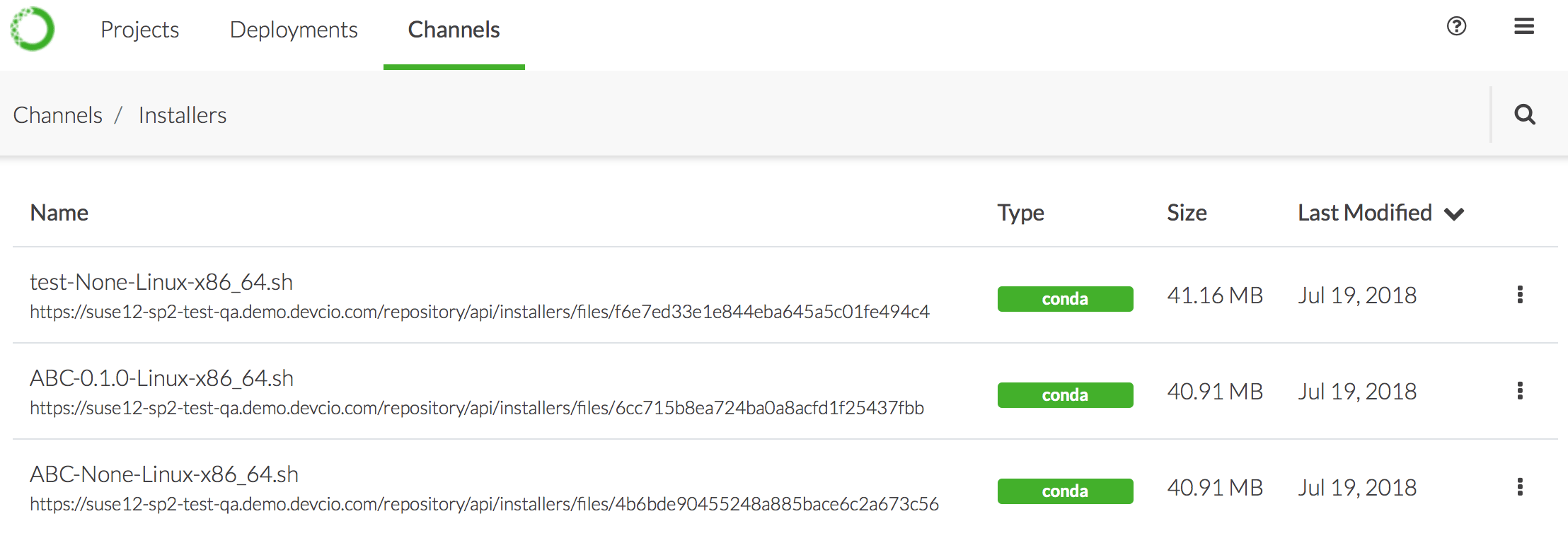
In addition to Anaconda and Miniconda installers, your Administrator may create custom installers, Cloudera Manager parcels, or Hortonworks Data Manager management packs for you and your colleagues to use. They make these specific packages and their dependencies available to you via channels.To view the installers available to you, select the top Channels menu, then click the Installers link in the top right corner.
To download an installer, simply click on its name in the list.
If you don’t see an installer that you expected to see, please contact your Administrator and ask them to generate the installer you need.
Was this page helpful?
{"docsConfig":{"theme":"mint","$schema":"https://mintlify.com/docs.json","name":"Anaconda","description":"Guides, tutorials, and reference material for Anaconda's Python, data science, and AI tools","colors":{"primary":"#1d6cf7","light":"#1d6cf7","dark":"#96f778"},"logo":{"light":"https://mintcdn.com/anaconda-29683c67/s-9WR15r5rZoaPqb/logo/light.svg?fit=max\u0026auto=format\u0026n=s-9WR15r5rZoaPqb\u0026q=85\u0026s=5996719b8530aaf065dc1ee1f39b2e67","dark":"https://mintcdn.com/anaconda-29683c67/s-9WR15r5rZoaPqb/logo/dark.svg?fit=max\u0026auto=format\u0026n=s-9WR15r5rZoaPqb\u0026q=85\u0026s=db482b1eac6af589d234160a76de3400","href":"https://www.anaconda.com/docs/main"},"favicon":"https://mintcdn.com/anaconda-29683c67/p8JNFuYYvTL8gfpM/favicon.png?fit=max\u0026auto=format\u0026n=p8JNFuYYvTL8gfpM\u0026q=85\u0026s=51a585758330bbe8f1ea032113854252","api":{"playground":{"display":"simple"}},"background":{"color":{"light":"#f4f5f8","dark":"#10121a"}},"navbar":{},"footer":{"socials":{"linkedin":"https://www.linkedin.com/company/anacondainc","github":"https://github.com/ContinuumIO","youtube":"https://www.youtube.com/c/ContinuumIo"},"links":[{"header":"Company","items":[{"label":"Anaconda Newsletter","href":"https://www.anaconda.com/newsletter"}]}]},"seo":{"metatags":{"canonical":"https://www.anaconda.com/docs"}},"styling":{"eyebrows":"breadcrumbs","latex":false},"integrations":{"ga4":{"measurementId":"G-VQTY6YKM6J"},"heap":{"appId":"758475466"}},"contextual":{"options":["claude","chatgpt","perplexity","cursor","vscode","add-mcp","copy"],"display":"header"},"navigation":{"pages":[]}},"deployment":{"deploymentMetadataValue":{"subdomain":"anaconda-29683c67","hasAudioNarration":false,"actualSubdomain":"anaconda-29683c67","customDomains":["anaconda.com"],"gitSource":{"type":"github","owner":"anaconda","repo":"documentation","deployBranch":"main","contentDirectory":"","isPrivate":true,"mountPath":"","label":""},"feedback":{"thumbs":true,"contextualFeedback":{"allowEmail":true,"emailDisclaimer":"Your email will only be used to follow up on this feedback."}},"entitlements":{"AI_CHAT":{"status":"ENABLED"},"REMOVE_BRANDING":{"status":"ENABLED"},"CONTEXTUAL_FEEDBACK":{"status":"ENABLED"},"CODE_SNIPPET_FEEDBACK":{"status":"ENABLED"},"WEB_MCP":{"status":"ENABLED"},"NARRATION":{"status":"ENABLED"}},"buildId":"6aee4d21425b90b39aa20edc","clientVersion":"0.0.4087","searchFilterCounts":[{"language":"default","tag":"Data Science \u0026 AI Workbench","count":240},{"language":"default","tag":"Anaconda Platform","count":151},{"language":"default","tag":"Package Security Manager","count":128},{"language":"default","tag":"Anaconda CLI","count":112},{"language":"default","tag":"Guides","count":105},{"language":"default","tag":"Anaconda CLI \u0026 MCP","count":104},{"language":"default","tag":"Plugins","count":93},{"language":"default","tag":"Commands","count":91},{"language":"default","tag":"Anaconda Desktop","count":86},{"language":"default","tag":"Platform Guides","count":86}],"searchSettings":{"isFiltersEnabled":true}},"assistantConfig":{"enableAskAiButton":false,"enableStarterQuestions":true,"enableContextualStarterQuestions":true,"deflection":{"enabled":true,"email":"support@anaconda.com"}},"basePath":"/docs","hasChatPermissions":true,"hasWebMcpPermissions":true,"toggles":[{"name":"kill-isr","enabled":true,"variant":{"name":"disabled","enabled":false,"feature_enabled":true},"impressionData":false},{"name":"agent-mintlify-slack","enabled":true,"variant":{"name":"disabled","enabled":false,"feature_enabled":true},"impressionData":false},{"name":"agent-integrations-settings","enabled":true,"variant":{"name":"disabled","enabled":false,"feature_enabled":true},"impressionData":false},{"name":"rbac-expansion","enabled":true,"variant":{"name":"disabled","enabled":false,"feature_enabled":true},"impressionData":false},{"name":"automations-pr-grouping","enabled":true,"variant":{"name":"disabled","enabled":false,"feature_enabled":true},"impressionData":false},{"name":"custom-prefix","enabled":true,"variant":{"name":"disabled","enabled":false,"feature_enabled":true},"impressionData":false},{"name":"analytics-v7","enabled":true,"variant":{"name":"disabled","enabled":false,"feature_enabled":true},"impressionData":false},{"name":"user-flows-analytics","enabled":true,"variant":{"name":"disabled","enabled":false,"feature_enabled":true},"impressionData":false},{"name":"no-publish-flow","enabled":true,"variant":{"name":"disabled","enabled":false,"feature_enabled":true},"impressionData":false},{"name":"workos-onboarding","enabled":true,"variant":{"name":"disabled","enabled":false,"feature_enabled":true},"impressionData":false},{"name":"llms-txt-v2","enabled":true,"variant":{"name":"disabled","enabled":false,"feature_enabled":true},"impressionData":false},{"name":"snapshot-serving-live","enabled":true,"variant":{"name":"disabled","enabled":false,"feature_enabled":true},"impressionData":false},{"name":"stripTemperatureMiddleware","enabled":true,"variant":{"name":"disabled","enabled":false,"feature_enabled":true},"impressionData":false},{"name":"support-platform-pylon-zendesk","enabled":true,"variant":{"name":"disabled","enabled":false,"feature_enabled":true},"impressionData":false},{"name":"snapshot-serving","enabled":true,"variant":{"name":"disabled","enabled":false,"feature_enabled":true},"impressionData":false},{"name":"instant-rollback","enabled":true,"variant":{"name":"disabled","enabled":false,"feature_enabled":true},"impressionData":false},{"name":"granular-notifications-server","enabled":true,"variant":{"name":"disabled","enabled":false,"feature_enabled":true},"impressionData":false},{"name":"granular-notifications","enabled":true,"variant":{"name":"disabled","enabled":false,"feature_enabled":true},"impressionData":false},{"name":"automations-fable","enabled":true,"variant":{"name":"disabled","enabled":false,"feature_enabled":true},"impressionData":false},{"name":"fixed-ai-action-pricing","enabled":true,"variant":{"name":"disabled","enabled":false,"feature_enabled":true},"impressionData":false},{"name":"automation-resolve-merge-conflict","enabled":true,"variant":{"name":"disabled","enabled":false,"feature_enabled":true},"impressionData":false},{"name":"scoped-publishing","enabled":true,"variant":{"name":"disabled","enabled":false,"feature_enabled":true},"impressionData":false},{"name":"mintql","enabled":true,"variant":{"name":"disabled","enabled":false,"feature_enabled":true},"impressionData":false},{"name":"page-level-analytics","enabled":true,"variant":{"name":"disabled","enabled":false,"feature_enabled":true},"impressionData":false},{"name":"editor-version-history-v2","enabled":true,"variant":{"name":"disabled","enabled":false,"feature_enabled":true},"impressionData":false},{"name":"billing-page-v2","enabled":true,"variant":{"name":"disabled","enabled":false,"feature_enabled":true},"impressionData":false},{"name":"full-page-search","enabled":true,"variant":{"name":"disabled","enabled":false,"feature_enabled":true},"impressionData":false},{"name":"workspace-projects","enabled":true,"variant":{"name":"disabled","enabled":false,"feature_enabled":true},"impressionData":false},{"name":"assistant-v5","enabled":true,"variant":{"name":"disabled","enabled":false,"feature_enabled":true},"impressionData":false},{"name":"fork-pr-previews","enabled":true,"variant":{"name":"disabled","enabled":false,"feature_enabled":true},"impressionData":false},{"name":"revalidation-jwt","enabled":true,"variant":{"name":"disabled","enabled":false,"feature_enabled":true},"impressionData":false},{"name":"workos-sso-scim","enabled":true,"variant":{"name":"disabled","enabled":false,"feature_enabled":true},"impressionData":false},{"name":"hobby-abuse-scan","enabled":true,"variant":{"name":"disabled","enabled":false,"feature_enabled":true},"impressionData":false},{"name":"dashboard-inbox","enabled":true,"variant":{"name":"disabled","enabled":false,"feature_enabled":true},"impressionData":false},{"name":"workos-signup","enabled":true,"variant":{"name":"disabled","enabled":false,"feature_enabled":true},"impressionData":false},{"name":"turbopuffer-dual-write","enabled":true,"variant":{"name":"disabled","enabled":false,"feature_enabled":true},"impressionData":false},{"name":"workos-enabled","enabled":true,"variant":{"name":"disabled","enabled":false,"feature_enabled":true},"impressionData":false},{"name":"approve-review-flow","enabled":true,"variant":{"name":"disabled","enabled":false,"feature_enabled":true},"impressionData":false},{"name":"editor-metadata","enabled":true,"variant":{"name":"disabled","enabled":false,"feature_enabled":true},"impressionData":false},{"name":"sso-setup-deadline-banner","enabled":true,"variant":{"name":"disabled","enabled":false,"feature_enabled":true},"impressionData":false},{"name":"turbopuffer-serve","enabled":true,"variant":{"name":"disabled","enabled":false,"feature_enabled":true},"impressionData":false},{"name":"live-agents","enabled":true,"variant":{"name":"disabled","enabled":false,"feature_enabled":true},"impressionData":false},{"name":"comment-mode","enabled":true,"variant":{"name":"disabled","enabled":false,"feature_enabled":true},"impressionData":false}],"googleFontsInlined":false},"customCss":[{"filePath":"custom.css","href":"/docs/_mintlify/custom/anaconda-29683c67/d510a3fe27570495/custom.css"}],"page":{"pagePath":"data-science/5.6.0/data-science-workflows/installers","slug":"/data-science/5.6.0/data-science-workflows/installers","pageMetadata":{"noindex":true,"title":"Using installers, parcels and management packs","keywords":["cloudera","cdp","parcels","management","packs","hortonworks"],"description":null,"href":"/data-science/5.6.0/data-science-workflows/installers"},"pageType":"default","mdx":{"mdxSource":{"compiledSource":"\"use strict\";const{Fragment:_Fragment,jsx:_jsx,jsxs:_jsxs}=arguments[0];const{useMDXComponents:_provideComponents}=arguments[0];function _createMdxContent(props){const _components={a:`a`,em:`em`,p:`p`,strong:`strong`,..._provideComponents(),...props.components},{Frame,Note,OptimizedImage}=_components;if(!Frame)_missingMdxReference(`Frame`,true);if(!Note)_missingMdxReference(`Note`,true);if(!OptimizedImage)_missingMdxReference(`OptimizedImage`,true);return _jsxs(_Fragment,{children:[_jsxs(_components.p,{children:[`In addition to Anaconda and Miniconda installers, your Administrator may create custom installers, Cloudera Manager parcels, or Hortonworks Data Manager management packs for you and your colleagues to use. They make these specific packages and their dependencies available to you via `,_jsx(_components.em,{children:`channels`}),`.`]}),`\n`,_jsxs(_components.p,{children:[`To view the installers available to you, select the top `,_jsx(_components.strong,{children:`Channels`}),` menu, then click the `,_jsx(_components.strong,{children:`Installers`}),` link in the top right corner.`]}),`\n`,_jsx(Frame,{children:_jsx(OptimizedImage,{src:`https://mintcdn.com/anaconda-29683c67/ghAcs1Rv_eiLtpni/images/anaconda-platform/installers.png?fit=max\u0026auto=format\u0026n=ghAcs1Rv_eiLtpni\u0026q=85\u0026s=87b800c98d3f3254a8d0e96eda88dc37`,alt:``,\"data-og-width\":`2216`,width:`2216`,\"data-og-height\":`778`,height:`778`,\"data-path\":`images/anaconda-platform/installers.png`,\"data-optimize\":`true`,\"data-opv\":`3`,srcset:`https://mintcdn.com/anaconda-29683c67/ghAcs1Rv_eiLtpni/images/anaconda-platform/installers.png?w=280\u0026fit=max\u0026auto=format\u0026n=ghAcs1Rv_eiLtpni\u0026q=85\u0026s=9505f11225215ef2235a8a51e084b9c0 280w, https://mintcdn.com/anaconda-29683c67/ghAcs1Rv_eiLtpni/images/anaconda-platform/installers.png?w=560\u0026fit=max\u0026auto=format\u0026n=ghAcs1Rv_eiLtpni\u0026q=85\u0026s=891e13bcabc89dc1f73a7a4cbcd6bf4c 560w, https://mintcdn.com/anaconda-29683c67/ghAcs1Rv_eiLtpni/images/anaconda-platform/installers.png?w=840\u0026fit=max\u0026auto=format\u0026n=ghAcs1Rv_eiLtpni\u0026q=85\u0026s=52d133af3212b27e5c5b92b4da687740 840w, https://mintcdn.com/anaconda-29683c67/ghAcs1Rv_eiLtpni/images/anaconda-platform/installers.png?w=1100\u0026fit=max\u0026auto=format\u0026n=ghAcs1Rv_eiLtpni\u0026q=85\u0026s=34e481395a4d89323dd7bc49361d2f84 1100w, https://mintcdn.com/anaconda-29683c67/ghAcs1Rv_eiLtpni/images/anaconda-platform/installers.png?w=1650\u0026fit=max\u0026auto=format\u0026n=ghAcs1Rv_eiLtpni\u0026q=85\u0026s=24872131be773e7dd0f791db30bfad15 1650w, https://mintcdn.com/anaconda-29683c67/ghAcs1Rv_eiLtpni/images/anaconda-platform/installers.png?w=2500\u0026fit=max\u0026auto=format\u0026n=ghAcs1Rv_eiLtpni\u0026q=85\u0026s=fd8873185c385130aaf8322f8dcf307f 2500w`})}),`\n`,_jsx(_components.p,{children:`To download an installer, simply click on its name in the list.`}),`\n`,_jsx(Note,{children:_jsxs(_components.p,{children:[`If you don’t see an installer that you expected to see, please contact your Administrator and ask them to `,_jsx(_components.a,{href:`/data-science/5.6.0/admin/custom-installer`,children:`generate the installer`}),` you need.`]})})]})}function MDXContent(props={}){const{wrapper:MDXLayout}={..._provideComponents(),...props.components};return MDXLayout?_jsx(MDXLayout,{...props,children:_jsx(_createMdxContent,{...props})}):_createMdxContent(props)}return{default:MDXContent};function _missingMdxReference(id,component){throw new Error(`Expected `+(component?`component`:`object`)+\" `\"+id+\"` to be defined: you likely forgot to import, pass, or provide it.\")}","frontmatter":{},"scope":{"config":{},"pageMetadata":{"noindex":true,"title":"Using installers, parcels and management packs","keywords":["cloudera","cdp","parcels","management","packs","hortonworks"],"description":null,"href":"/data-science/5.6.0/data-science-workflows/installers"}}},"mdxSourceWithNoJs":null},"mdxExtracts":{"tableOfContents":[],"codeExamples":{}},"jsLinks":["/docs/_mintlify/custom/anaconda-29683c67/b738e1eb47e9934c/_transcend.js","/docs/_mintlify/custom/anaconda-29683c67/3ca111da84ffed5d/docs-dropdown-tooltip.js","/docs/_mintlify/custom/anaconda-29683c67/a3d1c2dd97aa6593/toc-indicator.js"],"subdomain":"anaconda-29683c67","siteName":"Anaconda","title":"Using installers, parcels and management packs - Anaconda","contextualStarterQuestions":[{"_id":"6aee478f767a2a3642087ed6","deploymentId":"6781700c5f1e7d2ac00fcc4a","questionText":"How do I download an installer?","status":"active","generatedBy":"contextual","path":"data-science/5.6.0/data-science-workflows/installers","createdAt":"2026-11-06T21:33:03.724Z","updatedAt":"2026-11-06T21:33:03.724Z","__v":0},{"_id":"6aee478f767a2a3642087ed5","deploymentId":"6781700c5f1e7d2ac00fcc4a","questionText":"What are custom installers?","status":"active","generatedBy":"contextual","path":"data-science/5.6.0/data-science-workflows/installers","createdAt":"2026-11-06T21:33:03.724Z","updatedAt":"2026-11-06T21:33:03.724Z","__v":0},{"_id":"6aee478f767a2a3642087ed4","deploymentId":"6781700c5f1e7d2ac00fcc4a","questionText":"How do I view available installers?","status":"active","generatedBy":"contextual","path":"data-science/5.6.0/data-science-workflows/installers","createdAt":"2026-11-06T21:33:03.724Z","updatedAt":"2026-11-06T21:33:03.724Z","__v":0}],"navMaps":{"firstHrefInVersion":{"5.9.0":{"href":"/data-science/latest/data-science-workflows/installers","matchLevel":1},"5.8.1":{"href":"/data-science/5.8.1/data-science-workflows/installers","matchLevel":1,"noindex":true},"5.8.0":{"href":"/data-science/5.8.0/data-science-workflows/installers","matchLevel":1,"noindex":true},"5.7.1":{"href":"/data-science/5.7.1/data-science-workflows/installers","matchLevel":1,"noindex":true},"5.7.0":{"href":"/data-science/5.7.0/data-science-workflows/installers","matchLevel":1,"noindex":true},"5.6.2":{"href":"/data-science/5.6.2/data-science-workflows/installers","matchLevel":1,"noindex":true},"5.6.1":{"href":"/data-science/5.6.1/data-science-workflows/installers","matchLevel":1,"noindex":true},"5.6.0":{"href":"/data-science/5.6.0/data-science-workflows/installers","matchLevel":0},"5.5.2":{"href":"/data-science/5.5.2/data-science-workflows/installers","matchLevel":1,"noindex":true},"5.5.1":{"href":"/data-science/5.5.1/data-science-workflows/installers","matchLevel":1,"noindex":true},"6.8.0":{"href":"/psm-on-prem/6.8.0/main","matchLevel":4},"6.7.2":{"href":"/psm-on-prem/6.7.2/main","matchLevel":4},"6.7.1":{"href":"/psm-on-prem/6.7.1/main","matchLevel":4},"6.7.0":{"href":"/psm-on-prem/6.7.0/main","matchLevel":4},"6.6.5":{"href":"/psm-on-prem/6.6.5/main","matchLevel":4},"6.6.4":{"href":"/psm-on-prem/6.6.4/main","matchLevel":4},"6.6.3":{"href":"/psm-on-prem/6.6.3/main","matchLevel":4},"6.6.2":{"href":"/psm-on-prem/6.6.2/main","matchLevel":4},"6.6.1":{"href":"/psm-on-prem/6.6.1/main","matchLevel":4},"6.6.0":{"href":"/psm-on-prem/6.6.0/main","matchLevel":4},"6.5.3":{"href":"/psm-on-prem/6.5.3/main","matchLevel":4},"6.5.2":{"href":"/psm-on-prem/6.5.2/main","matchLevel":4},"6.5.1":{"href":"/psm-on-prem/6.5.1/main","matchLevel":4},"6.4.0":{"href":"/psm-on-prem/6.4.0/main","matchLevel":4},"6.3.1":{"href":"/psm-on-prem/6.3.1/main","matchLevel":4},"6.3.0":{"href":"/psm-on-prem/6.3.0/main","matchLevel":4},"6.2.0":{"href":"/psm-on-prem/6.2.0/main","matchLevel":4},"6.1.9":{"href":"/psm-on-prem/6.1.9/main","matchLevel":4},"6.1.8":{"href":"/psm-on-prem/6.1.8/main","matchLevel":4},"6.1.7":{"href":"/psm-on-prem/6.1.7/main","matchLevel":4},"6.1.6":{"href":"/psm-on-prem/6.1.6/main","matchLevel":4},"6.1.4":{"href":"/psm-on-prem/6.1.4/main","matchLevel":4}},"firstHrefInLanguage":{}},"lastModified":"2026-11-06T21:28:08.360Z","originalFileLocation":"data-science/5.6.0/data-science-workflows/installers.mdx"},"headHtml":"\u003cscript data-mint-head>(function(){var d=document.documentElement,p=null;if(!p){try{p=localStorage.getItem(\"isDarkMode\")}catch(e){}if(p==='true')p='dark';else if(p==='false')p='light';if(p!=='light'\u0026\u0026p!=='dark'\u0026\u0026p!=='system')p=\"system\"}var r=p==='system'?(matchMedia(\"(prefers-color-scheme: dark)\").matches?'dark':'light'):p;d.classList.remove(r==='dark'?'light':'dark');d.classList.add(r);d.setAttribute(\"data-theme-preference\",p)})();\u003c/script>\u003cmeta data-mint-head name=\"application-name\" content=\"Anaconda\">\u003cmeta data-mint-head name=\"generator\" content=\"Mintlify\">\u003cmeta data-mint-head name=\"robots\" content=\"noindex\">\u003clink data-mint-head rel=\"icon\" type=\"image/png\" sizes=\"192x192\" href=\"/docs/mintlify-assets/_mintlify/favicons/anaconda-29683c67/Q6mS5k5M0lNdBscF/_generated/favicon/android-chrome-192x192.png\" media=\"(prefers-color-scheme: light)\">\u003clink data-mint-head rel=\"apple-touch-icon\" type=\"image/png\" sizes=\"180x180\" href=\"/docs/mintlify-assets/_mintlify/favicons/anaconda-29683c67/Q6mS5k5M0lNdBscF/_generated/favicon/apple-touch-icon.png\">\u003clink data-mint-head rel=\"icon\" type=\"image/png\" sizes=\"16x16\" href=\"/docs/mintlify-assets/_mintlify/favicons/anaconda-29683c67/Q6mS5k5M0lNdBscF/_generated/favicon/favicon-16x16.png\" media=\"(prefers-color-scheme: light)\">\u003clink data-mint-head rel=\"icon\" type=\"image/png\" sizes=\"32x32\" href=\"/docs/mintlify-assets/_mintlify/favicons/anaconda-29683c67/Q6mS5k5M0lNdBscF/_generated/favicon/favicon-32x32.png\" media=\"(prefers-color-scheme: light)\">\u003clink data-mint-head rel=\"shortcut icon\" type=\"image/x-icon\" href=\"/docs/mintlify-assets/_mintlify/favicons/anaconda-29683c67/Q6mS5k5M0lNdBscF/_generated/favicon/favicon.ico\" media=\"(prefers-color-scheme: light)\">\u003clink data-mint-head rel=\"icon\" type=\"image/png\" sizes=\"192x192\" href=\"/docs/mintlify-assets/_mintlify/favicons/anaconda-29683c67/Q6mS5k5M0lNdBscF/_generated/favicon-dark/android-chrome-192x192.png\" media=\"(prefers-color-scheme: dark)\">\u003clink data-mint-head rel=\"icon\" type=\"image/png\" sizes=\"16x16\" href=\"/docs/mintlify-assets/_mintlify/favicons/anaconda-29683c67/Q6mS5k5M0lNdBscF/_generated/favicon-dark/favicon-16x16.png\" media=\"(prefers-color-scheme: dark)\">\u003clink data-mint-head rel=\"icon\" type=\"image/png\" sizes=\"32x32\" href=\"/docs/mintlify-assets/_mintlify/favicons/anaconda-29683c67/Q6mS5k5M0lNdBscF/_generated/favicon-dark/favicon-32x32.png\" media=\"(prefers-color-scheme: dark)\">\u003clink data-mint-head rel=\"shortcut icon\" type=\"image/x-icon\" href=\"/docs/mintlify-assets/_mintlify/favicons/anaconda-29683c67/Q6mS5k5M0lNdBscF/_generated/favicon-dark/favicon.ico\" media=\"(prefers-color-scheme: dark)\">\u003cmeta data-mint-head property=\"og:title\" content=\"Using installers, parcels and management packs - Anaconda\">\u003cmeta data-mint-head property=\"og:site_name\" content=\"Anaconda\">\u003cmeta data-mint-head property=\"og:url\" content=\"https://www.anaconda.com/docs/data-science/5.6.0/data-science-workflows/installers\">\u003cmeta data-mint-head property=\"og:type\" content=\"website\">\u003cmeta data-mint-head property=\"og:image\" content=\"https://anaconda-29683c67.mintlify.site/docs/_mintlify/api/og/v2?division=Using+Workbench\u0026amp;title=Using+installers%2C+parcels+and+management+packs\u0026amp;theme=a631e829865976b88c6af112\u0026amp;signature=98a29fc4f4bc8d0744545b0d42a17f6787e71842423292c23a2f9855c7fcb9b0\">\u003cmeta data-mint-head property=\"og:image:width\" content=\"1200\">\u003cmeta data-mint-head property=\"og:image:height\" content=\"630\">\u003cmeta data-mint-head name=\"twitter:card\" content=\"summary_large_image\">\u003cmeta data-mint-head name=\"twitter:title\" content=\"Using installers, parcels and management packs - Anaconda\">\u003cmeta data-mint-head name=\"twitter:image\" content=\"https://anaconda-29683c67.mintlify.site/docs/_mintlify/api/og/v2?division=Using+Workbench\u0026amp;title=Using+installers%2C+parcels+and+management+packs\u0026amp;theme=a631e829865976b88c6af112\u0026amp;signature=98a29fc4f4bc8d0744545b0d42a17f6787e71842423292c23a2f9855c7fcb9b0\">\u003cmeta data-mint-head name=\"twitter:image:width\" content=\"1200\">\u003cmeta data-mint-head name=\"twitter:image:height\" content=\"630\">\u003cmeta data-mint-head name=\"msapplication-config\" content=\"/docs/mintlify-assets/_mintlify/favicons/anaconda-29683c67/Q6mS5k5M0lNdBscF/_generated/favicon/browserconfig.xml\">\u003cmeta data-mint-head name=\"apple-mobile-web-app-title\" content=\"Anaconda\">\u003cmeta data-mint-head name=\"msapplication-TileColor\" content=\"#1d6cf7\">\u003clink data-mint-head rel=\"canonical\" href=\"https://www.anaconda.com/docs/data-science/5.6.0/data-science-workflows/installers\">\u003clink data-mint-head rel=\"alternate\" type=\"application/xml\" href=\"/docs/sitemap.xml\">\u003clink data-mint-head rel=\"alternate\" type=\"text/markdown\" href=\"/docs/data-science/5.6.0/data-science-workflows/installers.md\">","siteName":"Anaconda","nav":{"global":null,"products":[{"product":"Anaconda Docs","icon":"https://mintlify.s3.us-west-1.amazonaws.com/anaconda-29683c67/images/anaconda-icon.svg","pages":[{"title":"Anaconda Docs","href":"/main"}]},{"product":"Getting Started","icon":"rocket-launch","pages":[{"title":"Getting Started","href":"/getting-started/main"}]},{"product":"Anaconda.org","icon":"globe","pages":[{"title":"Anaconda.org","href":"/anaconda-org/key-features"}]},{"product":"Anaconda Desktop","icon":"desktop","pages":[{"title":"Anaconda Desktop","href":"/anaconda-desktop/key-features"}]},{"product":"Package Security Manager","icon":"shield-check","versions":[{"version":"6.8.0"},{"version":"6.7.2"},{"version":"6.7.1"},{"version":"6.7.0"},{"version":"6.6.5"},{"version":"6.6.4"},{"version":"6.6.3"},{"version":"6.6.2"},{"version":"6.6.1"},{"version":"6.6.0"},{"version":"6.5.3"},{"version":"6.5.2"},{"version":"6.5.1"},{"version":"6.4.0"},{"version":"6.3.1"},{"version":"6.3.0"},{"version":"6.2.0"},{"version":"6.1.9"},{"version":"6.1.8"},{"version":"6.1.7"},{"version":"6.1.6"},{"version":"6.1.4"}],"pages":[{"title":"Package Security Manager","href":"/anaconda-platform/main"}]},{"product":"Anaconda Platform","icon":"layer-group","pages":[{"title":"Anaconda Platform","href":"/platform/main"}]},{"product":"Data Science \u0026 AI Workbench","icon":"chart-network","versions":[{"version":"5.9.0","pages":[{"title":"5.9.0","href":"/data-science/latest/data-science-workflows/installers"}]},{"version":"5.8.1","pages":[{"title":"5.8.1","href":"/data-science/5.8.1/data-science-workflows/installers"}]},{"version":"5.8.0","pages":[{"title":"5.8.0","href":"/data-science/5.8.0/data-science-workflows/installers"}]},{"version":"5.7.1","pages":[{"title":"5.7.1","href":"/data-science/5.7.1/data-science-workflows/installers"}]},{"version":"5.7.0","pages":[{"title":"5.7.0","href":"/data-science/5.7.0/data-science-workflows/installers"}]},{"version":"5.6.2","pages":[{"title":"5.6.2","href":"/data-science/5.6.2/data-science-workflows/installers"}]},{"version":"5.6.1","pages":[{"title":"5.6.1","href":"/data-science/5.6.1/data-science-workflows/installers"}]},{"version":"5.6.0","groups":[{"group":"Data Science \u0026 AI Workbench (5.6.0)","pages":[{"title":"Anaconda Enterprise 5","sidebarTitle":"Overview","href":"/data-science/5.6.0/main"},{"group":"Installing Workbench","pages":[{"title":"Installing Workbench","sidebarTitle":"Overview","href":"/data-science/5.6.0/install/main"},{"title":"Bring Your Own Kubernetes (BYOK8s) Installation","href":"/data-science/5.6.0/install/byok8s"},{"title":"Gravity Installation","href":"/data-science/5.6.0/install/gravity"},{"title":"Post-install configuration","href":"/data-science/5.6.0/install/config"},{"title":"Updating TLS/SSL certificates","href":"/data-science/5.6.0/install/certs"},{"group":"Upgrading Workbench","pages":[{"title":"Upgrading Anaconda Enterprise","sidebarTitle":"Overview","href":"/data-science/5.6.0/install/migrate/main"},{"title":"Upgrading between versions of AE5","href":"/data-science/5.6.0/install/migrate/upgrade"},{"title":"Backing up and restoring Anaconda Enterprise","href":"/data-science/5.6.0/install/migrate/backup-restore"},{"title":"Uninstalling AE","href":"/data-science/5.6.0/install/migrate/uninstall"},{"title":"Keycloak Upgrade","href":"/data-science/5.6.0/install/migrate/keycloak-upgrade"},{"title":"Pre-install checklist","href":"/data-science/5.6.0/install/checklist-k8s"},{"title":"Pre-install checklist","href":"/data-science/5.6.0/install/checklist"},{"title":"Cloud performance requirements","href":"/data-science/5.6.0/install/cloud-reqs"},{"group":"Guides","pages":[{"title":"Azure Kubernetes Service","href":"/data-science/5.6.0/install/guides/aks"},{"title":"Amazon Elastic Kubernetes Service","href":"/data-science/5.6.0/install/guides/eks"},{"title":"Google Kubernetes Engine","href":"/data-science/5.6.0/install/guides/gke"},{"title":"Environment-specific recommendations","href":"/data-science/5.6.0/install/guides/main"},{"title":"NFS Storage Recommendations","href":"/data-science/5.6.0/install/guides/nfs"},{"title":"OpenShift Container Platform","href":"/data-science/5.6.0/install/guides/ocp"},{"title":"RBAC template","href":"/data-science/5.6.0/install/guides/rbac"},{"title":"RedHat OpenShift Service on AWS (ROSA)","href":"/data-science/5.6.0/install/guides/rosa"},{"title":"Helm values template","href":"/data-science/5.6.0/install/guides/values"}]},{"title":"Basic installation","href":"/data-science/5.6.0/install/install-k8s"},{"title":"Installing the cluster","href":"/data-science/5.6.0/install/on-prem"},{"title":"Installation requirements","href":"/data-science/5.6.0/install/reqs"},{"title":"Wizard installation (deprecated)","href":"/data-science/5.6.0/install/wizard"},{"title":"Installation requirements","href":"/data-science/5.6.0/install/zero-g"}]}]},{"group":"Administering Workbench","pages":[{"title":"Administering Anaconda Enterprise","href":"/data-science/5.6.0/admin/main"},{"group":"Managing Cluster Resources","pages":[{"title":"Managing cluster resources","href":"/data-science/5.6.0/admin/resources/main"},{"title":"Adding and removing nodes (Gravity)","href":"/data-science/5.6.0/admin/resources/add-remove-node"},{"title":"Monitoring cluster utilization","href":"/data-science/5.6.0/admin/resources/monitor-cluster"},{"title":"Monitoring sessions and deployments","href":"/data-science/5.6.0/admin/resources/monitor-sessions-deps"},{"title":"Viewing system logs","href":"/data-science/5.6.0/admin/resources/logging"},{"title":"Viewing activity logs","href":"/data-science/5.6.0/admin/resources/activity"},{"title":"Setting resource limits for sessions and deployments","href":"/data-science/5.6.0/admin/resources/resource-profile"},{"title":"Fault tolerance in Anaconda Enterprise","href":"/data-science/5.6.0/admin/resources/fault-tolerance"}]},{"group":"Configuring user access","pages":[{"title":"Configuring user access","href":"/data-science/5.6.0/admin/user-mgmt/main"},{"title":"Managing users","href":"/data-science/5.6.0/admin/user-mgmt/users"},{"title":"Managing roles and groups","href":"/data-science/5.6.0/admin/user-mgmt/groups"},{"title":"Managing System Administrators","href":"/data-science/5.6.0/admin/user-mgmt/admins"},{"title":"Configuring session timeouts","href":"/data-science/5.6.0/admin/user-mgmt/session-timeout"},{"title":"LDAP setup example","href":"/data-science/5.6.0/admin/user-mgmt/ldap-setup"},{"title":"Google IAM setup example","href":"/data-science/5.6.0/admin/user-mgmt/google-setup"}]},{"group":"Configuring channels and mirrors","pages":[{"title":"Configuring channels and mirrors","sidebarTitle":"Overview","href":"/data-science/5.6.0/admin/chan-pkg/main"},{"title":"Accessing remote package repositories","href":"/data-science/5.6.0/admin/chan-pkg/config-repo-access"},{"title":"Managing channels and packages","href":"/data-science/5.6.0/admin/chan-pkg/manage"},{"title":"Using a proxy for conda packages","href":"/data-science/5.6.0/admin/chan-pkg/proxy"},{"title":"Pointing conda to an on-premises repository","href":"/data-science/5.6.0/admin/chan-pkg/condarc"},{"title":"Mirroring channels and packages","href":"/data-science/5.6.0/admin/chan-pkg/mirror"}]},{"title":"Generating custom Anaconda installers","href":"/data-science/5.6.0/admin/custom-installer"},{"group":"Advanced platform settings","pages":[{"title":"Advanced platform settings","href":"/data-science/5.6.0/admin/advanced/main"},{"title":"Editing platform settings","href":"/data-science/5.6.0/admin/advanced/settings"},{"title":"Setting global config variables","href":"/data-science/5.6.0/admin/advanced/global_config"},{"title":"Changing the database password","href":"/data-science/5.6.0/admin/advanced/db-passwd"},{"title":"Changing the platform redirect URLs","href":"/data-science/5.6.0/admin/advanced/redirect-urls"},{"title":"Configuring Livy server for Hadoop Spark access","href":"/data-science/5.6.0/admin/advanced/config-livy-server"},{"title":"Adding RStudio to Anaconda Enterprise (AE) 5","href":"/data-science/5.6.0/admin/advanced/rstudio-install"},{"title":"Connecting to an external version control repository","href":"/data-science/5.6.0/admin/advanced/config-repo"},{"title":"Migrating projects between version control repositories","href":"/data-science/5.6.0/admin/advanced/migrate-projects"},{"title":"Mounting an external file share","href":"/data-science/5.6.0/admin/advanced/nfs"},{"title":"Disabling sudo for yum","href":"/data-science/5.6.0/admin/advanced/sudo-yum"},{"title":"Specifying alternate wildcard domains","href":"/data-science/5.6.0/admin/advanced/domains"},{"title":"Connecting to external Postgres and Redis","href":"/data-science/5.6.0/admin/advanced/external-postgres-redis"}]}]},{"group":"Using Workbench","pages":[{"title":"Using Anaconda Enterprise","sidebarTitle":"Overview","href":"/data-science/5.6.0/data-science-workflows/main"},{"group":"Projects","pages":[{"title":"Working with projects","href":"/data-science/5.6.0/data-science-workflows/projects/main"},{"title":"Collaborating on projects","href":"/data-science/5.6.0/data-science-workflows/projects/collaborate"},{"title":"Saving and committing changes in a project","href":"/data-science/5.6.0/data-science-workflows/projects/commit-changes"},{"title":"Developing a project","href":"/data-science/5.6.0/data-science-workflows/projects/dependencies"},{"title":"Editing a project","href":"/data-science/5.6.0/data-science-workflows/projects/edit-session"}]},{"group":"Templates","pages":[{"title":"Using project templates","href":"/data-science/5.6.0/data-science-workflows/templates/main"},{"title":"Python templates","href":"/data-science/5.6.0/data-science-workflows/templates/python"},{"title":"R templates","href":"/data-science/5.6.0/data-science-workflows/templates/r"},{"title":"Hadoop / Spark","href":"/data-science/5.6.0/data-science-workflows/templates/spark-hadoop"}]},{"group":"Packages","pages":[{"title":"Working with packages","sidebarTitle":"Overview","href":"/data-science/5.6.0/data-science-workflows/packages/main"},{"title":"Building a conda package","href":"/data-science/5.6.0/data-science-workflows/packages/build"},{"title":"Sharing channels and packages","href":"/data-science/5.6.0/data-science-workflows/packages/share"},{"title":"Uploading a conda package","href":"/data-science/5.6.0/data-science-workflows/packages/upload"},{"title":"Configuring conda","description":null,"href":"/data-science/5.6.0/data-science-workflows/packages/conda"}]},{"title":"Using installers, parcels and management packs","href":"/data-science/5.6.0/data-science-workflows/installers"},{"group":"Data","pages":[{"title":"Working with data","sidebarTitle":"Overview","description":null,"href":"/data-science/5.6.0/data-science-workflows/data/main"},{"title":"Loading data into your project","href":"/data-science/5.6.0/data-science-workflows/data/load"},{"title":"Exploring project data","href":"/data-science/5.6.0/data-science-workflows/data/explore"},{"title":"Data preparation","href":"/data-science/5.6.0/data-science-workflows/data/prep"},{"title":"Using statistics","href":"/data-science/5.6.0/data-science-workflows/data/stats"}]},{"group":"Deployments","pages":[{"title":"Working with deployments","href":"/data-science/5.6.0/data-science-workflows/deployments/main"},{"title":"Deploying a REST API","href":"/data-science/5.6.0/data-science-workflows/deployments/rest-api"},{"title":"Scheduling deployments","href":"/data-science/5.6.0/data-science-workflows/deployments/schedule-deploy"},{"title":"Deploying a project","href":"/data-science/5.6.0/data-science-workflows/deployments/project"},{"title":"Terminating a deployment","href":"/data-science/5.6.0/data-science-workflows/deployments/terminate"},{"title":"Deploying a Flask application","href":"/data-science/5.6.0/data-science-workflows/deployments/deploy-flask"},{"title":"Sharing deployments","href":"/data-science/5.6.0/data-science-workflows/deployments/share"}]},{"title":"Using GPUs in sessions and deployments","href":"/data-science/5.6.0/data-science-workflows/gpu"},{"title":"Configuring your user settings","href":"/data-science/5.6.0/data-science-workflows/user-settings"},{"title":"Visualizations and dashboards","href":"/data-science/5.6.0/data-science-workflows/viz"},{"group":"Ml Deep Learn","pages":[{"title":"Machine learning and deep learning","sidebarTitle":"Overview","href":"/data-science/5.6.0/data-science-workflows/ml-deep-learn/main"},{"title":"Developing models","href":"/data-science/5.6.0/data-science-workflows/ml-deep-learn/dev-model"},{"title":"Training models","href":"/data-science/5.6.0/data-science-workflows/ml-deep-learn/train-model"},{"title":"Deploying models as endpoints","href":"/data-science/5.6.0/data-science-workflows/ml-deep-learn/deploy-model"},{"title":"Querying and scoring models","href":"/data-science/5.6.0/data-science-workflows/ml-deep-learn/query-score-model"}]}]},{"title":"Troubleshooting","href":"/data-science/5.6.0/troubleshoot"},{"group":"Reference","pages":[{"title":"Reference materials","href":"/data-science/5.6.0/reference/main"},{"title":"Known issues","href":"/data-science/5.6.0/reference/known-issues"},{"title":"Frequently asked questions","href":"/data-science/5.6.0/reference/faq"},{"title":"Understanding Anaconda Enterprise system requirements","href":"/data-science/5.6.0/reference/understanding-ae5"},{"title":"Glossary","href":"/data-science/5.6.0/reference/glossary"},{"title":"Release notes","href":"/data-science/5.6.0/reference/release-notes"},{"title":"Gravity support policy","href":"/data-science/5.6.0/reference/gravity-support"}]}]}]},{"version":"5.5.2","pages":[{"title":"5.5.2","href":"/data-science/5.5.2/data-science-workflows/installers"}]},{"version":"5.5.1","pages":[{"title":"5.5.1","href":"/data-science/5.5.1/data-science-workflows/installers"}]}]},{"product":"Anaconda CLI \u0026 MCP","icon":"terminal","pages":[{"title":"Anaconda CLI \u0026 MCP","href":"/cli-reference/anaconda-cli/getting-started"}]},{"product":"Legacy applications","icon":"window-restore","pages":[{"title":"Legacy applications","href":"/legacy/anaconda-navigator/main"}]},{"product":"Reference","icon":"book","pages":[{"title":"Reference","href":"/reference/release-notes"}]},{"product":"Support \u0026 Troubleshooting","icon":"headset","pages":[{"title":"Support \u0026 Troubleshooting","href":"/reference/help-support"}]},{"product":"Repository Managers","hidden":true,"pages":[{"title":"Repository Managers","href":"/repo-managers/main"}]}]},"basePath":"","title":"Using installers, parcels and management packs - Anaconda","buildId":"dpl_BSPUBxEoKhhK7HzXVDPxdPvWx4xc","deploymentId":"dpl_BSPUBxEoKhhK7HzXVDPxdPvWx4xc","dynamics":["07c022d89b","a74be98ba7"],"chunks":["Frame-DRxXE_WT.js","DynamicMarkdown-AlxJK8VR.js","zoom-image-lightbox-B_-GSaTf.js","lightbox-handle-r17bVUz3.js"]}