> ## Documentation Index
> Fetch the complete documentation index at: https://anaconda.com/docs/llms.txt
> Use this file to discover all available pages before exploring further.
# Mirrors
export const Danger = ({children}) => {
return
{children}
;
};
export const MirrorFolder = () => {
return ;
};
Mirroring is the process of copying the contents of an external repository locally, ensuring users have fast and reliable access to its packages. When you run a mirror, it populates your channel with packages from the mirror’s source. Anaconda recommends that channels contain *only one mirror each* to prevent conflicts between package sources.
For more information on channels, see [Channels and subchannels](/docs/psm-on-prem/6.7.1/user/channel).
Mirroring is restricted to users whose [role](./keycloak_config/permissions#permission-levels) provides `write` or `manage` permissions for **Channel Mirrors** and/or **Subchannel Mirrors** categories.
Allowlist the following URLs before attempting to mirror:
* `https://repo.anaconda.com/`
* `https://repo.anaconda.cloud/`
* `https://anaconda.org/`
* `https://anaconda.com/`
* `https://api.anaconda.cloud/`
* `https://conda.anaconda.org/`
* `https://pypi.org/`
* `https://files.pythonhosted.org/`
* `https://cran.r-project.org/` (optional - for CRAN R users)
## Creating a mirror
When creating a mirror, the recommended workflow is:
1. Select a channel you want to contain your mirror.
2. Open the **Manage** dropdown menu and select *Freeze*.
3. Click **Freeze**.
4. Open the **Manage** dropdown menu again and select *Create Mirror*.
5. Complete the [Create mirror](#create-mirror-form) form.
6. Allow the mirror time to complete.
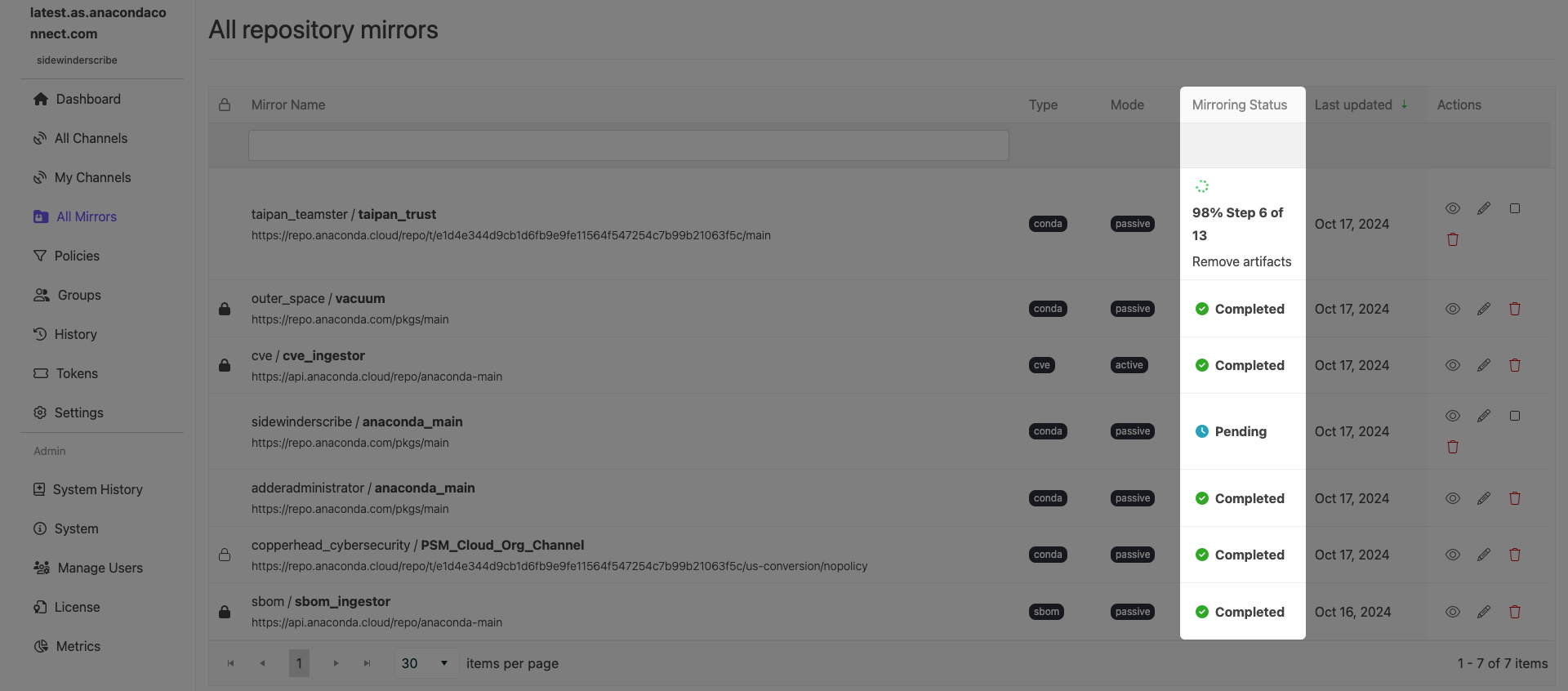
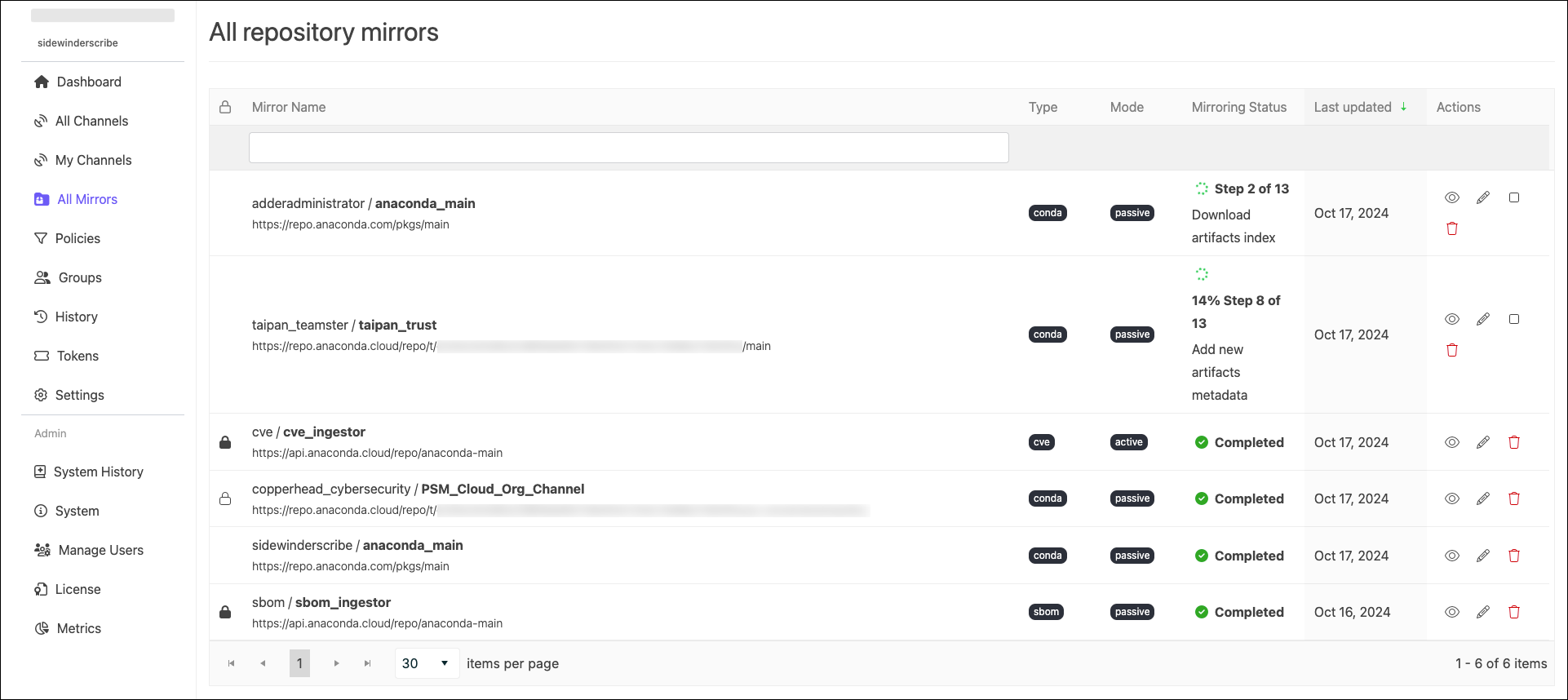
You can view the status of in progress mirrors from the **All repository mirrors** page, or from a channel’s **Mirrors** tab. In-progress mirrors display which step is currently being performed with a brief description of the operation.
7. Open the **Manage** dropdown and select *Unfreeze*.
8. Click **Unfreeze**.
For more information on freezing and unfreezing a channel, see [Freezing/Unfreezing Channels](/docs/psm-on-prem/6.7.1/user/channel#freezing-and-unfreezing-channels).
### Create mirror form
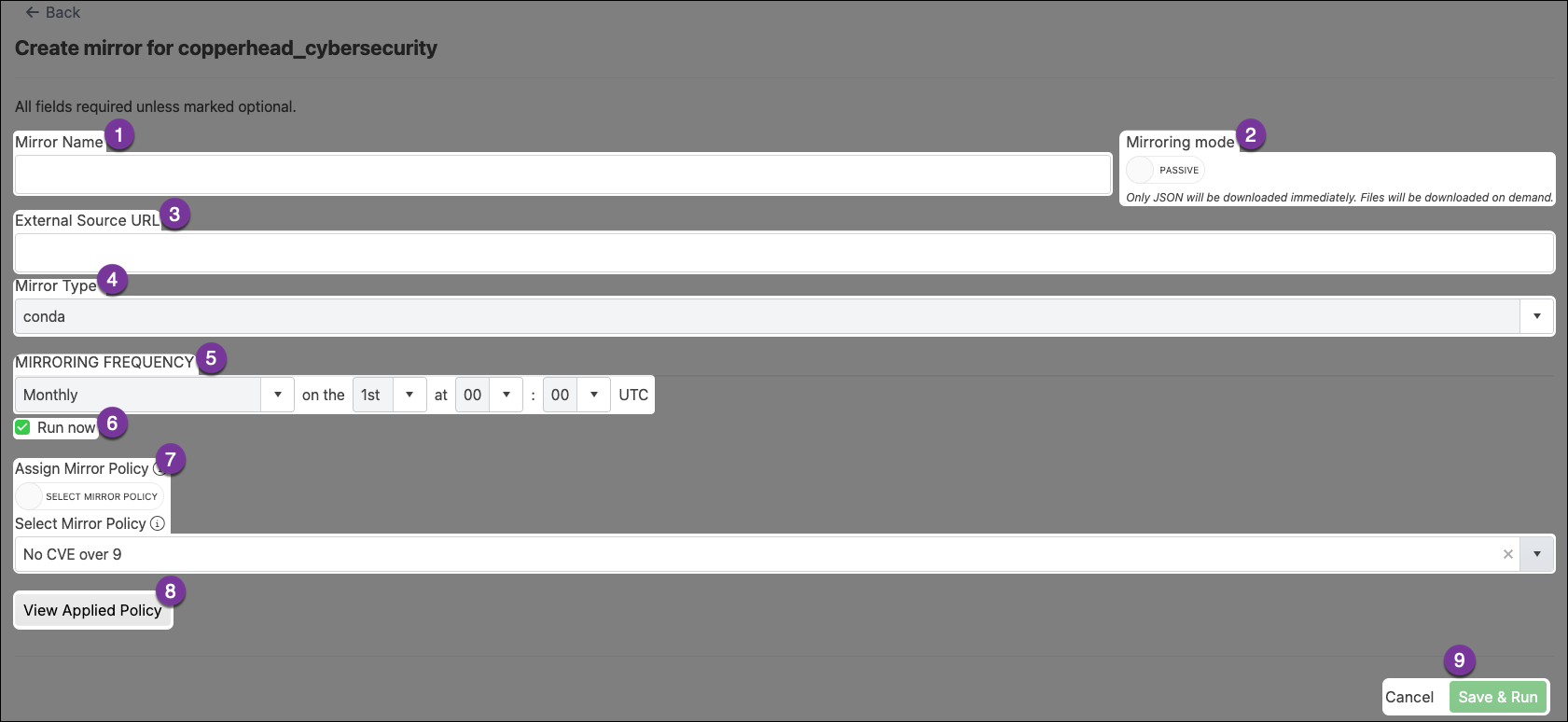
The **Create mirror** form allows you to set the configurations for your mirror. Let’s take a look at the different sections of the **Create mirror** form and what configurations they control.
Enter a name for your mirror. Anaconda recommends you name your mirror something descriptive for your end users.
Choose whether you want your mirror to be active or passive.
**Active Mirroring**: Downloads all packages not filtered out immediately to your local server. These mirrors can be large (for example, Anaconda’s public repository is 700GB, conda-forge is 3TB, and PyPI is 10TB). Active mirroring can take a long time to complete.
**Passive Mirroring**: Creates a metadata file listing all packages on the mirrored server. Packages are downloaded when users request them via `conda install `.
Regardless of which mirror you choose to create, the packages will be the same. Anaconda recommends establishing your mirrors as passive.
Enter the URL of the server/repository to mirror.
**Anaconda recommends creating mirrors for the following external source channels:**
* `https://repo.anaconda.cloud/pkgs/main`
* `https://repo.anaconda.cloud/pkgs/msys2`
* `https://repo.anaconda.cloud/pkgs/r`
If your external source channel is another Package Security Manager channel, you *must* use the format `https:///api/repo/`.
***
If your external source channel is another Package Security Manager channel *that contains CRAN R packages*, you *must* use the format `https:///api/repo//cran`.
***
If your external source channel is a *virtual* channel from Package Security Manager (Cloud), you *must* use the format `https://repo.anaconda.cloud/repo/t///`.
***
If your external source channel is one of the **Anaconda Channels** or **Community Package Channels** from Package Security Manager (Cloud), you *must* use the format `https://repo.anaconda.cloud/t//repo/`.
***
When creating mirrors that use Package Security Manager (Cloud) channels as the external source, replace `` with your [organization access token](/docs/anaconda-platform/user/tokens), and `` with your [organization ID](/docs/anaconda-platform/admin/organizations#creating-an-organization).
Set the type of packages that will be mirrored from the external source channel. This should align with the selection on the **Create Channel** form. Packages in this mirror that do not match the channel package type will be filtered out.
You can choose from conda, standard python, or standard R package types. *Make sure you have allowlisted the URLs listed at the top of this page before creating mirrors*.
Set the frequency you want your mirror to run and update your packages. The default value instructs the mirror to update at midnight on the first day of every month.
Custom frequencies use [cron expressions](https://crontab.cronhub.io/) to determine when they run.
Mirroring large channels can take several hours. Anaconda recommends against setting a frequency greater than *Daily* to avoid collisions between currently running and updating mirrors.
If you are mirroring the full PyPI repository, set your frequency to run once yearly. Once the PyPI mirror is complete, any attempts to re-run the mirror will cause issues.
Check this box to start your mirror when you click **Save & Run**. If the Run Now box was not checked, your changes are saved, and the mirror runs the next time its frequency configuration instructs it to do so.
Toggle between using the policy that is applied to the channel or selecting a policy to apply to the mirror. For more information about policies, see [Policies](./policies).
You cannot apply a policy to a mirror if it is already applied to the channel.
View details of the policy applied to the mirror.
Select **Cancel** at any time to quit your mirror form completion and discard any set parameters. Select **Save & Run** to start your mirror.
## Managing mirrors
Select ** All Mirrors** from the left-hand navigation to view mirrors globally for all users.
This view is only available to users whose role provides `Manage` permissions for the **mirror** attribute. This value must be assigned in Keycloak.
Use the search box to locate a mirror by name. Click a column header to sort mirrors by **Type**, **Mode**, **Mirroring Status**, or **Last Updated**.
### Mirror actions
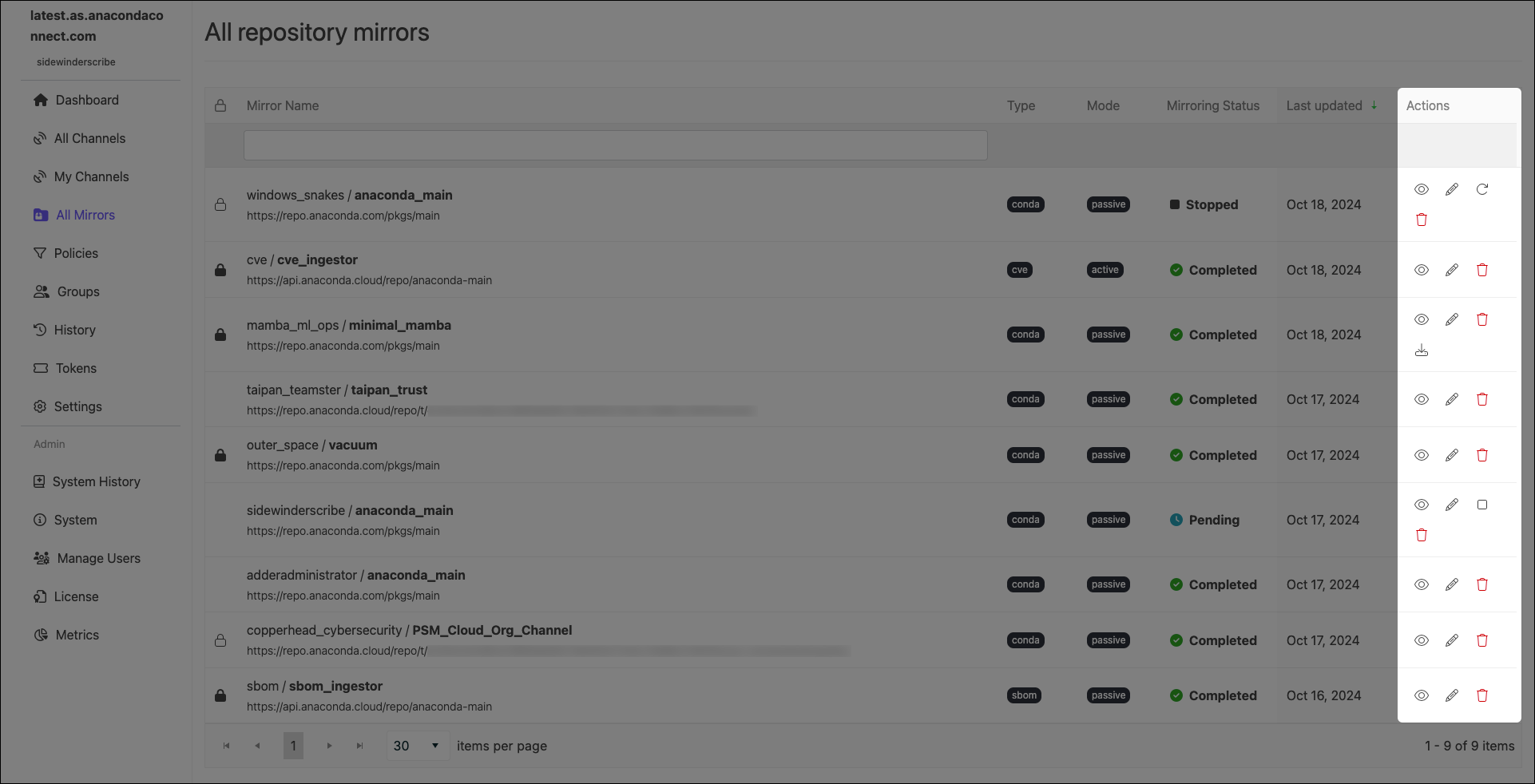
Use the icons in the **Actions** column to manage your mirrors:
Mirror actions can also be performed from a channel’s **Mirrors** tab.
**Edit mirror**: Edit a mirror’s configurations.
You cannot edit the mode of an established mirror.
**Stop running mirror**: Stop an in-progress mirror.
It can take up to 10 minutes for a mirror to fully stop. A mirror in the process of stopping will display **Stopping** as its mirroring status. Once it is complete, it will display **Stopped** as its status. Stopping a mirror does not discard the progress the mirror has made, and some packages may appear in your channel’s **Packages** tab.
**Restart Mirror**: Restart a stopped mirror.
Restarted mirrors run from the beginning of the mirroring process, not from where you stopped the run.
**See details**: View information about how many packages were filtered from the source, reasons for their exclusion, and whether packages were mirrored passively or actively.
**Delete mirror**: Delete a mirror.
**Download Dependency Report**: Download a dependency report (if available)
* A dependency report is a detailed list of all the software packages required for your specified packages to function correctly. It includes both direct dependencies (packages your specified packages require to run) and indirect dependencies (packages the dependencies require to run). A package dependency report can help you identify exactly which packages are necessary for your channel to be able to create a working environment using conda.
* Dependency reports are only available for mirrors that have policies with specific configurations applied:
* You must set package rules to allow packages by their names using [MatchSpec protocol](https://docs.conda.io/projects/conda/en/latest/dev-guide/api/conda/models/match_spec/index.html)—a syntax for specifying package names and versions in conda
* You must select the **Include dependencies** checkbox.