> ## Documentation Index
> Fetch the complete documentation index at: https://anaconda.com/docs/llms.txt
> Use this file to discover all available pages before exploring further.
# Enabling two-factor authentication
Two-factor authentication(2FA) can be enabled in Keycloak using either Google Authenticator or the One-Time Password(OTP) tool FreeOTP.
For more background on OTPs, see Keycloak’s [documentation on OTP](https://www.keycloak.org/docs/latest/server_admin/#otp-policies).
## For new users
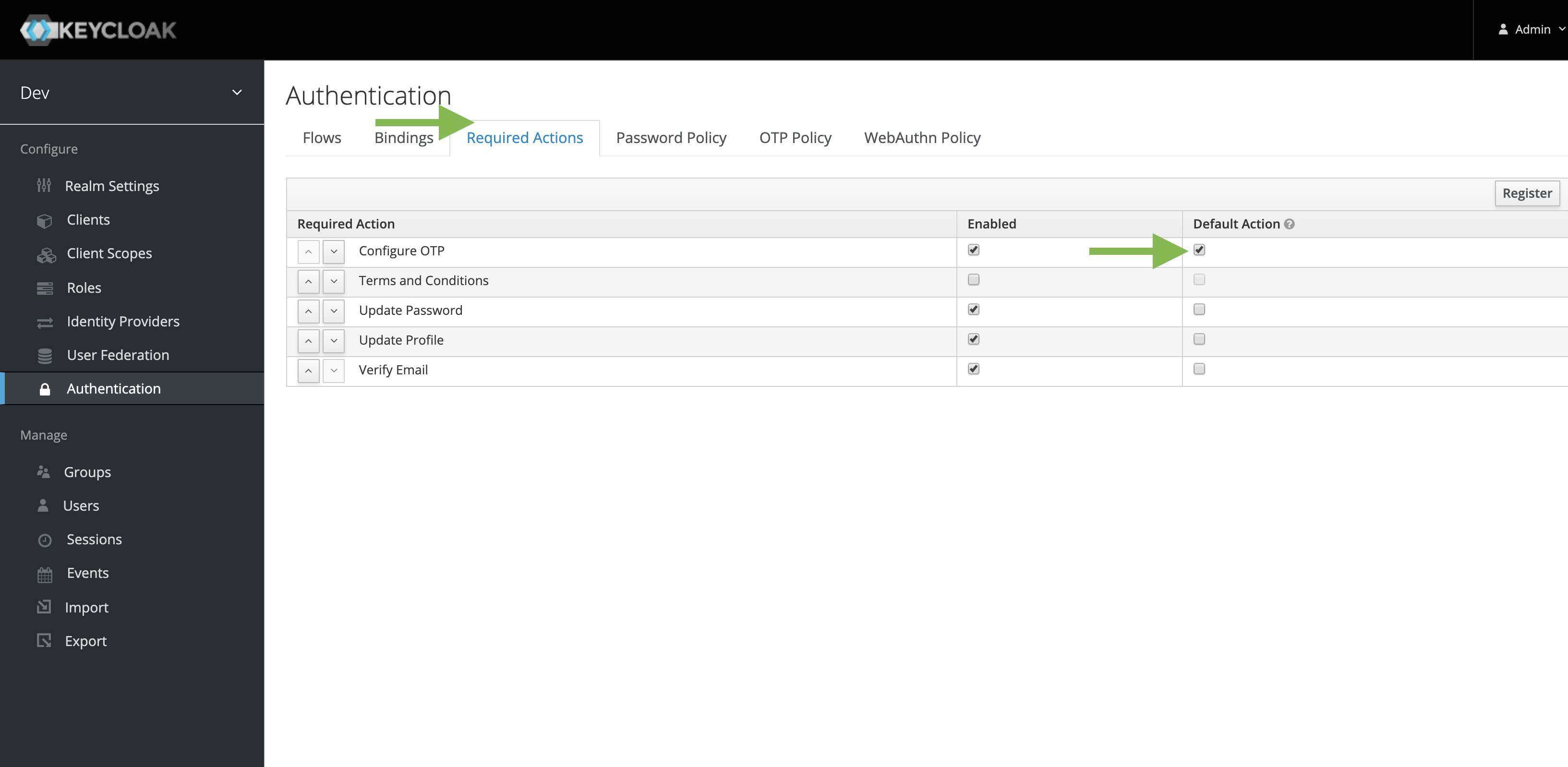
1. Go to **Authentication**.
2. Navigate to the **Required Actions** tab.
3. Under **Configure OTP**, select **Default**.
 ## For existing users
This should be done for every user that does not have an OTP configured.
1. Go to the user profile page.
2. Under **Required Field**, select **Configure OTP**.
## For existing users
This should be done for every user that does not have an OTP configured.
1. Go to the user profile page.
2. Under **Required Field**, select **Configure OTP**.