> ## Documentation Index
> Fetch the complete documentation index at: https://anaconda.com/docs/llms.txt
> Use this file to discover all available pages before exploring further.
# Create a dev-users-admin role
By default, the installer creates an admin role, which provides you full management of the Keycloak configuration. In some cases, you might want to give a user the ability to manage Anaconda Server users without providing that user with full permissions to the configuration. In our example, we’ll refer to this role as the *dev-users-admin*; however, you can name this role as you like.
For example, you might want to provide a user the ability to view and edit other users’ personal information, credentials, and roles.
Follow these steps to create the dev-users-admin role:
1. Log in as an admin.
2. Go to MASTER realm.
3. Go to **Roles** and click **Add Role**.
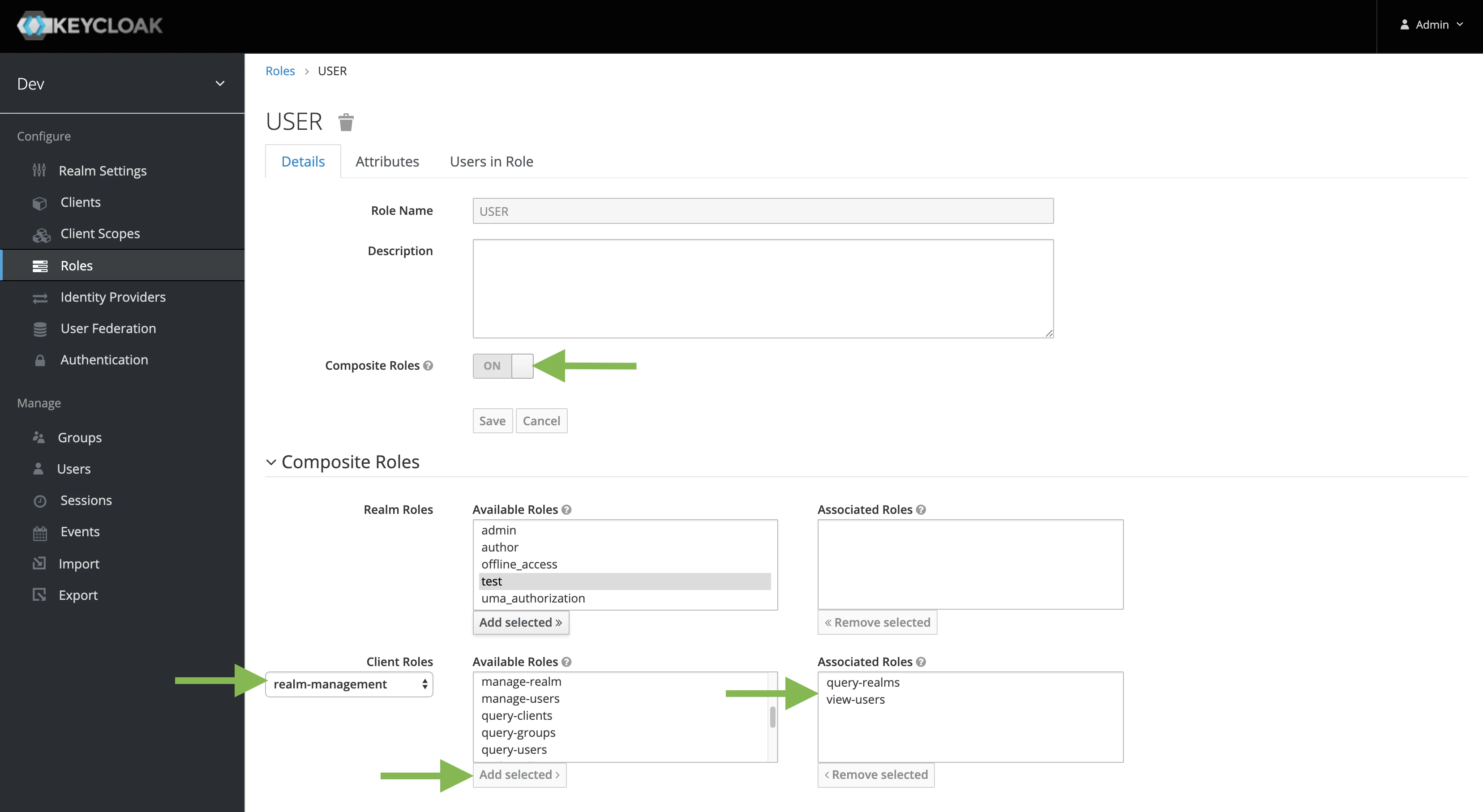
4. Ensure **Composite Roles** is **ON**.
5. Under the **Client Roles** dropdown, select dev-realm.
6. Assign available roles by selecting those roles and clicking **Add selected**.