> ## Documentation Index
> Fetch the complete documentation index at: https://anaconda.com/docs/llms.txt
> Use this file to discover all available pages before exploring further.
# Custom IAM role to access S3
export const Comments = ({children}) => {
return ;
};
This guide assumes you have read [Connect and run your first flow](/docs/platform/getting-started/connect-and-first-run).
Your tasks might need data in S3 buckets that the default task execution role cannot access. For example, the bucket might reside in a different AWS account than the one where your deployment runs. In this scenario, grant tasks access to the bucket with a custom IAM role.
## Creating the integration
Admin only
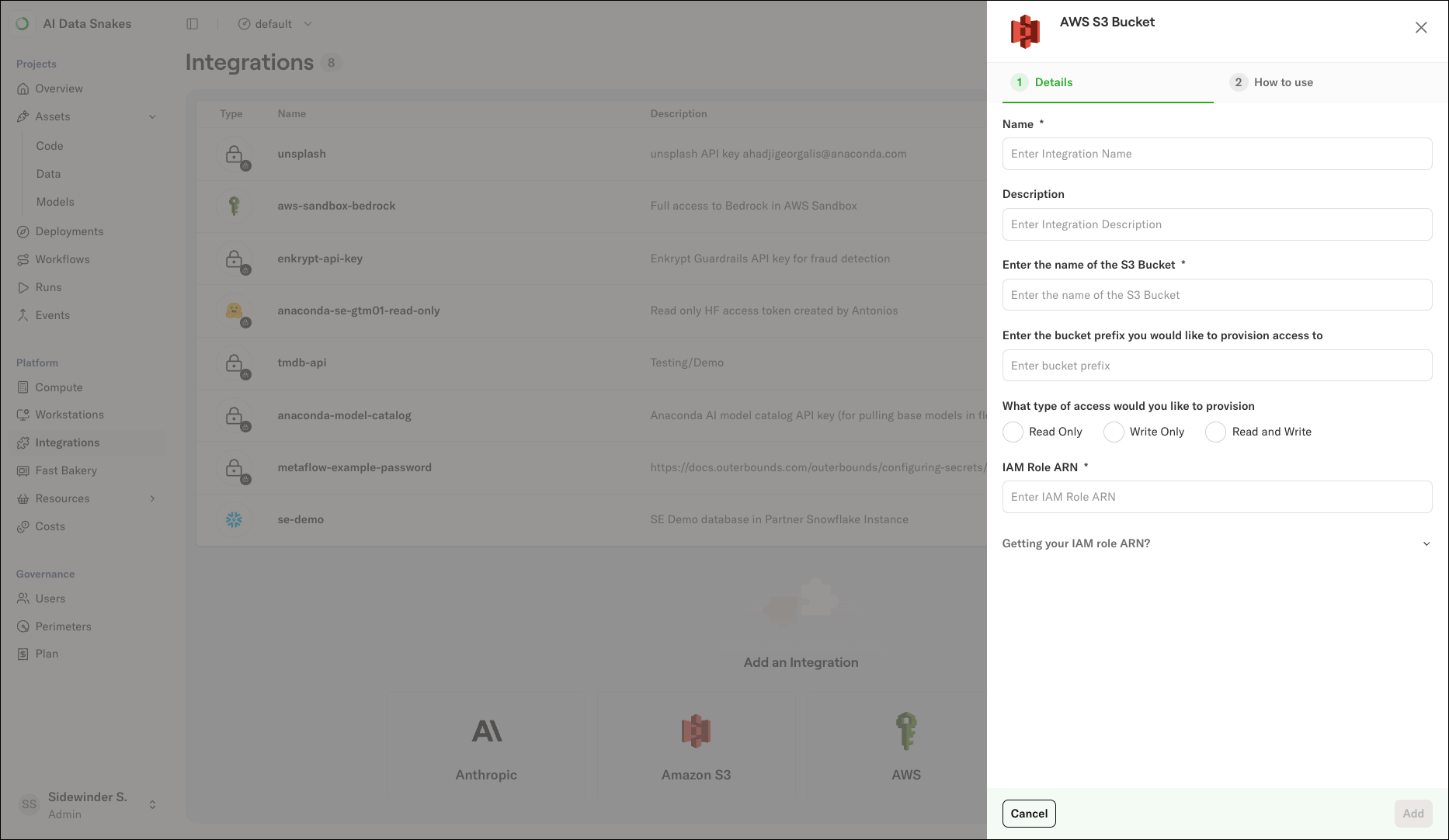
You must be an administrator of the deployment to create integrations. To create an Amazon S3 integration:
1. Select **Integrations** in the left-hand navigation.
2. Click the **Amazon S3** card.
3. Enter a **Name** and **Description** for the integration.
4. Under **Enter the name of the S3 Bucket**, enter the bucket name. To limit access to a path within the bucket, enter a prefix under **Enter the bucket prefix you would like to provision access to**.
5. Under **What type of access would you like to provision**, select the access level your tasks need: *Read Only*, *Write Only*, or *Read and Write*.
6. Expand **Getting your IAM role ARN?** and follow the instructions to create an IAM role in the account that hosts the bucket. The form provides:
* A trust policy that allows the task execution role to assume the role, with the task execution role's ARN pre-filled as the principal.
* The tag key `outerbounds.com/accessible-by-deployment` and value to attach to the role. The tag allows the platform to discover the role.
* An inline IAM policy scoped to your bucket, prefix, and access level. Attach the policy to the role in the AWS Console.
7. Under **IAM Role ARN**, enter the ARN of the role you created.
8. Click **Add**.
 ## Using the role
Pass the role ARN to the `role` parameter of the [`metaflow.S3` client](https://docs.metaflow.org/api/S3) to access the bucket in your flows:
```python expandable theme={null}
from metaflow import FlowSpec, step, S3
class CustomS3AccessFlow(FlowSpec):
@step
def start(self):
import pandas as pd
# Read data from an S3 bucket in another account
with S3(role="") as s3:
tmp_data_path = s3.get("s3:///")
df = pd.read_csv(tmp_data_path.path)
self.summary = df.describe()
self.next(self.end)
@step
def end(self):
print(self.summary)
if __name__ == "__main__":
CustomS3AccessFlow()
```
Replace \ with the ARN of the IAM role you created for the integration.
## Using the role
Pass the role ARN to the `role` parameter of the [`metaflow.S3` client](https://docs.metaflow.org/api/S3) to access the bucket in your flows:
```python expandable theme={null}
from metaflow import FlowSpec, step, S3
class CustomS3AccessFlow(FlowSpec):
@step
def start(self):
import pandas as pd
# Read data from an S3 bucket in another account
with S3(role="") as s3:
tmp_data_path = s3.get("s3:///")
df = pd.read_csv(tmp_data_path.path)
self.summary = df.describe()
self.next(self.end)
@step
def end(self):
print(self.summary)
if __name__ == "__main__":
CustomS3AccessFlow()
```
Replace \ with the ARN of the IAM role you created for the integration.
Replace \ with the name of your S3 bucket.
Replace \ with the key of the object to read.
The **How to use** tab of the integration shows a ready-to-use snippet with the role ARN pre-filled. You can also use the same role ARN with `get_aws_client` for direct S3 access, as described in [Configuring secrets](/docs/platform/guides/security/configuring-secrets#using-a-custom-iam-role).