> ## Documentation Index
> Fetch the complete documentation index at: https://anaconda.com/docs/llms.txt
> Use this file to discover all available pages before exploring further.
# Setting up a project
export const TroubleshootSolution = ({children}) => <>
Solution
{children}
;
export const TroubleshootCause = ({children}) =>
Cause
{children}
;
export const TroubleshootTitle = ({children}) => <>
{children}
;
export const Troubleshoot = ({children}) => ;
export const Comments = ({children}) => {
return ;
};
Projects consists of four key elements:
* A Git repository
* An `obproject.toml` configuration file
* A top-level `README.md`
* A CI/CD configuration that updates the project when you push changes
To start with a blank slate, clone [the `ob-project-empty` repository](https://github.com/outerbounds/ob-project-empty), which has these elements prepopulated:
```sh theme={null}
git clone https://github.com/outerbounds/ob-project-empty.git
```
The examples on this page use GitHub Actions for CI/CD. The platform also supports GitLab CI/CD, Azure DevOps, and CircleCI. For provider-specific configurations, see the [CI/CD integration guide](/docs/platform/guides/deploy/cicd-integration).
## Configuring a project
A project is configured by including an `obproject.toml` file in the root of your project's git repository. At a minimum, the file needs the following fields:
```toml title="obproject.toml" theme={null}
platform = ""
project = ""
title = ""
```
Replace \ with the URL of your Anaconda Platform deployment.
Replace \ with an identifier for the project, using only lowercase alphanumeric characters and underscores. The project name can match the repository name.
Replace \ with a human-readable name shown on the project overview page.
## Enabling CI/CD access
To keep the project in sync with your repository, you need to allow your CI/CD system to push changes to the platform. CI/CD jobs authenticate as a *machine user*: a platform-managed identity that authenticates with credentials issued by your CI/CD provider instead of a person's SSO login.
Create one following the instructions in [programmatic access with machine users](/docs/platform/guides/security/programmatic-access-via-machine-users). What each machine user requires depends on the provider type you select. Enter the values that identify your project's repository, and leave the optional claims empty so the machine user can authenticate jobs from any branch, including pull requests.
## Pushing a project update
The template's GitHub Actions workflow triggers a project update whenever you push a commit to the main branch or to a pull request.
To test the CI/CD access, edit the `README.md`, or make any other commit you like, and push it. A GitHub Action runs; you can follow its progress in the GitHub Actions UI. When it completes, the project appears on the platform with an empty overview page:
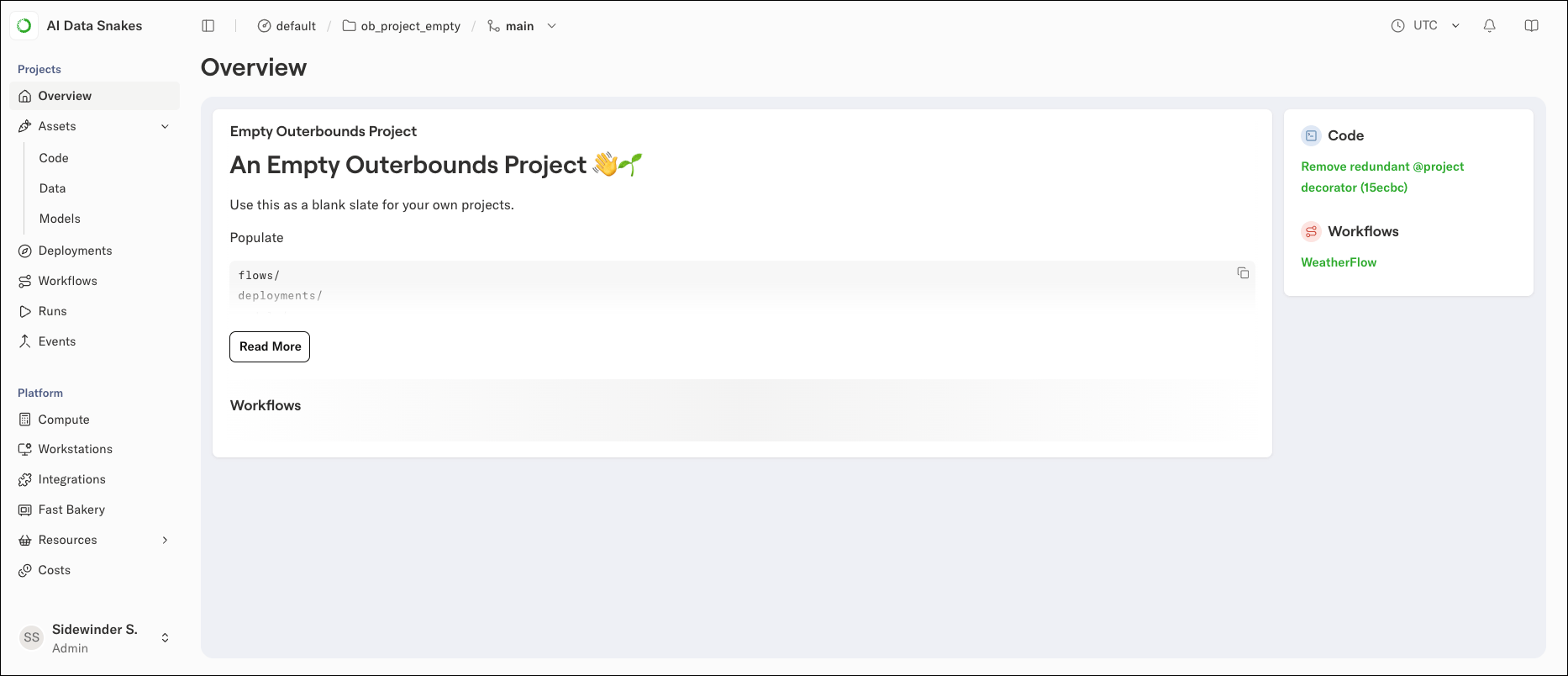 If you see this page, the project is up and running. Push more updates and check the **Code** view to see the latest commits included in the deployed project.
## Troubleshooting
### CI/CD job fails to authenticate
The CI/CD worker cannot authenticate to the platform because its token claims do not match a machine user, or the machine user does not exist.
Check the `CI/CD User` value in the error message and confirm that a machine user with that name exists, that its organization and repository claims match your repository, and that its optional claims (branch, environment, workflow) do not exclude your job.
Once you have a blank project deployed, [start building on top of it](/docs/platform/guides/projects/project-structure).
If you see this page, the project is up and running. Push more updates and check the **Code** view to see the latest commits included in the deployed project.
## Troubleshooting
### CI/CD job fails to authenticate
The CI/CD worker cannot authenticate to the platform because its token claims do not match a machine user, or the machine user does not exist.
Check the `CI/CD User` value in the error message and confirm that a machine user with that name exists, that its organization and repository claims match your repository, and that its optional claims (branch, environment, workflow) do not exclude your job.
Once you have a blank project deployed, [start building on top of it](/docs/platform/guides/projects/project-structure).