> ## Documentation Index
> Fetch the complete documentation index at: https://anaconda.com/docs/llms.txt
> Use this file to discover all available pages before exploring further.
# Project structure
export const GCell = ({children, className}) =>
{children}
;
export const GTH = ({children, className}) =>
{children}
;
export const GRow = ({children}) => {children}
;
export const GBody = ({children}) => {children}
;
export const GHead = ({children}) => {children}
;
export const GTable = ({children, className, cols}) =>
{children}
;
export const DefinitionDescription = ({children}) => {children};
export const DefinitionTerm = ({children}) => {children};
export const DefinitionList = ({children}) => {children}
;
export const Comments = ({children}) => {
return ;
};
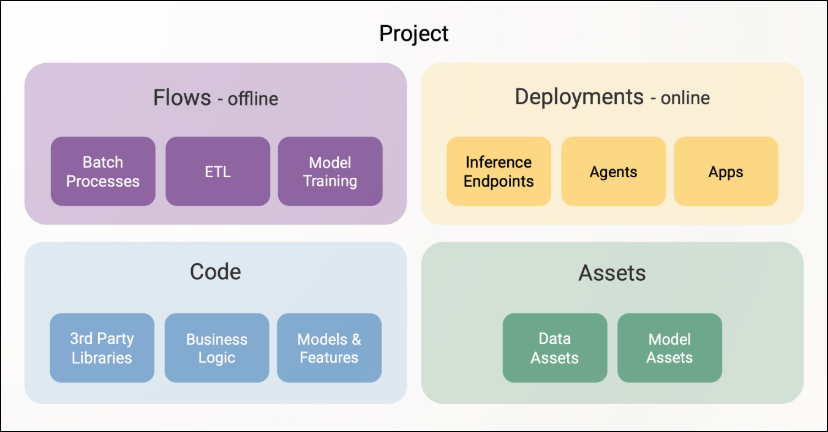
After [setting up an empty project](/docs/platform/guides/projects/setting-up-a-new-project), you can begin adding your own components. Fundamentally, all projects are composed of these top-level components:
 ## Flows
Flows refer to Metaflow flows, often [interconnected through events](https://www.anaconda.com/blog/metaflow-event-triggering). They form the backbone of your projects, handling data processing and ETL, model training and finetuning, [autonomous and batch inference](https://www.anaconda.com/blog/autonomous-inference), and any other types of background processing and high-performance computing.
In projects, flows are stored under a subdirectory `flows`, one Metaflow flow (named `flow.py`) per subdirectory, alongside any supporting Python modules and packages. As a best practice, it is useful to add a `README.md` file for each flow describing its role. They will be surfaced in the UI as well.
### Writing a `ProjectFlow`
Importantly, project flows should subclass from `ProjectFlow` instead of Metaflow's standard `FlowSpec`. In other words, simply author your flows like this:
```python highlight={1} theme={null}
from obproject import ProjectFlow
class MyFlow(ProjectFlow):
...
```
This leverages [Metaflow's `BaseFlow` pattern](https://docs.metaflow.org/metaflow/composing-flows/baseflow) to enrich flows with functionality related to the project structure. Besides this small detail, you can use all Metaflow features in your flows.
A typical flow hierarchy in a project repository ends up looking like this:
## Deployments
Deployments are microservices that serve requests through real-time APIs. Common use cases:
Model hosting and inference
Host models, including GenAI models running on fleets of GPUs, behind real-time endpoints.
UIs and dashboards
Serve internal tools such as TensorBoard or Streamlit apps.
Real-time agents
Run agents that respond to incoming requests and take action based on LLM outputs.
### Flows and deployments working together
The platform's strength comes from the tight connection between flows and deployments, bridging the offline and online worlds:
* A flow can continuously update a database for RAG, which a deployed agent then uses in real time.
* A deployed app can monitor model performance and trigger a retraining flow.
* A flow can deploy a model endpoint programmatically, for instance, whenever a new model has been trained.
### Deployments in a project
In your project, place deployments in the `deployments` directory. Each deployment is defined by a configuration file, `config.yml`, as documented in [Deployments deep dive](/docs/platform/guides/inference/deployments-deep-dive). You can define dependencies for the deployment in a standard `requirements.txt` or `pyproject.toml`. As with flows, it is recommended to add a `README.md` for each deployment.
The project hierarchy looks like this:
### Deployment commands
When `obproject-deploy` deploys apps, it runs from the **project root directory**, so commands in your `config.yml` must use paths relative to the project root, not the deployment directory.
For example, if your project structure is:
Write the `config.yml` commands with paths relative to the project root:
```yaml theme={null}
# deployments/dashboard/config.yml
name: dashboard
commands:
- streamlit run deployments/dashboard/app.py
```
```yaml theme={null}
# deployments/api/config.yml
name: api
commands:
- gunicorn --workers 2 --bind 0.0.0.0:8000 deployments.api.main:app
```
Running from the project root has two benefits:
* **Shared imports**: Apps can import modules from `src/` directly (`from my_module import ...`).
* **Consistency**: All paths are relative to the same root, making them predictable.
Use file paths for CLI tools (`streamlit run deployments/dashboard/app.py`) and Python module paths for WSGI/ASGI servers (`gunicorn ... deployments.api.main:app`).
## Code
Effective management of software dependencies is essential for building production-quality projects and enabling rapid iteration and collaboration. A project has one platform configuration file, `obproject.toml`, and one or more dependency manifests, such as `pyproject.toml` or `requirements.txt`. The platform configuration says what the project is and how it deploys; the dependency manifests say what packages the code needs:
File
Location
Purpose
`obproject.toml`
Project root
Project identity and behavior: names the project and platform, maps branches to perimeters and environments, registers shared flow configs, and customizes asset directory names. Read by `obproject-deploy`.
`pyproject.toml`
Project root
Project-wide dependency set. Applied to all flows through `@pypi_base`, and to deployments that do not declare their own dependencies.
`pyproject.toml` or `requirements.txt`
Deployment directory
Dependencies for a single deployment. Overrides the project-wide manifest for that deployment.
`obproject_multi.toml`
Monorepo root
Monorepo orchestration: names the CI/CD machine user and platform, and maps project names to their subdirectories. Only needed when one repository hosts multiple projects.
A typical project consists of multiple layers of software dependencies:
* **Code defining flows and deployments**, organized into subdirectories.
* **Project-level shared libraries** under the `src` directory.
* **Organization-level libraries** shared across projects.
* **Third-party dependencies**, such as `pandas` and `torch`, declared at the flow, deployment, or project level.
For example, consider the following project that trains a fraud detection model and deploys it for real-time inference:
### Code for flows and deployments
In addition to the entrypoint file (`flow.py`) or deployment server, each flow or deployment can include supporting modules and packages, such as `mymodel.py` in the tree above.
### Project-level shared libraries
Place libraries shared within a project under the `src` directory, as packages. For example, a `feature_encoders` package used both during training and inference ensures offline-online consistency of features:
In each package's `__init__.py`, include:
```python theme={null}
METAFLOW_PACKAGE_POLICY = 'include'
```
This ensures the package gets included in [the Metaflow code package](https://docs.metaflow.org/scaling/dependencies) when deployed. When you run `obproject-deploy`, it automatically sets up `PYTHONPATH` so your flows and apps can import these modules directly, such as `from feature_encoders import MyEncoder`.
### Organization-level libraries
Libraries shared across projects can be handled in two ways:
* If you can set `METAFLOW_PACKAGE_POLICY` in packages, simply `pip install` them as usual or add them to your `PYTHONPATH`. Once you `import` them in your flows and deployments, they get packaged automatically. This is a convenient option for private packages, even if they are not `pip install`-able from a package repository.
* If the shared libraries are pushed to a package repository, private or public, treat them like third-party dependencies.
### Declaring dependencies
You can declare dependencies at three levels in a project:
* **Per flow or step**: Use [Metaflow's `@pypi` or `@conda` decorators](https://docs.metaflow.org/scaling/dependencies) in your flow code.
* **Per deployment**: Add a `requirements.txt` or `pyproject.toml` to the deployment directory, or declare dependencies in its `config.yml`.
* **Project-wide**: Place a `pyproject.toml` at the root of the project next to `obproject.toml`. For example:
```toml theme={null}
[project]
dependencies = [
"pandas==2.2.2",
"fastapi==0.116.1"
]
```
A project-wide `pyproject.toml` is applied to all flows through [`@pypi_base`](https://docs.metaflow.org/scaling/dependencies/libraries#using-the-same-packages-in-all-steps) with no additional configuration, which is handy if you want every flow to use the exact same set of dependencies. It is also applied to deployments, unless a deployment declares its own dependencies in `config.yml`.
When the project is deployed, the platform uses [Fast Bakery to bake the requirements into a container image automatically](https://www.anaconda.com/blog/containerize-with-fast-bakery).
## Assets
Projects track data and models as **assets**: references built on [Metaflow artifacts](https://docs.metaflow.org/metaflow/basics#artifacts) that add metadata and tracking on top, giving you a model registry and data lineage for the project. By default, `obproject-deploy` looks for model assets in `models/` and data assets in `data/`. For more information, see [Project assets](/docs/platform/guides/projects/project-assets).
If the default asset directory names conflict with existing directories in your project, such as a `models/` directory used for data model schemas, customize them in `obproject.toml`:
```toml theme={null}
[obproject_dirs]
models = "ml_models"
data = "datasets"
```
## Local development
`ProjectFlow` automatically applies `@pypi_base` when your project has a `pyproject.toml` with dependencies. This ensures reproducible environments for both local and remote runs, but requires specifying an environment.
### Running flows locally
When `@pypi_base` is applied, you need to specify an environment:
```sh theme={null}
python flows/train/flow.py --environment=fast-bakery run
```
### Skipping dependency isolation
In some contexts, you might want to continue subclassing an `obproject.ProjectFlow` but turn off the automatic application of `@pypi_base`. For local iteration using your existing Python environment, you can skip the `@pypi_base` decorator:
Set `OBPROJECT_SKIP_PYPI_BASE` per run:
```sh theme={null}
OBPROJECT_SKIP_PYPI_BASE=1 python flows/train/flow.py run
```
Export `OBPROJECT_SKIP_PYPI_BASE` in your shell profile, such as `~/.bashrc` or `~/.zshrc`, to skip dependency isolation persistently:
```sh theme={null}
export OBPROJECT_SKIP_PYPI_BASE=1
```
Set `include_pyproject_toml` to `false` in `obproject.toml` to skip dependency isolation for the project:
```toml theme={null}
[dependencies]
include_pyproject_toml = false
```
Skipping `@pypi_base` is convenient when iterating locally. For production deployments through CI/CD, always apply dependencies with `--environment=fast-bakery` to ensure reproducible builds regardless of your local settings.
## CI/CD integration
Projects integrate seamlessly with CI/CD platforms to enable continuous deployment. The `obproject-deploy` CLI utility available via `pip install obproject-utils` automates deployment of flows and applications, making it straightforward to set up GitOps workflows.
Starting with `ob-project-utils==0.2.35`, every flow deployed by `obproject-deploy` carries a `commit-hash:` tag and a CI-provider-specific run ID tag, such as `obproject-deploy-gh-action-run:` for GitHub Actions. Use these tags to trace a running workflow back to the commit and CI build that deployed it. For more information, see [Deployment lineage tags](/docs/platform/guides/projects/project-lifecycle#deployment-lineage-tags).
GitHub Actions can deploy your project automatically when code is pushed to specific branches. Create `.github/workflows/deploy.yml`:
```yaml expandable theme={null}
name: Deploy project
on:
push:
branches:
- main
- develop
- 'feature/**'
env:
GH_HEAD_REF: ${{ github.head_ref }}
GH_REF: ${{ github.ref_name }}
permissions:
id-token: write
contents: read
pull-requests: write
jobs:
deploy:
name: Deploy Project
runs-on: ubuntu-latest
steps:
- uses: actions/checkout@v4
with:
ref: ${{ github.event.pull_request.head.sha }}
fetch-depth: 0
- name: Set up Python
uses: actions/setup-python@v1
with:
python-version: 3.12
- name: Install dependencies
run: |
python3 -m pip install -U requests
python3 -m pip install outerbounds pyyaml
python3 -m pip install -U ob-project-utils
- name: Configure the platform
run: |
PROJECT_NAME=$(yq .project obproject.toml)
DEFAULT_CICD_USER="${PROJECT_NAME//_/-}-cicd"
PLATFORM=$(yq .platform obproject.toml)
CICD_USER=$(yq ".cicd_user // \"$DEFAULT_CICD_USER\"" obproject.toml)
PERIMETER="default"
echo "Deployment target:"
echo " Platform: $PLATFORM"
echo " CI/CD User: $CICD_USER"
echo " Perimeter: $PERIMETER"
outerbounds service-principal-configure \
--name $CICD_USER \
--deployment-domain $PLATFORM \
--perimeter $PERIMETER \
--github-actions
- name: Deploy Project
env:
COMMIT_URL: "https://github.com/${{ github.repository }}/commit/"
CI_URL: "https://github.com/${{ github.repository }}/actions/runs/${{ github.run_id }}"
GH_TOKEN: ${{ secrets.GITHUB_TOKEN }}
COMMENTS_URL: ${{ github.event.pull_request.comments_url }}
PYTHONUNBUFFERED: 1
run: obproject-deploy
```
This workflow:
* Triggers on pushes to main, develop, and feature branches
* Authenticates as a [machine user](/docs/platform/guides/security/programmatic-access-via-machine-users) with GitHub's OIDC token
* Deploys flows, apps, and assets as configured
Use per-component `obproject_deploy.toml` files to control which branches deploy each app or flow. For details, see [Project lifecycle](/docs/platform/guides/projects/project-lifecycle#controlling-what-gets-deployed).
If you do not use `obproject-deploy`, you need to determine when to invoke `outerbounds service-principal-configure` in your CI runs.
Azure DevOps Pipelines support projects with automatic branch detection and JWT-based authentication. Create `azure-pipelines.yml`:
```yaml expandable theme={null}
trigger:
branches:
include:
- main
- develop
- feature/*
pool:
vmImage: ubuntu-latest
steps:
- checkout: self
- task: AzureCLI@2
displayName: 'Configure the platform'
inputs:
azureSubscription: '' # Replace with your Azure service connection name
addSpnToEnvironment: true
scriptType: bash
scriptLocation: inlineScript
inlineScript: |
# Check if yq is available
which yq || (echo "yq not found, installing..." && wget -qO /usr/local/bin/yq https://github.com/mikefarah/yq/releases/latest/download/yq_linux_amd64 && chmod +x /usr/local/bin/yq)
PROJECT_NAME=$(yq .project obproject.toml)
DEFAULT_CICD_USER="${PROJECT_NAME//_/-}-cicd"
PLATFORM=$(yq .platform obproject.toml)
CICD_USER=$(yq ".cicd_user // \"$DEFAULT_CICD_USER\"" obproject.toml)
PERIMETER="default"
echo "Deployment target:"
echo " Platform: $PLATFORM"
echo " CI/CD User: $CICD_USER"
echo " Perimeter: $PERIMETER"
python -m pip install -U pyyaml requests toml 'outerbounds[azure]' ob-project-utils
outerbounds service-principal-configure \
--name $CICD_USER \
--deployment-domain $PLATFORM \
--perimeter $PERIMETER \
--jwt-token $idToken
- script: |
obproject-deploy
displayName: 'Deploy Project'
env:
# https://learn.microsoft.com/en-us/azure/devops/pipelines/process/variables?view=azure-devops
SYSTEM_ACCESSTOKEN: $(System.AccessToken)
PYTHONUNBUFFERED: 1
# Pass all Azure DevOps variables that the deploy script needs
BUILD_SOURCEBRANCH: $(Build.SourceBranch)
SYSTEM_PULLREQUEST_SOURCEBRANCH: $(System.PullRequest.SourceBranch)
SYSTEM_COLLECTIONURI: $(System.CollectionUri)
SYSTEM_TEAMPROJECT: $(System.TeamProject)
BUILD_REPOSITORY_NAME: $(Build.Repository.Name)
BUILD_REPOSITORY_ID: $(Build.Repository.ID)
BUILD_BUILDID: $(Build.BuildId)
SYSTEM_PULLREQUEST_PULLREQUESTID: $(System.PullRequest.PullRequestId)
```
The pipeline automatically detects the current branch through Azure's built-in environment variables (`BUILD_SOURCEBRANCH`, `SYSTEM_PULLREQUEST_SOURCEBRANCH`).
CircleCI supports projects using OIDC tokens for secure authentication. Create `.circleci/config.yml`:
```yaml expandable theme={null}
version: 2.1
jobs:
deploy:
docker:
- image: cimg/python:3.12
steps:
- checkout
- run:
name: Install dependencies
command: |
python -m pip install -U pip
python -m pip install -U outerbounds ob-project-utils requests pyyaml
- run:
name: Configure the platform
command: |
# Read config using Python (more portable than yq)
if [ -f "obproject_multi.toml" ]; then
echo "Multi-project repository detected"
CICD_USER=$(python -c "import tomllib; print(tomllib.load(open('obproject_multi.toml', 'rb'))['cicd']['user'])")
PLATFORM=$(python -c "import tomllib; print(tomllib.load(open('obproject_multi.toml', 'rb'))['cicd']['platform'])")
PERIMETER=$(python -c "import tomllib; print(tomllib.load(open('obproject_multi.toml', 'rb'))['cicd'].get('perimeter', 'default'))")
else
echo "Single-project repository detected"
PROJECT_NAME=$(python -c "import tomllib; print(tomllib.load(open('obproject.toml', 'rb'))['project'])")
PLATFORM=$(python -c "import tomllib; print(tomllib.load(open('obproject.toml', 'rb'))['platform'])")
CICD_USER="${PROJECT_NAME}-cicd"
PERIMETER="default"
fi
outerbounds service-principal-configure \
--name $CICD_USER \
--deployment-domain $PLATFORM \
--perimeter $PERIMETER \
--jwt-token $CIRCLE_OIDC_TOKEN_V2
- run:
name: Deploy Project
command: obproject-deploy
environment:
PYTHONUNBUFFERED: "1"
- store_artifacts:
path: deployment_summary.md
destination: deployment-summary
workflows:
deploy:
jobs:
- deploy:
# A context is required for $CIRCLE_OIDC_TOKEN_V2 to be available.
# The context can be empty; it just needs to exist and be referenced.
context: platform
filters:
branches:
only:
- main
```
**CircleCI setup requirements:**
1. Create a machine user of type CircleCI, as described in [Programmatic access with machine users](/docs/platform/guides/security/programmatic-access-via-machine-users).
2. Create a CircleCI context (it can be empty). OIDC tokens are only available to jobs that reference a context.
3. Reference the context in your workflow configuration.
The deploy script automatically detects CircleCI through the `CIRCLECI` environment variable and extracts branch information from `CIRCLE_BRANCH`.
GitLab CI/CD supports OIDC authentication via the `id_tokens` keyword. Create `.gitlab-ci.yml`:
```yaml expandable theme={null}
stages:
- deploy
deploy:
stage: deploy
image: python:3.12
rules:
- if: $CI_PIPELINE_SOURCE == "merge_request_event"
- if: $CI_COMMIT_BRANCH == "main"
# The 'aud' value must match your Anaconda Platform URL.
# It cannot be read from obproject.toml because GitLab evaluates
# id_tokens at pipeline creation time, before any scripts run.
id_tokens:
OUTERBOUNDS_ID_TOKEN:
aud:
script:
- wget -qO /usr/local/bin/yq https://github.com/mikefarah/yq/releases/latest/download/yq_linux_amd64 && chmod +x /usr/local/bin/yq
- PROJECT_NAME=$(yq .project obproject.toml)
- PLATFORM=$(yq .platform obproject.toml)
- CICD_USER="${PROJECT_NAME//_/-}-cicd"
- PERIMETER="default"
- python -m pip install -U outerbounds ob-project-utils pyyaml
- |
outerbounds service-principal-configure \
--name $CICD_USER \
--deployment-domain $PLATFORM \
--perimeter $PERIMETER \
--jwt-token $OUTERBOUNDS_ID_TOKEN
- obproject-deploy
```
**GitLab setup requirements:**
1. Create a machine user of type GitLab, as described in [Programmatic access with machine users](/docs/platform/guides/security/programmatic-access-via-machine-users).
2. Update the `aud` value to match your Anaconda Platform URL.
The deploy script automatically detects GitLab CI through the `GITLAB_CI` environment variable and extracts branch information from `CI_COMMIT_REF_NAME`.
For authentication setup and additional platforms, see the [CI/CD integration guide](/docs/platform/guides/deploy/cicd-integration).
## Multi-project repositories
For monorepo setups with multiple independent projects, use `obproject_multi.toml` at the repository root:
```toml theme={null}
[cicd]
user = ""
platform = ""
[projects]
fraud_detection = "ml/fraud-detection"
recommendation = "ml/recommendation"
data_ingestion = "pipelines/ingestion"
```
Replace \ with the name of your CI/CD machine user.
## Flows
Flows refer to Metaflow flows, often [interconnected through events](https://www.anaconda.com/blog/metaflow-event-triggering). They form the backbone of your projects, handling data processing and ETL, model training and finetuning, [autonomous and batch inference](https://www.anaconda.com/blog/autonomous-inference), and any other types of background processing and high-performance computing.
In projects, flows are stored under a subdirectory `flows`, one Metaflow flow (named `flow.py`) per subdirectory, alongside any supporting Python modules and packages. As a best practice, it is useful to add a `README.md` file for each flow describing its role. They will be surfaced in the UI as well.
### Writing a `ProjectFlow`
Importantly, project flows should subclass from `ProjectFlow` instead of Metaflow's standard `FlowSpec`. In other words, simply author your flows like this:
```python highlight={1} theme={null}
from obproject import ProjectFlow
class MyFlow(ProjectFlow):
...
```
This leverages [Metaflow's `BaseFlow` pattern](https://docs.metaflow.org/metaflow/composing-flows/baseflow) to enrich flows with functionality related to the project structure. Besides this small detail, you can use all Metaflow features in your flows.
A typical flow hierarchy in a project repository ends up looking like this:
## Deployments
Deployments are microservices that serve requests through real-time APIs. Common use cases:
Model hosting and inference
Host models, including GenAI models running on fleets of GPUs, behind real-time endpoints.
UIs and dashboards
Serve internal tools such as TensorBoard or Streamlit apps.
Real-time agents
Run agents that respond to incoming requests and take action based on LLM outputs.
### Flows and deployments working together
The platform's strength comes from the tight connection between flows and deployments, bridging the offline and online worlds:
* A flow can continuously update a database for RAG, which a deployed agent then uses in real time.
* A deployed app can monitor model performance and trigger a retraining flow.
* A flow can deploy a model endpoint programmatically, for instance, whenever a new model has been trained.
### Deployments in a project
In your project, place deployments in the `deployments` directory. Each deployment is defined by a configuration file, `config.yml`, as documented in [Deployments deep dive](/docs/platform/guides/inference/deployments-deep-dive). You can define dependencies for the deployment in a standard `requirements.txt` or `pyproject.toml`. As with flows, it is recommended to add a `README.md` for each deployment.
The project hierarchy looks like this:
### Deployment commands
When `obproject-deploy` deploys apps, it runs from the **project root directory**, so commands in your `config.yml` must use paths relative to the project root, not the deployment directory.
For example, if your project structure is:
Write the `config.yml` commands with paths relative to the project root:
```yaml theme={null}
# deployments/dashboard/config.yml
name: dashboard
commands:
- streamlit run deployments/dashboard/app.py
```
```yaml theme={null}
# deployments/api/config.yml
name: api
commands:
- gunicorn --workers 2 --bind 0.0.0.0:8000 deployments.api.main:app
```
Running from the project root has two benefits:
* **Shared imports**: Apps can import modules from `src/` directly (`from my_module import ...`).
* **Consistency**: All paths are relative to the same root, making them predictable.
Use file paths for CLI tools (`streamlit run deployments/dashboard/app.py`) and Python module paths for WSGI/ASGI servers (`gunicorn ... deployments.api.main:app`).
## Code
Effective management of software dependencies is essential for building production-quality projects and enabling rapid iteration and collaboration. A project has one platform configuration file, `obproject.toml`, and one or more dependency manifests, such as `pyproject.toml` or `requirements.txt`. The platform configuration says what the project is and how it deploys; the dependency manifests say what packages the code needs:
File
Location
Purpose
`obproject.toml`
Project root
Project identity and behavior: names the project and platform, maps branches to perimeters and environments, registers shared flow configs, and customizes asset directory names. Read by `obproject-deploy`.
`pyproject.toml`
Project root
Project-wide dependency set. Applied to all flows through `@pypi_base`, and to deployments that do not declare their own dependencies.
`pyproject.toml` or `requirements.txt`
Deployment directory
Dependencies for a single deployment. Overrides the project-wide manifest for that deployment.
`obproject_multi.toml`
Monorepo root
Monorepo orchestration: names the CI/CD machine user and platform, and maps project names to their subdirectories. Only needed when one repository hosts multiple projects.
A typical project consists of multiple layers of software dependencies:
* **Code defining flows and deployments**, organized into subdirectories.
* **Project-level shared libraries** under the `src` directory.
* **Organization-level libraries** shared across projects.
* **Third-party dependencies**, such as `pandas` and `torch`, declared at the flow, deployment, or project level.
For example, consider the following project that trains a fraud detection model and deploys it for real-time inference:
### Code for flows and deployments
In addition to the entrypoint file (`flow.py`) or deployment server, each flow or deployment can include supporting modules and packages, such as `mymodel.py` in the tree above.
### Project-level shared libraries
Place libraries shared within a project under the `src` directory, as packages. For example, a `feature_encoders` package used both during training and inference ensures offline-online consistency of features:
In each package's `__init__.py`, include:
```python theme={null}
METAFLOW_PACKAGE_POLICY = 'include'
```
This ensures the package gets included in [the Metaflow code package](https://docs.metaflow.org/scaling/dependencies) when deployed. When you run `obproject-deploy`, it automatically sets up `PYTHONPATH` so your flows and apps can import these modules directly, such as `from feature_encoders import MyEncoder`.
### Organization-level libraries
Libraries shared across projects can be handled in two ways:
* If you can set `METAFLOW_PACKAGE_POLICY` in packages, simply `pip install` them as usual or add them to your `PYTHONPATH`. Once you `import` them in your flows and deployments, they get packaged automatically. This is a convenient option for private packages, even if they are not `pip install`-able from a package repository.
* If the shared libraries are pushed to a package repository, private or public, treat them like third-party dependencies.
### Declaring dependencies
You can declare dependencies at three levels in a project:
* **Per flow or step**: Use [Metaflow's `@pypi` or `@conda` decorators](https://docs.metaflow.org/scaling/dependencies) in your flow code.
* **Per deployment**: Add a `requirements.txt` or `pyproject.toml` to the deployment directory, or declare dependencies in its `config.yml`.
* **Project-wide**: Place a `pyproject.toml` at the root of the project next to `obproject.toml`. For example:
```toml theme={null}
[project]
dependencies = [
"pandas==2.2.2",
"fastapi==0.116.1"
]
```
A project-wide `pyproject.toml` is applied to all flows through [`@pypi_base`](https://docs.metaflow.org/scaling/dependencies/libraries#using-the-same-packages-in-all-steps) with no additional configuration, which is handy if you want every flow to use the exact same set of dependencies. It is also applied to deployments, unless a deployment declares its own dependencies in `config.yml`.
When the project is deployed, the platform uses [Fast Bakery to bake the requirements into a container image automatically](https://www.anaconda.com/blog/containerize-with-fast-bakery).
## Assets
Projects track data and models as **assets**: references built on [Metaflow artifacts](https://docs.metaflow.org/metaflow/basics#artifacts) that add metadata and tracking on top, giving you a model registry and data lineage for the project. By default, `obproject-deploy` looks for model assets in `models/` and data assets in `data/`. For more information, see [Project assets](/docs/platform/guides/projects/project-assets).
If the default asset directory names conflict with existing directories in your project, such as a `models/` directory used for data model schemas, customize them in `obproject.toml`:
```toml theme={null}
[obproject_dirs]
models = "ml_models"
data = "datasets"
```
## Local development
`ProjectFlow` automatically applies `@pypi_base` when your project has a `pyproject.toml` with dependencies. This ensures reproducible environments for both local and remote runs, but requires specifying an environment.
### Running flows locally
When `@pypi_base` is applied, you need to specify an environment:
```sh theme={null}
python flows/train/flow.py --environment=fast-bakery run
```
### Skipping dependency isolation
In some contexts, you might want to continue subclassing an `obproject.ProjectFlow` but turn off the automatic application of `@pypi_base`. For local iteration using your existing Python environment, you can skip the `@pypi_base` decorator:
Set `OBPROJECT_SKIP_PYPI_BASE` per run:
```sh theme={null}
OBPROJECT_SKIP_PYPI_BASE=1 python flows/train/flow.py run
```
Export `OBPROJECT_SKIP_PYPI_BASE` in your shell profile, such as `~/.bashrc` or `~/.zshrc`, to skip dependency isolation persistently:
```sh theme={null}
export OBPROJECT_SKIP_PYPI_BASE=1
```
Set `include_pyproject_toml` to `false` in `obproject.toml` to skip dependency isolation for the project:
```toml theme={null}
[dependencies]
include_pyproject_toml = false
```
Skipping `@pypi_base` is convenient when iterating locally. For production deployments through CI/CD, always apply dependencies with `--environment=fast-bakery` to ensure reproducible builds regardless of your local settings.
## CI/CD integration
Projects integrate seamlessly with CI/CD platforms to enable continuous deployment. The `obproject-deploy` CLI utility available via `pip install obproject-utils` automates deployment of flows and applications, making it straightforward to set up GitOps workflows.
Starting with `ob-project-utils==0.2.35`, every flow deployed by `obproject-deploy` carries a `commit-hash:` tag and a CI-provider-specific run ID tag, such as `obproject-deploy-gh-action-run:` for GitHub Actions. Use these tags to trace a running workflow back to the commit and CI build that deployed it. For more information, see [Deployment lineage tags](/docs/platform/guides/projects/project-lifecycle#deployment-lineage-tags).
GitHub Actions can deploy your project automatically when code is pushed to specific branches. Create `.github/workflows/deploy.yml`:
```yaml expandable theme={null}
name: Deploy project
on:
push:
branches:
- main
- develop
- 'feature/**'
env:
GH_HEAD_REF: ${{ github.head_ref }}
GH_REF: ${{ github.ref_name }}
permissions:
id-token: write
contents: read
pull-requests: write
jobs:
deploy:
name: Deploy Project
runs-on: ubuntu-latest
steps:
- uses: actions/checkout@v4
with:
ref: ${{ github.event.pull_request.head.sha }}
fetch-depth: 0
- name: Set up Python
uses: actions/setup-python@v1
with:
python-version: 3.12
- name: Install dependencies
run: |
python3 -m pip install -U requests
python3 -m pip install outerbounds pyyaml
python3 -m pip install -U ob-project-utils
- name: Configure the platform
run: |
PROJECT_NAME=$(yq .project obproject.toml)
DEFAULT_CICD_USER="${PROJECT_NAME//_/-}-cicd"
PLATFORM=$(yq .platform obproject.toml)
CICD_USER=$(yq ".cicd_user // \"$DEFAULT_CICD_USER\"" obproject.toml)
PERIMETER="default"
echo "Deployment target:"
echo " Platform: $PLATFORM"
echo " CI/CD User: $CICD_USER"
echo " Perimeter: $PERIMETER"
outerbounds service-principal-configure \
--name $CICD_USER \
--deployment-domain $PLATFORM \
--perimeter $PERIMETER \
--github-actions
- name: Deploy Project
env:
COMMIT_URL: "https://github.com/${{ github.repository }}/commit/"
CI_URL: "https://github.com/${{ github.repository }}/actions/runs/${{ github.run_id }}"
GH_TOKEN: ${{ secrets.GITHUB_TOKEN }}
COMMENTS_URL: ${{ github.event.pull_request.comments_url }}
PYTHONUNBUFFERED: 1
run: obproject-deploy
```
This workflow:
* Triggers on pushes to main, develop, and feature branches
* Authenticates as a [machine user](/docs/platform/guides/security/programmatic-access-via-machine-users) with GitHub's OIDC token
* Deploys flows, apps, and assets as configured
Use per-component `obproject_deploy.toml` files to control which branches deploy each app or flow. For details, see [Project lifecycle](/docs/platform/guides/projects/project-lifecycle#controlling-what-gets-deployed).
If you do not use `obproject-deploy`, you need to determine when to invoke `outerbounds service-principal-configure` in your CI runs.
Azure DevOps Pipelines support projects with automatic branch detection and JWT-based authentication. Create `azure-pipelines.yml`:
```yaml expandable theme={null}
trigger:
branches:
include:
- main
- develop
- feature/*
pool:
vmImage: ubuntu-latest
steps:
- checkout: self
- task: AzureCLI@2
displayName: 'Configure the platform'
inputs:
azureSubscription: '' # Replace with your Azure service connection name
addSpnToEnvironment: true
scriptType: bash
scriptLocation: inlineScript
inlineScript: |
# Check if yq is available
which yq || (echo "yq not found, installing..." && wget -qO /usr/local/bin/yq https://github.com/mikefarah/yq/releases/latest/download/yq_linux_amd64 && chmod +x /usr/local/bin/yq)
PROJECT_NAME=$(yq .project obproject.toml)
DEFAULT_CICD_USER="${PROJECT_NAME//_/-}-cicd"
PLATFORM=$(yq .platform obproject.toml)
CICD_USER=$(yq ".cicd_user // \"$DEFAULT_CICD_USER\"" obproject.toml)
PERIMETER="default"
echo "Deployment target:"
echo " Platform: $PLATFORM"
echo " CI/CD User: $CICD_USER"
echo " Perimeter: $PERIMETER"
python -m pip install -U pyyaml requests toml 'outerbounds[azure]' ob-project-utils
outerbounds service-principal-configure \
--name $CICD_USER \
--deployment-domain $PLATFORM \
--perimeter $PERIMETER \
--jwt-token $idToken
- script: |
obproject-deploy
displayName: 'Deploy Project'
env:
# https://learn.microsoft.com/en-us/azure/devops/pipelines/process/variables?view=azure-devops
SYSTEM_ACCESSTOKEN: $(System.AccessToken)
PYTHONUNBUFFERED: 1
# Pass all Azure DevOps variables that the deploy script needs
BUILD_SOURCEBRANCH: $(Build.SourceBranch)
SYSTEM_PULLREQUEST_SOURCEBRANCH: $(System.PullRequest.SourceBranch)
SYSTEM_COLLECTIONURI: $(System.CollectionUri)
SYSTEM_TEAMPROJECT: $(System.TeamProject)
BUILD_REPOSITORY_NAME: $(Build.Repository.Name)
BUILD_REPOSITORY_ID: $(Build.Repository.ID)
BUILD_BUILDID: $(Build.BuildId)
SYSTEM_PULLREQUEST_PULLREQUESTID: $(System.PullRequest.PullRequestId)
```
The pipeline automatically detects the current branch through Azure's built-in environment variables (`BUILD_SOURCEBRANCH`, `SYSTEM_PULLREQUEST_SOURCEBRANCH`).
CircleCI supports projects using OIDC tokens for secure authentication. Create `.circleci/config.yml`:
```yaml expandable theme={null}
version: 2.1
jobs:
deploy:
docker:
- image: cimg/python:3.12
steps:
- checkout
- run:
name: Install dependencies
command: |
python -m pip install -U pip
python -m pip install -U outerbounds ob-project-utils requests pyyaml
- run:
name: Configure the platform
command: |
# Read config using Python (more portable than yq)
if [ -f "obproject_multi.toml" ]; then
echo "Multi-project repository detected"
CICD_USER=$(python -c "import tomllib; print(tomllib.load(open('obproject_multi.toml', 'rb'))['cicd']['user'])")
PLATFORM=$(python -c "import tomllib; print(tomllib.load(open('obproject_multi.toml', 'rb'))['cicd']['platform'])")
PERIMETER=$(python -c "import tomllib; print(tomllib.load(open('obproject_multi.toml', 'rb'))['cicd'].get('perimeter', 'default'))")
else
echo "Single-project repository detected"
PROJECT_NAME=$(python -c "import tomllib; print(tomllib.load(open('obproject.toml', 'rb'))['project'])")
PLATFORM=$(python -c "import tomllib; print(tomllib.load(open('obproject.toml', 'rb'))['platform'])")
CICD_USER="${PROJECT_NAME}-cicd"
PERIMETER="default"
fi
outerbounds service-principal-configure \
--name $CICD_USER \
--deployment-domain $PLATFORM \
--perimeter $PERIMETER \
--jwt-token $CIRCLE_OIDC_TOKEN_V2
- run:
name: Deploy Project
command: obproject-deploy
environment:
PYTHONUNBUFFERED: "1"
- store_artifacts:
path: deployment_summary.md
destination: deployment-summary
workflows:
deploy:
jobs:
- deploy:
# A context is required for $CIRCLE_OIDC_TOKEN_V2 to be available.
# The context can be empty; it just needs to exist and be referenced.
context: platform
filters:
branches:
only:
- main
```
**CircleCI setup requirements:**
1. Create a machine user of type CircleCI, as described in [Programmatic access with machine users](/docs/platform/guides/security/programmatic-access-via-machine-users).
2. Create a CircleCI context (it can be empty). OIDC tokens are only available to jobs that reference a context.
3. Reference the context in your workflow configuration.
The deploy script automatically detects CircleCI through the `CIRCLECI` environment variable and extracts branch information from `CIRCLE_BRANCH`.
GitLab CI/CD supports OIDC authentication via the `id_tokens` keyword. Create `.gitlab-ci.yml`:
```yaml expandable theme={null}
stages:
- deploy
deploy:
stage: deploy
image: python:3.12
rules:
- if: $CI_PIPELINE_SOURCE == "merge_request_event"
- if: $CI_COMMIT_BRANCH == "main"
# The 'aud' value must match your Anaconda Platform URL.
# It cannot be read from obproject.toml because GitLab evaluates
# id_tokens at pipeline creation time, before any scripts run.
id_tokens:
OUTERBOUNDS_ID_TOKEN:
aud:
script:
- wget -qO /usr/local/bin/yq https://github.com/mikefarah/yq/releases/latest/download/yq_linux_amd64 && chmod +x /usr/local/bin/yq
- PROJECT_NAME=$(yq .project obproject.toml)
- PLATFORM=$(yq .platform obproject.toml)
- CICD_USER="${PROJECT_NAME//_/-}-cicd"
- PERIMETER="default"
- python -m pip install -U outerbounds ob-project-utils pyyaml
- |
outerbounds service-principal-configure \
--name $CICD_USER \
--deployment-domain $PLATFORM \
--perimeter $PERIMETER \
--jwt-token $OUTERBOUNDS_ID_TOKEN
- obproject-deploy
```
**GitLab setup requirements:**
1. Create a machine user of type GitLab, as described in [Programmatic access with machine users](/docs/platform/guides/security/programmatic-access-via-machine-users).
2. Update the `aud` value to match your Anaconda Platform URL.
The deploy script automatically detects GitLab CI through the `GITLAB_CI` environment variable and extracts branch information from `CI_COMMIT_REF_NAME`.
For authentication setup and additional platforms, see the [CI/CD integration guide](/docs/platform/guides/deploy/cicd-integration).
## Multi-project repositories
For monorepo setups with multiple independent projects, use `obproject_multi.toml` at the repository root:
```toml theme={null}
[cicd]
user = ""
platform = ""
[projects]
fraud_detection = "ml/fraud-detection"
recommendation = "ml/recommendation"
data_ingestion = "pipelines/ingestion"
```
Replace \ with the name of your CI/CD machine user.
Replace \ with the URL of your Anaconda Platform deployment.
Under `[projects]`, map each project name to the path of its project root relative to the repository root.
Each project directory contains its own `obproject.toml` and standard project structure. When you run `obproject-deploy` from the repository root, it:
1. Detects `obproject_multi.toml`
2. Authenticates as the specified machine user
3. Deploys each project independently to the configured platform
Individual projects can still be deployed independently by running `obproject-deploy` from their directories, which will use that project's specific `obproject.toml` configuration.
**Repository structure example:**
Each sub-project can have its own `src/` directory for shared code. Imports like `from models import MyModel` work because `obproject-deploy` sets up `PYTHONPATH` to include `src/` for both flows and deployments.
See [ob-multi-project-empty](https://github.com/outerbounds/ob-multi-project-empty) for a complete example.
## Branch configurations
You can map code branches to different perimeters and deployment configuration files to automate environment isolation. This is configured in `obproject.toml`:
```toml expandable theme={null}
platform = ""
project = "fraud_detection"
# Map branches to environments (supports glob patterns)
[branch_to_environment]
"main" = "production"
"develop" = "staging"
"feature/*" = "dev"
"*" = "dev" # Catch-all default
# Production environment (main branch)
[environments.production]
perimeter = "prod-perimeter"
deployment_config = "deployments/api/config.prod.yml"
# Staging environment (develop branch)
[environments.staging]
perimeter = "staging-perimeter"
deployment_config = "deployments/api/config.staging.yml"
# Development environment (feature/* and other branches)
[environments.dev]
perimeter = "default"
deployment_config = "deployments/api/config.yml"
```
Replace \ with the URL of your Anaconda Platform deployment.
When you run `obproject-deploy`, it:
1. Detects the current git branch
2. Maps it to an environment using glob pattern matching (first match wins)
3. Switches to the environment's perimeter
4. Uses the environment's deployment config for applications
This enables workflows like the following:
```sh theme={null}
# Automatically deploy to the production perimeter with the prod config
git checkout main
obproject-deploy
# Automatically deploy to the staging perimeter with the staging config
git checkout develop
obproject-deploy
# Automatically deploy to the dev perimeter with the dev config
git checkout feature/new-model
obproject-deploy
```
**Environment-specific configurations** can vary resources, replicas, and settings:
```yaml theme={null}
# config.prod.yml - Production configuration
name: fraud-api-prod
environment:
ENV_NAME: "production"
LOG_LEVEL: "warning"
resources:
cpu: "4"
memory: "8Gi"
commands:
- "gunicorn --workers 8 --worker-class uvicorn.workers.UvicornWorker --bind 0.0.0.0:8000 app:app"
```
```yaml theme={null}
# config.yml - Development configuration
name: fraud-api-dev
environment:
ENV_NAME: "development"
LOG_LEVEL: "debug"
resources:
cpu: "0.5"
memory: "512Mi"
commands:
- "gunicorn --workers 1 --worker-class uvicorn.workers.UvicornWorker --bind 0.0.0.0:8000 app:app"
```
Branch patterns are matched in the order they appear in `[branch_to_environment]`. Place specific patterns before wildcards to ensure correct matching.
### Flow configs
Flows often use Metaflow's `Config` to load JSON configuration files. There are two patterns for organizing configs:
Place config files directly in the flow directory:
```python theme={null}
class TrainFlow(ProjectFlow):
config = Config("config", default="config.json") # Relative to the flow directory
```
This works out of the box; no additional configuration needed.
For configs shared across multiple flows, place them at the project root and register them in `obproject.toml`:
```toml theme={null}
[environments.production.flow_configs]
model_config = "configs/model.json"
training_config = "configs/training.json"
[environments.dev.flow_configs]
model_config = "configs/model.json"
training_config = "configs/training.json"
```
```python theme={null}
class TrainFlow(ProjectFlow):
model_config = Config("model_config", default="configs/model.json")
training_config = Config("training_config", default="configs/training.json")
```
The deploy script detects `Config()` declarations in each flow and passes corresponding paths from `flow_configs`, so project-root paths resolve correctly when deploying from flow subdirectories.
Only register configs in `flow_configs` when using project-root paths (like `configs/model.json`). Flow-local configs (like `config.json` in the same directory as `flow.py`) do not need registration.
For a complete example with multi-environment deployment and API clients, see the example repository:
To see how these building blocks fit together in a real-world project, continue to [Example project](/docs/platform/guides/projects/example-project).