> ## Documentation Index
> Fetch the complete documentation index at: https://anaconda.com/docs/llms.txt
> Use this file to discover all available pages before exploring further.
# Deploy a model from the model catalog
export const Comments = ({children}) => {
return ;
};
The fastest way to serve a model on Anaconda Platform is to deploy it directly from the model catalog. Deployments from the catalog serve the model as-is, with no application logic around it, which makes them well suited for evaluating and comparing models before you commit to one.
The platform packages the model into a long-running service, schedules it on an inference compute pool, and gives you an authenticated API endpoint and a built-in chat interface to try it out, with no code or configuration files required.
To build a service around a model instead, see [Writing your first deployment](/docs/platform/guides/inference/writing-your-first-deployment). For background on how deployments work, see [What is a deployment?](/docs/platform/concepts/what-is-deployment)
For more inference patterns, including CLI-based deployment for vLLM (safetensors) models and the `@vllm` and `@llamacpp` decorators, see the inference examples repository:
## Deploying a model
1. In the left-hand navigation, select **Resources**, then select **Models**.
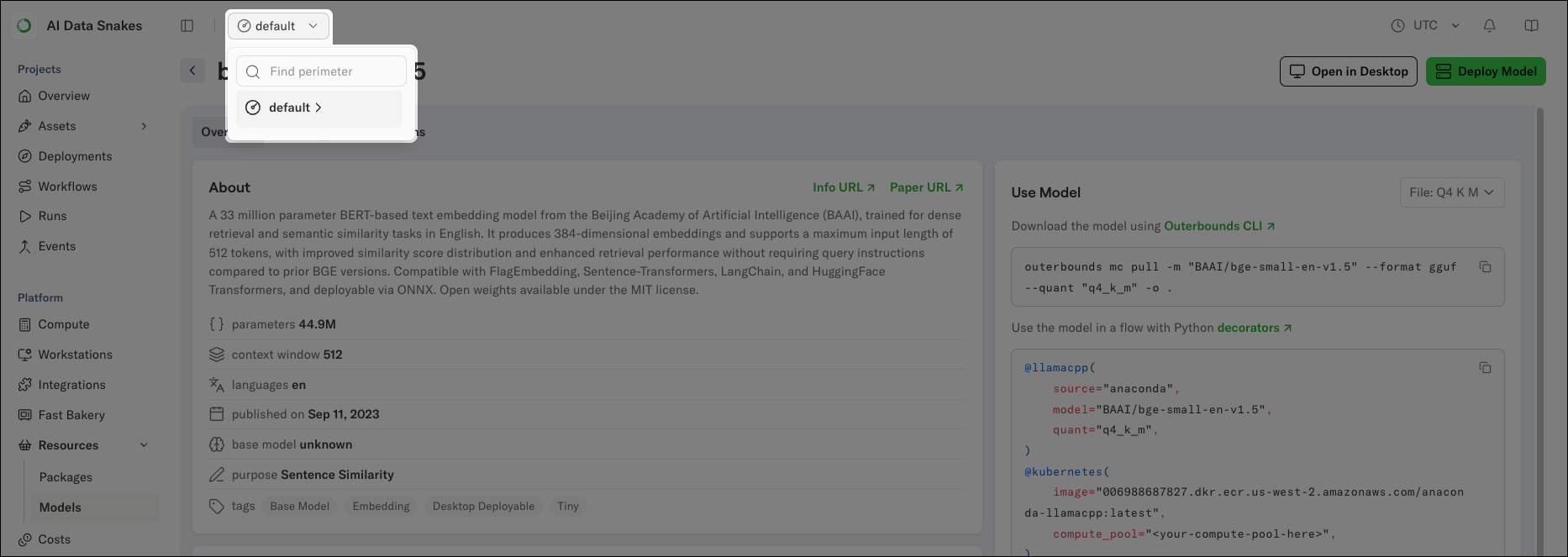
2. Confirm the context picker shows the perimeter you want to deploy into. The model catalog shows the models available in your current perimeter, as determined by that perimeter's model policies.
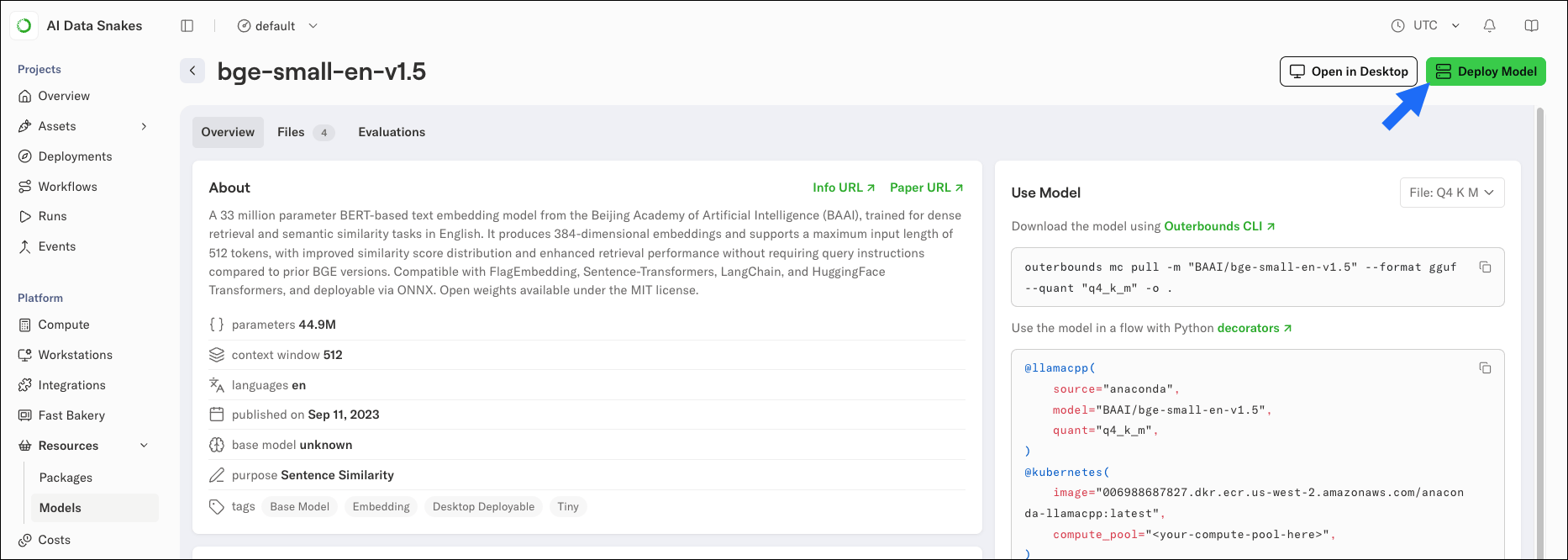
 3. Select a model from the list to open its details page.
4. Click **Deploy Model**.
3. Select a model from the list to open its details page.
4. Click **Deploy Model**.
 5. In the Deploy model dialog, confirm the **Project** context for the deployment.
6. Under **Resources**, set the CPU, memory, and disk for the deployment. Use the model's **file size** and **estimated RAM** values shown under the selected file as a guide. Memory must exceed the estimated RAM, and disk must exceed the file size with room for the serving runtime.
7. Select a compute pool for the deployment, or leave the selection empty to let the platform schedule it on the best-fitting pool. If no compute pool can manage your requested resources, choose a smaller model file or reduce the values for the resources you are requesting.
5. In the Deploy model dialog, confirm the **Project** context for the deployment.
6. Under **Resources**, set the CPU, memory, and disk for the deployment. Use the model's **file size** and **estimated RAM** values shown under the selected file as a guide. Memory must exceed the estimated RAM, and disk must exceed the file size with room for the serving runtime.
7. Select a compute pool for the deployment, or leave the selection empty to let the platform schedule it on the best-fitting pool. If no compute pool can manage your requested resources, choose a smaller model file or reduce the values for the resources you are requesting.
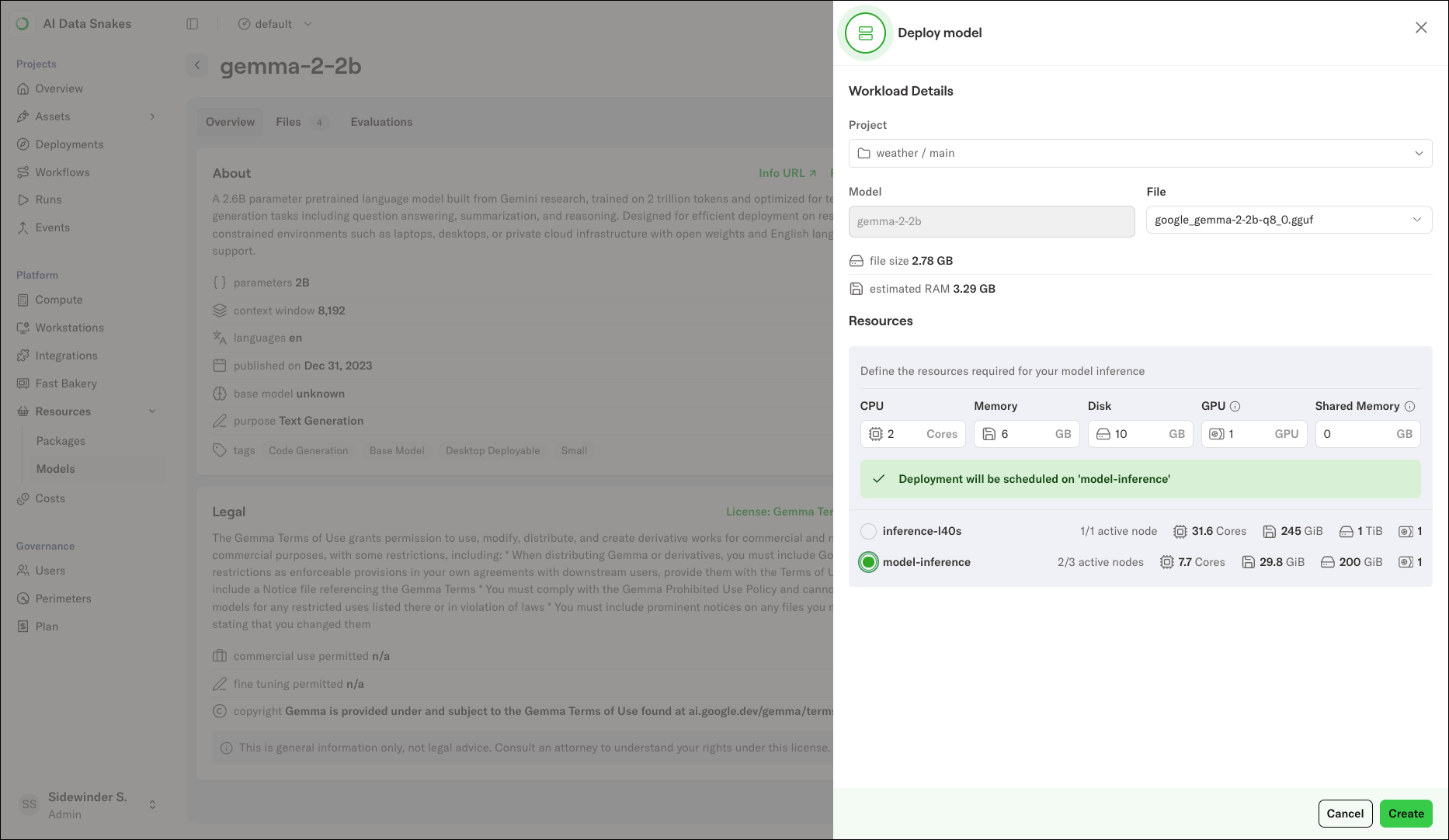 8. Click **Create**.
The platform opens the **Deployments** view. The deployment registers within a few seconds, then takes several minutes to provision and start.
If the Deployments view shows "Deployment not found" immediately after creating a deployment, refresh the page. The deployment list updates as the platform registers the new deployment.
## Accessing the deployment
When the deployment is ready, it appears in the Deployments list with a green status indicator. Select it to open the details view, which shows:
* The **API endpoint URL**, labeled "available at". This is the endpoint your applications call.
* **Additional UI routes**. For certain model file types (`.gguf` models served with `llamacpp`), this includes a built-in chat interface for trying the model interactively. Safetensors models served with vLLM expose the API endpoint only. Both the endpoint and the chat UI require visitors to be signed in to the platform.
* The serving image, compute pool, and resources the deployment is running with.
* Charts for requests per minute and autoscaling activity.
8. Click **Create**.
The platform opens the **Deployments** view. The deployment registers within a few seconds, then takes several minutes to provision and start.
If the Deployments view shows "Deployment not found" immediately after creating a deployment, refresh the page. The deployment list updates as the platform registers the new deployment.
## Accessing the deployment
When the deployment is ready, it appears in the Deployments list with a green status indicator. Select it to open the details view, which shows:
* The **API endpoint URL**, labeled "available at". This is the endpoint your applications call.
* **Additional UI routes**. For certain model file types (`.gguf` models served with `llamacpp`), this includes a built-in chat interface for trying the model interactively. Safetensors models served with vLLM expose the API endpoint only. Both the endpoint and the chat UI require visitors to be signed in to the platform.
* The serving image, compute pool, and resources the deployment is running with.
* Charts for requests per minute and autoscaling activity.
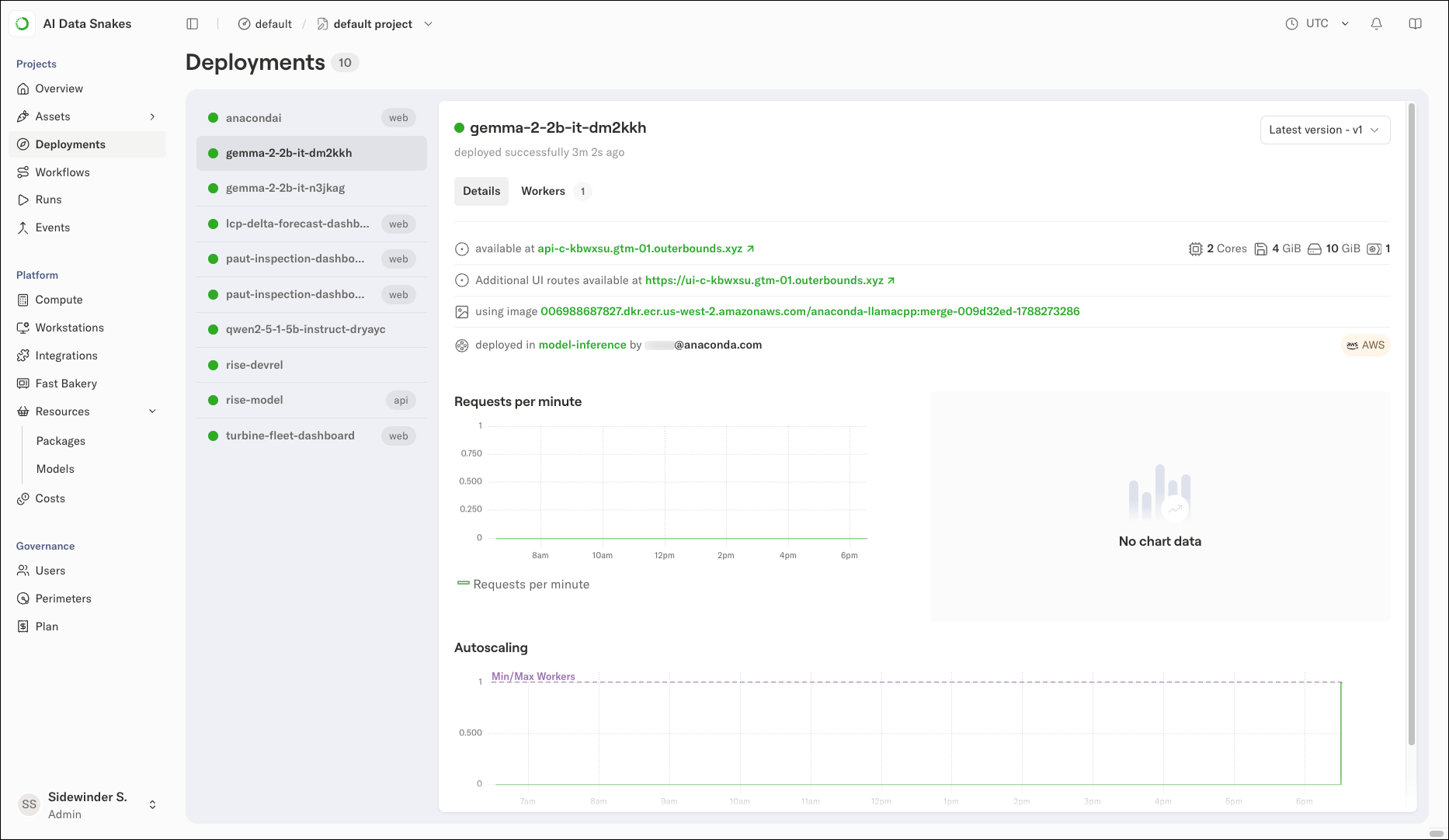 The deployment name gets a random suffix (for example, `gemma-2-2b-it-dm2kkh`) so you can deploy the same model more than once without name conflicts.
## Trying the model
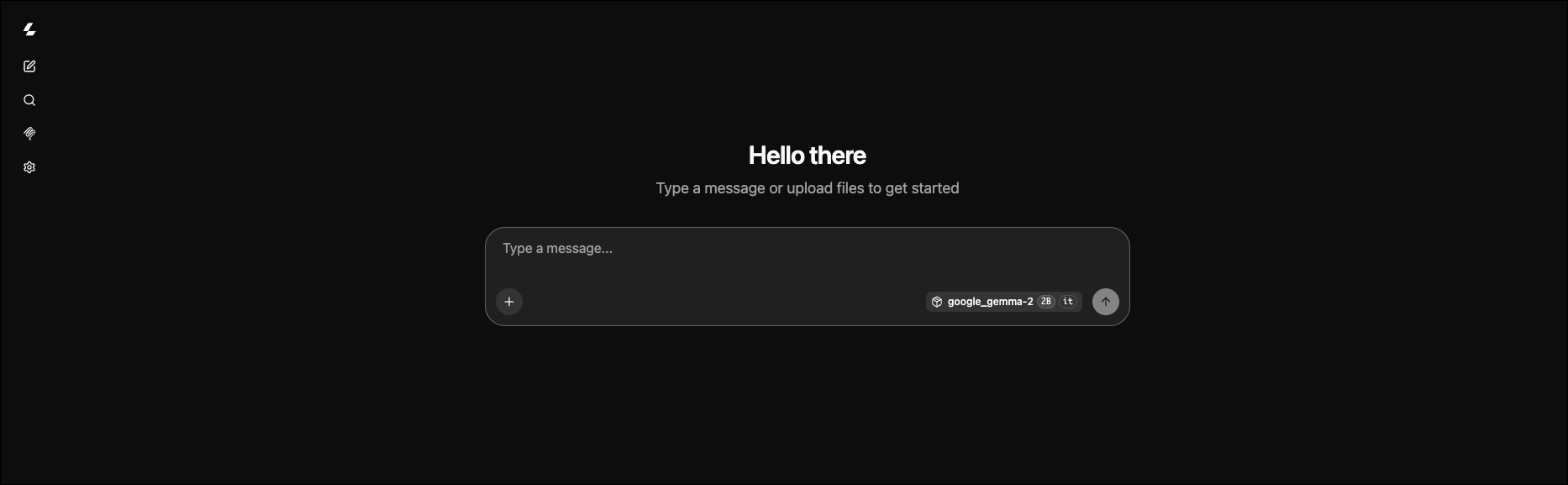
The deployment's API endpoint is the primary interface: send requests to the endpoint URL with your application or tools like `curl`. For gguf models served with llamacpp, the deployment also includes a built-in chat interface.
To open it, click the **Additional UI routes** link in the deployment details. You will be asked to sign in if you are not already signed in. From the chat UI, you can send messages to the model and inspect its responses without writing any code. Each response shows its token count, latency, and throughput in tokens per second, which gives you a quick read on how the deployment performs under your sizing choices.
The chat interface is available only for `.gguf` models served with `llamacpp`. Safetensors models served with `vLLM` expose the API endpoint only.
The deployment name gets a random suffix (for example, `gemma-2-2b-it-dm2kkh`) so you can deploy the same model more than once without name conflicts.
## Trying the model
The deployment's API endpoint is the primary interface: send requests to the endpoint URL with your application or tools like `curl`. For gguf models served with llamacpp, the deployment also includes a built-in chat interface.
To open it, click the **Additional UI routes** link in the deployment details. You will be asked to sign in if you are not already signed in. From the chat UI, you can send messages to the model and inspect its responses without writing any code. Each response shows its token count, latency, and throughput in tokens per second, which gives you a quick read on how the deployment performs under your sizing choices.
The chat interface is available only for `.gguf` models served with `llamacpp`. Safetensors models served with `vLLM` expose the API endpoint only.
 ## Deleting the deployment
To tear down a deployment you no longer need, use the CLI:
```sh theme={null}
outerbounds app delete --name
```
Replace \ with the full name of the deployment as shown in the Deployments list, including the random suffix (for example, `gemma-2-2b-it-dm2kkh`).
Deletion is asynchronous. The deployment might show a terminating state briefly before it disappears from the list.
## Next steps
* To deploy a custom service (such as a FastAPI app or a fine-tuned model) instead of a catalog model, see [Writing your first deployment](/docs/platform/guides/inference/writing-your-first-deployment).
* For deployment configuration options in depth, see [Deployments deep dive](/docs/platform/guides/inference/deployments-deep-dive).
* To manage deployments from the command line, see the [Deployments CLI reference](/docs/platform/cli/app/deploy).
## Deleting the deployment
To tear down a deployment you no longer need, use the CLI:
```sh theme={null}
outerbounds app delete --name
```
Replace \ with the full name of the deployment as shown in the Deployments list, including the random suffix (for example, `gemma-2-2b-it-dm2kkh`).
Deletion is asynchronous. The deployment might show a terminating state briefly before it disappears from the list.
## Next steps
* To deploy a custom service (such as a FastAPI app or a fine-tuned model) instead of a catalog model, see [Writing your first deployment](/docs/platform/guides/inference/writing-your-first-deployment).
* For deployment configuration options in depth, see [Deployments deep dive](/docs/platform/guides/inference/deployments-deep-dive).
* To manage deployments from the command line, see the [Deployments CLI reference](/docs/platform/cli/app/deploy).