> ## Documentation Index
> Fetch the complete documentation index at: https://anaconda.com/docs/llms.txt
> Use this file to discover all available pages before exploring further.
# Scale to the cloud
Anaconda Platform provides scalable compute resources for your workflows. You can:
* Scale vertically by requesting larger cloud instances for individual tasks
* Scale horizontally by running tasks in parallel
* Access GPU instances
* Spin up clusters for distributed computing
You can use any combination of these approaches.
## Scaling up and out
This example trains a model that requires 2 CPU cores and 16GB of memory. To demonstrate parallelism, the flow trains a separate model for each country in a list, running all four training tasks simultaneously.
The `ScalableFlow` flow uses two Metaflow constructs for scalability:
* The `foreach` argument spawns a separate task for each item in the `countries` list. For details, see [running many tasks in parallel](https://docs.metaflow.org/scaling/remote-tasks/introduction#running-many-tasks-in-parallel-with-foreach).
* The `@resources` decorator requests compute resources for a step. In this case, it requests 2 CPU cores and 16GB of memory for each training task. For details, see [requesting compute resources](https://docs.metaflow.org/scaling/remote-tasks/introduction#requesting-compute-resources).
After all four training tasks complete, the `join` step receives the results and selects the best-performing model. For details, see [branching and joining](https://docs.metaflow.org/metaflow/basics#branch).
```python highlight={9,11} expandable theme={null}
import random
from metaflow import FlowSpec, step, resources
class ScalableFlow(FlowSpec):
@step
def start(self):
self.countries = ['US', 'CA', 'BR', 'CN']
self.next(self.train, foreach='countries')
@resources(cpu=2, memory=16000)
@step
def train(self):
print('training model...')
self.score = random.randint(0, 10)
self.country = self.input
self.next(self.join)
@step
def join(self, inputs):
self.best = max(inputs, key=lambda x: x.score).country
self.next(self.end)
@step
def end(self):
print(self.best, 'produced best results')
if __name__ == '__main__':
ScalableFlow()
```
Save the flow as `scaleflow.py`. You can run it locally with `python scaleflow.py run` to test the logic before scaling. To run it on cloud compute with the requested resources and parallelism, use `run --with kubernetes`:
To run the flow in the cloud, you need a compute pool created with the *Metaflow Tasks* purpose. If you are unsure, contact your administrator.
```sh theme={null}
python scaleflow.py run --with kubernetes
```
The flow might take a while to start if the cluster needs to launch new instances to handle the workload. You can monitor the run in the **Runs** view.
For information on defining execution environments for your flows, see [Define the environment](/docs/platform/getting-started/defining-the-environment).
## Observing the cluster status
Anaconda Platform launches cloud instances automatically to execute your workload. To monitor cluster behavior and view cluster status, select **Compute** in the left-hand navigation.
The **Cluster Demand** chart shows total compute demand across all running tasks. When demand exceeds available resources, indicated by the red line, the cluster auto-scales to launch more instances.
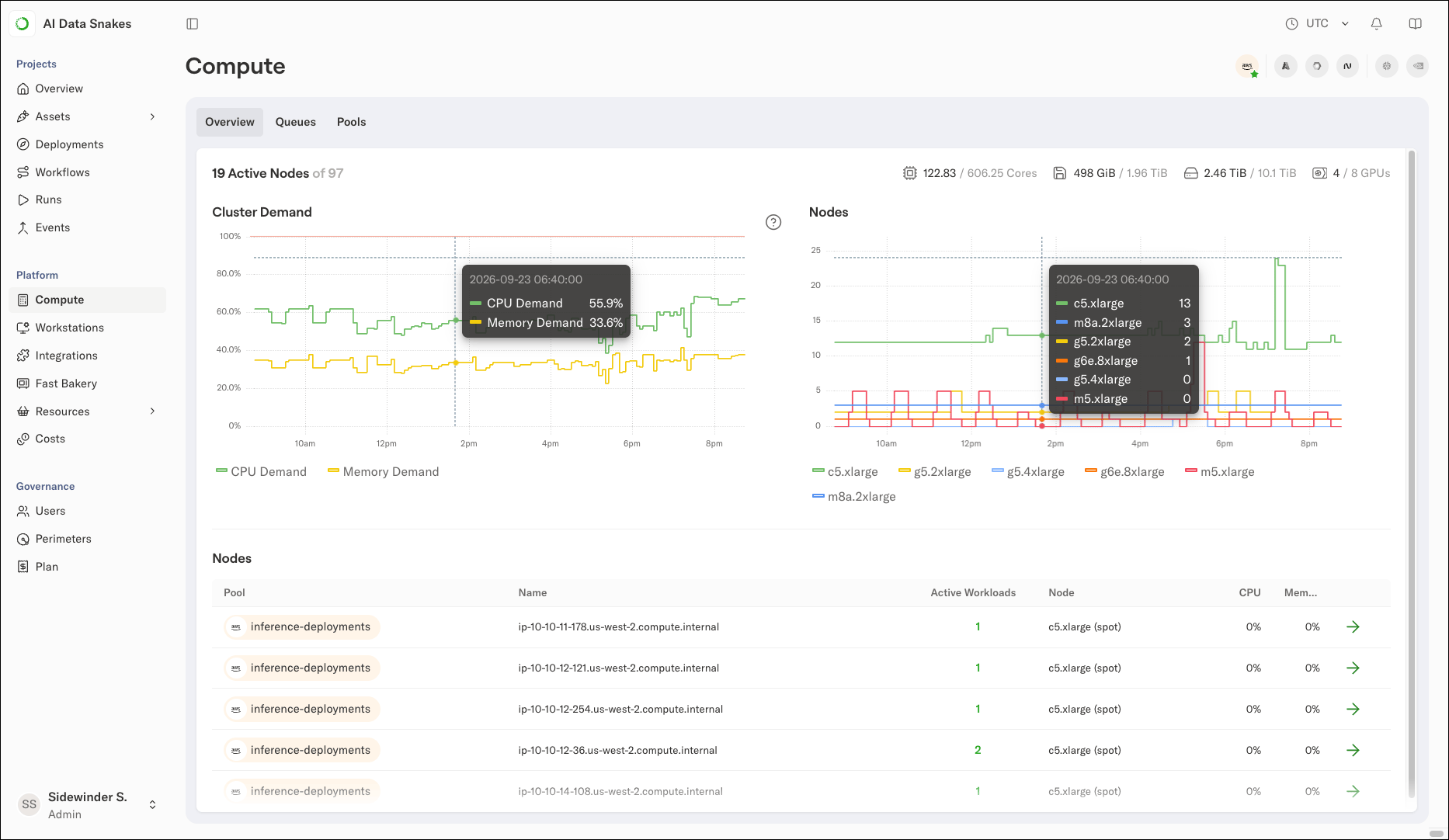 The **Nodes** chart shows the number of instances online, broken down by instance type. The count increases after demand spikes and decreases when tasks complete. This auto-scaling behavior makes [Anaconda Platform cost-efficient](/docs/platform/guides/monitor/cost-optimization-overview) because you only pay for instances when they are actively needed.
## What kind of compute resources can I request?
Available resources depend on your cluster configuration. To check available compute pools, click the **Pools** tab on the **Compute** page.
If you request resources that are not available, the flow fails with an error message. For example, you can request 512GB of memory for all steps in a flow:
```sh theme={null}
python scaleflow.py run --with kubernetes:memory=512000
```
If your cluster does not have instances with 512GB of memory configured, the flow fails with an error message.
**Configuring compute pools**
Anaconda Platform can federate compute pools from various sources:
* Cloud instances in your primary cloud account
* Cloud instances from other providers, such as AWS, Azure, and GCP
* GPU instances from neo-clouds such as CoreWeave and Nebius
* On-prem resources as part of the unified cluster
Contact your administrator to request changes to compute pools.
The **Nodes** chart shows the number of instances online, broken down by instance type. The count increases after demand spikes and decreases when tasks complete. This auto-scaling behavior makes [Anaconda Platform cost-efficient](/docs/platform/guides/monitor/cost-optimization-overview) because you only pay for instances when they are actively needed.
## What kind of compute resources can I request?
Available resources depend on your cluster configuration. To check available compute pools, click the **Pools** tab on the **Compute** page.
If you request resources that are not available, the flow fails with an error message. For example, you can request 512GB of memory for all steps in a flow:
```sh theme={null}
python scaleflow.py run --with kubernetes:memory=512000
```
If your cluster does not have instances with 512GB of memory configured, the flow fails with an error message.
**Configuring compute pools**
Anaconda Platform can federate compute pools from various sources:
* Cloud instances in your primary cloud account
* Cloud instances from other providers, such as AWS, Azure, and GCP
* GPU instances from neo-clouds such as CoreWeave and Nebius
* On-prem resources as part of the unified cluster
Contact your administrator to request changes to compute pools.