> ## Documentation Index
> Fetch the complete documentation index at: https://anaconda.com/docs/llms.txt
> Use this file to discover all available pages before exploring further.
# Platform architecture
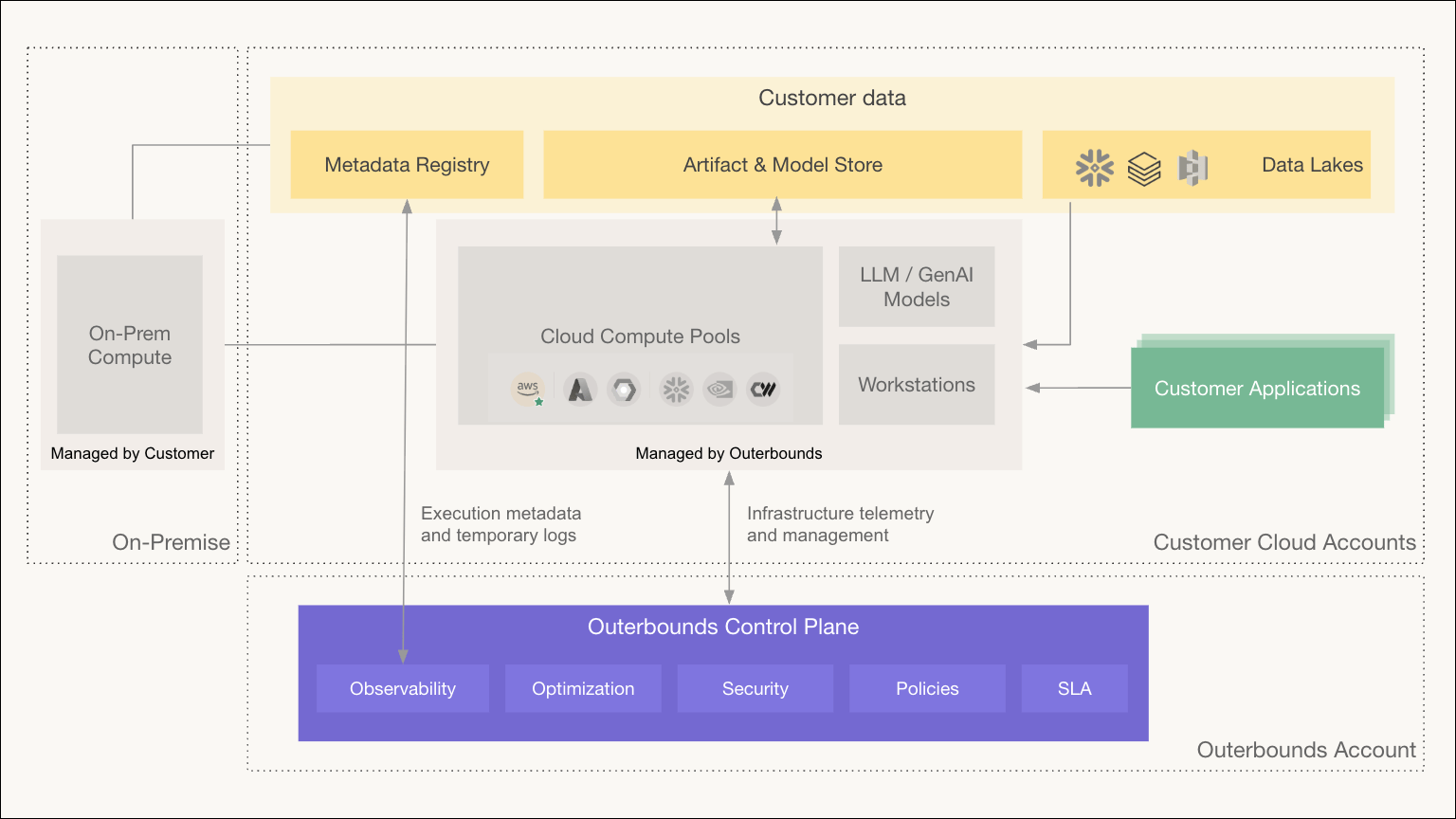
Anaconda Platform uses a bring-your-own-cloud model that separates the platform into two planes. Anaconda operates the control plane, which manages, monitors, and secures the platform.
Your organization owns the data plane, which runs every component that processes your code, data, and models. Data plane traffic does not route through the control plane, so your data never leaves your network.
Each organization is single-tenant. You get a dedicated control plane instance and your own data plane, not a shared multi-tenant service.
 ## Control plane
The control plane is a dedicated instance that Anaconda operates on AWS. It hosts the platform's management surface:
* **Platform UI and API**: The web interface your teams use day to day, the onboarding flows that provision your organization, and the programmatic API that the CLI and automation authenticate to.
* **Identity and access management**: User and machine-user records, role and privilege assignments, and SSO configuration for your organization.
* **Telemetry and monitoring**: Infrastructure telemetry collected from data plane components so Anaconda can operate, monitor, and support the platform.
The control plane stores metadata about your organization, not your data. Run metadata, logs, and metrics are served through the UI without the control plane permanently storing your workload data.
## Data plane
The data plane is a Kubernetes cluster in your cloud account: EKS on AWS, GKE on Google Cloud, AKS on Azure, Nebius, or CoreWeave. It runs every component that processes your code, data, or models:
* **Platform operator**: A Kubernetes operator that reconciles the platform's resources, including perimeters, compute pools, workstations, and deployment endpoints.
* **Workflow orchestration**: The workflow engine that schedules and runs your flows, along with the eventing system that powers triggers.
* **Environment build service**: Resolves packages from your perimeter's governed channels, builds container images, and caches them for subsequent runs.
* **Metadata service and database**: Tracks every run, task, and artifact. The database and object storage (S3, GCS, or Azure Blob) that hold your artifacts and models live entirely in your account.
* **Workstations and endpoints**: Cloud workstations for development and the long-running services your teams deploy, including model-serving endpoints.
Your cloud credentials never leave the data plane. The platform mints short-lived, per-perimeter credentials for workloads at runtime, so tasks authenticate to cloud services with scoped, temporary access rather than stored keys.
## How the planes interact
The control plane authenticates requests from users and automation, then directs the data plane to fulfill them. When you run a flow, the control plane verifies your identity and privileges, and the data plane does everything else: policy checks, environment builds, scheduling, execution, and artifact storage all happen inside your cloud.
Anaconda establishes the connection between the planes when it provisions your organization. Networking options include AWS PrivateLink or VPC peering for private connectivity, or public connectivity if your security posture allows it.
## Perimeters
A perimeter is the platform's unit of isolation, and it spans both planes. When an administrator creates a perimeter, the platform provisions dedicated resources for it in the data plane (a Kubernetes namespace, a task IAM role, storage roots, and a database schema) and registers its access configuration in the control plane. Channels, policies, compute access, and user privileges all attach to the perimeter. For the full concept, see [What is a perimeter?](/docs/platform/concepts/what-is-a-perimeter).
## External compute
The data plane can extend beyond its primary cluster. Additional cloud providers, GPU providers, or on-premises clusters attach as satellite clusters, and the platform schedules workloads onto them alongside your primary compute. This lets you burst into other clouds or use specialized hardware without moving your data plane. For more on compute topology, see [What is compute?](/docs/platform/concepts/what-is-compute).
## Learn more
* [System requirements](/docs/platform/system-requirements) for what your organization provides and what Anaconda provisions
## Control plane
The control plane is a dedicated instance that Anaconda operates on AWS. It hosts the platform's management surface:
* **Platform UI and API**: The web interface your teams use day to day, the onboarding flows that provision your organization, and the programmatic API that the CLI and automation authenticate to.
* **Identity and access management**: User and machine-user records, role and privilege assignments, and SSO configuration for your organization.
* **Telemetry and monitoring**: Infrastructure telemetry collected from data plane components so Anaconda can operate, monitor, and support the platform.
The control plane stores metadata about your organization, not your data. Run metadata, logs, and metrics are served through the UI without the control plane permanently storing your workload data.
## Data plane
The data plane is a Kubernetes cluster in your cloud account: EKS on AWS, GKE on Google Cloud, AKS on Azure, Nebius, or CoreWeave. It runs every component that processes your code, data, or models:
* **Platform operator**: A Kubernetes operator that reconciles the platform's resources, including perimeters, compute pools, workstations, and deployment endpoints.
* **Workflow orchestration**: The workflow engine that schedules and runs your flows, along with the eventing system that powers triggers.
* **Environment build service**: Resolves packages from your perimeter's governed channels, builds container images, and caches them for subsequent runs.
* **Metadata service and database**: Tracks every run, task, and artifact. The database and object storage (S3, GCS, or Azure Blob) that hold your artifacts and models live entirely in your account.
* **Workstations and endpoints**: Cloud workstations for development and the long-running services your teams deploy, including model-serving endpoints.
Your cloud credentials never leave the data plane. The platform mints short-lived, per-perimeter credentials for workloads at runtime, so tasks authenticate to cloud services with scoped, temporary access rather than stored keys.
## How the planes interact
The control plane authenticates requests from users and automation, then directs the data plane to fulfill them. When you run a flow, the control plane verifies your identity and privileges, and the data plane does everything else: policy checks, environment builds, scheduling, execution, and artifact storage all happen inside your cloud.
Anaconda establishes the connection between the planes when it provisions your organization. Networking options include AWS PrivateLink or VPC peering for private connectivity, or public connectivity if your security posture allows it.
## Perimeters
A perimeter is the platform's unit of isolation, and it spans both planes. When an administrator creates a perimeter, the platform provisions dedicated resources for it in the data plane (a Kubernetes namespace, a task IAM role, storage roots, and a database schema) and registers its access configuration in the control plane. Channels, policies, compute access, and user privileges all attach to the perimeter. For the full concept, see [What is a perimeter?](/docs/platform/concepts/what-is-a-perimeter).
## External compute
The data plane can extend beyond its primary cluster. Additional cloud providers, GPU providers, or on-premises clusters attach as satellite clusters, and the platform schedules workloads onto them alongside your primary compute. This lets you burst into other clouds or use specialized hardware without moving your data plane. For more on compute topology, see [What is compute?](/docs/platform/concepts/what-is-compute).
## Learn more
* [System requirements](/docs/platform/system-requirements) for what your organization provides and what Anaconda provisions