> ## Documentation Index
> Fetch the complete documentation index at: https://anaconda.com/docs/llms.txt
> Use this file to discover all available pages before exploring further.
# Migrating projects between version control repositories
If your organization has changed Git hosting services, and you therefore need to migrate projects from one *supported* version control repository to another, Anaconda recommends you follow this high-level process:
1. [Perform pre-migration setup](#pre-migration-setup).
2. [Run the project migration script](#using-the-migration-tool).
3. [Perform post migration cleanup](#post-migration-cleanup).
**Prequisites:**
* [Update the Anaconda Enterprise config map](./config-repo) with the information required to connect to the external version control repository.
* To run the project migration script, you’ll need Administrator access to a command line tool that can run bash or Python scripts *on the master node of the Anaconda Enterprise cluster*.
* You’ll also need the Postgres database password, origin Git host token/password, and destination Git host token/password.
***
## Pre-migration setup
1. If you haven’t already done so, install the version of conda provided with the Anaconda Enterprise installer *on the master node*:
```
bash anaconda-enterprise-5.3.1-56.gf54c3abad/installer/conda-bootstrap-4.5.12
```
2. After conda is finished installing, login to the terminal again.
3. Install git, using the command that’s appropriate for your environment:
On RHEL/CentOS: `yum install git`
On Ubuntu/Debian: `apt install git`
4. Use the following command to create the conda environment:
```
conda create --name migrate --file anaconda-enterprise-5.3.1-56.gf54c3abad/environment.txt
```
5. Use the following command to activate the conda environment:
```
conda activate migrate
```
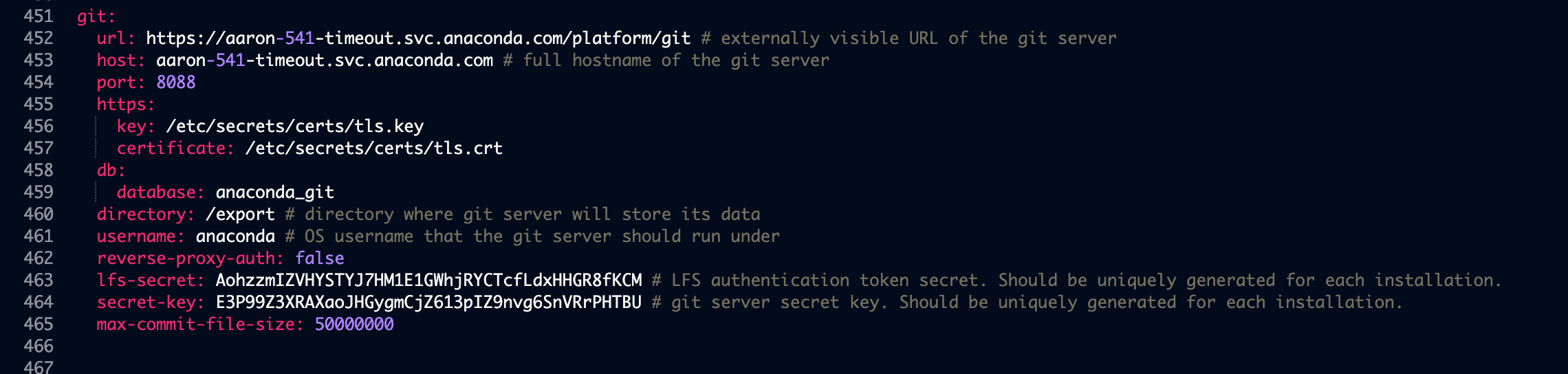
6. Temporarily disable reverse proxy authentication by adding the following key-value pair to the `git` section (outside of the `storage` section in the config map) of the `anaconda-enterprise-anaconda-platform.yml` file used to [configure the platform to use an external version control repository](./config-repo):
```
reverse-proxy-auth: false
```
This should look similar to the following:
 7. Run the following command to restart the associated pod on the master node:
```
kubectl delete pod -l 'app=ap-git-storage'
```
8. Create a user mappings file that maps Anaconda Enterprise user IDs to Git user IDs. This is a colon-separated text file where the first field is the AE user name, and the second field is the corresponding Git user name. For example:
```
ae-admin:git-admin
ae-user1:git-user1
ae-user2:git-user2
```
If you intend on migrating to or from a Bitbucket repository, you must use your `Bitbucket account ID` instead of your `Bitbucket username` in the `user mappings file`.
***
## Using the migration tool
If you’ve migrated to [https://github.com](https://github.com), whenever a user is [added to a project as a collaborator](../../data-science-workflows/projects/collaborate), they’ll be sent an invitation to collaborate via email. **They’ll need to accept this invitation to be able to commit changes to the repository associated with the project.** *This does not apply to Github Enterprise.*
Using the migration tool with `https` instead of `http` for the internal storage may result in an SSL error.
The migration tool is a Python script, `migrate_projects.py`, found in the AE5 installation tarball. It can be used in the following ways:
```
usage: migrate_projects.py [-h] [--parallel PARALLEL] [--log-file LOG_FILE]
[--force-migrate] [--scratch-dir SCRATCH_DIR]
--postgres-host POSTGRES_HOST
[--postgres-user POSTGRES_USER]
[--postgres-passwd POSTGRES_PASSWD]
[--origin-api-type {internal,bitbucket-v1-api,bitbucket-v2-api,github-v3-api,gitlab-v4-api}]
--origin-api-url ORIGIN_API_URL
[--origin-username ORIGIN_USERNAME]
[--origin-token ORIGIN_TOKEN]
[--origin-organization ORIGIN_ORGANIZATION]
[--dest-api-type {internal,bitbucket-v1-api,bitbucket-v2-api,github-v3-api,gitlab-v4-api}]
--dest-api-url DEST_API_URL
[--dest-username DEST_USERNAME]
[--dest-token DEST_TOKEN]
[--dest-organization DEST_ORGANIZATION]
--dest-user-mappings DEST_USER_MAPPINGS
optional arguments:
-h, --help show this help message and exit
--parallel PARALLEL Number of parallel migration jobs to spawn
--log-file LOG_FILE Path prefix to log directory, suffixed with a
timestamp, e.g. migrate-projects-
log-1559234750640867208
--force-migrate Forces migration by replacing local and destination
repositories
--scratch-dir SCRATCH_DIR
The scratch directory for cloning project repositories
--postgres-host POSTGRES_HOST
Hostname of AE5 Postgres DB
--postgres-user POSTGRES_USER
Username of AE5 postgres DB
--postgres-passwd POSTGRES_PASSWD
Password of AE5 postgres DB
--origin-api-type {internal,bitbucket-v1-api,bitbucket-v2-api,github-v3-api,gitlab-v4-api}
Origin git host API type
--origin-api-url ORIGIN_API_URL
Origin git host API URL (must be all lowercase)
--origin-username ORIGIN_USERNAME
Origin git host username
--origin-token ORIGIN_TOKEN
Origin git host auth token
--origin-organization ORIGIN_ORGANIZATION
Origin git host organization
--dest-api-type {internal,bitbucket-v1-api,bitbucket-v2-api,github-v3-api,gitlab-v4-api}
Destination git host API type
--dest-api-url DEST_API_URL
Destination git host API URL (must be all lowercase)
--dest-username DEST_USERNAME
Destination git host username
--dest-token DEST_TOKEN
Destination git host auth token
--dest-organization DEST_ORGANIZATION
Destination git host organization
--dest-user-mappings DEST_USER_MAPPINGS
Colon-separated AE-to-git-host mappings file, e.g. ae-
user1:github-user1
```
For example, the tool can be used in the following way:
```
python migrate_projects.py --postgres-host localhost --origin-api-url http://localhost:8443/ --origin-username root --dest-api-type gitlab-v4-api --dest-api-url https://mbrock-gitlab.anacondaenterprise.com/ --dest-username root --dest-organization demo --dest-user-mappings user-mappings-gitea-to-gitlab.txt --force-migrate --parallel 4
```
To ensure tokens are not visible in bash history, they can be omitted and can be entered via stdin when running the script.
***
## Post-migration cleanup
After the script finishes migrating the projects, re-enable reverse proxy authentication by editing the key-value pair you previously added to the `git` section of the `anaconda-enterprise-anaconda-platform.yml` file, so it looks like the following:
```
reverse-proxy-auth: true
```
If you do not re-enable reverse proxy authentication, Anaconda Enterprise will not work.
To verify that the new repository is being used by Anaconda Enterprise, [edit an existing project](../../data-science-workflows/projects/edit-session) and [commit your changes to it](../../data-science-workflows/projects/commit-changes).
7. Run the following command to restart the associated pod on the master node:
```
kubectl delete pod -l 'app=ap-git-storage'
```
8. Create a user mappings file that maps Anaconda Enterprise user IDs to Git user IDs. This is a colon-separated text file where the first field is the AE user name, and the second field is the corresponding Git user name. For example:
```
ae-admin:git-admin
ae-user1:git-user1
ae-user2:git-user2
```
If you intend on migrating to or from a Bitbucket repository, you must use your `Bitbucket account ID` instead of your `Bitbucket username` in the `user mappings file`.
***
## Using the migration tool
If you’ve migrated to [https://github.com](https://github.com), whenever a user is [added to a project as a collaborator](../../data-science-workflows/projects/collaborate), they’ll be sent an invitation to collaborate via email. **They’ll need to accept this invitation to be able to commit changes to the repository associated with the project.** *This does not apply to Github Enterprise.*
Using the migration tool with `https` instead of `http` for the internal storage may result in an SSL error.
The migration tool is a Python script, `migrate_projects.py`, found in the AE5 installation tarball. It can be used in the following ways:
```
usage: migrate_projects.py [-h] [--parallel PARALLEL] [--log-file LOG_FILE]
[--force-migrate] [--scratch-dir SCRATCH_DIR]
--postgres-host POSTGRES_HOST
[--postgres-user POSTGRES_USER]
[--postgres-passwd POSTGRES_PASSWD]
[--origin-api-type {internal,bitbucket-v1-api,bitbucket-v2-api,github-v3-api,gitlab-v4-api}]
--origin-api-url ORIGIN_API_URL
[--origin-username ORIGIN_USERNAME]
[--origin-token ORIGIN_TOKEN]
[--origin-organization ORIGIN_ORGANIZATION]
[--dest-api-type {internal,bitbucket-v1-api,bitbucket-v2-api,github-v3-api,gitlab-v4-api}]
--dest-api-url DEST_API_URL
[--dest-username DEST_USERNAME]
[--dest-token DEST_TOKEN]
[--dest-organization DEST_ORGANIZATION]
--dest-user-mappings DEST_USER_MAPPINGS
optional arguments:
-h, --help show this help message and exit
--parallel PARALLEL Number of parallel migration jobs to spawn
--log-file LOG_FILE Path prefix to log directory, suffixed with a
timestamp, e.g. migrate-projects-
log-1559234750640867208
--force-migrate Forces migration by replacing local and destination
repositories
--scratch-dir SCRATCH_DIR
The scratch directory for cloning project repositories
--postgres-host POSTGRES_HOST
Hostname of AE5 Postgres DB
--postgres-user POSTGRES_USER
Username of AE5 postgres DB
--postgres-passwd POSTGRES_PASSWD
Password of AE5 postgres DB
--origin-api-type {internal,bitbucket-v1-api,bitbucket-v2-api,github-v3-api,gitlab-v4-api}
Origin git host API type
--origin-api-url ORIGIN_API_URL
Origin git host API URL (must be all lowercase)
--origin-username ORIGIN_USERNAME
Origin git host username
--origin-token ORIGIN_TOKEN
Origin git host auth token
--origin-organization ORIGIN_ORGANIZATION
Origin git host organization
--dest-api-type {internal,bitbucket-v1-api,bitbucket-v2-api,github-v3-api,gitlab-v4-api}
Destination git host API type
--dest-api-url DEST_API_URL
Destination git host API URL (must be all lowercase)
--dest-username DEST_USERNAME
Destination git host username
--dest-token DEST_TOKEN
Destination git host auth token
--dest-organization DEST_ORGANIZATION
Destination git host organization
--dest-user-mappings DEST_USER_MAPPINGS
Colon-separated AE-to-git-host mappings file, e.g. ae-
user1:github-user1
```
For example, the tool can be used in the following way:
```
python migrate_projects.py --postgres-host localhost --origin-api-url http://localhost:8443/ --origin-username root --dest-api-type gitlab-v4-api --dest-api-url https://mbrock-gitlab.anacondaenterprise.com/ --dest-username root --dest-organization demo --dest-user-mappings user-mappings-gitea-to-gitlab.txt --force-migrate --parallel 4
```
To ensure tokens are not visible in bash history, they can be omitted and can be entered via stdin when running the script.
***
## Post-migration cleanup
After the script finishes migrating the projects, re-enable reverse proxy authentication by editing the key-value pair you previously added to the `git` section of the `anaconda-enterprise-anaconda-platform.yml` file, so it looks like the following:
```
reverse-proxy-auth: true
```
If you do not re-enable reverse proxy authentication, Anaconda Enterprise will not work.
To verify that the new repository is being used by Anaconda Enterprise, [edit an existing project](../../data-science-workflows/projects/edit-session) and [commit your changes to it](../../data-science-workflows/projects/commit-changes).